Medicare WordPress Theme
by BoldThemes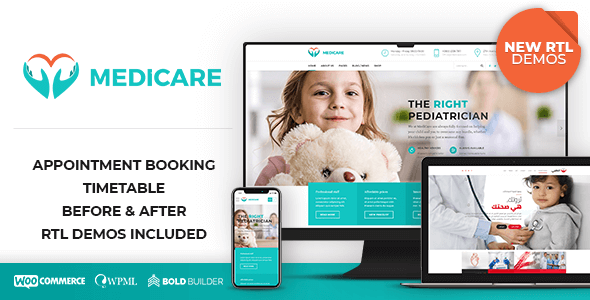
Stuck on your Medicare WordPress theme? Let's fix it.
No endless back-and-forth. Just send us the details and we'll get it done.
No obligation · Replies within 1 hour · Quote within 1 day
Setup · Customization · Bug fixes · WooCommerce integration
About Medicare WP Theme
Medicare is a medical and health WordPress theme built by BoldThemes, designed for clinics, hospitals, doctors, and health-related businesses. It ships with a dedicated appointment booking system, department and doctor profile pages, and a set of pre-built demo layouts that cover a wide range of healthcare niches.
The theme uses BoldThemes’ own page builder elements alongside WPBakery, giving you drag-and-drop control over layouts without touching code. It includes a timetable plugin for scheduling, patient testimonial sections, and WooCommerce support for selling health products or services.
Performance is reasonable out of the box, though like most feature-heavy themes, it benefits from proper caching and image optimisation. Medicare is translation-ready and WPML-compatible, making it a practical choice for multilingual medical practices.
Get matched with a Medicare developer in under one day
Tell us about your Medicare project. Small fixes, Medicare theme customization, or a full website build, whatever you need, we've got it covered.
We'll connect you to the right Medicare developers, define the scope, and get everything 100% clear.
You'll get one estimate, hire your preferred developer, and start collaborating.
Medicare has enough moving parts, the timetable plugin, appointment system, WPBakery layouts, doctor profiles, that small configuration mistakes compound quickly. Hiring through Codeable connects you with vetted WordPress developers who have worked on healthcare sites and understand both the technical and compliance-adjacent requirements that come with them.
Every project on Codeable starts with a free estimate. Developers review your requirements before any money changes hands, so you know exactly what the work involves before committing.
Pros
- Includes a purpose-built appointment and timetable system without needing a separate premium plugin
- Doctor and department profile templates are pre-structured and easy to populate
- Multiple demo layouts cover clinics, dentists, hospitals, and single practitioners
- WooCommerce integration works cleanly for selling health supplements or service packages
- WPML-compatible and translation-ready, practical for multilingual healthcare practices
Cons
- WPBakery dependency makes the codebase heavier and harder to migrate away from later
- The bundled timetable plugin has limited flexibility for complex multi-doctor scheduling
- Customiser options are broad but shallow, deeper changes require custom CSS or PHP
- Update compatibility with newer WordPress versions can lag, especially for bundled plugins
- Demo import can be unreliable and may require manual cleanup after installation
Who is Medicare for?
Medical Clinics and GP Practices
Medicare’s department pages and doctor profiles map directly to how clinics present their services. The appointment booking system handles basic scheduling without a third-party plugin. A Medicare developer can extend this with custom intake forms, patient login areas, and integrated calendar tools suited to a multi-doctor practice.
Dental Practices
The theme’s timetable and service listing features work well for dental practices needing to display treatment types, dentist bios, and booking availability. A Medicare specialist can add before-and-after galleries, patient review sections, and local SEO schema to help the practice appear in local search results.
Physiotherapy and Rehabilitation Centres
Physiotherapy centres benefit from Medicare’s treatment page structure and staff profile templates. A developer can configure the booking system around session types and therapist availability, add a patient resource library, and integrate video content for exercise guides or rehabilitation programmes.
Private Hospitals and Specialist Consultants
Private hospitals and specialist consultants need more complex layouts with multiple departments, insurance information, and detailed consultant profiles. A Medicare expert can build out these structures using custom post types and advanced WPBakery layouts, keeping everything manageable through the WordPress admin.
Health and Wellness Product Shops
Medicare’s WooCommerce integration makes it usable for health product shops alongside a clinic website. A developer can set up product categories for supplements, medical devices, or wellness kits, add subscription billing, and ensure the shop design stays consistent with the medical branding of the main site.

Customizing Medicare
Medicare gives you a solid starting point, but most clinics need customisation before the site reflects their actual services and branding. A Medicare expert can rework the appointment booking flow, add custom fields to doctor profiles, and build department-specific landing pages that go beyond the default demo content.
Common customisation work includes integrating third-party booking systems like Calendly or Doctolib, adjusting the timetable plugin to match real clinic hours, and styling the theme to match existing brand guidelines. The Customizer covers colours, fonts, and layout options, but anything beyond surface-level changes typically requires PHP and CSS work.
A Medicare specialist can also extend WooCommerce functionality for health product shops, add multilingual support via WPML, and ensure the site meets basic accessibility standards relevant to healthcare websites.
Recommended plugins for Medicare
Medicare works well with a focused plugin stack. For booking, most developers use the bundled timetable plugin alongside WPForms or Gravity Forms for custom intake forms. WooCommerce handles product sales cleanly within the theme’s layout.
On the technical side, pairing Medicare with a caching plugin and a CDN makes a real difference. See our WordPress performance optimisation service for specifics. For search visibility, the theme supports Yoast and Rank Math out of the box. If your clinic relies on local search traffic, structured SEO work is worth prioritising. Our WordPress SEO service covers schema markup, local SEO, and on-page optimisation suited to medical sites.
Not sure which plugins to use? This WordPress plugins directory covers the most popular options with reviews and setup guides.
Medicare common issues
Medicare theme appointment booking not working
The appointment booking system in Medicare relies on the bundled timetable plugin and specific shortcode configurations. If bookings stop working, the first step is checking whether the plugin is active and up to date. Conflicts with caching plugins or security plugins that block POST requests are common causes. Clearing the cache and temporarily disabling other plugins usually isolates the problem. If the issue persists, a WordPress bug fixing specialist can trace the conflict and restore functionality.
Medicare timetable plugin not displaying correctly
Timetable display issues in Medicare are often caused by a CSS conflict with another plugin or a misconfigured shortcode. Check that the timetable plugin version matches the theme version. If you recently updated either, a mismatch can break the layout. Inspecting the element in browser dev tools usually reveals whether a style is being overridden. Clearing cached CSS files in your caching plugin resolves this in many cases.
Medicare demo import fails or imports blank pages
Medicare’s demo import depends on the One Click Demo Import plugin and requires sufficient PHP memory and execution time. Failed imports are usually caused by a 30-second PHP timeout or a memory limit below 256MB. Increase both in your php.ini or wp-config.php and retry the import. If pages import but appear blank, WPBakery likely hasn’t activated yet. Activate it before importing, then refresh the pages. A bug fixing developer can complete this manually if automated import keeps failing.
Doctor profile pages showing 404 error after permalink change
Doctor profile 404 errors after a permalink change are a flush issue. Go to Settings > Permalinks and click Save Changes without changing anything. This forces WordPress to regenerate the rewrite rules. If the 404 persists, check that the custom post type for doctors is still registered correctly. A theme update that altered CPT slugs can cause this, requiring a redirect rule or slug correction.
Medicare theme slow to load on mobile
Medicare loads several scripts and stylesheets by default, which affects mobile performance. Start by running the site through PageSpeed Insights to identify the heaviest assets. Enabling lazy loading for images, deferring non-critical JavaScript, and using a caching plugin with CSS/JS minification cuts load time significantly. Switching to a lightweight hosting plan with PHP 8.1 or above also helps. Our WordPress performance service covers full audits for theme-heavy setups like Medicare.
WPBakery editor not loading in Medicare theme
If the WPBakery editor fails to load in Medicare, it’s usually a JavaScript error caused by a plugin conflict or an outdated version of WPBakery. Open the browser console to identify the specific error. Common culprits include ad blockers interfering with admin scripts, outdated WPBakery versions, or a permissions issue on the uploads folder. Updating WPBakery and testing with plugins disabled one by one typically resolves it.
Medicare theme not compatible with latest WordPress update
BoldThemes releases compatibility updates for Medicare after major WordPress releases, but there’s sometimes a gap. If something broke after a WordPress update, check the BoldThemes changelog for a patch. In the meantime, avoid running untested updates on live sites. Use a staging environment to verify compatibility first. If you’re on an older version of Medicare and can’t update due to customisations, a developer can patch the specific incompatibility without a full theme update.
Medicare contact form not sending emails
Contact form email failures in Medicare are almost always a mail delivery issue, not a form configuration problem. WordPress’s default wp_mail function relies on the server’s sendmail, which most hosts block or throttle. Install an SMTP plugin such as WP Mail SMTP and connect it to a transactional mail provider like Mailgun, SendGrid, or your Google Workspace account. Test delivery through the plugin’s diagnostics tool. Check spam folders before assuming emails aren’t sending.
Medicare theme header menu not showing on mobile
A missing mobile menu in Medicare usually points to a JavaScript conflict preventing the menu toggle from initialising. Open the browser console on mobile view and look for JS errors. If the hamburger icon appears but clicking it does nothing, a script is likely blocking the theme’s menu function. Disable plugins one by one to find the conflict. If the icon doesn’t appear at all, a CSS override is hiding it, check custom CSS added to the Customizer for any display:none rules targeting the mobile nav.
Medicare WooCommerce shop page layout broken
WooCommerce layout breaks in Medicare after updates are common because WooCommerce periodically changes its template structure. Medicare includes WooCommerce template overrides in its theme files. When WooCommerce updates, those overrides can become outdated. Go to WooCommerce > Status > System Status and look for outdated templates. A WordPress bug fixing developer can update those template files to match the current WooCommerce version without breaking your existing customisations.
Medicare FAQ
Medicare is a practical choice for medical practices that need doctor profiles, department pages, and basic appointment scheduling without buying separate plugins. It works best for small to mid-size clinics. Larger practices with complex booking requirements may need custom development on top of what the theme provides out of the box.
Medicare is built around WPBakery, not Elementor. You can technically install Elementor alongside it, but conflicts are common and the theme’s design elements won’t automatically work within Elementor. If you prefer Elementor, BoldThemes has other themes better suited to it. A Medicare developer can advise whether adapting the theme or switching tools makes more sense for your project.
Yes. Medicare includes service and treatment page templates that map well to dental practice needs. You can list treatments, add dentist profiles, display pricing, and configure a booking form. A Medicare specialist can add before-and-after image galleries and local SEO schema to help the site rank for location-based searches.
Rates vary based on the scope of work. Basic setup and configuration typically falls in the lower range, while custom functionality like third-party booking integration or bespoke layouts costs more. On Codeable, you get a free estimate before committing to anything, so you know the cost upfront with no surprises.
Yes. Medicare bundles a timetable plugin that handles basic appointment scheduling, including doctor availability and time slot display. For more advanced booking features like payment at booking, automated reminders, or patient account management, you’ll need to integrate a dedicated booking plugin or custom development.
Medicare as a theme is not HIPAA compliant on its own. HIPAA compliance involves your hosting environment, data handling practices, and how patient information is stored and transmitted. The theme itself has no special data security features. If your site collects patient data, you need a HIPAA-compliant host and specific technical measures beyond what any WordPress theme provides.
Yes. Medicare is translation-ready and compatible with WPML, the standard plugin for multilingual WordPress sites. A Medicare developer can configure WPML across all custom post types, including doctor profiles and department pages, and ensure the timetable and booking elements display correctly in each language.
Never update Medicare directly if you’ve made changes to theme files. Use a child theme for all customisations before updating the parent theme. If you haven’t done this, back up the site first, document your changes, and apply them manually after updating. A developer can help migrate your customisations to a child theme to make future updates safe.
Yes. Medicare includes WooCommerce support and styled templates for shop, product, and cart pages. It works well for selling health products or service packages. Some WooCommerce template files may need updating after major WooCommerce releases, but the integration is stable for everyday use.
Migrating an existing medical site to Medicare is straightforward for content but requires careful planning for structure. Posts and pages transfer via WordPress export, but layouts built in another page builder won’t carry over. A developer will need to rebuild page layouts within WPBakery. Our WordPress migration service covers full site moves with minimal downtime.
Hire a Medicare Theme Developer
Whether you need a Medicare theme set up from scratch, customised for your clinic, or fixed after something broke, working with a specialist saves time and avoids costly mistakes. Our developers know the theme’s architecture, its plugin dependencies, and the common failure points.
Get a Free Estimate and describe your project. No obligation to hire, no upfront payment, just a clear scope from a developer who knows what they’re doing.
You'll need a free Codeable account so developers can ask questions and send their quotes.