Hotel Master Booking WordPress WordPress Theme
by GoodLayers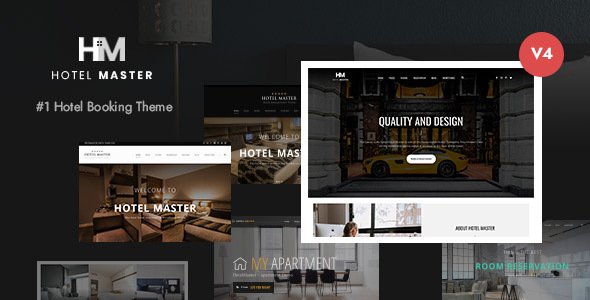
Stuck on your Hotel Master Booking WordPress WordPress theme? Let's fix it.
No endless back-and-forth. Just send us the details and we'll get it done.
No obligation · Replies within 1 hour · Quote within 1 day
Setup · Customization · Bug fixes · WooCommerce integration
About Hotel Master Booking WordPress WP Theme
Hotel Master Booking WordPress is a hospitality theme built by GoodLayers. It ships with a dedicated room management system, a front-end booking engine, and availability calendar — all designed specifically for hotels, guesthouses, and resorts that need real reservations, not just a contact form.
The theme is built on GoodLayers’ GDLR Core framework, which powers the drag-and-drop page builder and handles most layout customisation without touching code. It supports room types, rate plans, seasonal pricing, and booking confirmation emails out of the box.
For properties that need a serious booking workflow without the overhead of a standalone property management system, Hotel Master Booking WordPress covers most bases. It works well for small to mid-sized properties that want direct bookings and full control over their site.
Get matched with a Hotel Master Booking WordPress developer in under one day
Tell us about your Hotel Master Booking WordPress project. Small fixes, Hotel Master Booking WordPress theme customization, or a full website build, whatever you need, we've got it covered.
We'll connect you to the right Hotel Master Booking WordPress developers, define the scope, and get everything 100% clear.
You'll get one estimate, hire your preferred developer, and start collaborating.
Hotel Master Booking WordPress has enough moving parts — room config, rate logic, payment flow — that a misconfiguration can silently break bookings. Fixing that after launch costs more than getting it right the first time.
Through Codeable, you get matched with a vetted Hotel Master Booking WordPress developer who has worked with GoodLayers themes before. No generalist freelancers, no guesswork. Post your project, get a free estimate, and only proceed if it makes sense for your property.
Pros
- Built-in booking engine with availability calendar — no third-party booking plugin required
- Supports seasonal and occupancy-based pricing natively within the theme settings
- WooCommerce integration handles payments, so any WooCommerce gateway works for bookings
- GoodLayers page builder gives granular layout control over room pages and landing sections
- Booking confirmation and notification emails are configurable without extra plugins
Cons
- The GoodLayers GDLR Core framework is proprietary, making it harder to work with than standard WordPress builders
- No channel manager integration — availability sync with Booking.com or Airbnb requires custom development
- The booking engine lacks multi-property support, which limits use for hotel groups or chains
- Theme updates occasionally break custom CSS or child theme overrides, especially after major version bumps
- Documentation is sparse on advanced booking configuration, so edge cases often require trial and error
Who is Hotel Master Booking WordPress for?
Independent Boutique Hotels
Boutique hotels with a defined brand need full control over layout and room presentation. Hotel Master Booking WordPress supports multiple room types with individual galleries, amenities lists, and pricing tiers. A Hotel Master Booking WordPress specialist can build a site that reflects the property’s identity while keeping the booking flow clean and conversion-focused.
Bed and Breakfast Properties
B&B operators typically manage a small number of rooms and need a booking system that’s simple for guests and easy for the owner to manage. The theme’s availability calendar and single-property booking engine fit this scale well. A developer can configure minimum stays, breakfast add-ons, and deposit requirements to match the property’s policies.
Holiday Villas and Vacation Rentals
Villa and vacation rental sites benefit from the theme’s full-page room layouts and large image support. Seasonal pricing tools handle peak and off-peak rates. A Hotel Master Booking WordPress developer can extend the booking form to capture check-in time, guest counts, and special requests relevant to self-catering properties.
Hostels and Budget Accommodation
Hostels need bed and dorm room types alongside private rooms, with different pricing logic for each. Hotel Master Booking WordPress handles multiple room categories, and with developer input, the booking form can be customised to capture the information hostels actually need, including age ranges or group bookings.
Eco Lodges and Glamping Sites
Eco lodges and glamping sites sell an experience first. The theme’s visual layout tools support immersive storytelling pages alongside the booking engine. A Hotel Master Booking WordPress specialist can set up seasonal availability windows, minimum stay rules, and activity add-ons that match the way these properties actually operate.

Customizing Hotel Master Booking WordPress
Customising Hotel Master Booking WordPress goes beyond picking colours. The real work is in configuring room types, setting up rate rules, mapping availability, and connecting payment gateways — all of which interact with each other and can break the booking flow if misconfigured.
A Hotel Master Booking WordPress expert can handle the full setup: custom room layouts, conditional pricing by season or occupancy, deposit settings, and booking form fields tailored to your property. The GDLR page builder gives a lot of visual control, but pairing it with custom CSS and child theme overrides produces far cleaner results than drag-and-drop alone.
If you need specific functionality — multi-currency support, coupon codes, or a customised confirmation email template — those changes require developer-level work to implement cleanly and without breaking the core booking logic.
Recommended plugins for Hotel Master Booking WordPress
Hotel Master Booking WordPress integrates with WooCommerce for payment processing, which opens up a wide extension ecosystem. Payment gateways, deposit handling, and invoice plugins all slot in through WooCommerce.
For properties focused on search visibility, pairing the theme with proper WordPress SEO optimisation — structured data for accommodation, local schema, and page-level optimisation — can drive direct booking traffic. On the technical side, WordPress performance tuning is worth prioritising, since the booking engine adds server load and slow pages hurt conversion rates directly.
Not sure which plugins to use? This WordPress plugins directory covers the most popular options with reviews and setup guides.
Hotel Master Booking WordPress common issues
Hotel Master Booking WordPress booking form not submitting
Form submission failures in Hotel Master Booking WordPress usually come from a JavaScript conflict or a misconfigured nonce. Start by disabling all non-GoodLayers plugins and testing the form in a clean browser session. Check the browser console for JS errors. If the form uses AJAX, verify that your server isn’t blocking AJAX requests through a security plugin or server-level firewall rule. If the issue persists, a WordPress bug fixing specialist can trace the exact failure point in the booking request.
Availability calendar not showing correct dates in Hotel Master Booking
Calendar display errors usually mean the room’s availability data isn’t loading correctly from the database or there’s a caching layer serving stale data. Clear all caching plugins and your CDN cache first. Then check that the room’s booking settings have correct date ranges and no overlapping blocked periods. If the calendar shows wrong availability after clearing cache, the issue is likely in how closed dates are stored — review the room configuration in GoodLayers’ hotel settings panel.
WooCommerce payment not processing after Hotel Master Booking checkout
If WooCommerce payment fails after the Hotel Master Booking checkout, first check whether the WooCommerce order is actually being created. If orders appear in WooCommerce with a failed status, the problem is at the gateway level — verify API keys and test mode settings. If no order is created, the booking-to-WooCommerce handoff is broken, often caused by a plugin conflict or a theme update that changed the cart hook. A WordPress bug fixing service can isolate the exact failure in the checkout flow.
Hotel Master Booking WordPress room price not updating based on dates
Dynamic pricing not updating usually means the seasonal rate rules aren’t saved correctly or the date range logic has an overlap. Open the Hotel Master Booking room settings and review each rate plan individually. Make sure date ranges don’t overlap and that the base price isn’t overriding the seasonal rule. Also check whether any caching plugin is storing the price output — object caching can serve a cached price even when the booking engine calculates the correct one dynamically.
Booking confirmation email not sending in Hotel Master Booking WordPress
Confirmation emails failing in Hotel Master Booking WordPress are almost always a mail delivery problem, not a theme bug. WordPress uses PHP mail by default, which most hosting providers block or throttle. Install an SMTP plugin such as WP Mail SMTP and connect it to a transactional mail service. Also check that the email templates in the Hotel Master Booking settings have valid From addresses that match your sending domain, as mismatched addresses trigger spam filters before the email leaves the server.
Hotel Master Booking WordPress page builder layout broken after update
Page builder layouts breaking after a GoodLayers update usually means shortcode output has changed or a CSS class has been renamed. Avoid updating the theme without first backing up the site. After an update breaks a layout, compare the page source before and after to identify which class or element changed. If you’re using a child theme, some overrides may need updating to match the new parent. For complex breakages, a WordPress bug fixing expert can restore the layout without rebuilding pages from scratch.
Hotel Master Booking WordPress not showing rooms on booking page
If rooms aren’t appearing on the booking page, check that each room has a published status and is assigned to the correct room type category in Hotel Master Booking settings. The booking page uses a specific shortcode or template that pulls rooms by category — if the category is misassigned or the shortcode parameters are wrong, rooms won’t display. Also verify that the booking page template is set to the GoodLayers hotel template and not a generic page template, which bypasses the room query entirely.
Hotel Master Booking WordPress booking blocked even when dates are available
Bookings being blocked on available dates usually points to a closed date entry that shouldn’t be there or a minimum stay rule preventing selection of certain date combinations. Open the room management panel and audit all manual blocks and closed periods. Also check whether a previous test booking left a pending WooCommerce order that’s holding inventory. Pending orders in WooCommerce can lock availability until they expire or are cancelled, depending on your WooCommerce hold stock settings.
Hotel Master Booking WordPress slow loading on room pages
Slow room pages in Hotel Master Booking WordPress are typically caused by unoptimised images in room galleries, unminified scripts from the GDLR Core framework, or database queries from the availability engine running on every page load. Start with image compression on all room gallery images. Then check whether the booking engine is making redundant database calls by using a query monitor plugin. Implementing server-side caching carefully — excluding booking pages from full-page cache — reduces load times without breaking the live availability display.
Hotel Master Booking WordPress child theme not applying custom styles
Child theme styles not applying in Hotel Master Booking WordPress usually means the child theme stylesheet is loading before the parent, so parent styles override it. Check the child theme’s functions.php to ensure the stylesheet is enqueued with a dependency on the parent theme’s handle. Also verify you’re editing the correct child theme files — GoodLayers uses custom template files that need to be copied to the child theme directory before they can be overridden, rather than relying on standard WordPress template hierarchy alone.
Hotel Master Booking WordPress FAQ
Yes. Hotel Master Booking WordPress is well-suited for independent hotels, guesthouses, and B&Bs. It handles multiple room types, availability calendars, and direct bookings without requiring a separate property management system. The setup complexity scales with the number of rooms and pricing rules, but for small properties it’s manageable with a developer’s help on initial configuration.
Yes. Hotel Master Booking WordPress uses WooCommerce to process payments at checkout. This means any WooCommerce-compatible payment gateway — Stripe, PayPal, Square, and others — can be used for booking payments. It also means WooCommerce order management applies to booking transactions, which is useful for refunds, invoicing, and reporting.
Not natively. Hotel Master Booking WordPress is designed for single-property use. If you manage multiple properties, you would need separate WordPress installations for each, or custom development to extend the theme’s room taxonomy. There is no built-in multi-property or chain management feature in the default theme setup.
Yes, through WooCommerce. The booking checkout hands off to WooCommerce, which processes the payment via your configured gateway. You can also set up deposit-only payments, where guests pay a percentage at booking and the remainder on arrival, by configuring WooCommerce deposit plugins alongside the theme’s booking settings.
Seasonal pricing is configured inside the Hotel Master Booking room settings panel. Each room supports multiple rate plans with defined date ranges. You assign a price per night to each plan, and the booking engine applies the rate that matches the selected dates. Overlapping date ranges can cause conflicts, so each plan’s dates need to be set carefully.
Hotel Master Booking WordPress is built on GoodLayers’ own GDLR Core page builder. It is not designed to work with Elementor, and mixing the two on the same site typically causes conflicts. If you specifically need Elementor, this is not the right theme. GoodLayers’ builder handles most layout needs for hotel sites within its own framework.
Not out of the box. There is no native channel manager or iCal sync built into Hotel Master Booking WordPress. Connecting to Booking.com, Airbnb, or other OTAs requires custom development or a third-party channel manager plugin that integrates with the theme’s availability system. This is a significant limitation for properties that list on multiple platforms.
Migrating Hotel Master Booking WordPress to a new host follows the same process as any WordPress migration — export the database, move all files, update wp-config.php, and update URLs. The booking data lives in the WordPress database, so it migrates with the rest of the site. For a clean migration without downtime or data loss, a WordPress migration service handles the full process reliably.
Yes. Like any WordPress site, Hotel Master Booking WordPress needs regular updates for the theme, GoodLayers plugins, WooCommerce, and WordPress core. A booking site has higher stakes than a standard site — an update that breaks the checkout means lost reservations. Scheduled WordPress maintenance with pre-update backups and post-update testing protects the booking flow.
Hotel Master Booking WordPress was built by GoodLayers, a theme development company that produces hospitality and multi-purpose WordPress themes. GoodLayers is based in Hong Kong and has been selling themes on ThemeForest since 2012. Their themes share the GDLR Core framework, which underpins the page builder and plugin architecture used across their product line.
Hire a Hotel Master Booking WordPress Expert
Whether you need a full Hotel Master Booking WordPress setup, a booking flow that’s broken, or custom rate logic that the theme doesn’t handle out of the box — a specialist makes the difference. Our developers know the GoodLayers framework and the booking engine internals.
Get a Free Estimate with no obligation. Describe your project and get matched with a Hotel Master Booking WordPress developer within 24 hours.
You'll need a free Codeable account so developers can ask questions and send their quotes.