PhotoMe WordPress Theme
by ThemeGoods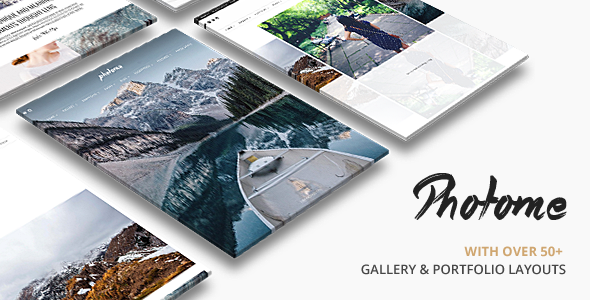
Stuck on your PhotoMe WordPress theme? Let's fix it.
No endless back-and-forth. Just send us the details and we'll get it done.
No obligation · Replies within 1 hour · Quote within 1 day
Setup · Customization · Bug fixes · WooCommerce integration
About PhotoMe WP Theme
PhotoMe is a photography-focused WordPress theme by ThemeGoods. It targets photographers, visual artists, and creative studios who need a clean, image-first layout without sacrificing flexibility. The theme ships with multiple homepage styles, a fullscreen portfolio grid, and a built-in slideshow. It supports WooCommerce for print sales and integrates with popular page builders.
ThemeGoods built PhotoMe with performance in mind. The code is lean, the demo content imports cleanly, and the responsive breakpoints hold up well across devices. It’s a solid starting point for anyone building a portfolio or photography studio site on WordPress, though like most premium themes, it has quirks that can slow you down if you’re not familiar with the setup.
Get matched with a PhotoMe developer in under one day
Tell us about your PhotoMe project. Small fixes, PhotoMe theme customization, or a full website build, whatever you need, we've got it covered.
We'll connect you to the right PhotoMe developers, define the scope, and get everything 100% clear.
You'll get one estimate, hire your preferred developer, and start collaborating.
PhotoMe is approachable out of the box, but custom work adds up fast. Tweaking layouts, fixing conflicts after updates, or building out a client gallery system takes time and familiarity with how ThemeGoods structures their themes. Hiring through Codeable connects you with vetted WordPress developers who have hands-on experience with photography themes like PhotoMe. You post the project, get matched within 24 hours, and receive a free estimate before committing to anything.
Pros
- Clean, image-first design that loads well for photography portfolios
- Multiple homepage layout options included without extra purchase
- WooCommerce compatibility for selling prints directly from the gallery
- One-click demo import works reliably with minimal setup friction
- Responsive grid handles portrait and landscape images without manual intervention
Cons
- Customizer options are limited compared to block-based themes on the market
- No native client proofing or gallery password protection built in
- Updates from ThemeGoods have been infrequent, raising long-term support concerns
- Heavy reliance on shortcodes makes switching themes a rebuild, not a migration
- Documentation covers basics only, advanced customization requires developer knowledge
Who is PhotoMe for?
Wedding Photography Studios
Wedding photographers need galleries that load fast and look polished on mobile. PhotoMe’s fullscreen slideshow and multi-gallery portfolio structure handles large session galleries well. Pair it with a contact form plugin and a WooCommerce print ordering flow, and a PhotoMe developer can build a complete client-facing studio site without heavy third-party tools.
Portrait & Headshot Photographers
Headshot photographers often work B2B and need a site that converts visitors quickly. PhotoMe’s minimal layout keeps focus on the work. A specialist can configure the homepage to lead with social proof, a clear booking CTA, and a curated portfolio section, all within the theme’s existing structure without forcing a page builder on top.
Fine Art Print Shops
Selling fine art prints requires a storefront that doesn’t feel generic. PhotoMe’s WooCommerce integration lets you display product photography in a gallery context rather than a standard shop grid. A PhotoMe expert can configure variable products for print sizes and finishes while keeping the visual experience consistent with the editorial feel of the theme.
Commercial & Product Photographers
Commercial photographers working with agencies or brands need a portfolio that’s quick to update and easy to organize by category. PhotoMe’s project post type and filtering system supports this workflow. A developer can extend the category structure, add password-protected client folders, and wire up a simple brief submission form within the existing design.
Photography Schools & Workshops
Photography educators running workshops or online courses need more than a portfolio. PhotoMe provides the visual foundation, and a specialist can add course listing pages, registration forms, and a member area for enrolled students. The theme’s clean typography makes long-form content about technique and curriculum readable alongside the visual work.

Customizing PhotoMe
PhotoMe gives you a visual customizer for colors, fonts, and layout options, but deeper changes require more than dragging sliders. Adjusting the portfolio grid spacing, modifying hover effects, or restructuring the homepage layout often means editing CSS or working with the theme’s custom shortcodes directly.
If you need custom gallery layouts, client proofing pages, or a booking form wired into the design, you’ll want a PhotoMe expert who knows the theme’s structure. A specialist can also extend the WooCommerce print shop integration without breaking the visual consistency ThemeGoods built in. Child themes are strongly recommended before any code-level changes to keep your customizations intact across updates.
Recommended plugins for PhotoMe
PhotoMe pairs well with several plugins, but choose carefully to avoid bloat. For speed, combine a caching plugin with image optimization since photography sites carry heavy assets. A WordPress performance audit can identify exactly where your PhotoMe site is losing load time.
For visibility, PhotoMe’s built-in SEO fields cover basics, but a dedicated plugin like Yoast or Rank Math adds schema markup for photographers and proper open graph tags. If organic traffic matters to your studio, a structured WordPress SEO setup makes a real difference in how your portfolio pages rank.
Not sure which plugins to use? This WordPress plugins directory covers the most popular options with reviews and setup guides.
PhotoMe common issues
PhotoMe portfolio grid not displaying correctly after update
Portfolio grid layout breaks usually trace back to a JavaScript conflict with another plugin or a CSS override from a caching plugin serving stale files. Clear all caches first, then disable plugins one at a time to isolate the conflict. Check the browser console for JS errors pointing to which script is failing. If the grid was working before a specific update, compare the changelog. Persistent layout issues after updates often need a developer review of the theme’s grid JS.
PhotoMe fullscreen slideshow not working on mobile
PhotoMe’s fullscreen slideshow depends on a JavaScript library that sometimes conflicts with mobile browser touch handling. Check if the issue is specific to one mobile browser or all. Update to the latest theme version first. If the problem persists, a common fix is adjusting the slider initialization options in the theme’s JS file via a child theme. Avoid editing core theme files directly. A WordPress bug fixing specialist can diagnose and patch this without risking other functionality.
WooCommerce checkout broken on PhotoMe theme
WooCommerce conflicts in PhotoMe usually involve the checkout template. PhotoMe may override WooCommerce templates that have since been updated by WooCommerce core, causing layout or functional breaks. Navigate to WooCommerce status and check for outdated templates flagged there. Updating those specific template files in a child theme resolves most checkout issues. If payment gateway steps are breaking, also check for JS conflicts on the checkout page specifically.
PhotoMe demo import fails or imports blank pages
Demo import failures in PhotoMe are often caused by PHP memory limits, execution timeouts, or missing required plugins. Set memory_limit to at least 256M in wp-config.php and increase max_execution_time. Install all required plugins listed in the theme documentation before running the importer. If pages import but appear blank, check that Elementor or the theme’s page builder is activated and that the imported post meta is not being stripped by a security plugin.
PhotoMe custom fonts not loading after theme update
Font loading issues after a PhotoMe update usually mean the theme is now referencing a different font stack or the Google Fonts API call has changed. Open browser dev tools, go to the Network tab, and filter for font requests to see what is loading and what is failing. If custom fonts were added via the customizer, re-save the customizer settings. If fonts were added via CSS in a child theme, check whether the theme update changed class names or font variable names the CSS was targeting.
PhotoMe gallery images showing as broken links
Broken gallery images are almost always a media library path issue or a regeneration problem after a server migration. Run a thumbnail regeneration plugin to rebuild image sizes. If images were uploaded to a different server and the site was migrated, check that the uploads folder path is correct in Settings > Media and that file permissions on wp-content/uploads allow read access. Use a plugin like Media Library Organizer to audit missing attachments. For recurring issues, get a WordPress bug fix.
PhotoMe contact form not sending emails
If PhotoMe’s contact form plugin is not sending emails, the issue is typically server-level mail delivery, not the theme itself. Most shared hosts block PHP mail() by default. Install an SMTP plugin like WP Mail SMTP and connect it to a transactional email service such as Mailgun or SendGrid. Test the connection using the plugin’s test email feature. Also check spam folders before assuming delivery failure. If the form is not submitting at all, check for JS errors blocking the form handler script.
PhotoMe theme slow loading on mobile devices
Photography sites on PhotoMe are image-heavy by nature. Slow mobile load times usually come from unoptimized image sizes, render-blocking scripts, and no lazy loading. Enable lazy loading for images, compress uploads using a plugin like ShortPixel or Imagify, and defer non-critical JS. Check if PhotoMe loads its slider scripts on pages that don’t use a slider. A targeted approach to script loading on a per-template basis cuts load time significantly. Avoid blanket plugin solutions that break slider functionality.
PhotoMe header logo not showing on all pages
Logo visibility issues across pages in PhotoMe often stem from page-level transparent header settings overriding the default logo. PhotoMe supports per-page header styles in some versions, and a transparent header on a dark page can make a dark logo invisible. Check the page settings metabox for any header override options. Also verify that the logo is set in Appearance > Customize > Header and not just in a page builder section on the homepage only, which is a common setup mistake.
PhotoMe child theme changes not applying
If child theme changes are not applying in PhotoMe, first confirm the child theme is actually active in Appearance > Themes. Check that the child theme’s style.css has the correct Template header pointing to the parent theme folder name exactly as it appears in the filesystem. CSS changes not applying often mean a caching layer is serving the parent stylesheet. Clear all caches including server-side and CDN caches. If PHP function overrides are not working, check for fatal errors in the child theme’s functions.php that prevent it from loading. A WordPress bug fix service can resolve persistent child theme conflicts quickly.
PhotoMe FAQ
ThemeGoods has slowed update releases for PhotoMe in recent years. The theme still functions on current WordPress versions but may not receive timely updates for new WooCommerce or Gutenberg compatibility. If long-term support is a priority, plan for a developer to handle compatibility patches manually or consider whether the theme fits a long-term strategy before building on it.
PhotoMe was built with its own shortcode system and is not natively optimized for Elementor or WPBakery. You can use Elementor on it, but expect conflicts in fullwidth layouts and header areas. Some users layer Elementor over PhotoMe’s page templates successfully, but it requires a developer familiar with both to avoid visual and performance issues.
Yes. PhotoMe includes WooCommerce support and the shop pages adopt the theme’s visual style. You can sell print products with variable sizes and finishes. The integration works for straightforward shops, but complex product configurations or custom checkout flows will need developer work. Keep WooCommerce templates updated to avoid checkout template conflicts.
PhotoMe does not have native client proofing built in. The simplest approach is using WordPress’s built-in page password protection combined with a gallery plugin. For a proper client gallery with individual logins, download approvals, or selection tools, you’ll need a third-party plugin like Pixopoint or a custom-built solution from a PhotoMe specialist.
PhotoMe works most predictably with its own built-in shortcodes and the native WordPress editor. Elementor can be used but requires care around fullwidth sections and header areas. WPBakery has similar friction points. If you want full page builder control, a developer can configure Elementor as the primary builder while retaining PhotoMe’s header, footer, and portfolio post types.
Start with image optimization since photography sites carry the most overhead there. Use a plugin like ShortPixel to compress uploads and enable lazy loading. Add a caching plugin and defer non-critical scripts. Avoid loading the slider library on pages that don’t use it. For a full diagnosis, a WordPress performance review will identify the biggest bottlenecks specific to your PhotoMe setup.
Yes, PhotoMe sites migrate like any WordPress install. Use a migration plugin like Duplicator or All-in-One WP Migration to move files and the database together. Update the site URL in the database after migration. The most common post-migration issue is image paths breaking if the uploads folder structure changes. A WordPress migration service handles this without downtime or data loss.
PhotoMe does not officially list WPML compatibility in its documentation. That said, WPML works on most WordPress themes with varying degrees of manual configuration. Portfolio custom post types and theme strings will need to be registered in WPML’s string translation module manually. For a multilingual PhotoMe site, budget for developer time to handle the integration properly.
PhotoMe does not include a booking system. The straightforward approach is embedding a form plugin like Gravity Forms or WPForms on a dedicated booking page. For session scheduling with calendar availability, a plugin like Bookly or Simply Schedule Appointments can be embedded within PhotoMe’s page templates. A developer can style the form output to match the theme’s visual language.
If you already have a PhotoMe site with content and established SEO, rebuilding on a new theme has real costs. A developer can extend and maintain PhotoMe effectively. If you’re starting fresh, weigh PhotoMe’s reduced update frequency against newer photography themes. A specialist can advise on whether PhotoMe fits your requirements or whether a migration makes more sense long-term.
Hire a PhotoMe Expert Developer
Whether you need a one-time fix or a full custom build on PhotoMe, working with a specialist saves time and avoids costly mistakes. Our developers know ThemeGoods themes inside out and can handle everything from layout customization to WooCommerce print shop integration. Get a Free Estimate and describe your project. No obligation, no upfront cost, just a clear answer on what it takes to get your PhotoMe site where it needs to be.
You'll need a free Codeable account so developers can ask questions and send their quotes.