Classima – Classified Ads WordPress Theme WordPress Theme
by RadiusTheme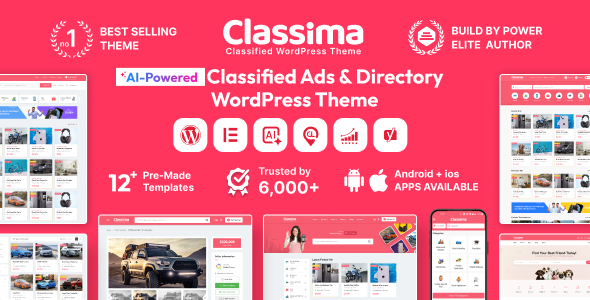
Stuck on your Classima – Classified Ads WordPress Theme WordPress theme? Let's fix it.
No endless back-and-forth. Just send us the details and we'll get it done.
No obligation · Replies within 1 hour · Quote within 1 day
Setup · Customization · Bug fixes · WooCommerce integration
About Classima – Classified Ads WordPress Theme WP Theme
Classima is a classified ads WordPress theme built by RadiusTheme. It’s designed for listing directories, job boards, real estate portals, and general classifieds marketplaces. The theme ships with a front-end submission system, monetisation tools, and deep integration with the Classified Listing Pro plugin.
Out of the box, Classima handles multi-category listings, location-based search, user dashboards, and payment gateways. It uses Elementor for page building and supports WooCommerce for handling paid packages. The code is structured around a custom post type architecture, which keeps listings separate from standard WordPress content and makes management straightforward at scale.
For anyone building a classifieds site from scratch or migrating an existing directory, Classima covers the core functionality without requiring a stack of third-party plugins to get started.
Get matched with a Classima – Classified Ads WordPress Theme developer in under one day
Tell us about your Classima – Classified Ads WordPress Theme project. Small fixes, Classima – Classified Ads WordPress Theme theme customization, or a full website build, whatever you need, we've got it covered.
We'll connect you to the right Classima – Classified Ads WordPress Theme developers, define the scope, and get everything 100% clear.
You'll get one estimate, hire your preferred developer, and start collaborating.
Classima is not a drop-in theme. It has a plugin-dependent architecture, a custom post type system, and payment logic that requires careful configuration. Mistakes in setup cost time and money, especially once real users and listings are involved.
The developers available through Codeable have direct experience with RadiusTheme products and classified ad builds. They can handle everything from initial setup to complex feature additions. You get a vetted specialist, not a generalist who will figure it out as they go.
Pros
- Front-end listing submission system works without admin access, making it practical for real user-generated content sites
- Deep WooCommerce integration handles paid listing packages, featured upgrades, and subscription billing without custom code
- Location-based search with radius filtering is built in, which is a core requirement for most classifieds use cases
- Elementor compatibility means layout work on static pages is accessible without touching code
- RadiusTheme provides regular updates and maintains compatibility between Classima and its companion plugins
Cons
- Heavy reliance on Classified Listing Pro plugin means the theme alone is not functional for a real marketplace without the paid add-on
- Default design looks dated without customisation and requires significant work to stand out from other Classima-based sites
- Performance degrades noticeably on sites with large listing volumes if caching and database optimisation are not configured properly
- Custom field configuration is limited in the free version, which pushes most serious builds toward the Pro plugin immediately
- Documentation covers basic setup well but lacks detail on hook usage and advanced customisation, making developer onboarding slower
Who is Classima – Classified Ads WordPress Theme for?
General Classifieds Marketplace
Classima handles multi-category buy-and-sell marketplaces well. The front-end submission system lets users post ads without admin access, and paid package logic controls visibility and featured placement. It suits Craigslist-style local classifieds or niche vertical markets where user-generated listings drive the content.
Real Estate Listings Portal
Real estate portals need location search, image galleries, price filtering, and contact forms. Classima covers all of these through its core feature set. A developer can extend it with mortgage calculators, agent profiles, or custom property fields to match the needs of a regional or national property listing site.
Job Board and Recruitment Site
Job boards benefit from Classima’s category and tag structure, which maps naturally onto job types, industries, and locations. Employers can post listings through the front-end form, and paid packages control how long and how prominently a job ad appears. Resume uploads and application tracking require additional customisation.
Vehicle Sales Directory
Vehicle directories need make, model, year, and mileage as custom fields alongside location and price filters. Classima’s custom field system supports this with the Pro plugin. A Classima specialist can configure the search facets and listing templates to match standard auto classifieds UX patterns without building from scratch.
Local Business Directory
Local business directories use Classima’s location radius search and category filtering to help users find services nearby. Business owners can claim or submit their own listings, and monetisation comes through featured placement or subscription packages. It works for city guides, service directories, and niche professional listings.

Customizing Classima – Classified Ads WordPress Theme
Classima gives you a reasonable amount of control through its theme options panel and Elementor integration, but serious customisation usually requires developer involvement. Things like custom listing fields, modified search filters, altered pricing package logic, or redesigned user dashboards go beyond what the panel exposes.
A Classima – Classified Ads WordPress Theme expert can restructure the listing submission flow, add custom taxonomies, modify the maps integration, or build out monetisation logic tailored to your specific market. RadiusTheme’s plugin architecture is well-documented, but working inside it efficiently requires familiarity with its hooks and filter system.
Whether you need a white-label look, a custom membership tier, or tighter control over how listings are displayed and filtered, a developer who knows Classima well will get you there without breaking the existing functionality.
Recommended plugins for Classima – Classified Ads WordPress Theme
Classima works with several key extensions that expand its core feature set. The Classified Listing Pro plugin adds paid packages, featured listings, and subscription plans. The Classified Listing Store add-on turns user profiles into storefronts. For maps, it supports Google Maps and OpenStreetMap out of the box.
Performance matters on listing-heavy sites. A large classifieds database with image-heavy posts can slow page loads considerably. Pairing Classima with proper caching and a CDN is essential. See our WordPress performance optimisation service for specifics.
For sites relying on organic traffic, structured listing data and clean taxonomy URLs are critical. Our WordPress SEO optimisation service covers schema markup and site architecture for directory-style builds.
Not sure which plugins to use? This WordPress plugins directory covers the most popular options with reviews and setup guides.
Classima – Classified Ads WordPress Theme common issues
Classima listing submission form not working after update
This usually happens when the Classified Listing Pro plugin and Classima are on mismatched versions after an update. Check that both the theme and plugin are fully updated. If the form still breaks, deactivate other plugins one by one to identify a conflict. Nonce errors on submission often point to caching plugins serving stale form tokens. Clear all caches and test in a logged-out session. If the issue persists, a developer can trace the form action hooks to find where the process is failing.
Classima search filter returning no results
Empty search results are often caused by a mismatch between listing location data and the search query format. Check that listings have been saved with valid location data and that the geolocation API key is active and unrestricted. Also verify that the search widget is using the correct post type. If custom fields were added, confirm they are marked as searchable in the plugin settings. A WordPress bug fixing specialist can audit the search query logic if configuration checks don’t resolve it.
Classima payment package not showing on checkout
If paid packages are not appearing at checkout, the most common cause is a misconfiguration in the package assignment under Classified Listing Pro settings. Check that packages are set to active and assigned to the correct listing category. WooCommerce product IDs must match what the plugin expects. Also confirm that the WooCommerce integration is enabled in the plugin settings. If packages were recently edited, clear transients from the database and re-test.
Classima Google Maps not loading on listing pages
Google Maps failures are almost always caused by an invalid or restricted API key. Go to the Google Cloud Console, check that the Maps JavaScript API and Geocoding API are enabled, and verify that the key has no HTTP referrer restrictions blocking your domain. Enter the key correctly in the Classified Listing settings panel. If maps load in the admin but not on the front end, a JavaScript conflict with another plugin or theme script is likely the cause.
Classima user dashboard showing blank page
A blank user dashboard usually points to a permalink or page assignment issue. Go to Settings > Permalinks and re-save without changing anything. Then check that the dashboard page is correctly assigned in the Classified Listing plugin settings. If the page exists but shows blank, a PHP error is likely being suppressed. Enable WP_DEBUG temporarily to read the error. Plugin conflicts or a missing template file in a child theme can also cause this. See our WordPress bug fixing service for faster diagnosis.
Classima featured listing badge not displaying
If the featured badge is not displaying on listing cards, check that the listing was saved with featured status after the WooCommerce payment completed. The plugin marks listings as featured via a hook triggered on order completion. If orders were marked complete manually or outside the normal flow, the hook may not have fired. You can manually set featured status from the listing edit screen in the admin. Also check that the badge is not hidden by CSS from a theme customisation or child theme override.
Classima listing images not uploading from front end
Front-end image upload failures are commonly caused by file permission issues on the uploads directory, PHP upload size limits, or a security plugin blocking the upload request. Check that wp-content/uploads is writable. Increase upload_max_filesize and post_max_size in your php.ini or via .htaccess if files are being rejected silently. Test with your security plugin deactivated. If uploads work in the admin but not the front-end form, the issue is likely in how the form handles the media library nonce for non-admin users.
Classima WooCommerce order not linking to listing
The link between a WooCommerce order and a listing is created when the user completes the package purchase flow through the Classified Listing plugin. If orders are not linking, check that the listing ID is being passed correctly through the checkout. This often breaks when custom checkout flows or redirect plugins interfere with the query string. Review the order meta in WooCommerce to see if the listing ID is stored. A WordPress bug fixing expert can trace the order meta storage to find where the connection is being dropped.
Classima category page showing wrong listings
Wrong listings appearing on category pages can happen if custom taxonomies are not properly registered or if a caching layer is serving stale archive pages. First clear all caches and re-save permalinks. Check that your listings are using the correct Classified Listing category taxonomy rather than the default WordPress category. If a child theme has a custom archive template, verify it is querying the right post type and taxonomy. Elementor-built archive pages sometimes override the default query and need manual adjustment.
Classima email notifications not sending after listing submission
Email notification failures after listing submission are usually caused by WordPress’s default wp_mail function being blocked by the hosting environment. Install an SMTP plugin and configure it with proper mail server credentials. Check that notification settings are enabled in the Classified Listing plugin settings panel, specifically for the submission confirmation and admin alert emails. If emails send from elsewhere in WordPress but not from Classima, the issue is likely in how the plugin’s email hooks are triggered, which a developer can check in the source.
Classima – Classified Ads WordPress Theme FAQ
Classima has limited functionality without Classified Listing Pro. The theme handles design and layout, but the core submission system, packages, user dashboard, and search filters are plugin-dependent. For any real classifieds site, the Pro plugin is effectively required. RadiusTheme bundles it with most Classima purchases, so check your licence before buying separately.
Yes. Classima is built with Elementor compatibility in mind. Static pages like the homepage, about page, and contact page can be built using Elementor’s drag-and-drop editor. However, listing templates, search results, and user dashboards use their own template system managed by the Classified Listing plugin, not Elementor widgets.
Yes. Classima handles listing payments through WooCommerce. You create listing packages as WooCommerce products and users purchase them during the submission flow. Stripe, PayPal, and any WooCommerce-compatible gateway will work. The integration is handled through the Classified Listing Pro plugin settings and requires WooCommerce to be installed and active.
Custom fields are managed through the Classified Listing Pro plugin’s form builder. You can add text fields, dropdowns, checkboxes, and file uploads to the submission form and control which categories show which fields. The free version has limited field types. For complex field logic or conditional fields, a developer familiar with the plugin’s field API is needed.
Classima is translation-ready and compatible with WPML and Polylang. The theme and plugin strings are available in .pot format for translation. RadiusTheme has released some language files directly. For a fully multilingual classifieds site with translated listing categories and search, WPML with the WooCommerce Multilingual add-on is the most complete solution.
By default, users must register to submit a listing. This is tied to the user dashboard and ownership tracking features. You can adjust registration requirements in the plugin settings, but allowing guest submissions adds complexity around listing management and contact handling. Most classifieds sites keep registration required to reduce spam and maintain user accountability.
Classima works for real estate with the right configuration. It supports location search, gallery images, price filtering, and custom fields for property details. It is not a dedicated real estate theme like Houzez, so you will need a developer to configure custom fields and search facets properly. For large property portals, evaluate whether a purpose-built real estate theme might be a better starting point.
Use a child theme for all customisations. This is the standard approach and keeps your changes safe when the parent theme updates. Classima supports child themes fully. For plugin-side customisations, use custom hooks rather than editing plugin files directly. Before any major update, back up the site and test on a staging environment first.
Yes. WooCommerce is central to Classima’s monetisation system. Listing packages are WooCommerce products and the checkout flow runs through WooCommerce. This means you can use any WooCommerce payment gateway and reporting tools. It also means WooCommerce must be kept updated and compatible with Classima and Classified Listing Pro to avoid checkout failures.
Post your project through Codeable to get matched with a vetted Classima developer. Describe what you need, whether it’s initial setup, custom features, or fixes, and you’ll receive a free estimate within 24 hours. Codeable developers specialise in WordPress and have experience with RadiusTheme products. There’s no obligation to proceed after receiving the estimate.
Hire a Classima – Classified Ads WordPress Theme Developer
Need a Classima – Classified Ads WordPress Theme expert for setup, customisation, or fixes? Post your project and get matched with a vetted developer within 24 hours. No commitment required until you approve the estimate.
From payment gateway configuration to custom listing fields and front-end redesigns, our developers know the Classima ecosystem inside out. Get a Free Estimate and describe exactly what you need.
You'll need a free Codeable account so developers can ask questions and send their quotes.