Engitech WordPress Theme
by OceanThemes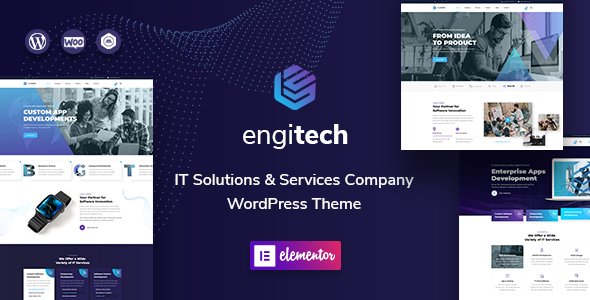
Stuck on your Engitech WordPress theme? Let's fix it.
No endless back-and-forth. Just send us the details and we'll get it done.
No obligation · Replies within 1 hour · Quote within 1 day
Setup · Customization · Bug fixes · WooCommerce integration
About Engitech WP Theme
Engitech is a WordPress theme built by OceanThemes for engineering, technology, and IT service companies. It ships with a clean, professional layout that works well for agencies and consultancies that need to present services, team members, and case studies without a lot of setup friction.
The theme is built on a custom framework and includes pre-built page templates for common sections like services, portfolios, testimonials, and pricing tables. It supports Elementor, which makes page-level editing straightforward for most users.
Out of the box, Engitech covers the basics: responsive layout, retina-ready icons, Google Fonts integration, and WooCommerce compatibility. It is a practical choice for IT firms and tech startups that want a polished site without building everything from scratch.
Get matched with a Engitech developer in under one day
Tell us about your Engitech project. Small fixes, Engitech theme customization, or a full website build, whatever you need, we've got it covered.
We'll connect you to the right Engitech developers, define the scope, and get everything 100% clear.
You'll get one estimate, hire your preferred developer, and start collaborating.
Engitech is not a difficult theme, but getting it to look and perform exactly how your business needs takes more than clicking through the Customizer. Custom layouts, third-party integrations, and performance tuning all need developer involvement at some point.
Codeable connects you with vetted WordPress specialists who know themes like Engitech in depth. You describe the work, get a clear estimate, and decide whether to proceed. No retainers, no guesswork. If you need an Engitech specialist for a one-time fix or an ongoing build, this is the most direct path to qualified help.
Pros
- Pre-built templates cover IT, engineering, and tech agency use cases well
- Full Elementor compatibility makes page layout editing accessible without code
- Clean, professional visual style that works without heavy customization
- WooCommerce ready for firms selling services, subscriptions, or digital products
- Includes dedicated templates for services, team, portfolio, and pricing sections
Cons
- Custom post type support is limited without additional plugins or developer work
- Default page load speed needs optimization before going live on a production site
- Some template sections are tightly structured and difficult to rearrange without CSS knowledge
- Documentation is basic and does not cover advanced customization scenarios
- Heavy reliance on Elementor means switching page builders later is disruptive
Who is Engitech for?
IT Services Company
Engitech’s service page templates and icon-based feature sections map directly to how IT companies present their offerings. A developer can extend this with custom service post types, filterable case study grids, and a client portal integration, turning the base theme into a full business site for a growing IT firm.
Engineering Consultancy
Engineering consultancies need to project credibility. Engitech’s team member layouts, project portfolio section, and testimonial blocks handle that well. An Engitech developer can add industry-specific credential displays, downloadable project briefs, and a contact routing form tailored to consultancy intake workflows.
Software Development Agency
Software agencies need to show work and convert visitors. Engitech’s portfolio templates provide a starting point, but a specialist can build out filterable project galleries, technology stack displays, and integrated case study pages that go deeper than the default layout allows.
Managed Service Provider
MSPs benefit from Engitech’s pricing table templates and service tier layouts. With developer help, you can add a ticket submission form, client login area, and service status page, giving clients a functional self-service layer built directly into the theme without a separate platform.
Tech Startup
Tech startups need a site that looks polished from day one. Engitech delivers that without months of design work. An Engitech developer can configure a focused landing page setup, integrate a product demo request form, and connect the site to a CRM so every lead is captured and routed correctly.

Customizing Engitech
Engitech gives you a reasonable amount of control through the WordPress Customizer, where you can adjust colors, typography, header layout, and footer structure. Elementor handles most of the page-level work, so you can rearrange sections, swap content, and tweak spacing without touching code.
That said, deeper customization, like modifying the theme’s service card layout, changing the portfolio grid behavior, or integrating custom post types, usually requires custom CSS or PHP work. An Engitech expert can handle those changes cleanly without breaking the existing structure.
If you need a tailored look that goes beyond the default templates, or if you want to add features the theme does not support natively, working with an Engitech developer saves time and avoids the trial-and-error of DIY modifications.
Recommended plugins for Engitech
Engitech pairs well with a few key plugins that extend what it can do. WooCommerce adds e-commerce if you are selling services or digital products. WPML or Polylang handles multilingual setups for firms with international clients.
On the technical side, pairing Engitech with a solid caching plugin and a CDN makes a measurable difference in load times. See our WordPress performance services if your Engitech site is running slow. For firms targeting organic search, plugin-level SEO work matters too, and our WordPress SEO services cover that in full.
Not sure which plugins to use? This WordPress plugins directory covers the most popular options with reviews and setup guides.
Engitech common issues
Engitech header not displaying correctly on mobile
This is usually caused by a CSS conflict between Engitech’s mobile stylesheet and a plugin adding its own styles. Open browser dev tools on mobile view and check which rule is overriding the header container width or flex properties. A targeted CSS fix in your child theme resolves this without touching core files. If the header collapses entirely, check whether the mobile menu script is loading, as ad blockers or caching plugins sometimes block it.
Engitech Elementor sections not loading after update
After updates, Elementor sometimes loses its connection to Engitech’s registered widget areas or custom controls. Go to Elementor > Tools and run the Regenerate CSS and Sync Library options first. If sections still appear blank, check the browser console for JavaScript errors. A mismatch between the Elementor version and the theme’s bundled widget code is the most common cause. Updating both together, or rolling one back, usually resolves it. If this keeps recurring, a developer can audit the integration. See our WordPress bug fixing service for persistent cases.
Engitech portfolio grid not showing all posts
The Engitech portfolio grid relies on a custom post type and a shortcode or Elementor widget to display posts. If posts are missing, check the post count limit set in the widget settings, it defaults to a low number in some versions. Also confirm that portfolio posts are published and not stuck in draft. If the grid shows some but not all categories, check the category filter parameter in the shortcode or widget. Taxonomy assignment errors are a common cause here.
Engitech contact form not sending emails
Engitech typically bundles or recommends Contact Form 7 or WPForms. Email delivery failures are almost never a theme issue. They are caused by the server’s default PHP mail function being blocked by the host. Install an SMTP plugin like WP Mail SMTP and connect it to a transactional email service. Test delivery using the plugin’s built-in test tool. If the form submits but nothing happens visually, check for JavaScript errors that might be blocking the AJAX response.
Engitech theme options not saving in Customizer
Customizer settings failing to save usually points to a permissions issue, a caching conflict, or a PHP error happening silently in the background. First, clear all caches including server-level cache, then retry. If that does not work, temporarily disable plugins one by one to find a conflict. Check your server’s PHP error log for any fatal errors triggered during the save request. If the issue persists across a clean environment, our WordPress bug fixing service can trace the root cause.
Engitech site slow to load on desktop
Engitech loads several scripts and stylesheets that are not always deferred or minified by default. Run the site through PageSpeed Insights to identify the specific bottlenecks. Common fixes include enabling Gzip compression, deferring non-critical JavaScript, and switching to a faster host. The theme’s slider and animation scripts add render-blocking weight on the homepage in particular. A performance-focused developer can audit and optimize the asset loading order without breaking the layout. Visit our WordPress performance page for more detail.
Engitech pricing table layout broken
Pricing table layout breaks in Engitech are almost always caused by a CSS conflict with a plugin, usually one that injects its own table or column styles globally. Check the affected columns in browser dev tools and look for competing width or display rules. If you updated the theme recently, the pricing table HTML structure may have changed and your child theme CSS may need updating to match. Reverting to the previous layout in your child theme stylesheet is the safest fix while you diagnose the cause.
Engitech white screen after plugin update
A white screen after a plugin update in Engitech is a fatal PHP error. Enable WP_DEBUG in wp-config.php to surface the error message, then you will know exactly which plugin is causing the conflict. If you cannot access wp-admin, use FTP or your host’s file manager to rename the conflicting plugin folder, which deactivates it without needing dashboard access. Once the site loads, update or replace the plugin. Our WordPress bug fixing service handles white screen emergencies fast.
Engitech Google Fonts not loading
Engitech loads Google Fonts via an enqueued URL in the theme’s functions.php or a Customizer setting. If fonts are not rendering, first check whether your browser or a privacy plugin is blocking Google’s font CDN. In some EU hosting environments, Google Fonts are blocked for GDPR compliance. The fix is to download the fonts and host them locally using a plugin like OMGF. Also verify that no caching plugin is serving a stale stylesheet that points to an old font URL.
Engitech homepage slider not working
The Engitech homepage slider relies on a JavaScript library, usually Swiper or a bundled slider script. If it is not working, check the browser console for script load errors. Common causes include a JavaScript conflict with another plugin, the slider script being blocked by a caching or optimization plugin, or slider content not being published. If you are using Elementor to manage the slider, regenerate the CSS from Elementor’s tools panel and confirm the slides have valid images assigned.
Engitech FAQ
Yes. Engitech is purpose-built for IT, engineering, and tech service businesses. It includes templates for services, portfolios, team pages, and pricing that cover most of what those companies need. For more specific requirements, an Engitech developer can extend the theme without rebuilding it from scratch.
Engitech is fully compatible with Elementor. Most page-level editing, including sections, columns, and content blocks, is handled through Elementor’s page builder. Some theme-specific sections like the header and footer are controlled through the Customizer rather than Elementor.
For standard setup and content editing, yes. The Customizer and Elementor handle most tasks without code. For anything beyond that, such as custom layouts, new features, or integration with third-party tools, you will need either CSS knowledge or an Engitech specialist to handle those changes correctly.
Engitech is WooCommerce compatible. The theme’s styles apply to standard WooCommerce pages including shop, single product, cart, and checkout. For heavily customized store layouts or specific product display requirements, additional CSS or a developer’s input will be needed to align the store with the rest of your design.
Create a child theme by making a new folder in wp-content/themes, adding a style.css file with a Template header pointing to Engitech, and a functions.php file that enqueues the parent stylesheet. Activate it from the Themes screen. All custom CSS and PHP changes go in the child theme so updates do not overwrite your work.
Engitech works with WPML and Polylang for multilingual setups. The theme’s strings are translatable through standard WordPress translation tools. For a full multilingual build, including translated Elementor templates and language-specific menus, an Engitech developer familiar with WPML configuration will save you significant setup time.
Start by enabling caching, compressing images, and deferring non-critical scripts. Engitech’s slider and animation assets add page weight that is not always necessary on every page. A performance audit will show exactly where the bottlenecks are. Our WordPress performance services cover full optimization for Engitech sites.
Yes. An Engitech developer can handle layout changes, custom features, integrations, or a full site build. Through Codeable, you post your project, get matched with a vetted specialist, and receive a clear estimate before any work starts. Get a Free Estimate to get started.
OceanThemes maintains Engitech and releases updates that address compatibility with newer versions of WordPress and Elementor. Before updating, always test in a staging environment first, as updates can occasionally affect custom layouts or child theme styles that depend on the previous version’s markup.
Migrating an existing site to Engitech involves rebuilding your page layouts in Elementor using the theme’s templates as a starting point, then porting your content. If you are migrating from another host or WordPress installation, our WordPress migration service handles the technical side so your content and data arrive intact.
Hire an Engitech Developer
Whether you need layout changes, a custom feature, or a full site build on Engitech, our WordPress developers can handle it. Work is scoped clearly, delivered through Codeable, and backed by a risk-free process. Get a Free Estimate and describe your project. You will hear back within 24 hours with a clear plan and price, no obligation to hire.
You'll need a free Codeable account so developers can ask questions and send their quotes.