University WordPress Theme
by CactusThemes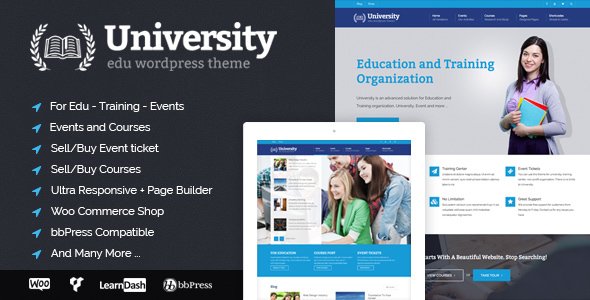
Stuck on your University WordPress theme? Let's fix it.
No endless back-and-forth. Just send us the details and we'll get it done.
No obligation · Replies within 1 hour · Quote within 1 day
Setup · Customization · Bug fixes · WooCommerce integration
About University WP Theme
University is a WordPress theme by CactusThemes built specifically for higher education institutions. It ships with a structured layout designed to handle the complexity of academic websites: faculties, departments, events, courses, and news all have dedicated sections that slot into place without heavy configuration.
The theme uses the WPBakery page builder and includes a set of custom shortcodes and widgets tailored to university content. It supports multiple header styles, a mega menu, and an events calendar integration. The design is formal without being rigid, giving institutions room to apply their own branding while keeping a professional academic feel.
CactusThemes has kept the theme actively maintained with updates that address compatibility with newer versions of WordPress and WooCommerce. For institutions that need more than the defaults, hiring a University theme developer is the practical next step.
Get matched with a University developer in under one day
Tell us about your University project. Small fixes, University theme customization, or a full website build, whatever you need, we've got it covered.
We'll connect you to the right University developers, define the scope, and get everything 100% clear.
You'll get one estimate, hire your preferred developer, and start collaborating.
Finding a reliable University theme developer takes time most institutions don’t have. Codeable connects you with vetted WordPress specialists who have real experience with complex academic sites. Every developer on the platform has passed a technical review, so you’re not gambling on an unknown freelancer.
Projects are scoped upfront, estimates are free, and there’s no obligation to hire. Whether you need a single bug fixed or a full faculty directory built from scratch, a University WordPress expert on Codeable can scope and deliver the work correctly.
Pros
- Purpose-built post types for faculties, departments, courses, and events reduce setup time on academic sites
- Includes a mega menu system suited to the deep navigation structures university sites require
- WPBakery page builder integration gives non-developers flexibility on interior pages
- Multiple homepage layouts included, covering different institution sizes and content priorities
- Redux Framework options panel is well-organized and covers most global design settings without custom code
Cons
- WPBakery dependency means layout work is tied to shortcode markup that complicates future migrations
- Course and faculty post types lack deep filtering out of the box and need plugin or custom code support
- Mobile menu handling on deep navigation structures can require CSS fixes for smaller breakpoints
- Demo import doesn't always replicate perfectly on fresh installs, often requiring manual cleanup
- Theme documentation is limited in areas covering custom post type extension and advanced template overrides
Who is University for?
University & College Websites
University theme fits full-scale college and university sites with multiple faculties and departments. The built-in department post types, faculty profiles, and events system handle the core content types without requiring separate plugins. A University theme developer can extend these for complex multi-campus or multi-faculty structures.
Online Course & E-Learning Platforms
With a LMS plugin like LearnDash layered on top, University’s course listing pages become a full e-learning front end. The theme’s layout system handles course categories and program pages cleanly. A University theme specialist can wire the LMS data into custom templates that match the institution’s design requirements.
Academic Research Institutions
Research institutions need publication listings, project pages, and staff profiles alongside standard academic content. University’s flexible post types and WPBakery elements cover most of this. A developer can build custom post types for research outputs and connect them to faculty profiles with relational queries.
Private Schools & Secondary Education
Private schools need admissions information, news, events, and staff pages in a format that works for parents and prospective students. University’s event calendar integration and news post types cover this well. A University WordPress expert can adapt the design to suit a younger audience without rebuilding the structure.
Vocational Training & Certification Providers
Vocational providers need program listings with clear certification outcomes, schedules, and enrollment paths. University’s course and events architecture maps to this use case with some configuration. A University theme developer can build intake forms, schedule pages, and certification detail pages on top of the existing structure.

Customizing University
Out of the box, University gives you color controls, font options via Google Fonts, and a theme options panel built on Redux Framework. You can configure headers, adjust layout widths, and toggle sections from within the panel without touching code.
Beyond the defaults, customization gets technical fast. Faculty profile layouts, custom course taxonomies, and department-specific page templates all require PHP and CSS work. A University theme expert can extend the existing post types, build child theme overrides, and wire up ACF fields to match your institution’s exact content structure.
If your site needs a custom student portal section, a searchable course directory, or event filtering by faculty, that work needs a developer who knows the theme internals. A University WordPress specialist saves significant time compared to trial-and-error customization on a live academic site.
Recommended plugins for University
University pairs well with several plugins that extend its core functionality. The Events Calendar handles academic scheduling reliably. LearnDash or LifterLMS can add a full course delivery layer on top of the theme’s course listing pages. WPML handles multilingual content for international institutions.
Performance matters on academic sites with high traffic during enrollment periods. A developer can configure caching, image optimization, and a CDN setup to keep load times fast. See our WordPress performance service for specifics. If your institution needs search visibility, pairing University with a proper technical SEO setup covered in our WordPress SEO service will make a measurable difference in organic reach.
Not sure which plugins to use? This WordPress plugins directory covers the most popular options with reviews and setup guides.
University common issues
University theme mega menu not working after WordPress update
Mega menu failures after a WordPress update usually trace back to a JavaScript conflict introduced by an updated plugin or a jQuery compatibility issue. Open your browser console and look for JS errors on page load. Disable plugins one at a time to isolate the conflict. If the menu script itself is failing, check whether the theme’s navigation JS file is loading correctly in the page source. A persistent conflict may need a developer to patch the enqueue order.
University theme events calendar not displaying correctly
If The Events Calendar plugin events aren’t rendering correctly in University theme, first check that both the theme and the plugin are on their latest versions. Template conflicts between University’s events templates and the plugin’s own templates are a common cause. Look in the theme folder for any tribe-events template overrides and compare them against the plugin’s current template structure. Outdated overrides break display. Our WordPress bug fixing service can resolve template conflicts quickly.
Faculty post type not showing on University theme pages
If faculty profiles aren’t appearing, confirm the Faculty custom post type is still registered. Deactivate and reactivate the University theme’s core plugin if one is bundled, as custom post types are often registered there rather than in functions.php. Also flush permalinks by visiting Settings > Permalinks and saving. If the post type is missing entirely after a theme switch, the data may need to be re-registered via a custom plugin.
University theme WPBakery elements showing raw shortcodes on frontend
Raw WPBakery shortcodes appearing on the frontend mean the page builder plugin is inactive or its rendering is being blocked. Go to Plugins and confirm WPBakery Page Builder is active. If it is active, check for a PHP error in the site’s error log that may be interrupting the shortcode rendering function. A plugin conflict or a memory limit issue can both cause this. Increasing PHP memory limit in wp-config.php to 256M is a quick diagnostic step.
University theme demo import fails or shows blank pages
Demo import failures in University theme are usually caused by server timeout limits, insufficient PHP memory, or a missing required plugin. Before importing, install all required and recommended plugins listed in the theme documentation. Set PHP max execution time to at least 300 seconds and memory limit to 256M. If pages import but show blank, check that WPBakery is active and that the imported pages are set to the correct page template in Page Attributes. Our WordPress bug fixing service handles import failures efficiently.
University theme course listings page returning 404 error
A 404 on the course listings page almost always means the custom post type permalink structure isn’t flushed. Go to Settings > Permalinks and click Save Changes without changing anything. This forces WordPress to rebuild the rewrite rules. If the 404 persists, check whether the course post type slug in the theme settings matches the URL you’re accessing. A mismatch between the registered slug and the page slug will produce a persistent 404.
University theme Redux options panel not saving changes
Redux Framework options not saving typically points to a nonce verification failure, a REST API conflict, or a caching plugin intercepting the save request. First, disable your caching plugin and try saving again. If that resolves it, configure the cache plugin to exclude the theme options endpoint. If the issue persists, check for JavaScript errors in the browser console when clicking Save, as a JS conflict can silently block the AJAX save call.
University theme mobile menu broken or not opening
Mobile menu issues in University theme are often caused by a JavaScript error preventing the toggle event from firing. Check the browser console on mobile viewport for errors. A common cause is a second jQuery instance loaded by a plugin conflicting with the theme’s navigation script. Also check if the mobile menu toggle button is hidden by a CSS rule introduced by a customization. Inspect the hamburger button element and verify its display and z-index values are correct.
University theme slow loading on pages with multiple WPBakery rows
WPBakery-heavy pages load slowly because each row and element generates additional DOM and often loads its own CSS and JS assets. Start by enabling WPBakery’s built-in CSS compression option under WPBakery > Settings > Performance. Then use a caching plugin and configure it to combine and minify CSS and JS. For persistent performance issues on University theme, our WordPress performance service covers full audit and optimization. Lazy loading images on long faculty and course pages also helps significantly.
University theme search returning no results for posts
University theme’s search may exclude custom post types like courses and faculty by default. WordPress search doesn’t automatically include all post types unless they’re registered with 'exclude_from_search' => false. Add a filter to your child theme’s functions.php to include the relevant post types in search queries. Alternatively, install SearchWP which gives you full control over which post types and fields are indexed. Check the search template file as well to confirm it’s rendering all post type results correctly.
University FAQ
CactusThemes has continued releasing updates for the University theme. You can verify the current version and update history on ThemeForest where the theme is sold. Active support is provided through the ThemeForest comments section and the CactusThemes support system. For complex issues beyond standard support, a University theme developer can step in.
University theme is built around WPBakery and doesn’t officially support Elementor. You can install Elementor alongside it, but template conflicts and styling issues are likely. A University theme specialist can resolve compatibility conflicts if you need Elementor for specific pages, but the cleanest approach is to use WPBakery as intended by the theme.
The theme’s pre-built page layouts rely heavily on WPBakery shortcodes. Removing WPBakery will break these layouts and display raw shortcode text. You can build new pages using the standard WordPress block editor, but the demo content and pre-built templates won’t render correctly without WPBakery active.
Departments in University theme are typically managed as a custom taxonomy or custom post type accessible from the WordPress admin sidebar. Go to the Departments section, add a new entry, assign faculty members, and set a department page template. For complex multi-department structures with custom fields, a University WordPress expert can extend the taxonomy with additional data fields.
University theme is listed as WPML-compatible on ThemeForest. CactusThemes has done compatibility work with the plugin. For full multilingual functionality including translated custom post types like courses and faculty profiles, additional configuration is required. A University theme developer familiar with WPML can handle the complete setup.
Yes. Both LearnDash and LifterLMS can be installed on a University theme site. The theme provides course listing pages, but the LMS plugin handles course delivery, enrollment, and student management. Styling the LMS output to match University theme’s design requires CSS work and in some cases custom templates from a University WordPress developer.
Create a new folder in wp-content/themes/ named university-child. Add a style.css file with the correct theme header including Template: university pointing to the parent theme folder name. Add a functions.php that enqueues the parent stylesheet. Activate the child theme from Appearance > Themes. All customizations go into the child theme to survive updates.
CactusThemes updates University periodically to maintain WordPress compatibility. Check the theme’s changelog on ThemeForest for the latest tested WordPress version. Running an outdated version of the theme on a current WordPress install can cause conflicts. Keep the theme updated and test updates on a staging site before applying them to production.
Migrating a University theme site follows the standard WordPress migration process: export the database, move theme and plugin files, update the database with the new domain using a tool like WP-CLI search-replace, and update file paths. Custom post type data moves with the database. For a smooth migration, our WordPress migration service covers the full process without data loss.
Yes. A University theme expert can handle anything from layout customization and plugin integration to custom post type development and performance work. Codeable is the best place to find vetted University WordPress developers. Post your project, get a scoped estimate for free, and hire only if it fits. Visit our WordPress development services page for more.
Hire a University Theme Expert
Need a University theme developer who knows the theme’s page builder structure, custom post types, and Redux options panel? A specialist handles the work faster and without breaking existing content. Post your project, get a free estimate within 24 hours, and only move forward if the scope fits your budget. Get a Free Estimate and connect with a vetted University WordPress developer today.
You'll need a free Codeable account so developers can ask questions and send their quotes.