Zeen WordPress Theme
by codetipi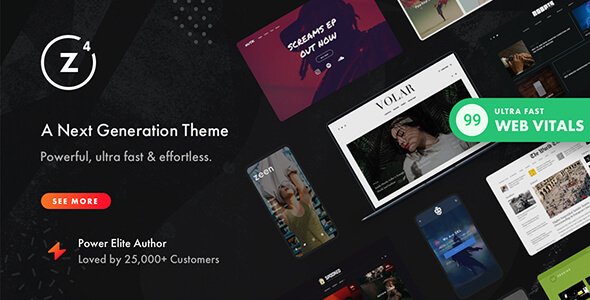
Stuck on your Zeen WordPress theme? Let's fix it.
No endless back-and-forth. Just send us the details and we'll get it done.
No obligation · Replies within 1 hour · Quote within 1 day
Setup · Customization · Bug fixes · WooCommerce integration
About Zeen WP Theme
Zeen is a premium WordPress news and magazine theme built by Codetipi. It targets publishers who need speed, editorial control, and a polished front end without hiring a designer for every layout change.
The theme ships with a drag-and-drop layout builder, over 25 pre-built demo sites, and tight integration with popular ad networks. Typography controls, dark mode, article progress bars, and sticky sidebars are all built in. Zeen also supports AMP, schema markup, and lazy loading out of the box, which matters for news sites where page speed directly affects bounce rates.
It runs on the Codetipi framework and leans on its own block-style section builder rather than Gutenberg or Elementor. That speeds up front-end performance but does mean there is a learning curve if you are coming from a page builder workflow.
Get matched with a Zeen developer in under one day
Tell us about your Zeen project. Small fixes, Zeen theme customization, or a full website build, whatever you need, we've got it covered.
We'll connect you to the right Zeen developers, define the scope, and get everything 100% clear.
You'll get one estimate, hire your preferred developer, and start collaborating.
Zeen has its own framework, its own builder, and its own way of doing things. Generic WordPress advice does not always apply. A developer who has worked inside the Codetipi ecosystem knows where the theme stores its settings, how to override templates correctly, and how to avoid breaking updates.
Codeable connects you with vetted WordPress specialists, including developers with direct Zeen experience. You post your project, get matched within 24 hours, and receive a free estimate before committing to anything.
Pros
- Built-in section builder produces fast-loading pages without a third-party page builder dependency
- Over 25 one-click demo imports covering news, lifestyle, tech, and food niches
- Native AMP support and schema markup included without extra plugins
- Dedicated ad zone manager handles header, in-content, sidebar, and sticky ad placements
- Dark mode, article reading progress bar, and sticky sidebar all configurable from the Customizer
Cons
- The Codetipi section builder has a steep learning curve compared to Gutenberg or Elementor
- Heavy demo imports can slow down sites if images and demo content are not cleaned up after setup
- Limited compatibility with some third-party page builders since Zeen has its own layout system
- Customer support response times can be slow during peak periods on the Envato forums
- Customizing individual post templates requires PHP knowledge and child theme work
Who is Zeen for?
News and Current Affairs
Zeen suits high-volume news publishers well. The section builder handles breaking news tickers, featured article sliders, and category feeds on the homepage. AMP support and schema markup help news content appear in Google’s Top Stories. A Zeen developer can configure custom newsroom layouts and automate ad placements across article templates.
Food and Recipe Blogs
Food blogs need strong visual layouts and fast image loading. Zeen’s grid options handle both. Recipe sites can use the demo designs as a starting point and customise card styles, category pages, and featured post sections. A Zeen specialist can add recipe schema markup and integrate a recipe plugin cleanly into existing templates.
Tech and Gadget Reviews
Review-heavy tech sites benefit from Zeen’s flexible post layouts and built-in rating display options. The theme supports comparison tables and product-style article formats. Pairing it with an affiliate link manager and having a Zeen developer set up custom review templates gives tech publishers a clean, monetisable setup.
Lifestyle and Culture Magazines
Lifestyle and culture publishers need editorial variety, not just a single post layout. Zeen delivers that through its section builder, which supports mixed grid types, full-width features, and editorial-style category landing pages. A Zeen expert can push the design further with custom section types and typography tuning.
Sports and Fan Sites
Sports sites need real-time feel, strong category structure, and heavy ad inventory. Zeen handles all three. The ticker feature works for live score updates, and the ad zones accommodate pre-roll and sticky units. A Zeen developer can build team or league-specific category templates to organise large content archives cleanly.

Customizing Zeen
Zeen gives you a lot of control inside the WordPress Customizer, but unlocking everything takes time. The section builder lets you mix and match post grids, sliders, video blocks, and ad zones across any page. Each element has its own spacing, color, and typography settings.
Where things get complicated is custom post layouts, breaking out of the demo design, or connecting Zeen to a headless or custom API setup. That is where a Zeen expert saves real time. A developer who knows the Codetipi framework can modify child theme templates, add custom hooks, and build layouts that the visual editor cannot produce on its own.
If you need something specific, like a custom homepage grid, a unique category template, or a members-only content wall, hiring a Zeen specialist is faster and safer than trial and error in a live environment.
Recommended plugins for Zeen
Zeen works well with WooCommerce for shop sections, Mailchimp and ConvertKit for list building, and most major ad management plugins. It also supports Google AdSense, AdThrive, and Mediavine placements through its built-in ad zone manager.
For SEO, Zeen outputs structured data automatically, but pairing it with a dedicated plugin and a proper WordPress SEO setup gets you much further. On the performance side, Zeen is faster than most magazine themes, though image-heavy news sites benefit significantly from a WordPress performance audit to fine-tune caching, image delivery, and script loading.
Not sure which plugins to use? This WordPress plugins directory covers the most popular options with reviews and setup guides.
Zeen common issues
Zeen homepage layout not saving after update
This usually happens when a theme update resets section builder data stored in the Customizer. Before updating Zeen, export your Customizer settings using a plugin like Customizer Export/Import. If the layout is already gone, check the WordPress revisions for the Customizer and restore the last working state. If the data is lost entirely, a WordPress bug fix from a Zeen developer can often recover section builder data from the database.
Zeen section builder sections disappearing on mobile
Zeen sections can collapse or hide on mobile due to conflicting CSS from a caching plugin that stored a pre-update stylesheet. Clear all caches, including server-side and CDN caches, then check the section builder’s mobile visibility toggles for each affected section. Some sections default to hidden on mobile and need to be manually re-enabled inside the builder settings panel.
Zeen theme slow loading on mobile devices
Zeen is faster than most magazine themes, but image-heavy homepages with multiple sliders and grids can still cause poor mobile scores. Start by enabling lazy loading in Zeen’s performance settings if it is not already on. Then audit third-party scripts, especially ad tags and social share widgets. Deferring non-critical scripts and serving images through a CDN makes the biggest difference on mobile connections.
Zeen ticker not showing latest posts
The Zeen ticker pulls from a category or tag you assign in the theme settings. If it stops showing posts, check that the assigned category still exists and contains recently published content. A plugin conflict with a caching or transient manager can also block the ticker query. Temporarily disable caching and check if the ticker refreshes. If the issue persists, contact a WordPress bug fixing specialist to inspect the ticker query directly.
Zeen dark mode not applying to all pages
Zeen’s dark mode applies globally, but some page builders, custom page templates, or third-party widgets inject their own background and text colours that override the dark mode stylesheet. Open browser dev tools and inspect the element that is not changing. Find which CSS rule is overriding the dark mode class and add a targeted override in your child theme’s style.css file to fix it without touching core theme files.
Zeen AMP pages showing unstyled content
AMP pages in Zeen pulling in unstyled content usually means the AMP plugin is not recognising Zeen’s custom post templates. Make sure you are running an AMP-compatible version of Zeen and that the AMP plugin is updated. Check the AMP validation tool in the WordPress admin for specific errors. Custom fonts, custom CSS, or JavaScript injected outside Zeen’s sanctioned hooks are the most common causes of AMP validation failures.
Zeen ad zones not displaying ads correctly
Zeen’s ad zones require ads to be set up inside the theme’s dedicated ad manager, not just inserted via a plugin. If ads are not showing, confirm the ad code is saved correctly in the Zeen ad zone settings and that the zone is assigned to the right placement. Ad blockers in your browser can also prevent you from seeing ads during testing. Use a private browsing window with no extensions to verify whether the ad code itself is rendering.
Zeen featured image not showing in article header
Missing featured images in Zeen article headers are often caused by an incorrect image size being registered or the featured image not meeting the minimum dimensions Zeen expects for that template. Check the post’s featured image dimensions against Zeen’s recommended sizes in the documentation. Running the Regenerate Thumbnails plugin after resizing will force WordPress to create the correct image crops for all existing posts. If specific templates are affected, a WordPress bug fix can resolve template-level image handling issues.
Zeen category page layout reset after theme update
Zeen theme updates can reset category page layout assignments stored in theme options. This happens when the update modifies the database option keys used by the section builder. After any major Zeen update, audit category pages and reassign layouts where needed. Going forward, document your layout assignments or export theme settings before applying updates so recovery is faster if a reset happens again.
Zeen custom fonts not loading after switching demo
Custom fonts in Zeen are linked to specific demo settings. When you switch demos, the font settings reset to the new demo defaults. Go to Customizer, open the Typography section, and manually reselect your preferred fonts. If you imported fonts via a custom CSS snippet or a Google Fonts plugin, check that the enqueue order is not being overridden by Zeen’s own font loading, which can prevent your custom fonts from applying correctly.
Zeen FAQ
Zeen outputs structured data and schema markup natively, which gives it a solid SEO foundation. It also supports AMP and produces clean HTML output. For serious publishers, pairing Zeen with a dedicated SEO plugin and a proper technical SEO setup is still necessary. The theme alone does not replace a full SEO strategy.
Zeen has its own section builder and is not designed to work with Elementor. You can use Elementor on individual pages by assigning an Elementor-built template, but mixing both builders on the same site causes conflicts. Most Zeen users stick with the built-in builder since Elementor negates Zeen’s performance advantages.
Enable Zeen’s built-in lazy loading, reduce the number of active sliders on the homepage, and serve images through a CDN. Audit third-party scripts from ad networks and social plugins, as these are usually the biggest drag. A server-level caching setup and a performance-optimised hosting stack make the most difference for high-traffic magazine sites.
Zeen supports WooCommerce and can display shop sections alongside editorial content. It is not a dedicated shop theme, but it works for magazine sites that want a product section or merch store. The layout options for shop pages are more limited than a purpose-built WooCommerce theme, so custom template work may be needed.
Yes, Zeen includes native AMP support. You still need the official AMP plugin installed and configured. Some custom sections and third-party scripts will not pass AMP validation without adjustments. Testing each page type through Google’s AMP validator after setup is recommended before going live.
Go to Appearance, then Zeen Demo Importer inside your WordPress admin. Select a demo, choose whether to import content and media, and run the importer. The process can take several minutes. Make sure your PHP memory limit and max execution time are set high enough to avoid a timeout mid-import.
Codetipi continues to release Zeen updates, though the pace slows between major versions. It is an actively maintained theme as of recent Envato records. Before updating, always check the changelog for breaking changes and back up your site. Some section builder changes in updates have caused layout resets for existing users.
Create a new folder in your wp-content/themes directory, add a style.css file with a Template header pointing to Zeen, and add a functions.php file that enqueues the parent theme stylesheet. Activate the child theme from the WordPress admin. All template overrides and custom CSS should go in the child theme to survive future Zeen updates.
Zeen works well with Yoast SEO or Rank Math, WP Rocket or LiteSpeed Cache for performance, Advanced Ads or AdSanity for ad management, and MailChimp for WordPress for list building. The theme has its own slider and grid tools, so separate slider plugins are not needed and can cause conflicts.
Zeen developer rates on Codeable typically range based on project scope. Small fixes or configuration tasks cost less than full custom builds. You can post your project for free and get an estimate before committing. There is no obligation to hire, and all developers on Codeable are vetted before they can take on work.
Hire a Zeen Developer
Need a Zeen expert to build a custom layout, fix a persistent bug, or get your magazine site performing properly? Describe your project and get matched with a vetted developer who knows the theme inside out. No generic WordPress generalists. Get a free estimate with no obligation to hire. Work is delivered through Codeable, so your project is covered end to end.
You'll need a free Codeable account so developers can ask questions and send their quotes.