Careerfy WordPress Theme
by eyecix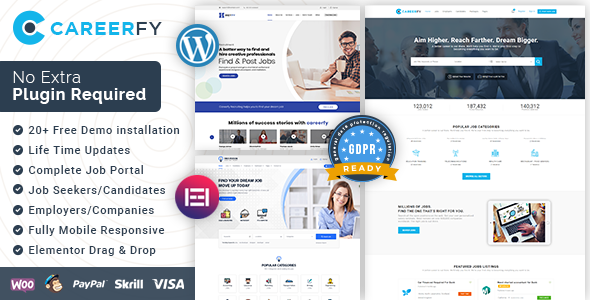
Stuck on your Careerfy WordPress theme? Let's fix it.
No endless back-and-forth. Just send us the details and we'll get it done.
No obligation · Replies within 1 hour · Quote within 1 day
Setup · Customization · Bug fixes · WooCommerce integration
About Careerfy WP Theme
Careerfy is a job board WordPress theme built by eyecix. It ships with a front-end job submission system, resume management, candidate profiles, and employer dashboards. The theme integrates tightly with WP Job Manager and its add-ons, giving you a functional job board out of the box without custom development.
It includes multiple homepage layouts, Ajax-powered job search, Google Maps integration, and a built-in membership system for paid listings. The design is clean and works across devices without additional plugins. Careerfy is one of the more feature-complete job board themes on ThemeForest, but the sheer number of options means setup takes time, and getting everything configured the way you want it often requires someone who knows the theme well.
Get matched with a Careerfy developer in under one day
Tell us about your Careerfy project. Small fixes, Careerfy theme customization, or a full website build, whatever you need, we've got it covered.
We'll connect you to the right Careerfy developers, define the scope, and get everything 100% clear.
You'll get one estimate, hire your preferred developer, and start collaborating.
Careerfy has enough moving parts that generic WordPress developers often get stuck on the WP Job Manager integration or the membership configuration. Codeable connects you with vetted developers who have worked specifically with Careerfy and job board projects. You post your project, get a fixed estimate within 24 hours, and only move forward if the price works for you. No cold pitches, no guessing on quality.
Pros
- Ships with a fully functional job board including employer dashboards, candidate profiles, and front-end job submission
- Tight WP Job Manager integration means most job board features work without additional custom code
- Built-in membership and paid listing system handles monetization without requiring a separate plugin stack
- Ajax-powered job search with location filtering and Google Maps works out of the box
- Multiple homepage layouts and pre-built demo imports reduce initial design time significantly
Cons
- Theme options panel is large and poorly documented, making initial configuration slow for new users
- Heavy reliance on WP Job Manager means add-on costs stack up quickly if you need full feature coverage
- Page speed scores are average out of the box due to unoptimized assets and render-blocking scripts
- Some layout options conflict with popular page builders, limiting design flexibility on custom pages
- Updates occasionally break customizations, especially on child theme modifications tied to specific template files
Who is Careerfy for?
General Job Board
Careerfy fits a general job board well. Employers post listings, candidates apply, and the admin controls visibility and featured placement. The built-in category and location search handles broad job databases without custom development. A Careerfy developer can add featured employer sections, sponsored listing tiers, and application tracking to complete the setup.
Remote Work Platform
Remote job boards work naturally with Careerfy since location filtering can be set to optional. You can configure listing categories around role type rather than geography. A Careerfy specialist can strip out map-based search, add remote-friendly tags, and build landing pages by category to target specific remote job seekers through organic search.
Industry-Specific Recruitment Site
Tech, healthcare, legal, and trade-specific job boards all work well with Careerfy. The theme supports custom job types and niche taxonomies. A Careerfy expert can configure category-specific employer profiles, add custom fields relevant to the industry, and set up separate listing packages for different employer sizes within a single niche.
Freelance Marketplace
With WooCommerce and WP Job Manager’s freelance add-ons, Careerfy can be configured as a project-posting platform where clients post work and freelancers apply. A Careerfy developer can modify the application flow to support project budgets, skill tags, and portfolio submission fields without building from scratch.
Campus Recruitment Portal
Universities and training programs use Careerfy for internship and graduate job boards restricted to registered students. A Careerfy specialist can set up role-based access so only verified candidates see listings, configure employer vetting workflows, and build reporting dashboards for career services teams managing placement data.

Customizing Careerfy
Careerfy ships with a large set of theme options, but mapping those options to a specific business model takes real configuration work. Employer registration flows, candidate search filters, listing packages, and membership tiers all need to be set up correctly before the site works as intended.
A Careerfy expert can handle custom color schemes, layout adjustments, and typography changes through the theme panel, but deeper work like custom job fields, modified search filters, or integration with external HR tools requires code-level changes. Hiring a Careerfy specialist is the faster route if you need custom application workflows, restricted employer access, or a multi-niche job board structure that goes beyond the default setup.
Recommended plugins for Careerfy
Careerfy connects with WP Job Manager add-ons for applications, alerts, bookmarks, and recruiter profiles. Adding WooCommerce enables paid listing packages and employer subscriptions. For traffic-heavy job boards, pairing Careerfy with a proper caching layer and CDN makes a measurable difference. See our WordPress performance services for that setup.
Job boards also depend heavily on organic search. Schema markup for job postings, XML sitemaps per listing type, and crawl budget management all matter. Our WordPress SEO service covers those specifics for job board sites.
Not sure which plugins to use? This WordPress plugins directory covers the most popular options with reviews and setup guides.
Careerfy common issues
Careerfy job search not returning results
This is usually caused by a conflict between the Ajax search handler and a caching plugin serving stale results, or a missing index on the job listing post type. Start by clearing all caches and testing in an incognito window. If results still fail, check that WP Job Manager’s listing status is set to published and that the search widget is pulling from the correct post type. A plugin conflict can also block the Ajax request entirely.
Careerfy employer dashboard showing blank page
A blank employer dashboard typically points to a PHP error being suppressed, a permission issue with the employer role, or a missing page assignment in the WP Job Manager settings. Go to WP Job Manager settings and confirm the dashboard, post a job, and manage jobs pages are all correctly assigned. Enable WordPress debug mode to surface any underlying errors. If the issue appeared after a theme update, a template override in your child theme may be outdated.
Careerfy resume upload not working
Resume upload failures in Careerfy are usually caused by server-side file size limits, incorrect folder permissions on the uploads directory, or a conflict with a security plugin blocking file uploads. Check your PHP upload_max_filesize and post_max_size values in php.ini. Also verify that the WP Job Manager Resume Manager add-on is active and that allowed file types in its settings include the formats your candidates are uploading. Our WordPress bug fixing service can resolve this quickly.
Careerfy Google Maps not displaying on job listings
Google Maps display issues in Careerfy are almost always caused by a missing or restricted Google Maps API key. Since 2018, Google requires a valid API key with Maps JavaScript API and Geocoding API enabled. Enter your key in the Careerfy theme settings under the Maps section. If the key is valid but maps still fail, check browser console errors for domain restriction or billing account issues on the Google Cloud side.
Careerfy membership plans not showing on registration
If membership plans are not appearing at registration, check that the WP Job Manager Paid Listings add-on is active and that at least one package has been published in WooCommerce as a product with the job package type set. Also confirm that the registration page in Careerfy settings is assigned correctly and that the shortcode rendering the membership selection is present on that page. Deactivate conflicting membership plugins temporarily to rule out interference.
Careerfy email notifications not being sent
Missing email notifications from Careerfy are usually a server deliverability problem rather than a theme bug. WordPress uses PHP mail by default, which most hosts block or deprioritize. Install an SMTP plugin like WP Mail SMTP and configure it with your transactional email provider credentials. Also check WP Job Manager’s notification settings to confirm alerts for application received, listing approved, and listing expiry are all enabled.
Careerfy frontend job submission form fields missing
Missing fields on the frontend job submission form usually mean a WP Job Manager field configuration issue or a conflict with a form customization plugin. Go to WP Job Manager settings and review the Job Submission fields list. Fields can be individually disabled there. If custom fields added through code are missing, check that the relevant filter hooks are firing correctly and haven’t been overridden by a Careerfy template. Our WordPress bug fixing service handles this type of issue regularly.
Careerfy child theme not applying styles after update
After a Careerfy theme update, child theme styles can stop applying if the parent theme changed its style.css version number and your child theme’s enqueue function references a specific version. Update your child theme’s wp_enqueue_style call to use wp_get_theme()->get(‘Version’) for the parent dependency. Also check if any template files in your child theme are outdated relative to the updated parent templates, as stale overrides can cause layout and styling gaps.
Careerfy WooCommerce checkout not completing for listing packages
WooCommerce checkout failures for Careerfy listing packages are typically caused by payment gateway misconfiguration, SSL issues on the checkout page, or a conflict between WooCommerce and a caching or security plugin. Check WooCommerce status logs for the specific error at the point of failure. Confirm your payment gateway API keys are set to live mode if you’re in production. Also ensure the WooCommerce checkout page has HTTPS and is excluded from full-page caching.
Careerfy Ajax loading spinner stuck on job search
A stuck Ajax spinner on Careerfy job search usually indicates a JavaScript error blocking the Ajax response handler. Open browser developer tools and check the console for errors during a search. Common causes include a jQuery conflict from another plugin, a REST API endpoint being blocked by a security plugin, or a corrupted theme script file. Try disabling plugins one by one to isolate the conflict. If the issue persists after theme and plugin updates, our bug fixing team can trace the exact JS conflict.
Careerfy FAQ
Yes. Careerfy is built specifically around WP Job Manager. Most of its core features including job submission, employer dashboards, candidate profiles, and application management rely on WP Job Manager and its official add-ons. You need WP Job Manager active for the theme to function as a job board.
Yes. Careerfy integrates with WooCommerce through the WP Job Manager Paid Listings add-on. Employers purchase listing packages as WooCommerce products. You can set up multiple tiers with different durations, featured placement, and application limits. Standard WooCommerce payment gateways apply.
Basic setup is manageable without code, but getting everything configured correctly takes time. Employer registration, membership plans, email notifications, and search filters all require careful settings configuration. For anything beyond the default demo setup, a Careerfy specialist will save you significant time and prevent configuration mistakes.
Employer registration is handled through WP Job Manager’s registration settings combined with Careerfy’s role configuration. Go to WP Job Manager settings, enable employer registration, and assign the correct user role. Careerfy then controls what employers see after login through its dashboard template. You may need to configure redirect pages in the theme settings as well.
Careerfy is translation-ready and ships with a .pot file. For multilingual job boards, it works with WPML and Polylang. Full translation requires translating both the theme strings and WP Job Manager strings separately. Some interface elements tied to add-ons may need additional translation configuration depending on which plugins are active.
Yes, Careerfy is mobile responsive across its layouts. The job search, listing pages, employer dashboards, and candidate profiles all adapt to smaller screens. That said, complex filtering interfaces and multi-column layouts can feel cramped on mobile, and some customizations may need CSS adjustments to maintain usability on phones.
Yes. With the WP Job Manager Resume Manager add-on active, you can configure Careerfy to focus on candidate profiles and resume listings. Employers search resumes and contact candidates directly. You can restrict job posting access entirely and build the site purely around talent discovery rather than job listings.
Careerfy’s default asset loading is not optimized. Start by enabling a caching plugin, deferring non-critical scripts, and serving images through a CDN. Google Maps and Ajax search add load time. Reducing unused WP Job Manager add-ons also helps. Our WordPress performance service covers full optimization for job board setups.
Careerfy is listed as WPML-compatible. You can translate theme strings, job listing fields, and page content through WPML’s interface. WP Job Manager itself also supports WPML. For a fully multilingual job board, plan for translation work across the theme, active add-ons, and any custom fields you have added.
Yes. A Careerfy developer can migrate job listings, employer accounts, candidate profiles, and application data from another platform or theme. The complexity depends on your current setup. Data from non-WordPress job board software usually requires custom import scripts. Post your project for a scoped estimate before committing to anything.
Hire a Careerfy Developer for Your Job Board
Whether you need a Careerfy expert to build your job board from scratch, fix a broken feature, or add custom functionality, we can match you with the right developer. Work is scoped before any money changes hands. Get a free estimate and describe your project. You’ll have a developer matched within 24 hours with no obligation to proceed.
You'll need a free Codeable account so developers can ask questions and send their quotes.