Razzi WordPress Theme
by drfuri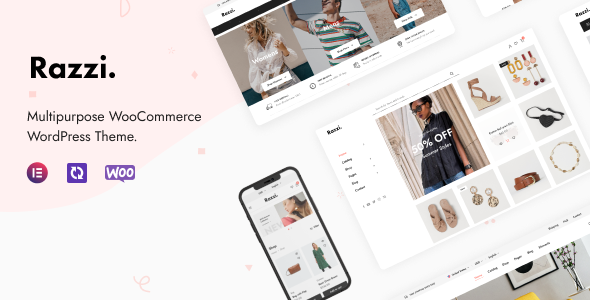
Stuck on your Razzi WordPress theme? Let's fix it.
No endless back-and-forth. Just send us the details and we'll get it done.
No obligation · Replies within 1 hour · Quote within 1 day
Setup · Customization · Bug fixes · WooCommerce integration
About Razzi WP Theme
Razzi is a WooCommerce theme built by drfuri, designed for fashion, electronics, and multi-category stores. It ships with a large library of pre-built demos, AOS scroll animations, and a header builder that gives store owners genuine layout control without touching code.
The theme is built on the Elementor page builder and integrates tightly with WooCommerce, supporting features like quick view, product filters, wishlist, and compare out of the box. Performance is a consideration in the build, with lazy loading and optimized asset loading included. Razzi suits stores that need a polished, visually rich frontend without the overhead of a custom-coded solution. It is actively maintained on ThemeForest and has accumulated strong ratings across a large install base.
Get matched with a Razzi developer in under one day
Tell us about your Razzi project. Small fixes, Razzi theme customization, or a full website build, whatever you need, we've got it covered.
We'll connect you to the right Razzi developers, define the scope, and get everything 100% clear.
You'll get one estimate, hire your preferred developer, and start collaborating.
Razzi has enough moving parts that a straightforward customisation can become complicated fast. Finding a developer who knows the theme specifically, not just WordPress in general, makes a real difference to the outcome. Codeable connects you with vetted WordPress developers who have hands-on experience with themes like Razzi. You post your project, receive a clear estimate, and only proceed if you are happy with it. No bidding wars, no junior developers learning on your project.
Pros
- Large library of niche-specific demo stores covering fashion, electronics, furniture, and more
- Built-in WooCommerce features like quick view, product compare, and wishlist without needing extra plugins
- Custom header and footer builder with sticky, transparent, and mobile-specific layout options
- Supports both Elementor and WPBakery, giving flexibility depending on what the developer prefers
- Active updates and support from drfuri with a strong ThemeForest rating and large user base
Cons
- Relies on the Razzi Addons plugin for core features, creating a dependency that complicates theme switching
- Demo import can be slow and occasionally incomplete, requiring manual cleanup after installation
- Customizer options are dense and poorly categorised, making it hard to find specific settings quickly
- Some Elementor widgets added by Razzi Addons conflict with third-party Elementor extensions
- Page builder dependency means the theme performs best with Elementor installed, adding to overall page weight
Who is Razzi for?
Fashion and Apparel Stores
Razzi has several fashion-specific demos with lookbook layouts, size guide support, and product variation swatches. A Razzi specialist can configure the colour and size swatch display, set up outfits as grouped products, and style the collection pages to match seasonal campaigns without custom development from scratch.
Electronics and Tech Retailers
The electronics demos include comparison tables, specification tabs, and star rating displays suited to tech buyers. A Razzi developer can integrate product filter plugins, set up category-specific layouts, and configure the mega menu to handle large electronics catalogues with subcategories and featured product columns.
Home Furniture and Decor
Razzi’s furniture demos ship with fullscreen hero sections, room-scene imagery layouts, and a clean product detail structure that suits high-ticket items. A Razzi expert can adapt these layouts to your room categories, set up a custom quote request flow, and configure the wishlist for customers comparing options before buying.
Multi-Vendor Marketplaces
With Dokan or WCFM integration, Razzi can power a multi-vendor marketplace. A Razzi developer will need to configure vendor store pages to inherit the theme’s header and footer correctly and ensure the product card styles remain consistent across vendor listings, which requires targeted CSS and template overrides.
Beauty and Cosmetics Shops
The beauty demos in Razzi use soft colour palettes, ingredient highlight sections, and before-and-after image blocks. A Razzi specialist can set up subscription product options via WooCommerce Subscriptions, configure bundle deals for skincare kits, and apply custom typography that fits a premium cosmetics brand identity.

Customizing Razzi
Razzi gives you a lot of surface area to customize, but that breadth can slow down the process if you are unfamiliar with its structure. The theme uses a combination of Elementor widgets, a custom Razzi Addons plugin, and the WordPress Customizer, so changes can live in three different places depending on what you are editing.
A Razzi expert can map out exactly where each setting lives, import and modify demo content cleanly, and build custom section layouts that match your brand without breaking the existing page structure. drfuri has documented the theme reasonably well, but implementing custom header layouts, mega menus, or product card variations typically requires someone who has worked inside Razzi before. Hiring a Razzi specialist saves hours of trial and error.
Recommended plugins for Razzi
Razzi is built to work with the broader WooCommerce and Elementor ecosystems. Common extensions include YITH WooCommerce Wishlist, WooCommerce Product Filter, and Rank Math or Yoast for SEO. If search ranking matters to your store, pairing Razzi with a proper WordPress SEO setup is worth prioritising early. On the speed side, Razzi supports lazy loading natively, but combining it with a caching layer and image optimisation makes a measurable difference. See our WordPress performance service for what that looks like in practice. Always test plugin compatibility before adding extensions, as some styling conflicts can appear with the Razzi Addons plugin active.
Not sure which plugins to use? This WordPress plugins directory covers the most popular options with reviews and setup guides.
Razzi common issues
Razzi demo import not working or stuck at 0%
Demo import failures in Razzi are usually caused by server timeout limits or PHP memory restrictions. Increase max_execution_time to 300 and memory_limit to 256M in your php.ini or wp-config.php. If the import still stalls, try importing content, widgets, and Customizer settings separately using the manual import files drfuri provides in the theme documentation. A caching plugin active during import can also block the process.
Razzi header builder not saving changes
When Razzi’s header builder does not save, the most common cause is a JavaScript conflict with another plugin. Deactivate all non-essential plugins and test saving again. If it works, reactivate plugins one by one to find the conflict. Also check that your user role has the correct capabilities, as some security plugins restrict Customizer saves. Clearing browser cache and switching to a default browser often resolves intermittent saving failures.
Razzi product quick view not opening
Razzi quick view requires the Razzi Addons plugin to be active and functioning. If the modal does not open, check the browser console for JavaScript errors. A common cause is a jQuery conflict with another plugin loading its own version of jQuery. Also confirm that quick view is enabled in the Customizer under WooCommerce settings. If issues persist, our WordPress bug fixing service can diagnose and resolve the conflict directly.
Razzi Addons plugin causing white screen
A white screen triggered by the Razzi Addons plugin usually means a PHP compatibility issue or a conflict with a recently updated plugin. Access your site via FTP or file manager and rename the Razzi Addons plugin folder to deactivate it. Then check your PHP error log for the specific fatal error. Update PHP to 8.0 or higher and re-enable the plugin. If the error persists, get professional bug fixing support to trace the exact conflict.
Razzi mobile menu not closing after link click
If the Razzi mobile menu stays open after clicking a link, it is typically a JavaScript event listener issue. This often appears after a theme or Elementor update changes the menu markup. Check that the Razzi Addons plugin is updated to match the theme version. Adding a small custom JavaScript snippet to force the menu close on anchor link click can resolve it immediately. A Razzi developer can apply this without affecting other menu behaviour.
Razzi WooCommerce cart not updating without page reload
Razzi uses AJAX for cart updates, and failures usually trace back to a caching plugin serving stale cart fragments. Exclude the WooCommerce cart fragments endpoint from your cache and ensure the wc-ajax URL is not being blocked. In WP Rocket or similar plugins, enable the WooCommerce compatibility mode. If you are using a CDN, ensure dynamic requests bypass the cache layer entirely.
Razzi Elementor widgets missing after update
Missing Razzi Elementor widgets after an update typically means the Razzi Addons plugin version is out of sync with the theme version. Update both the theme and the plugin at the same time. If widgets still do not appear, navigate to Elementor’s Tools panel and run the database regeneration. Clearing Elementor’s font and CSS cache also resolves display issues that can make widgets appear absent when they are actually loaded.
Razzi homepage not matching demo after import
When the Razzi homepage does not match the demo, the most common reasons are missing demo content, unassigned page template, or unimported Customizer settings. Check that the page is using the full-width or Elementor Canvas template. Re-import only the Customizer settings file if the layout looks unstyled. Also confirm that all required plugins listed in the demo requirements are active, as missing plugins leave widget placeholders blank.
Razzi product filter not working with AJAX
AJAX product filtering in Razzi depends on correct integration between the filter plugin and the theme’s archive template. If filters reload the page instead of updating results via AJAX, check that the filter plugin you are using, such as JetSmartFilters or FiboSearch, is configured for AJAX mode. Razzi may require a template override to hook the filter output correctly. Our bug fixing service handles filter integration issues across common plugin combinations.
Razzi footer columns overlapping on mobile
Footer column overlap on mobile in Razzi is usually a grid breakpoint issue in the theme’s CSS. Open the Customizer, navigate to Footer settings, and check the column layout set for tablet and mobile. If the setting is correct but columns still overlap, inspect the element in DevTools to find a conflicting width or float rule. Adding a targeted CSS override in the Additional CSS panel to set column width to 100% on small screens resolves it cleanly.
Razzi FAQ
Razzi is a well-built WooCommerce theme for stores that need a feature-rich frontend. It handles product displays, filtering, and checkout styling better than most mid-range themes. The main trade-off is that it relies heavily on the Razzi Addons plugin, which creates a dependency. For stores with straightforward catalogue structures and high design requirements, it is a strong choice.
Yes, Razzi is built primarily around Elementor. The theme ships with custom Elementor widgets via the Razzi Addons plugin, covering product grids, sliders, category blocks, and promotional banners. Most demo pages are built entirely in Elementor. You will need Elementor free at minimum, and some advanced widgets require Elementor Pro.
Razzi requires the Razzi Addons plugin for core functionality and Elementor for page editing. It also recommends WooCommerce, Contact Form 7, and MailChimp for WooCommerce. Some demos use additional plugins that are listed in the demo documentation. Always check the required plugins list before importing a specific demo to avoid broken layouts.
Razzi’s compatibility with WooCommerce High-Performance Order Storage depends on the theme version. Recent updates from drfuri have addressed most HPOS-related issues, but you should test on a staging environment before enabling HPOS on a live Razzi store. Check the changelog on ThemeForest for HPOS mentions in recent release notes.
Go to Appearance, then Import Demo Data after activating the theme and required plugins. Select the demo you want, choose whether to import all content or specific files, and run the import. The process can take several minutes. Increase your server’s PHP memory and execution time limits beforehand to avoid timeouts during large demo imports.
Technically yes, but you will lose most of the theme’s distinguishing features. Quick view, product swatches, the header builder, and all custom Elementor widgets depend on the Razzi Addons plugin. Without it, Razzi functions as a basic WooCommerce theme. If you are considering removing the plugin dependency, migrating to a different theme architecture would make more sense.
Razzi is not officially tested for WordPress multisite. It can work on a multisite network in some configurations, but drfuri does not provide multisite support. If you need Razzi running across multiple subsites or subdomains, a developer experienced with both Razzi and multisite setups should handle the configuration to avoid licensing and plugin activation issues.
Download the latest theme zip from your ThemeForest downloads page. You can update via Appearance, then Themes, by uploading the new zip and replacing the existing version. Alternatively, use the Envato Market plugin to handle updates automatically. Always back up your site before updating, and update the Razzi Addons plugin at the same time to keep versions in sync.
Razzi’s default setup is reasonably optimised but not exceptional out of the box. Elementor adds page weight, and multiple demo assets can slow initial load times. With proper image compression, a caching plugin, and a CDN, Razzi stores can achieve good Core Web Vitals scores. A dedicated WordPress performance optimisation pass makes a measurable difference on Razzi stores.
Yes. A Razzi developer can handle full store setup from demo import to launch, or tackle specific tasks like custom layouts, plugin integration, or speed optimisation. You can post your project on Codeable and get matched with a vetted Razzi specialist within 24 hours. The estimate is free and there is no obligation to proceed.
Hire a Razzi Developer for Your WooCommerce Store
Whether you need a Razzi expert to build a store from a demo, fix a layout issue, or add custom functionality, you can get matched with a vetted developer through Codeable. Post your project, get a free estimate, and decide from there. No obligation, no risk. Get a Free Estimate and have a developer looking at your project within 24 hours.
You'll need a free Codeable account so developers can ask questions and send their quotes.