DK WordPress Theme
by ThemeGoods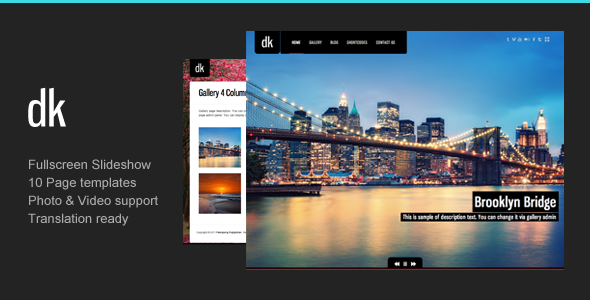
Stuck on your DK WordPress theme? Let's fix it.
No endless back-and-forth. Just send us the details and we'll get it done.
No obligation · Replies within 1 hour · Quote within 1 day
Setup · Customization · Bug fixes · WooCommerce integration
About DK WP Theme
DK is a WordPress theme by ThemeGoods, built for creative professionals and portfolio-focused websites. It ships with a clean grid layout, smooth transitions, and a minimal design that keeps the focus on visual content. The theme is compatible with WPBakery Page Builder and supports multiple portfolio styles including masonry, grid, and full-width layouts.
DK includes a custom post type for portfolio projects, built-in filterable galleries, and a one-page scrolling option. It is translation-ready and supports WPML for multilingual sites. The theme follows standard WordPress coding practices, making it relatively straightforward to extend or modify. If you need a theme that loads fast, stays out of the way, and presents creative work cleanly, DK is a solid starting point.
Get matched with a DK developer in under one day
Tell us about your DK project. Small fixes, DK theme customization, or a full website build, whatever you need, we've got it covered.
We'll connect you to the right DK developers, define the scope, and get everything 100% clear.
You'll get one estimate, hire your preferred developer, and start collaborating.
Most DK customization jobs are straightforward for an experienced developer but time-consuming to figure out alone. FoxyConcept works through Codeable, a vetted network of WordPress specialists. Every developer on Codeable is screened and reviewed, so you are not rolling the dice on quality. Post your project, get a free estimate, and only move forward if the scope and price make sense. No obligation, no risk.
Pros
- Clean minimal design that works well for visual and portfolio-heavy sites
- Multiple portfolio layout options including masonry, grid, and full-width out of the box
- WPBakery Page Builder included, giving non-technical users drag-and-drop control
- WPML compatible for building multilingual portfolio or studio sites
- One-page scrolling mode built in, no extra plugin required
Cons
- Relies on WPBakery shortcodes, which can cause content lock-in if you switch themes
- Limited Gutenberg support means the block editor experience is inconsistent
- Update frequency from ThemeGoods has slowed, so compatibility with newer WordPress versions needs monitoring
- Built-in customization options do not cover every layout scenario without custom CSS
- Documentation is basic and does not cover advanced modification use cases
Who is DK for?
Photographer Portfolio
DK suits photographers who need a clean grid to display work without distraction. The masonry and full-width portfolio layouts handle large image sets well. A DK developer can configure lightboxes, category filters, and custom project pages to match how a photographer organizes and presents their work to clients.
Creative Agency Website
Creative agencies need a site that communicates quality quickly. DK’s minimal layout keeps focus on case studies and project work. A DK expert can extend the theme with custom service sections, team pages, and client testimonial blocks, building out a complete agency site on top of the portfolio foundation.
Freelance Designer Site
Freelance designers need a site that is fast to set up and easy to update. DK handles both. The Customizer options cover most branding needs, and the portfolio post type makes adding new projects simple. A DK developer can add a contact form, refine the typography, and set up a child theme so updates do not overwrite your changes.
Art Director Showcase
Art directors working across print, digital, and motion benefit from DK’s flexible portfolio layouts. Projects can be displayed with mixed media including video embeds and image sliders. A DK specialist can build out individual project templates that match the type and scale of each piece of work being presented.
Print and Digital Studio
Studios selling prints or digital files can combine DK’s portfolio display with WooCommerce. A DK developer can wire up a shop section, configure product pages, and make sure the buying experience fits the visual tone of the rest of the site without the typical WooCommerce default styling clashing with the theme.

Customizing DK
DK gives you control over fonts, colors, header styles, and layout options through the WordPress Customizer. You can switch between boxed and full-width layouts, adjust spacing, and choose from multiple header configurations without touching code. Portfolio templates can be customized per project using built-in meta options.
For deeper changes, a DK expert can handle custom CSS overrides, child theme development, layout modifications, and integration with third-party plugins. If you need a unique header, a custom post grid, or a modified WPBakery element, a DK developer can build it cleanly without breaking theme update compatibility. Working through a child theme is always recommended before making structural changes.
Recommended plugins for DK
DK works well with several common WordPress plugins. WooCommerce can be added for selling prints or digital downloads. Contact Form 7 or WPForms handles inquiries. WPML covers multilingual needs.
For site speed, a DK developer can configure caching, image optimization, and lazy loading to keep scores high. See our WordPress performance service for details. If you are trying to rank your portfolio or studio site, structured data, meta tags, and clean URLs all need attention. Our WordPress SEO service covers that end to end. Both areas benefit from specialist work rather than plugin defaults alone.
Not sure which plugins to use? This WordPress plugins directory covers the most popular options with reviews and setup guides.
DK common issues
DK theme portfolio not showing on homepage
This is usually a template assignment issue. Check that your homepage is set to use the correct DK portfolio template under Page Attributes. Also verify that the portfolio post type has published items and that the portfolio shortcode or WPBakery element on the page is configured with the correct category. Clearing your cache after changes is essential before testing.
DK WordPress theme WPBakery elements not loading
WPBakery elements failing to load in DK usually points to a JavaScript conflict or an outdated version of the page builder. First, update WPBakery to the latest version bundled with the theme. Then disable other plugins one by one to isolate a conflict. If the issue persists, a WordPress bug fixing specialist can trace the exact script collision and resolve it cleanly.
DK theme header overlapping content on scroll
Header overlap in DK is typically caused by the sticky header height not being accounted for in the page top padding. Go to Customizer and adjust the header offset or top padding setting. If DK’s built-in options do not fully fix it, add a CSS rule targeting the main content wrapper with a padding-top value that matches the sticky header height. Test across screen sizes.
DK portfolio filter not working after WordPress update
DK’s portfolio filter relies on Isotope.js. After a WordPress update, a plugin or core script may conflict with or dequeue this library. Open your browser console and look for JavaScript errors on the portfolio page. If Isotope is not loading, check whether a performance or optimization plugin is incorrectly deferring or removing it. Excluding that script from deferral usually fixes the filter.
DK theme images not displaying in grid layout
Grid images disappearing in DK is often a thumbnail size issue. Go to Settings, Media, and confirm thumbnail dimensions match what DK expects. If you recently changed these settings, use a plugin like Regenerate Thumbnails to rebuild all image sizes. Also check that the portfolio featured image is set on each project post, as DK pulls from featured image rather than the content gallery.
DK theme mobile menu not opening
A broken mobile menu in DK is almost always a JavaScript error. Open the browser console on a mobile viewport and look for errors on page load. Common causes include a plugin deferring jQuery or a theme update introducing a script version mismatch. If you have a caching plugin, clear all cached files and test again. If the issue is deeper, a WordPress bug fixing service can isolate and fix it quickly.
DK WordPress theme slow to load on mobile
DK can be slow on mobile if large uncompressed images are loading and no lazy loading is in place. Start by running the site through PageSpeed Insights to identify the biggest offenders. Install a caching plugin, enable image compression, and add lazy loading for images below the fold. DK’s portfolio grids often load all thumbnails at once, which a developer can optimize with deferred loading logic.
DK theme custom CSS not applying after update
Custom CSS being lost after a DK update means it was added directly to the theme files rather than a child theme or the Customizer’s Additional CSS field. CSS in theme files is overwritten on every update. Move your rules to Customizer under Additional CSS, or set up a child theme to hold any custom code. This is a one-time fix that prevents the problem from recurring with future updates.
DK theme footer widgets not showing
Footer widgets not showing in DK usually means the footer widget area is not enabled or the correct footer layout is not selected in the theme options. Go to Appearance, Widgets, and confirm widgets are assigned to the DK footer regions. Also check the footer column setting in DK’s Customizer panel, as setting it to zero or none hides the widget area entirely regardless of what is assigned.
DK WordPress theme white screen after plugin install
A white screen after installing a plugin alongside DK points to a PHP fatal error or memory limit issue. Enable WordPress debug mode by adding WP_DEBUG true to wp-config.php to see the actual error. If a plugin is conflicting with DK’s included libraries, the error message will identify the file. A WordPress bug fix developer can resolve conflicts like this without data loss.
DK FAQ
DK was built for older WordPress versions and ThemeGoods’ update cadence has slowed. The theme generally works with current WordPress but edge cases exist, particularly around the block editor and newer PHP versions. Test on a staging site before updating WordPress on a live DK site. A DK developer can handle any compatibility patches needed.
DK is designed around WPBakery, not Elementor. You can install Elementor alongside it but you will lose DK’s built-in WPBakery elements. Some sections may conflict or display incorrectly. If you want to use Elementor, a DK developer can audit compatibility and rebuild relevant sections to work cleanly with the Elementor editor.
Create a folder in wp-content/themes named dk-child. Add a style.css file with the required WordPress child theme headers and a Template field pointing to dk. Add a functions.php that enqueues the parent theme stylesheet. Activate the child theme from the Appearance menu. All custom CSS and PHP changes should go in the child theme, not the parent.
DK does not include dedicated WooCommerce templates, so product pages and cart will use WooCommerce default styles. This often looks inconsistent with the rest of the site. A DK developer can add WooCommerce template overrides inside a child theme to match the shop pages to DK’s visual style.
Yes. DK includes a one-page scrolling mode where navigation links scroll to sections on a single page. This is configured through the theme options and requires setting up sections as individual pages or using anchor links. A DK specialist can set this up correctly, including smooth scrolling behavior and active menu highlighting.
DK’s WPBakery integration includes a row background option that supports video URLs. In the WPBakery row settings, set the background type to video and paste a self-hosted or YouTube URL. For autoplay and mobile fallback behavior, additional CSS and JavaScript may be needed. A DK developer can handle the finer control points.
DK itself does not set cookies or collect data, but plugins you use alongside it may. GDPR compliance depends on your full plugin stack, contact forms, analytics tools, and any embedded third-party scripts. A developer can audit what data is being collected and configure a cookie consent solution that covers the whole site correctly.
Rates for a DK WordPress developer through Codeable typically range depending on the scope. Small fixes can be a few hundred dollars. Larger builds or custom feature development cost more. The best way to get an accurate figure is to get a free estimate by describing your specific project.
Yes. Migrating content to a new DK theme setup involves moving posts, pages, media, and settings to a new WordPress install or switching themes on an existing one. Our WordPress migration service handles this cleanly, including rebuilding portfolio content and re-creating WPBakery page layouts in the new environment.
DK works with caching plugins like WP Rocket, W3 Total Cache, and LiteSpeed Cache. Some of DK’s JavaScript, particularly the portfolio filter and WPBakery scripts, should be excluded from deferral and concatenation. A DK developer can configure caching rules correctly so speed improvements do not break interactive elements.
Hire a DK WordPress Developer
Whether you need a DK expert for a quick fix, a full site build, or ongoing customization work, FoxyConcept can help. Projects are handled through Codeable, which means you get a vetted WordPress developer matched to your specific requirements. Get a Free Estimate and describe what you need. There is no obligation to hire and no upfront cost to find out what the work involves.
You'll need a free Codeable account so developers can ask questions and send their quotes.