The Keynote WordPress Theme
by GoodLayers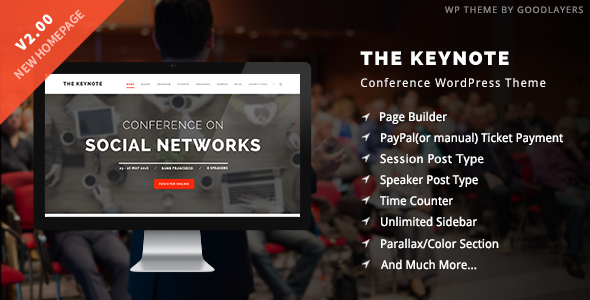
Stuck on your The Keynote WordPress theme? Let's fix it.
No endless back-and-forth. Just send us the details and we'll get it done.
No obligation · Replies within 1 hour · Quote within 1 day
Setup · Customization · Bug fixes · WooCommerce integration
About The Keynote WP Theme
The Keynote is a premium WordPress theme built by GoodLayers, designed primarily for conference, event, and speaker websites. It ships with a dedicated event schedule builder, speaker profile layouts, ticket integration support, and a drag-and-drop page builder called Goodlayers Page Builder. The theme handles multi-day events cleanly, with filterable session grids and countdown timers built in.
GoodLayers has been building WordPress themes since 2012, and The Keynote reflects that experience. The code is structured, the options panel is extensive, and the demo content covers most event site scenarios out of the box. It works with WooCommerce for ticket sales and integrates with popular event plugins. If you run conferences, summits, workshops, or speaking tours, The Keynote covers the core functionality without needing a separate event management plugin.
Get matched with a The Keynote developer in under one day
Tell us about your The Keynote project. Small fixes, The Keynote theme customization, or a full website build, whatever you need, we've got it covered.
We'll connect you to the right The Keynote developers, define the scope, and get everything 100% clear.
You'll get one estimate, hire your preferred developer, and start collaborating.
GoodLayers themes are well documented, but event sites built on The Keynote frequently need developer input. Schedule logic, speaker imports, custom registration flows, and third-party integrations all require hands-on work. The developers available through Codeable have specific experience with GoodLayers themes and understand how the page builder interacts with custom templates. You get a vetted specialist, not a generalist who will figure it out as they go.
Pros
- Built-in event schedule builder handles multi-day, multi-track conferences without a separate plugin
- Speaker profile post type ships with the theme, including bio, photo, session links, and social handles
- Countdown timer widget is native and easy to configure per event date
- WooCommerce compatibility is built in, making ticket sales straightforward to set up
- GoodLayers Page Builder gives non-developers layout control without requiring Elementor or Divi
Cons
- GoodLayers Page Builder creates page builder lock-in, making it hard to switch themes later without rebuilding pages
- The options panel is large and can be confusing for first-time users without documentation
- Page load times increase noticeably on schedules with many sessions and speaker thumbnails
- WPML multilingual support requires manual configuration and does not work out of the box
- Theme updates can occasionally break custom CSS or child theme overrides on major version jumps
Who is The Keynote for?
Annual Industry Conference
The Keynote was built for exactly this. Multi-day schedules with multiple tracks, speaker grids with session assignments, sponsor tiers, and ticket sales through WooCommerce all come together cleanly. A The Keynote developer can extend the schedule builder to handle room assignments, session capacities, and agenda exports that conference organizers typically need.
Speaker and Keynote Tour Site
Professional speakers running their own site benefit from The Keynote’s speaker-focused layouts. Upcoming appearances, talk topics, video reels, and booking forms fit naturally into the theme structure. A The Keynote specialist can customize the layout to present a single speaker’s brand rather than a multi-speaker event format, which requires some template adjustments.
Online Summit or Virtual Event
Virtual summits need session pages with video embeds, countdown timers, and registration gates. The Keynote handles the content structure, and a developer can integrate tools like Zoom, Vimeo, or a membership plugin to restrict session access. The schedule builder translates well to time-zone-aware virtual formats with some customization.
Corporate Training Event
Companies running internal training events or external paid workshops need a clean schedule, presenter profiles, and registration handling. The Keynote provides the event structure, and WooCommerce handles payments. A The Keynote developer can add custom fields for session prerequisites, materials downloads, and certificate delivery that training event organizers typically require.
Workshop and Seminar Series
Recurring workshop series need a repeatable structure that is easy to update each cycle. The Keynote’s event post types and schedule builder support this with moderate customization. A specialist can build a template system so adding a new workshop date does not require rebuilding the page from scratch each time.

Customizing The Keynote
Out of the box, The Keynote gives you a solid starting point, but most event sites need adjustments that go beyond the theme options panel. A skilled The Keynote expert can rework speaker grid layouts, build custom session filtering by track or room, and adjust the schedule builder to match a specific multi-stage event format.
Typography, color schemes, and header styles are all configurable through the GoodLayers options panel, but achieving a truly custom look often requires editing child theme CSS or modifying template files directly. Custom post type adjustments for sponsors, exhibitors, or workshop leaders are common requests. A The Keynote specialist can also connect the theme to third-party registration platforms like Eventbrite or build a custom ticket flow through WooCommerce without breaking the existing layout.
Recommended plugins for The Keynote
The Keynote pairs well with several WordPress additions that extend what the theme does by default. WooCommerce handles ticket sales and merchandise. WPML adds multilingual support for international events. Yoast SEO or Rank Math slot in cleanly for WordPress SEO optimisation across speaker and session pages.
On the performance side, The Keynote’s page builder can generate heavier page loads on large event sites. Pairing it with a caching plugin, a CDN, and image optimisation tools makes a real difference. See our WordPress performance services for how that gets handled properly.
Not sure which plugins to use? This WordPress plugins directory covers the most popular options with reviews and setup guides.
The Keynote common issues
The Keynote schedule builder not displaying sessions correctly
This usually comes down to a session-to-day assignment missing or a schedule shortcode with incorrect parameters. Open the schedule post type and verify each session is assigned to the correct day and time slot. If sessions appear in the wrong order, check whether the event date fields are using the right date format. Clearing the site cache after saving often resolves display inconsistencies. If the builder output is corrupted, a The Keynote developer can inspect the serialized data directly.
The Keynote speaker photos not showing on mobile
Speaker photo display issues on mobile are typically caused by the image size registered by the theme not being generated for uploaded images. Run a thumbnail regeneration using a plugin like Regenerate Thumbnails. If the issue persists, check the CSS for the speaker grid on small viewports. The GoodLayers page builder sometimes applies fixed-width inline styles that override responsive behavior. Removing those inline constraints in a child theme stylesheet usually fixes it.
GoodLayers page builder broken after WordPress update
GoodLayers Page Builder conflicts after WordPress core updates are a known issue, particularly around the block editor coexisting with the classic editor dependency. First, check whether the Classic Editor plugin is active and up to date. If page builder elements have stopped rendering, clear all caches and deactivate conflicting plugins one by one. For persistent issues, our WordPress bug fixing service can diagnose and restore the builder without data loss.
The Keynote countdown timer showing wrong date
The countdown timer in The Keynote pulls from the event date field set in the theme options or the individual event post. If it shows the wrong date, verify the date is saved correctly in the event post settings, not just the page builder widget. Also check the WordPress timezone setting under Settings > General, as the timer uses that as its reference. Mismatched server and WordPress timezones are a common cause of off-by-hours countdown errors.
The Keynote WooCommerce ticket page layout broken
When the WooCommerce ticket page breaks visually, the most common cause is a CSS conflict between The Keynote’s stylesheet and WooCommerce’s own styles after an update. Check the browser console for CSS errors and identify which element is unstyled. Adding targeted overrides in a child theme stylesheet usually resolves this. If WooCommerce was updated and the layout collapsed site-wide, get a bug fix assessment to identify whether a template override needs updating.
The Keynote theme options not saving
Theme options failing to save in GoodLayers themes are often caused by a PHP memory limit being too low or a security plugin blocking the options save request. Increase the PHP memory limit to at least 256MB in wp-config.php. If a security plugin is active, temporarily disable it and retry saving. Nonce expiry on long editing sessions also causes silent save failures. Reload the options page and save again within the session window.
The Keynote header logo not displaying correctly
Header logo issues in The Keynote are usually tied to the logo upload field in the theme options panel not saving the correct attachment URL, or a caching layer serving the old logo. Re-upload the logo through The Keynote theme options, save, and purge all caches. If the logo appears stretched or misaligned, add CSS to the child theme to set explicit max-width and height: auto on the logo image selector used by the GoodLayers header module.
The Keynote slow loading on session pages
Session pages become slow when they load large speaker thumbnails, embedded video iframes, and page builder shortcode output all at once. Start by enabling lazy loading for images and deferring non-critical scripts. A caching plugin with page-level caching helps significantly. If the GoodLayers page builder is generating excessive inline scripts, a developer can refactor those sections. See our WordPress performance services for a structured approach to speeding up The Keynote sites.
The Keynote demo content not importing properly
Demo content import failures in The Keynote are common when the server’s max execution time or upload file size limit is too low. The demo XML and media files can be large. Increase max_execution_time to 300 and upload_max_filesize to at least 64MB in php.ini or via the hosting control panel. If images import but appear broken, the demo uses placeholder image URLs that need to be replaced. Importing in stages, starting with content then media, often works better than a single bulk import.
The Keynote custom CSS not applying after update
Custom CSS stops applying after a theme update when it was added directly to the parent theme’s style.css rather than a child theme or the Additional CSS field in the Customizer. Always use a child theme for custom CSS in GoodLayers themes. If you were using the built-in custom CSS field in the GoodLayers options panel, check whether the update reset that field. Copy your styles to the WordPress Customizer’s Additional CSS section to prevent future update losses.
The Keynote FAQ
Yes. The Keynote was purpose-built for conference and event sites. It includes a schedule builder, speaker post types, countdown timers, and sponsor section layouts. For straightforward single-track conferences, setup is manageable without a developer. Multi-track or multi-day events with custom integrations will benefit from a The Keynote specialist handling the configuration.
The Keynote is built around the GoodLayers Page Builder, not Elementor. While Elementor can technically be installed alongside the theme, the two builders do not share components and using both creates bloat. Most The Keynote sites stick with the native GoodLayers builder. If Elementor compatibility is a hard requirement, a developer can advise on the cleanest approach.
Yes. The Keynote has built-in WooCommerce support for selling tickets. You create ticket products in WooCommerce and link them to event pages. The theme provides styled product and checkout pages that match the event design. For complex ticketing scenarios like tiered pricing, group bookings, or seat selection, additional plugins or custom development may be needed.
The Keynote registers a Speakers custom post type. Go to Speakers in the WordPress dashboard, add a new entry, fill in the bio, photo, session, and social fields, then publish. The speaker will appear in speaker grid shortcodes and page builder speaker elements. Assign them to a session in the schedule builder to link their profile to a specific time slot.
GoodLayers has continued to update The Keynote, though update frequency is slower than it was at launch. Major WordPress compatibility updates are released, but feature additions are infrequent. Check the ThemeForest changelog for the current version before purchasing. For sites needing long-term support, pairing the theme with ongoing WordPress maintenance is a sensible approach.
The Keynote supports WPML for multilingual sites, but it requires manual setup. String translation for theme-specific labels needs to be registered through WPML’s string translation module. The schedule and speaker post types need to be configured as translatable in WPML settings. It works, but it is not a one-click process. A The Keynote developer familiar with WPML can handle this setup efficiently.
The Keynote uses the GoodLayers Page Builder, which is a proprietary drag-and-drop builder included with all GoodLayers themes. It is not Elementor, Divi, or WPBakery. The builder has its own set of elements optimized for event content, including schedule grids, speaker sliders, and countdown modules. Content built with it is not portable to other page builders.
Yes, with some adjustment. The Keynote’s schedule and session structure translates well to virtual events. You can embed video streams in session pages and add registration gates using a membership or access control plugin. Time zone display for international audiences requires a small customization. A developer can configure the theme to work cleanly as a virtual summit platform.
Go to the Schedule post type in your WordPress dashboard, create a new schedule, and add days and sessions using the built-in fields. Each session can be assigned a speaker, time, room, and track. Once the schedule is created, insert it into a page using the schedule shortcode or the GoodLayers Page Builder schedule element. Sessions pull speaker data automatically from the Speakers post type.
For a basic single-track event site using the demo content as a starting point, a non-developer can manage setup. For multi-track schedules, WooCommerce ticketing, third-party integrations, or any design customization beyond the theme options, a The Keynote developer will save significant time and prevent configuration mistakes that are harder to fix later.
Hire a The Keynote Developer
Whether you need a full event site built on The Keynote, a specific feature added, or a layout issue fixed, working with an experienced developer saves time. Our developers on Codeable have handled GoodLayers projects across conferences, summits, and speaker series. Get a free estimate with no obligation. You describe the work, get matched within 24 hours, and decide whether to proceed. No risk, no upfront cost.
You'll need a free Codeable account so developers can ask questions and send their quotes.