LENS WordPress Theme
by pixelgrade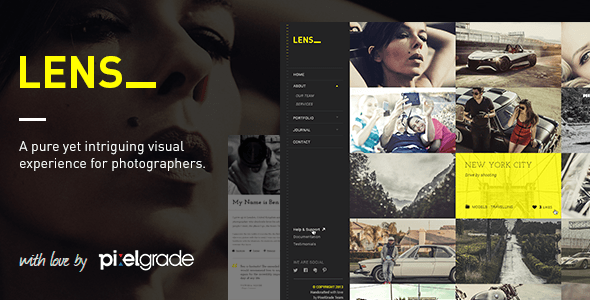
Stuck on your LENS WordPress theme? Let's fix it.
No endless back-and-forth. Just send us the details and we'll get it done.
No obligation · Replies within 1 hour · Quote within 1 day
Setup · Customization · Bug fixes · WooCommerce integration
About LENS WP Theme
LENS is a photography-focused WordPress theme by Pixelgrade, built specifically for photographers who want their images to do the talking. The theme uses a full-screen, grid-based layout that puts visual work front and center without cluttering the interface with unnecessary elements.
It supports multiple portfolio styles, cover-style project pages, and a clean typographic system that keeps focus on the photography. LENS integrates tightly with the WordPress Customizer, giving photographers control over layout density, color accents, and header behavior without touching code.
Built on a lightweight codebase, LENS loads fast out of the box and follows modern WordPress standards. It works with Jetpack for galleries and supports custom post types for portfolio organization. If you shoot commercial work, documentary photography, or editorial projects, LENS gives you a clean, professional foundation to present it.
Get matched with a LENS developer in under one day
Tell us about your LENS project. Small fixes, LENS theme customization, or a full website build, whatever you need, we've got it covered.
We'll connect you to the right LENS developers, define the scope, and get everything 100% clear.
You'll get one estimate, hire your preferred developer, and start collaborating.
Pixelgrade builds well-structured themes, but every photography business has specific needs that go beyond what a theme handles on its own. A vetted LENS developer can customize layouts, fix display issues, add functionality, and make the theme work the way your workflow actually requires.
Through Codeable, you get matched with developers who have reviewed your project brief before submitting an estimate. No bidding wars, no junior developers learning on your project. Post your project and get a straight answer on scope and cost within 24 hours.
Pros
- Full-screen image presentation with minimal UI distraction, ideal for portfolio work
- Multiple grid layout options built into the Customizer without needing extra plugins
- Clean, lightweight codebase from Pixelgrade that loads fast on image-heavy pages
- Strong typography system with well-chosen default font pairings for editorial use
- Tight WordPress Customizer integration makes basic adjustments straightforward for non-developers
Cons
- Limited built-in filtering for portfolio archives — category filtering requires custom development
- No native client proofing or gallery password protection without additional plugins
- Customizer options are sufficient for basic changes but hit a ceiling quickly for complex branding
- No structured data or schema markup included for photography portfolio content
- Theme updates from Pixelgrade can occasionally conflict with child theme customizations
Who is LENS for?
Commercial Photographers
Commercial photographers need a portfolio that communicates value quickly to art directors and brand managers. LENS handles full-screen campaign imagery well and keeps navigation clean. A LENS developer can add client-specific project pages with password protection and a contact workflow that feeds directly into a CRM or email system.
Documentary and Editorial Photographers
Documentary work often involves long-form projects with mixed media. LENS supports project-level storytelling through its cover-page layout and sequenced image display. A LENS specialist can extend this with custom text blocks, audio embeds, or multi-page project structures that keep editorial work organized and readable.
Wedding and Portrait Studios
Wedding and portrait studios need booking inquiry forms, gallery delivery, and package information alongside portfolio work. LENS provides a clean visual base that a LENS expert can extend with inquiry forms, pricing pages, and integration with gallery delivery tools like Pic-Time or Pixieset via custom links or embedded workflows.
Fine Art Photographers
Fine art photographers often sell prints directly from their site. LENS doesn’t include ecommerce out of the box, but a LENS developer can integrate WooCommerce in a way that matches the theme’s aesthetic, adding print size selectors, edition tracking, and a checkout flow that doesn’t break the visual experience of the portfolio.
Photography Agencies and Collectives
Photography collectives and agencies need multi-photographer portfolio structures that LENS doesn’t handle by default. A LENS specialist can build custom post types for individual photographer profiles, filtered archive pages by contributor, and a shared project index, turning a single-photographer theme into a proper agency portfolio.

Customizing LENS
LENS gives photographers a solid starting point, but making it match a specific brand identity often requires more than the default Customizer options. A LENS expert can adjust the grid spacing and column count, rework typography pairings, modify how project cover images behave on scroll, and add custom color logic beyond what the theme panel exposes.
More advanced customizations include building out a client proofing area, adding password-protected galleries per project, integrating contact forms with conditional logic, or creating a custom front-page layout that differs from the standard portfolio grid. A LENS developer can also extend the theme’s archive templates to support filtering by category or tag without third-party plugins adding unnecessary overhead.
If you need the theme to behave differently from how Pixelgrade designed it, working with a LENS specialist is the most reliable path to getting exactly what your photography business needs.
Recommended plugins for LENS
LENS pairs well with a focused set of tools. For galleries and image delivery, Jetpack’s Photon CDN speeds up image loading across devices. If you want deeper performance control, a developer can configure server-level caching, lazy loading, and WebP conversion to keep your portfolio fast. See how we approach WordPress performance optimization for image-heavy sites.
On the SEO side, LENS doesn’t ship with schema markup for photography portfolios out of the box. Adding structured data for ImageObject and CreativeWork types helps search engines understand your content better. We cover that as part of our WordPress SEO service. Both are worth addressing before you start driving traffic to a new LENS site.
Not sure which plugins to use? This WordPress plugins directory covers the most popular options with reviews and setup guides.
LENS common issues
LENS theme portfolio grid not displaying correctly after update
Grid display issues after a LENS update are usually caused by cached CSS or a conflict with a caching plugin serving old stylesheet versions. Clear all caches first, including server-level and CDN caches. If the grid is still broken, check whether your child theme overrides any of the grid template files that Pixelgrade updated. Compare your child theme’s templates against the updated parent theme files and reconcile the differences.
LENS WordPress theme images not loading on mobile
Mobile image loading issues in LENS typically come down to incorrect srcset values or a theme option that limits image sizes for smaller screens. Check that WordPress has generated all required intermediate image sizes by running a forced image regeneration using a plugin like Regenerate Thumbnails. Also confirm that your server is not blocking hotlinking from mobile user agents. If the problem persists, our WordPress bug fixing service can isolate the exact cause.
LENS theme full-screen layout broken on certain page templates
Full-screen layout breaks in LENS often trace back to a plugin adding inline styles or scripts that override the theme’s viewport height calculations. Disable plugins one at a time to identify the conflict. The most common offenders are page builders, accessibility plugins, and cookie consent tools that inject elements into the document body. A LENS developer can add targeted CSS fixes or enqueue scripts in the correct order to resolve the conflict permanently.
LENS theme customizer changes not saving
When LENS Customizer changes won’t save, the issue is usually a REST API authentication failure or a permissions problem with the WordPress uploads directory. Check your browser console for 403 or 401 errors during the save request. Confirm your site URL settings in Settings > General match the actual URL, as mismatches break REST API nonces. If you’re on a managed host with aggressive security rules, whitelist the Customizer’s REST endpoints.
LENS WordPress theme slow to load with large image galleries
LENS is lightweight but image-heavy portfolios can still load slowly if images aren’t properly sized and compressed before upload. Enable lazy loading for off-screen images, serve images through a CDN, and convert large JPEGs to WebP format. Also check whether Jetpack’s Photon module is active, as it handles responsive image delivery efficiently. For a deeper performance audit, see our WordPress performance service.
LENS theme project cover image not showing on archive page
If LENS project cover images aren’t showing on archive pages, the most likely cause is that the featured image wasn’t set on the project post, or the image dimensions don’t meet the minimum size LENS expects for cover display. Check each project post and confirm a featured image is assigned. Also verify that your thumbnail sizes are registered correctly and that images have been regenerated at those sizes since the theme was activated.
LENS theme menu not visible on white background header
Invisible menu text on white header backgrounds in LENS is a contrast issue tied to the header color settings in the Customizer. LENS allows per-page header color overrides through page meta options. If menu items are set to white globally but the header is also white on certain pages, the text disappears. Set a dark menu color for those specific pages in the page settings, or adjust the global header color logic through a LENS developer’s custom CSS fix.
LENS WordPress theme footer widgets not appearing
Footer widgets not appearing in LENS usually means the widget area isn’t registered or the footer template isn’t calling the widget sidebar correctly. Check Appearance > Widgets to confirm the footer sidebar is available and has widgets assigned. If the sidebar doesn’t appear in the widget screen, a plugin conflict may have deregistered it. Deactivate plugins temporarily to test. Our WordPress bug fixing service can resolve persistent widget registration issues.
LENS theme conflicting with Jetpack gallery module
LENS and Jetpack can conflict when Jetpack’s gallery module overrides the default WordPress gallery shortcode output with its own markup, which doesn’t inherit LENS’s gallery styling. To resolve this, either disable Jetpack’s Gallery module in Jetpack settings and use LENS’s native gallery handling, or enqueue custom CSS that targets Jetpack’s gallery output classes and applies the LENS styling manually. A LENS specialist can implement whichever approach fits your site structure.
LENS theme child theme styles not applying after update
Child theme styles not applying after a LENS parent theme update usually means the child theme’s stylesheet is missing the correct template header comment or the enqueue order changed. Open your child theme’s functions.php and confirm the wp_enqueue_style call loads the parent stylesheet first, then the child stylesheet with the parent as a dependency. Also check that the child theme’s style.css Template header points to the correct parent theme folder name, which must match exactly.
LENS FAQ
Yes. LENS is designed specifically for photographers and handles image-heavy portfolios cleanly. It supports full-screen project pages, multiple grid styles, and a focused layout that keeps attention on the work. It suits commercial, editorial, and documentary photographers well. More complex needs like client proofing or print sales require a LENS developer to extend the theme.
LENS doesn’t include WooCommerce support out of the box, and the default WooCommerce templates won’t inherit the theme’s visual style automatically. A LENS developer can integrate WooCommerce with custom templates that match the theme’s aesthetic, add print product types, and create a checkout experience that doesn’t break the portfolio layout.
For basic setup, yes. The WordPress Customizer handles fonts, colors, layout options, and header behavior without code. Beyond that, adjusting templates, adding custom functionality, or making structural layout changes requires PHP and CSS knowledge. A LENS specialist is worth bringing in for anything beyond standard Customizer options.
LENS supports video embeds within project pages using standard WordPress oEmbed, so you can include Vimeo or YouTube videos inside portfolio projects. It doesn’t have a dedicated video grid or autoplay cover video feature by default. A LENS developer can build those in if video is central to your portfolio presentation.
LENS includes blog post support, but the blog layout is minimal by default. You can create a Posts page in WordPress Settings > Reading and link it in your navigation. The blog inherits the theme’s typography and spacing. For a more styled blog section with custom category pages or featured post layouts, a LENS developer can build out proper blog templates.
Pixelgrade continues to maintain LENS with compatibility updates for current WordPress versions. Check the theme’s changelog on ThemeForest or the Pixelgrade website for recent update dates. If you’re running an older version of LENS and haven’t updated in some time, a LENS expert can audit your setup before you update to avoid breaking customizations.
Yes, migrating an existing photography site to LENS is straightforward for the content itself. Portfolio posts, images, and pages transfer cleanly. The work is in rebuilding your layout preferences within LENS’s structure and reconfiguring menus and widgets. For sites with custom post types or complex gallery setups, a WordPress migration specialist can handle it without data loss.
LENS is not designed to work with Elementor or similar page builders. Pixelgrade themes use their own layout system, and page builders often conflict with LENS’s full-screen and cover-page templates. Adding a page builder typically breaks the theme’s intended behavior. A LENS developer working with the theme’s native structure will produce better results than forcing a builder into it.
Start by enabling lazy loading for images, reducing image file sizes before uploading, and serving images from a CDN. In WordPress, switch to WebP formats where possible and disable any plugins running unnecessary scripts on portfolio pages. LENS is lightweight, so most mobile speed issues are image delivery problems rather than theme code problems.
Yes, the standard approach is to use a child theme for all customizations. CSS changes go in the child theme stylesheet, and template overrides copy parent theme files into the child theme folder. This way, parent theme updates don’t overwrite your changes. A LENS developer will always use this structure to keep your customizations safe across updates.
Hire a LENS Developer for Your Photography Site
Whether you need a LENS expert to customize your portfolio layout, fix a display bug, or extend the theme with new functionality, we can match you with the right developer for the job. Work is scoped clearly before it starts, and you only pay when you’re confident in the plan.
Get a Free Estimate and describe what you need. A LENS specialist will review your project and come back with a clear proposal, no obligation to proceed.
You'll need a free Codeable account so developers can ask questions and send their quotes.