Fortuna WordPress Theme
by blueowlcreative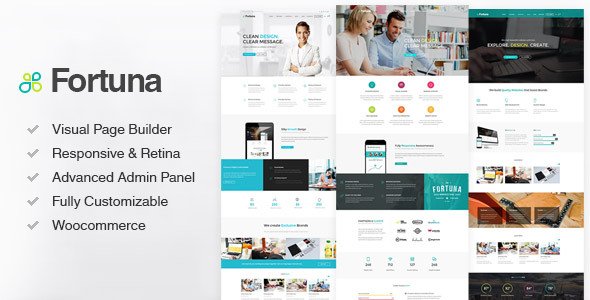
Stuck on your Fortuna WordPress theme? Let's fix it.
No endless back-and-forth. Just send us the details and we'll get it done.
No obligation · Replies within 1 hour · Quote within 1 day
Setup · Customization · Bug fixes · WooCommerce integration
About Fortuna WP Theme
Fortuna is a multipurpose WordPress theme by blueowlcreative, built for business, portfolio, and agency sites. It ships with a drag-and-drop page builder, pre-built demo layouts, and a clean visual structure that works across industries.
The theme supports WooCommerce, custom widgets, and multiple header and footer layouts. Typography controls, color schemes, and section backgrounds are all manageable from the Customizer without touching code.
Fortuna is designed to be visually flexible. Whether you’re building a single landing page or a full multi-page business site, the layout options cover most scenarios out of the box. Performance is reasonable on a clean install, though plugin-heavy builds will need optimization attention.
Get matched with a Fortuna developer in under one day
Tell us about your Fortuna project. Small fixes, Fortuna theme customization, or a full website build, whatever you need, we've got it covered.
We'll connect you to the right Fortuna developers, define the scope, and get everything 100% clear.
You'll get one estimate, hire your preferred developer, and start collaborating.
Fortuna is capable, but it rewards people who know how to push it. If you’re spending hours inside the builder trying to get a layout right, or dealing with styling that breaks on mobile, a Fortuna developer will sort it faster than you expect.
Through Codeable, you get matched with vetted WordPress specialists who have hands-on theme experience. Post your project, get a clear estimate, and decide from there. No commitment until you’re ready. The quality bar on Codeable is high, and turnaround is typically quick for scoped work.
Pros
- Pre-built demo content covers a wide range of industries and imports cleanly in most environments
- Built-in Customizer controls for typography, colors, and header layouts reduce reliance on extra plugins
- WooCommerce compatibility is solid out of the box with styled product pages and cart elements
- Multiple header and footer layout options without needing a third-party header builder plugin
- Responsive design holds up across breakpoints with minimal mobile-specific fixes needed on clean builds
Cons
- Documentation is thin in places, especially around advanced custom post type integration
- Page builder lock-in makes it difficult to migrate content cleanly if you switch themes later
- Default font loading can slow initial page render if not optimized after setup
- Some demo sections rely on shortcodes that become orphaned if the theme is ever deactivated
- Limited community forum activity means troubleshooting obscure issues often requires developer help
Who is Fortuna for?
Business and Agency Sites
Fortuna’s section-based layouts and pre-built business demos make it a practical choice for agencies and small businesses. You get service sections, team grids, testimonials, and contact areas ready to configure. A Fortuna developer can adapt the demo structure to match your specific service offering without rebuilding from scratch.
Portfolio and Creative Studios
The portfolio grid layouts in Fortuna handle image-heavy creative work well. Filterable portfolio categories, lightbox support, and clean single project pages give studios a functional showcase. A Fortuna specialist can extend the default portfolio post type with custom fields for client, year, and deliverables.
WooCommerce Stores
Fortuna’s WooCommerce styling covers product archives, single product pages, and the cart flow. It doesn’t require heavy customization to look professional. For stores needing custom product layouts or checkout modifications, a Fortuna developer can extend the WooCommerce templates within a child theme cleanly.
Consulting and Professional Services
Consultants and professional service firms benefit from Fortuna’s structured content areas. Pricing tables, service breakdowns, bio sections, and lead capture forms all have demo equivalents. A Fortuna expert can wire up CRM integrations and contact form routing to match your intake process.
Event and Conference Sites
Event sites need countdown timers, speaker grids, schedule layouts, and ticket links. Fortuna supports these use cases with its modular section approach. Pairing it with an events plugin gives you a full conference site. A Fortuna developer can handle the custom styling needed to make the plugin output match the theme design.

Customizing Fortuna
Fortuna gives you a solid starting point, but most clients want something that feels distinctly theirs. That’s where a Fortuna expert makes the difference. Adjusting the pre-built demos, overriding default styles, and extending the builder with custom sections all require hands-on work.
A Fortuna specialist can handle custom post type integration, advanced header configurations, sticky navigation behavior, and pixel-level layout adjustments that the Customizer won’t expose directly.
Custom child theme development is the cleanest approach for any meaningful changes. It keeps your modifications safe through updates. If you need Fortuna tailored to a specific brand or workflow, working with a developer is faster and cleaner than trial and error in the builder.
Recommended plugins for Fortuna
Fortuna works well with WooCommerce, Contact Form 7, WPML, and most major page builder plugins. For sites pushing heavier traffic, pairing Fortuna with a caching layer and image optimization is necessary. Visit our WordPress performance service for specifics on what that setup involves.
On the SEO side, Fortuna is compatible with Yoast and Rank Math, but schema markup and structured metadata still need configuration. Our WordPress SEO service covers that end-to-end. Extensions are only as useful as their configuration, so getting that right from the start saves cleanup later.
Not sure which plugins to use? This WordPress plugins directory covers the most popular options with reviews and setup guides.
Fortuna common issues
Fortuna theme header not sticky after update
Sticky header behavior in Fortuna is controlled through the Customizer under Header Settings. If it stopped working after an update, check whether a JavaScript conflict is blocking the sticky scroll event. Open your browser console and look for JS errors. Deactivate plugins one at a time to isolate the conflict. If the issue persists, your child theme CSS may need a z-index or position fix on the header element.
Fortuna page builder sections not saving
If Fortuna’s builder sections aren’t saving, the most common causes are a PHP memory limit that’s too low, a nonce timeout from a long editing session, or a plugin conflict with the builder’s AJAX calls. Increase your PHP memory limit to at least 256MB in wp-config.php. Clear your cache and try again. If the problem continues, our WordPress bug fixing service can trace the exact failure point.
Fortuna WooCommerce product page layout broken
Broken WooCommerce product page layouts in Fortuna usually follow a WooCommerce major version update that changes template hooks. Fortuna’s WooCommerce templates may be outdated. Check WooCommerce > Status > System Status for outdated template warnings. Update the templates through your child theme by copying the relevant files from the WooCommerce plugin into your child theme’s woocommerce folder and applying the needed changes.
Fortuna mobile menu not opening on iOS
Mobile menu failures on iOS in Fortuna are typically tied to touch event handling in the theme’s navigation JavaScript. The click event on the hamburger icon may not register correctly on certain iOS Safari versions. Adding a CSS cursor: pointer to the menu toggle element often fixes it. If that doesn’t resolve it, the JS file handling the toggle may need a touchstart event fallback added. Test on both Safari and Chrome for iOS to narrow it down.
Fortuna demo import fails or gets stuck
Fortuna demo import failures are usually caused by server timeout limits, insufficient PHP memory, or a missing required plugin. Before importing, install all required plugins listed in the theme documentation. Set max_execution_time to 300 and memory_limit to 256M in your php.ini or wp-config.php. If the import stalls partway through, try importing content, widgets, and settings separately rather than using the one-click option. Our WordPress bug fixing service handles stuck imports regularly.
Fortuna theme custom fonts not loading
Custom fonts not loading in Fortuna can come from a few places. If you’re using Google Fonts through the Customizer, check that your server can reach external URLs. If you’ve uploaded custom fonts manually, verify the font-face declarations in your child theme CSS use the correct file paths. Browser caching can also cause stale font references. Clear your cache and check the network tab in your browser dev tools to confirm the font files are being fetched.
Fortuna footer widgets not displaying correctly
Footer widget display problems in Fortuna are often caused by widget area configuration mismatches or a CSS conflict introduced by a plugin. Go to Appearance > Widgets and confirm your widgets are assigned to the correct footer widget area. If the layout is visually off, inspect the footer columns in your browser dev tools. Fortuna’s footer column count is typically set in the Customizer. Make sure the column setting matches the number of widget areas you’ve populated.
Fortuna theme white screen after update
A white screen after a Fortuna theme update points to a PHP fatal error. Enable WP_DEBUG in wp-config.php to see the error message. The cause is usually a conflict between the updated theme code and an older plugin or a PHP version incompatibility. If the error references a specific file, that’s your starting point. If you can’t access wp-admin, connect via FTP, rename the theme folder temporarily to revert to the previous theme, then investigate from there. See our WordPress bug fixing service for urgent recovery.
Fortuna contact form not sending emails
Contact form email failures in Fortuna are almost always a mail delivery issue, not a theme issue. WordPress’s default wp_mail function relies on your server’s sendmail, which many hosts restrict. Install an SMTP plugin like WP Mail SMTP and configure it with your email provider’s credentials. Test using the plugin’s built-in send test feature. Also check your spam folder before assuming emails aren’t sending at all.
Fortuna portfolio filter not working
Fortuna portfolio filter issues are commonly caused by a JavaScript conflict with another plugin loading its own version of jQuery or Isotope. Open your browser console and check for JS errors when clicking a filter. If Isotope is being loaded twice, you’ll see initialization errors. Dequeue duplicate scripts through your child theme’s functions.php. If the filter markup is present in the HTML but the filtering isn’t working visually, the Isotope initialization may be firing before the images have loaded.
Fortuna FAQ
Yes. Fortuna’s pre-built layouts, service sections, and team grids make it a practical choice for business sites. It handles the standard pages well: homepage, about, services, and contact. For more complex business requirements, a Fortuna expert can extend the default structure with custom post types and advanced layouts.
Fortuna includes WooCommerce support with styled shop, product, cart, and checkout pages. It works on a standard WooCommerce install without requiring additional plugins. For custom product layouts or checkout modifications, a Fortuna developer can handle those through child theme templates.
Fortuna demo content is imported through the theme’s built-in import tool, usually found under Appearance > Import Demo. Install required plugins first, then run the import. Set PHP memory to 256MB and max execution time to 300 seconds before importing to avoid timeouts on slower servers.
Fortuna is built around its bundled page builder, so working without it limits your layout options significantly. You can still use the Classic Editor or Gutenberg for basic page content, but the pre-built section layouts depend on the builder. Switching to Elementor is possible but requires rebuilding existing pages.
Post your project on Codeable and get matched with a vetted Fortuna developer within 24 hours. You receive a free estimate before any work starts. Codeable screens all developers, so the quality is consistent. It’s the most straightforward route to finding a Fortuna specialist without vetting freelancers yourself.
Fortuna can be used alongside Elementor, but the theme’s native builder and Elementor can conflict on the same page. Most developers choose one or the other for a given build. If you want to use Elementor with Fortuna, a Fortuna developer can set up the integration cleanly so both tools don’t interfere.
Always use a child theme for customizations. If you’ve modified the parent theme directly, those changes will be lost on update. With a child theme in place, update the parent theme normally. After updating, check for visual regressions and review any WooCommerce template update notices if applicable.
Fortuna is compatible with WPML. You can translate pages, custom post types, and theme strings through WPML’s interface. For full multilingual builds, a Fortuna specialist can configure language switchers within the theme’s header and navigation areas to match the design.
Slow Fortuna sites are usually caused by unoptimized images, too many plugins, or no caching in place. The theme’s default font loading and slider assets also add weight. Start with a caching plugin and image compression, then audit your plugin list. Our WordPress performance service covers full site audits.
Yes, Fortuna sites migrate like any other WordPress site. Export your database, copy your files, update wp-config.php with the new database credentials, and run a search-replace on the URL. If you need help, our WordPress migration service handles the full process without downtime.
Hire a Fortuna Expert Developer
If you need a Fortuna developer for customization, bug fixes, or a full site build, the fastest route is a free estimate. Describe what you need, get matched with a specialist through Codeable, and receive a clear quote before any work starts. No risk, no obligation.
Get a Free Estimate and have a Fortuna expert review your project within 24 hours.
You'll need a free Codeable account so developers can ask questions and send their quotes.