Kleanity WordPress Theme
by GoodLayers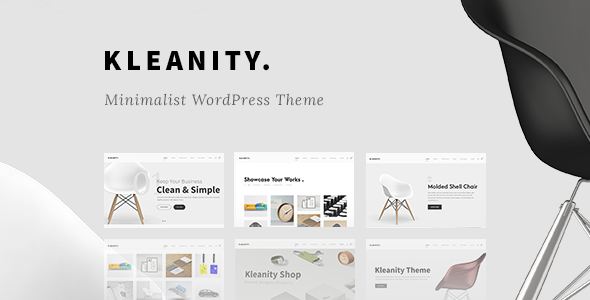
Stuck on your Kleanity WordPress theme? Let's fix it.
No endless back-and-forth. Just send us the details and we'll get it done.
No obligation · Replies within 1 hour · Quote within 1 day
Setup · Customization · Bug fixes · WooCommerce integration
About Kleanity WP Theme
Kleanity is a WordPress theme built by GoodLayers, designed around clean layouts and a minimal aesthetic. It ships with the GoodLayers page builder, giving you drag-and-drop control over page structure without needing a third-party plugin. The theme targets creative agencies, portfolio sites, and small businesses that want a polished look without heavy customization overhead.
Out of the box, Kleanity includes multiple homepage demos, header style options, custom post types for portfolio work, and WooCommerce support. GoodLayers has a track record of maintaining their themes, and Kleanity follows that pattern with consistent updates. It performs reasonably well on standard hosting, though like most feature-rich themes, it benefits from proper caching and image optimization. For straightforward sites, the built-in options cover most needs. For complex builds, you’ll want someone who knows the GoodLayers ecosystem well.
Get matched with a Kleanity developer in under one day
Tell us about your Kleanity project. Small fixes, Kleanity theme customization, or a full website build, whatever you need, we've got it covered.
We'll connect you to the right Kleanity developers, define the scope, and get everything 100% clear.
You'll get one estimate, hire your preferred developer, and start collaborating.
GoodLayers themes have their own logic, and Kleanity is no exception. When something breaks or a build needs to go beyond the default options, you need someone who knows the theme’s architecture. Through Codeable, you get access to vetted WordPress developers who have hands-on experience with Kleanity and the GoodLayers ecosystem. Every project starts with a free estimate, and you only move forward if the scope and price make sense. No guesswork, no junior developers learning on your project.
Pros
- Clean, minimal design that works well for agencies and portfolios without heavy visual customization
- Built-in GoodLayers page builder reduces dependency on third-party page builders like Elementor or WPBakery
- Multiple pre-built demo layouts that can be imported and adapted quickly
- WooCommerce support included for clients who need a basic shop alongside their main site
- GoodLayers maintains active updates, so core compatibility with WordPress stays current
Cons
- The GoodLayers page builder has a steeper learning curve than more widely documented builders
- Page builder markup adds extra DOM elements, which increases page weight if not optimized
- Switching away from Kleanity later is difficult because content is tied to GoodLayers shortcodes
- Limited community resources compared to themes built on Elementor or the block editor
- Some advanced layout options require CSS knowledge to fine-tune beyond what the theme options allow
Who is Kleanity for?
Creative Agency
Kleanity’s clean grid layouts and portfolio post type make it a practical choice for creative agencies showcasing client work. The multiple header styles and homepage demo layouts give agencies a starting point that looks professional without excessive setup. A Kleanity developer can build out service pages, case studies, and team sections using the GoodLayers builder efficiently.
Freelance Portfolio
Freelancers who need a minimal, well-structured portfolio site benefit from Kleanity’s focus on visual presentation. The portfolio filtering and project detail layouts are built in, so there’s no need to wire up custom post types from scratch. A Kleanity specialist can tailor the layout to match a specific personal brand without overengineering the build.
Architecture or Interior Design Firm
Architecture and interior design firms need image-heavy layouts that stay clean under large photo content. Kleanity handles full-width imagery well and supports gallery-style project pages. A Kleanity expert can configure project category filtering and custom grid spacing to make visual portfolios look intentional rather than default.
Photography Studio
Photography studios need fast-loading galleries and minimal UI that keeps focus on the images. Kleanity’s whitespace-forward design suits this well. Combined with proper image optimization, a Kleanity developer can deliver a photography portfolio that loads quickly and presents work cleanly across desktop and mobile without custom theme development from scratch.
Small Business with WooCommerce
Small businesses that want a clean brochure site with a shop attached can use Kleanity’s WooCommerce support to handle both. The theme’s styling covers basic product pages and cart flows. A Kleanity specialist can extend the WooCommerce templates and integrate payment and shipping plugins without conflicting with the GoodLayers builder on the marketing pages.

Customizing Kleanity
Kleanity’s customization runs through two main areas: the WordPress Customizer for global settings like typography, colors, and header layout, and the GoodLayers page builder for individual page design. The two systems work together but have separate logic, which can trip up anyone unfamiliar with how GoodLayers structures its components.
A Kleanity expert can help you get the most from the theme’s built-in options before reaching for custom code. Things like custom header configurations, portfolio filtering behavior, mega menus, and WooCommerce styling all require knowing where GoodLayers hides its settings. If you need changes that go beyond the theme options, such as custom templates, modified post layouts, or integrated third-party plugins, a Kleanity specialist can handle that cleanly without breaking the theme’s update path.
Recommended plugins for Kleanity
Kleanity works with most standard WordPress plugins without conflicts. For contact forms, WPForms and Contact Form 7 both integrate cleanly. WooCommerce is supported natively for basic shop setups. WPML compatibility makes it viable for multilingual sites.
Where Kleanity needs extra attention is performance. The GoodLayers builder adds page weight, so pairing the theme with a solid WordPress performance setup matters more than with lighter themes. On the SEO side, Kleanity’s structure is compatible with Yoast and Rank Math, but getting schema and meta handling right across portfolio and custom post types often needs configuration. A proper WordPress SEO setup ensures those pages get indexed correctly.
Not sure which plugins to use? This WordPress plugins directory covers the most popular options with reviews and setup guides.
Kleanity common issues
Kleanity page builder not loading in WordPress editor
This is usually caused by a JavaScript conflict with another plugin or a PHP memory limit issue. Start by deactivating all plugins except GoodLayers-related ones and testing again. If the builder loads, reactivate plugins one at a time to isolate the conflict. Also check your PHP memory limit in wp-config.php and increase it to at least 256MB. If the issue persists, the GoodLayers plugin files may need to be re-uploaded fresh via FTP.
Kleanity demo import failing or stuck
Demo imports fail most often due to server timeout limits, low PHP max execution time, or max upload size restrictions. Contact your host to temporarily increase these values before retrying the import. Make sure the required GoodLayers plugins are all activated before starting. If the import stalls repeatedly, a manual approach, importing XML content and then applying settings separately, often works where the one-click method does not. Our WordPress bug fixing service can handle stubborn import failures.
Kleanity portfolio items not showing on page
If portfolio items exist but aren’t showing on the page, the issue is almost always in the GoodLayers page builder element settings. Open the page in the builder, locate the portfolio element, and check which portfolio category is selected and how many items are set to display. Also verify that the portfolio custom post type is published and not in draft. If you recently changed permalink settings, go to Settings > Permalinks and save to flush rewrite rules.
Kleanity header not displaying correctly on mobile
Mobile header issues in Kleanity are typically CSS-related or tied to breakpoint settings in the theme options. Go to the Header section in the GoodLayers theme options and check the mobile menu trigger settings. If you’ve added custom CSS or used a plugin like Autoptimize, CSS minification can sometimes strip rules that control mobile nav behavior. Disable CSS minification temporarily to test. A child theme is the right place for any custom header CSS to avoid it being overwritten.
Kleanity slow loading after adding content
Slow performance with Kleanity is a common issue once pages are built out with the GoodLayers builder. The builder adds extra HTML and loads multiple CSS and JS files. Start with a caching plugin like WP Rocket and enable CSS/JS minification and combination. Use a CDN for static assets. Compress and properly size images before uploading. For a more thorough performance fix, our WordPress bug fixing service can audit and resolve the underlying bottlenecks.
Kleanity WooCommerce styling broken
WooCommerce styling breaks in Kleanity usually happen after a WooCommerce update that changes template structure, or after the theme updates without refreshing its WooCommerce template overrides. Go to WooCommerce > Status > Tools and run the template check. Any outdated template files that Kleanity overrides will need to be updated to match the current WooCommerce version. If you’ve customized WooCommerce templates in the theme, those changes need to be carefully merged.
Kleanity custom fonts not loading
Custom fonts not loading in Kleanity is usually a settings issue in the theme options panel. Go to GoodLayers theme settings and check the Typography section. If you’re using Google Fonts, ensure the font names match exactly what Google Fonts provides. If you’ve uploaded custom fonts manually, verify the file paths are correct and the CSS font-face declarations reference the right URLs. Browser caching can also hide new font settings, so clear cache and test in an incognito window.
Kleanity contact form not sending emails
Contact forms not sending in Kleanity is not a theme issue but a server email delivery problem. Most shared hosts block PHP mail() or send it in a way that ends up in spam. Install an SMTP plugin like WP Mail SMTP and configure it with a real email service like Gmail, Mailgun, or SendGrid. Test sending via the plugin’s test tool. Also check spam folders before assuming emails are failing. The form plugin itself, whether Contact Form 7 or WPForms, has its own mail log that can help diagnose the failure.
Kleanity theme update broke the site layout
Layout breaks after a Kleanity update are most often caused by changes to GoodLayers shortcode or builder block structure. Before updating, always backup the site. After an update causes breakage, check if GoodLayers released any required companion plugin updates and apply those too. In some cases, regenerating CSS from the theme options panel fixes visual regressions. If the damage is significant, our WordPress bug fixing service can restore the layout without rolling back the update entirely.
Kleanity blog page showing wrong layout
If the Kleanity blog page is showing the wrong layout, first check that the page assigned as the blog page in Settings > Reading is using the correct template. The GoodLayers builder sometimes gets applied to the blog page accidentally, overriding the default loop. If the blog page has builder content on it, remove it and let WordPress handle the blog loop natively. Blog listing style options like grid vs. list are usually controlled in the GoodLayers theme options under Blog settings, not in the page itself.
Kleanity FAQ
Kleanity was built around the GoodLayers page builder, not Gutenberg. Basic pages can be edited with the block editor, but the theme’s layout features, like portfolio elements and custom row settings, rely on the GoodLayers builder. Full block editor compatibility is limited. If you want a Gutenberg-first workflow, Kleanity is not the ideal choice without a Kleanity specialist adapting the setup.
Elementor can technically be used alongside Kleanity, but it creates overlap with the GoodLayers builder. Running two page builders on the same site adds page weight and increases the chance of style conflicts. Most Kleanity developers recommend committing to the GoodLayers builder for consistency. If you prefer Elementor, a different theme built natively around it would be a cleaner choice.
Yes, Kleanity includes WooCommerce support. Basic shop pages, product listings, cart, and checkout are all styled within the theme. For more advanced WooCommerce functionality like custom product types, subscriptions, or complex filtering, additional plugins and configuration are needed. A Kleanity developer can extend the WooCommerce integration beyond the default setup.
Kleanity demo content is imported through the GoodLayers theme options panel. After activating the theme and required plugins, go to the demo import section and select which demo to install. Make sure required plugins are active first. Server limits on PHP execution time and upload size affect success rates. If the import fails, increasing those limits on your host usually resolves it.
Kleanity produces clean HTML output and works with major SEO plugins like Yoast and Rank Math. The theme itself doesn’t add junk markup that hurts SEO. However, the GoodLayers builder adds some extra HTML nesting. Proper SEO configuration, including schema, meta tags, and sitemap setup, still needs to be handled through an SEO plugin and a solid configuration process.
Create a child theme folder in wp-content/themes with a style.css file that references Kleanity as the parent theme and a functions.php file that enqueues the parent stylesheet. Any template overrides or custom CSS go into the child theme. This protects your customizations when the parent theme updates. A Kleanity developer can set this up correctly if you’re not comfortable doing it manually.
Kleanity is compatible with WPML, the most widely used WordPress multilingual plugin. GoodLayers themes have documented WPML support. String translation for theme-specific text requires registering strings in WPML’s String Translation module. Setup can be technical, particularly when translating GoodLayers builder content. A Kleanity specialist familiar with WPML can handle the configuration cleanly.
Kleanity uses the proprietary GoodLayers page builder, which is included with the theme. It is a drag-and-drop visual builder with rows, columns, and content elements specific to the GoodLayers ecosystem. It is not a standalone plugin and is tightly tied to Kleanity’s design system. This differs from Elementor, WPBakery, or the native block editor.
Always use a child theme for any CSS or template customizations. Changes made directly to Kleanity’s parent theme files are overwritten on update. Theme option settings, like typography and color choices, are stored in the database and survive updates. Before updating, back up the site and check GoodLayers’ changelog for any breaking changes that might affect your builder layouts.
The most reliable way to find a vetted Kleanity developer is through Codeable, a platform that screens WordPress developers before they can take projects. You post your project, get a free estimate, and choose whether to proceed. FoxyConcept works through Codeable and can connect you with a Kleanity specialist who knows the GoodLayers ecosystem and can deliver reliable results.
Hire a Kleanity Developer for Your Project
Whether you need a Kleanity expert to build a site from scratch, customize an existing setup, or fix something that’s broken, the right developer makes the difference. Post your project through our free estimate process and get matched with a vetted Kleanity specialist within 24 hours. You’ll receive a clear estimate with no obligation to hire. Work gets done on Codeable, which means quality is guaranteed and your project is in experienced hands from day one.
You'll need a free Codeable account so developers can ask questions and send their quotes.