SoulMedic WordPress Theme
by designthemes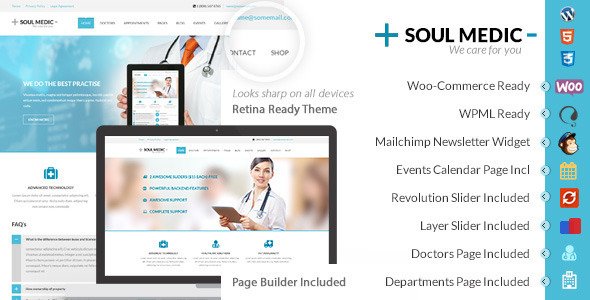
Stuck on your SoulMedic WordPress theme? Let's fix it.
No endless back-and-forth. Just send us the details and we'll get it done.
No obligation · Replies within 1 hour · Quote within 1 day
Setup · Customization · Bug fixes · WooCommerce integration
About SoulMedic WP Theme
SoulMedic is a medical WordPress theme built by DesignThemes. It targets clinics, hospitals, dental practices, and individual healthcare professionals who need a clean, appointment-ready website without building from scratch.
The theme ships with multiple homepage layouts, a pre-built appointment booking section, department and doctor profile pages, and support for popular plugins like WPBakery Page Builder. It also includes custom post types for services, staff, and testimonials.
DesignThemes has a solid track record with niche-specific themes, and SoulMedic reflects that. The design is professional without being sterile, and the included demo content covers most medical site structures out of the box. That said, getting it to match a specific clinic’s workflow usually takes some developer involvement.
Get matched with a SoulMedic developer in under one day
Tell us about your SoulMedic project. Small fixes, SoulMedic theme customization, or a full website build, whatever you need, we've got it covered.
We'll connect you to the right SoulMedic developers, define the scope, and get everything 100% clear.
You'll get one estimate, hire your preferred developer, and start collaborating.
SoulMedic looks straightforward until you need it to do something specific. Connecting a real booking system, adjusting the WPBakery layouts without breaking mobile, or setting up custom post type archives for departments and doctors all take time to do properly.
Working with a vetted SoulMedic specialist through Codeable means you get an experienced developer who knows the theme and understands healthcare site requirements. No agencies, no guesswork. Post a project, get a free estimate, and only proceed if it makes sense for your practice.
Pros
- Multiple pre-built homepage layouts designed specifically for medical and clinic sites
- Includes custom post types for doctors, departments, and services out of the box
- Built-in appointment request section with basic form functionality
- WPBakery Page Builder included, allowing drag-and-drop layout control without coding
- Actively maintained by DesignThemes with regular compatibility updates
Cons
- WPBakery lock-in makes migrating to Gutenberg or Elementor later a significant undertaking
- Demo content import can be slow and sometimes requires manual cleanup to work correctly
- Built-in booking form is basic and lacks real scheduling logic without a third-party plugin
- Mobile performance can suffer with default settings and unoptimized images from demo content
- Customization beyond the theme options panel requires PHP and CSS knowledge or developer help
Who is SoulMedic for?
General Medical Clinics
SoulMedic fits general practice clinics well. The department and doctor post types map directly to how most clinics organize their services. Appointment request forms, staff profiles, and service pages can all be live quickly using the included demo structure. A developer can wire these to a real scheduling system when you are ready to automate bookings.
Dental Practices
Dental practices benefit from SoulMedic’s clean layouts and service archive pages. The theme handles treatment listings, team profiles, and patient testimonials without much customization. Adding a before-and-after gallery or integrating a dental-specific booking plugin like Dentally requires a SoulMedic specialist but is straightforward to implement.
Mental Health and Therapy Services
Therapy and counseling practices need a calm, professional look. SoulMedic’s typography and whitespace-friendly layouts suit this well. A developer can remove clinical elements like department grids and instead build out a single-therapist structure with session types, intake form integration, and secure contact handling appropriate for mental health contexts.
Specialist Doctors and Consultants
Individual consultants and specialist doctors often need a site that focuses on credentials, services offered, and a clear way to book a consultation. SoulMedic supports this with single-doctor homepage variants. Stripping back the multi-department structure and building a focused single-specialty layout is a common customization task for a SoulMedic developer.
Physiotherapy and Rehabilitation Centers
Physiotherapy centers need to communicate treatment types, team expertise, and appointment availability. SoulMedic’s service and staff post types handle this well. Integrating exercise video content, downloadable rehab guides, or a class schedule alongside the standard booking flow requires some plugin work but SoulMedic provides a solid visual foundation.

Customizing SoulMedic
Out of the box, SoulMedic covers the basics well. You get color scheme controls, Google Fonts integration, and layout options for headers and footers. The WPBakery-based page builder lets non-technical users rearrange sections, but anything beyond surface-level changes gets tricky fast.
A SoulMedic expert can help you rework the appointment form to connect with a booking plugin like Amelia or Bookly, build out custom doctor profile templates, add filterable service archives, or restructure navigation for multi-location practices. Custom CSS overrides and child theme setup are also common requests.
If your clinic has specific intake forms, insurance information pages, or patient portal links to integrate, a SoulMedic developer will save you significant time and avoid theme update conflicts down the line.
Recommended plugins for SoulMedic
SoulMedic pairs well with several plugin categories. For booking, Amelia and Bookly both integrate cleanly. Contact Form 7 and WPForms handle patient inquiries. WPML works for multilingual clinic sites.
On the technical side, SoulMedic sites can get heavy due to WPBakery shortcode output and unoptimized images from demo content. Addressing this through WordPress performance optimization makes a noticeable difference in page load times, especially on mobile.
If you are targeting local patients through Google, pairing SoulMedic with a proper WordPress SEO setup covering schema markup for medical practices, local business data, and page-level optimization is worth prioritizing early.
Not sure which plugins to use? This WordPress plugins directory covers the most popular options with reviews and setup guides.
SoulMedic common issues
SoulMedic appointment form not sending emails
This is almost always a server-side mail configuration issue, not a theme bug. SoulMedic’s contact and appointment forms rely on WordPress’s wp_mail() function. If your host blocks default PHP mail, emails will silently fail. Install WP Mail SMTP, configure it with your host’s SMTP credentials or a transactional mail service like SendGrid, and test the form. If the issue persists after that, check the form plugin settings for correct recipient address configuration.
SoulMedic demo content import fails or is incomplete
SoulMedic demo imports can time out on shared hosting due to memory or execution limits. Before importing, set max_execution_time to 300 and memory_limit to at least 256M in your php.ini or wp-config.php. Use the one-click demo importer from DesignThemes rather than the standard WordPress importer. If it still fails, try importing XML content and widgets separately. A developer can also manually recreate key pages from the demo if full import is not possible.
SoulMedic mobile menu not opening or overlapping content
Mobile menu issues in SoulMedic are usually caused by a JavaScript conflict with another plugin, or CSS z-index problems introduced by a page builder element. Open your browser’s console and check for JS errors on mobile. Try disabling plugins one by one to isolate a conflict. If the menu opens but overlaps content, inspect the menu container’s z-index and position values. Adding a small CSS fix in your child theme often resolves the overlap. For persistent issues, check out our WordPress bug fixing service.
SoulMedic WPBakery elements not displaying correctly after update
After a WPBakery update, shortcode rendering can break if the theme’s bundled version and the updated version conflict. SoulMedic bundles WPBakery as an included plugin, so you should update it through the theme’s plugin installer rather than directly from the WordPress plugin screen. If elements are already broken, deactivate and reactivate WPBakery, then clear your cache. If shortcodes are rendering as raw text, the plugin may have been deactivated during the update process.
SoulMedic doctor profiles not showing on archive page
If SoulMedic doctor profile posts exist but are not showing on the archive, check the custom post type archive setting in Settings > Reading and ensure the post type is set to be publicly queryable. A permalink flush (Settings > Permalinks > Save Changes) often fixes archive 404s after initial setup. If you added doctors before the theme was fully activated, the custom post type may not have been registered at import time. Re-saving the posts usually forces them into the correct archive.
SoulMedic homepage slider broken or not loading images
SoulMedic’s homepage slider is typically powered by a bundled slider plugin. If images are not loading, check whether the slider plugin is activated and up to date. Also verify that the slider images are correctly assigned in the slider settings panel, not just uploaded to the media library. Browser console errors pointing to missing JS files often indicate a plugin activation issue. Clear server and browser cache after making any changes. If the slider was working and stopped after an update, check our WordPress bug fixing service for help.
SoulMedic Google Fonts not loading
Google Fonts failing to load in SoulMedic usually means the font API request is being blocked or the font name is entered incorrectly in the theme options. Open your browser’s network tab and filter for fonts.googleapis.com requests to see if they are returning errors. Some security plugins block external API calls. Also check if your site is running on HTTPS while the font URL is being requested over HTTP. Updating the font URL to use a relative protocol or HTTPS directly typically resolves this.
SoulMedic page speed score low on PageSpeed Insights
SoulMedic’s default setup loads WPBakery-generated CSS and JS inline, which inflates page weight significantly. Start by enabling a caching plugin like WP Rocket or LiteSpeed Cache, then minify and combine CSS and JS files. Compress and resize images from the demo content, as many are oversized. Disable any bundled plugins you are not actively using. For a more thorough fix, a developer can audit render-blocking resources and restructure asset loading. See our WordPress performance optimization service for a structured approach.
SoulMedic header overlapping page content on scroll
A fixed or sticky header overlapping page content in SoulMedic is a CSS spacing issue. The page content area needs a top padding or margin equal to the header height. You can add this to your child theme’s stylesheet: body { padding-top: [header height]px; }. The exact value depends on whether you are using the default or a custom header variant. If the overlap only happens on specific templates, the issue is likely in that template’s container CSS rather than the global header. Inspect the affected page and adjust the top offset accordingly.
SoulMedic child theme not inheriting parent styles
If a SoulMedic child theme is not pulling in parent styles, the most common cause is a missing or incorrect wp_enqueue_scripts call in the child theme’s functions.php. The child theme should enqueue the parent stylesheet explicitly rather than using @import in CSS. Use wp_enqueue_style('parent-style', get_template_directory_uri() . '/style.css'). Also check that the child theme’s style.css header correctly declares Template: soulmedic matching the exact parent theme folder name.
SoulMedic FAQ
DesignThemes updates SoulMedic periodically for WordPress compatibility. For the most recent 6.x versions, check the theme changelog on ThemeForest before updating your live site. It is always good practice to test major WordPress updates on a staging environment first, particularly with WPBakery-dependent themes where shortcode rendering can be affected by core changes.
SoulMedic is built around WPBakery Page Builder and does not officially support Elementor. You can install Elementor alongside it, but conflicts between the two page builders are common, especially with scripts and styles. If you want a full Elementor-based medical site, it is more practical to migrate the content to an Elementor-native theme than to force compatibility with SoulMedic.
Yes. SoulMedic includes homepage variants suited to individual practitioners. A developer can simplify the multi-department structure down to a focused single-doctor layout with a bio, services list, and contact or booking section. Most of the unnecessary post types like departments can simply be left unused or hidden from navigation without breaking anything else in the theme.
SoulMedic includes a basic appointment request form, but it is not a full booking system. It collects information and sends an email notification. For real-time scheduling, slot availability, and calendar management, you need a third-party plugin. Amelia, Bookly, and Simply Schedule Appointments all integrate well with SoulMedic and cover most clinic scheduling requirements.
Always use a child theme for any custom CSS or PHP changes. With a child theme in place, you can update SoulMedic without overwriting your modifications. Back up your site before updating, then apply the theme update and test key pages. WPBakery-related layout changes are the most common post-update issue and usually require a cache clear and a WPBakery reactivation to resolve.
SoulMedic itself does not handle GDPR compliance automatically. You will need a cookie consent plugin, a reviewed privacy policy page, and confirmation that any forms handling patient data are compliant with your regional regulations. Healthcare sites have stricter data handling requirements than general websites, so a proper GDPR audit of your forms, third-party scripts, and analytics setup is worth doing before launch.
SoulMedic is translation-ready and works with WPML and Polylang for multilingual setups. The theme’s text strings can be translated using a .po file editor like Poedit. If you are building a bilingual clinic site, WPML is the more stable choice and handles custom post types like doctor profiles and departments correctly, which is important for SoulMedic’s structure.
SoulMedic does not ship with dedicated WooCommerce templates, but WooCommerce can be installed and will use the plugin’s default styling. If you need to sell products like supplements or health packages, the default WooCommerce templates will function but will look visually inconsistent with the SoulMedic design. A developer can apply basic WooCommerce styling that matches the theme’s color and typography choices.
Migrating a SoulMedic site follows the standard WordPress migration process. Export your database, copy all files including the theme, plugins, and uploads folder, then import to the new host and update the site URL in the database. Plugins like Duplicator or All-in-One WP Migration handle this in fewer steps. Test all forms, custom post type archives, and the appointment section after migration. See our WordPress migration service if you need hands-on help.
FoxyConcept connects you with vetted SoulMedic developers through Codeable. Post your project, describe what your clinic needs, and receive a free estimate within 24 hours. There is no obligation to hire after the estimate. Visit our WordPress development services page for more detail on what is covered, or go straight to the estimate form to get started.
Hire a SoulMedic Developer
Whether you need a full SoulMedic setup, a booking system integration, or fixes to an existing site, working with a specialist gets it done right. FoxyConcept connects you with vetted WordPress developers through Codeable who have hands-on SoulMedic experience.
There is no obligation after the estimate. Get a Free Estimate and describe what your clinic needs. You will hear back within 24 hours.
You'll need a free Codeable account so developers can ask questions and send their quotes.