TownPress WordPress Theme
by LSVRthemes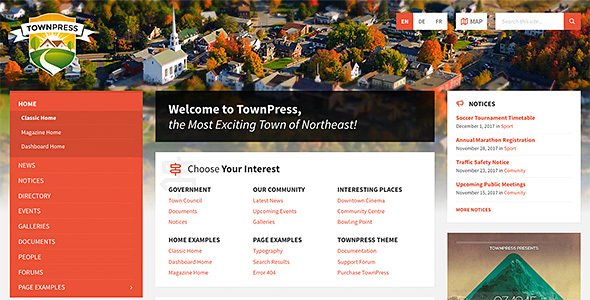
Stuck on your TownPress WordPress theme? Let's fix it.
No endless back-and-forth. Just send us the details and we'll get it done.
No obligation · Replies within 1 hour · Quote within 1 day
Setup · Customization · Bug fixes · WooCommerce integration
About TownPress WP Theme
TownPress is a WordPress theme built by LSVRthemes, designed specifically for municipalities, local governments, and community portals. It ships with a modular page builder, pre-built inner pages, an events calendar, a document manager, and a staff directory out of the box. The theme targets city councils, village websites, and public sector organisations that need structured content without relying heavily on third-party plugins.
The codebase follows standard WordPress conventions, making it relatively straightforward to extend. Child theme support is built in. LSVRthemes maintains the theme actively, with updates covering Gutenberg compatibility and security patches. If you need a government or community site up quickly with minimal custom development, TownPress covers most of the structural groundwork without requiring a heavily bespoke build.
Get matched with a TownPress developer in under one day
Tell us about your TownPress project. Small fixes, TownPress theme customization, or a full website build, whatever you need, we've got it covered.
We'll connect you to the right TownPress developers, define the scope, and get everything 100% clear.
You'll get one estimate, hire your preferred developer, and start collaborating.
TownPress has enough moving parts that a general WordPress developer can get lost quickly. The custom post types, the Customizer options, and the template structure all interact in ways that are specific to this theme. A developer who has worked with TownPress before will spot the shortcuts and avoid the common breakage points.
Through Codeable, you get matched with vetted WordPress specialists who know government and community themes. No guesswork on who you’re hiring. Post a project, get an estimate, and start with someone who can actually deliver.
Pros
- Purpose-built for municipal and community sites with relevant post types included
- Document manager handles downloadable PDFs and official files without extra plugins
- Staff directory and departments are baked in, not bolted on
- Customizer-based options panel is accessible to non-technical admins
- Active maintenance from LSVRthemes with regular compatibility updates
Cons
- The built-in events calendar is basic compared to dedicated event plugins
- Homepage section layout is rigid and requires developer work to restructure significantly
- Not well suited for sites outside the government or community niche
- Limited third-party documentation beyond the official LSVRthemes docs
- The Theme Options panel can feel cluttered when managing a large site
Who is TownPress for?
Municipal Government Website
TownPress is a direct fit for city and town council websites. The departments structure, staff directory, and document archive cover the core requirements without custom development. A TownPress developer can wire up the content types to match your council’s actual structure and configure user roles so multiple departments can manage their own sections independently.
Village or Parish Council
Smaller parish and village councils get a lot of value from TownPress without needing a large budget. The theme handles meeting agendas, document downloads, and a basic events feed well. A TownPress specialist can trim the layout to match a smaller site’s needs and keep the admin interface simple enough for volunteers to manage.
Community News Portal
Local news and community notice sites benefit from TownPress’s news post structure and homepage feed layout. It handles multiple content categories cleanly. A TownPress expert can extend the archive templates and add filtering by neighbourhood or topic, which most community portals need once content volume grows.
Nonprofit Public Services Organisation
Nonprofits delivering public services, housing advice, or community support programmes fit the TownPress structure well. The document manager handles policy PDFs and referral forms. Staff profiles and department pages give the site the credibility structure these organisations need without heavy custom work from a developer.
Local Tourism and Information Site
Local tourism boards and visitor information sites can use TownPress as a starting point. The events calendar surfaces what’s on, and the page builder handles attraction listings. A TownPress developer will typically extend the custom post types to include venues or points of interest and adjust the colour scheme to match destination branding.

Customizing TownPress
TownPress ships with a Theme Options panel built on the WordPress Customizer. You can control colours, typography, header layouts, and footer widgets without touching code. The homepage uses a section-based layout with toggle controls for each content block, including a hero slider, news feed, events, and a quick links bar.
Beyond the defaults, a TownPress expert can dig into the template hierarchy to create custom page types, modify the document archive, or rework the events output to match a specific council workflow. Custom post types like Departments and Staff are registered by the theme, so a TownPress developer can hook into those structures cleanly. If the built-in options hit a wall, targeted PHP and CSS work gets you the rest of the way without fighting the theme’s architecture.
Recommended plugins for TownPress
TownPress works with most standard WordPress plugins. WooCommerce is not a natural fit given the theme’s focus, but contact forms, GDPR tools, and translation plugins like WPML integrate without issues. The theme’s events system can be replaced or extended with The Events Calendar plugin if you need ticketing or recurring event logic.
For public-facing government sites, load time matters. Pairing TownPress with a caching layer and image optimisation is straightforward. See our WordPress performance services for specifics. If the site needs to rank in local search, the theme’s clean HTML structure plays well with Yoast or Rank Math. Our WordPress SEO service covers that in full.
Not sure which plugins to use? This WordPress plugins directory covers the most popular options with reviews and setup guides.
TownPress common issues
TownPress homepage sections not showing after update
Homepage sections disappearing after an update usually means the Theme Options data got partially reset or a section was toggled off during the update process. Go to Appearance > Customize > Homepage Sections and check each toggle. If sections are enabled but still missing, check for a JavaScript conflict in the browser console. A plugin loaded after the update may be interfering with the Customizer output. Deactivate plugins one by one to isolate the cause. Our WordPress bug fixing service can handle this quickly.
TownPress events not displaying on the front page
If the events feed on the homepage is empty, first check that events have been published and have a valid date set. TownPress filters events by date, so past events will not appear. If dates are correct, check the Homepage Events Count setting in Theme Options. If it’s set to zero, nothing will display. Also confirm the homepage template assigned in the page settings is the TownPress static front page template, not a standard page template.
TownPress document manager not uploading files
Upload failures in the TownPress document manager are usually a server-side issue. Check the file size against the PHP upload_max_filesize and post_max_size values in your server configuration. PDF MIME type restrictions on some hosts can also block uploads. If the file size is within limits and uploads still fail, check folder write permissions on wp-content/uploads. A hosting-level fix is usually needed here rather than a theme change.
TownPress staff directory page showing blank
A blank staff directory page typically points to a template assignment issue or a conflict with a caching plugin serving a stale page. First, clear your cache completely. Then check the page is using the Staff template under Page Attributes. If the template is correct and the page is still blank, enable WP_DEBUG to check for PHP errors. Missing staff posts or an incorrectly configured staff category can also cause the template to render empty. Our WordPress bug fixing service covers template debugging.
TownPress slider images not loading correctly
Slider images failing to load in TownPress usually comes down to image size registration. The theme registers specific image sizes for the slider. If images were uploaded before the theme was activated, those sizes may not have been generated. Use a plugin like Regenerate Thumbnails to rebuild all image sizes. Also check that the images assigned to slides in Theme Options are still attached to valid media library entries and have not been deleted.
TownPress custom logo not appearing in header
If a custom logo set via the Customizer is not appearing, check that the logo dimensions meet the theme’s expected proportions. TownPress has a defined header logo area, and oversized images may be hidden via CSS. Also check for a caching issue, which can serve the old header. If the logo appears in the Customizer preview but not on the live site, a full-page cache clear usually resolves it. If the issue persists, inspect the header.php template for hardcoded image references from a previous setup.
TownPress Customizer changes not saving
Customizer changes not saving in TownPress are often caused by a REST API conflict or a security plugin blocking the save request. Open your browser’s network tab, trigger a save, and look for a failed request to wp-json or admin-ajax.php. A firewall rule or a plugin like Wordfence may be blocking it. Also check that your WordPress site URL and home URL match exactly, as a mismatch can break Customizer save requests. Our WordPress bug fixing service can diagnose this reliably.
TownPress translation not working with WPML
WPML compatibility with TownPress requires registering the theme’s custom post types and strings for translation. Go to WPML > Theme and Plugins Localization and scan for strings. Custom post types like Staff and Documents need to be set as translatable in WPML > Translation Management. If translated pages are showing the wrong template, check that the translated page has the same Page Template attribute assigned as the original. LSVRthemes maintains basic WPML compatibility but complex setups may need developer attention.
TownPress child theme styles not overriding parent
If a TownPress child theme’s CSS is not overriding the parent, confirm the child theme’s style.css has the correct Template header pointing to the parent theme folder name, which should be townpress. Also check that the child theme’s functions.php is enqueueing its stylesheet after the parent. Using wp_enqueue_style with a dependency on the parent stylesheet handle ensures correct load order. Inline styles added via the Customizer load after both, so they will always win unless specificity in the child theme CSS is increased.
TownPress map widget showing error on contact page
The TownPress map widget uses Google Maps and requires a valid API key with the Maps JavaScript API enabled. If the map shows an error, go to your Google Cloud Console and check that the API key is active and billing is enabled on the account. The key must be added in TownPress Theme Options under the Maps section. If the key is correct and the map still fails, check for browser console errors indicating a referer restriction on the API key that is blocking your domain.
TownPress FAQ
Yes. TownPress is one of the few WordPress themes purpose-built for municipal and local government use. It includes departments, staff directories, document management, events, and news out of the box. It is a practical choice for councils and public sector organisations that need a structured, content-heavy site without building everything from scratch.
TownPress is compatible with the Gutenberg block editor for standard content pages. The theme’s homepage sections and custom post types are managed through Theme Options and the Customizer rather than the block editor. LSVRthemes has updated the theme to avoid conflicts with Gutenberg, but the homepage layout system is separate from the block editing interface.
Technically yes, but the theme’s structure is strongly oriented toward public sector content. A community organisation, nonprofit, or local tourism body could use it well. For a business, portfolio, or e-commerce site, TownPress is not a natural fit and you would be working against its architecture rather than with it.
Departments in TownPress are a custom taxonomy linked to staff and page content. You add a new department under the relevant menu in the WordPress admin, then assign staff members and pages to it. The department archive page is generated automatically. A TownPress developer can customise the department template if the default layout does not match your content requirements.
TownPress is translation-ready and includes a .pot file for manual translation. For multilingual sites, it works with WPML and Polylang. Custom post types like Staff and Documents need to be manually registered as translatable within your chosen plugin’s settings. Complex multilingual setups benefit from developer input to ensure all templates and strings are handled correctly.
TownPress has its own page-building system for the homepage and uses standard WordPress templates for inner pages. Elementor can be used on standard pages without conflict. However, the TownPress homepage sections are not Elementor-based, and using Elementor to rebuild the homepage requires bypassing the theme’s native layout system, which a TownPress specialist can plan properly before you start.
Create a new folder in wp-content/themes with a name like townpress-child. Add a style.css with the correct Template header referencing townpress and a functions.php that enqueues the parent stylesheet. Activate the child theme from Appearance > Themes. Any template files you copy into the child theme folder will override the parent without affecting the original files during future updates.
Yes, migrating an existing site to TownPress is possible. The content migrates as standard WordPress posts and pages, but you will need to map existing content into TownPress’s custom post types and page templates manually. If you are moving from another CMS or a heavily customised theme, a WordPress migration handled by a specialist avoids data loss and layout issues during the switch.
TownPress does not include a built-in maintenance mode. You can use a dedicated plugin like WP Maintenance Mode or SeedProd for that. If your site needs regular updates and scheduled downtime managed properly, a WordPress maintenance plan covers that alongside updates, backups, and security monitoring.
Cost depends on the scope of work. A small fix or configuration task through Codeable can cost less than a hundred dollars. A full TownPress site build for a municipality with custom post type work, multilingual setup, and content migration will run significantly higher. Post your project on Codeable to get a specific estimate from a vetted TownPress developer based on your actual requirements.
Hire a TownPress Developer
Whether you need a TownPress expert to build a full municipality site from scratch, customise an existing installation, or fix something that has stopped working, we can match you with the right developer through Codeable. Every developer is vetted. You get a free estimate before any commitment.
Get a Free Estimate and describe your project. You’ll hear back within 24 hours.
You'll need a free Codeable account so developers can ask questions and send their quotes.