Nanosoft WordPress Theme
by linethemes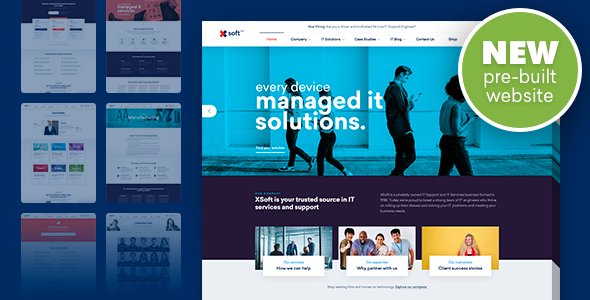
Stuck on your Nanosoft WordPress theme? Let's fix it.
No endless back-and-forth. Just send us the details and we'll get it done.
No obligation · Replies within 1 hour · Quote within 1 day
Setup · Customization · Bug fixes · WooCommerce integration
About Nanosoft WP Theme
Nanosoft is a WordPress theme by Linethemes built for IT companies, software agencies, and tech startups. It ships with multiple homepage layouts, a drag-and-drop page builder, and pre-built inner pages covering services, pricing, team, and blog sections.
The design leans clean and corporate, with a focus on conversion-oriented layouts. Nanosoft supports Elementor, WPBakery, and includes a dedicated theme options panel for typography, colors, and header styles. It also bundles premium plugins like Revolution Slider and Essential Grid, which reduces the cost of setup for new projects.
For teams looking to build a polished tech or SaaS website without starting from scratch, Nanosoft provides a solid structural foundation. That said, heavier plugin bundles and nested shortcodes can slow down the site if the theme is not properly configured from the start.
Get matched with a Nanosoft developer in under one day
Tell us about your Nanosoft project. Small fixes, Nanosoft theme customization, or a full website build, whatever you need, we've got it covered.
We'll connect you to the right Nanosoft developers, define the scope, and get everything 100% clear.
You'll get one estimate, hire your preferred developer, and start collaborating.
Most Nanosoft issues come from plugin conflicts, misconfigured page builder elements, or customizations made directly to theme files. A vetted Nanosoft developer on Codeable can diagnose those problems fast and build on top of the theme properly.
Codeable works exclusively with screened WordPress specialists. You post your project, get a fixed estimate within 24 hours, and only proceed if the scope makes sense. No bidding wars, no junior freelancers. Just developers who know what they are doing with themes like Nanosoft.
Pros
- Multiple pre-built homepage demos targeted at IT and SaaS niches save setup time
- Supports both Elementor and WPBakery, giving flexibility depending on your workflow
- Bundled Revolution Slider and Essential Grid reduce upfront plugin costs
- Dedicated theme options panel covers typography, color schemes, and header styles without code
- Pre-built inner pages for pricing, services, and team sections cover most corporate site needs
Cons
- Bundled plugins increase page weight and require active performance tuning
- WPBakery shortcode dependency makes switching page builders difficult later
- Default demo content imports can conflict with existing media or plugin configurations
- Customer support from Linethemes can be slow for complex or theme-specific issues
- Child theme is not included by default, so direct customizations are at risk during updates
Who is Nanosoft for?
IT Services Company
Nanosoft suits IT service companies that need structured pages for each service line, a team section, and case study layouts. A Nanosoft developer can tailor the service archive and add custom filtering so visitors find relevant offerings faster. The corporate design style matches client expectations in the IT sector.
SaaS Product Landing Page
The pricing table and feature comparison layouts built into Nanosoft work well for SaaS landing pages. A Nanosoft specialist can wire up a signup form, integrate your billing platform, and configure the header CTA to drive trial signups. The clean layout keeps focus on conversion without visual clutter.
Software Development Agency
Software development agencies can use Nanosoft’s portfolio and project sections to showcase past work. A developer can extend these with custom post types for case studies and add filterable technology tags. The result is a structured agency site that clearly communicates capabilities to prospective clients.
Tech Startup Website
Tech startups need a site that loads fast, looks polished, and can be updated without a developer on call. Nanosoft provides a usable starting point, but a Nanosoft expert should configure the child theme, trim unused scripts, and set up the page builder so non-technical team members can maintain content independently.
Managed Hosting or Cloud Provider
Cloud and managed hosting providers benefit from Nanosoft’s pricing table and plan comparison features. A Nanosoft developer can integrate WHMCS or custom plan selection logic, configure a knowledge base section, and connect live chat tools. The theme’s structure handles feature-heavy pages without collapsing visually.

Customizing Nanosoft
Nanosoft gives you a visual options panel for basic changes, but meaningful customization often requires going deeper. Adjusting the header layout, creating custom service sections, or modifying the pricing table structure typically means editing templates or writing custom CSS.
A Nanosoft expert can reconfigure the theme to match your brand without touching fragile shortcode structures. That includes custom post type setups, conditional header logic, mobile layout fixes, and child theme development to protect your changes across updates.
If you are using Elementor with Nanosoft, a developer can rebuild key sections using native Elementor widgets, reducing dependency on bundled plugins and improving long-term maintainability. For teams that need a tailored result, working with a Nanosoft specialist saves significant trial and error.
Recommended plugins for Nanosoft
Nanosoft bundles Revolution Slider and Essential Grid, but most production sites need more. Adding WooCommerce for digital product sales, WPML for multilingual content, or a booking plugin for software demos are common extensions.
Performance matters here. Bundled plugins add weight, and a poorly configured Nanosoft site can score poorly on Core Web Vitals. A developer can implement proper WordPress performance optimisation to offset that overhead.
For tech companies relying on organic search, pairing Nanosoft with structured WordPress SEO work ensures your service and feature pages are indexed correctly and rank for relevant terms.
Not sure which plugins to use? This WordPress plugins directory covers the most popular options with reviews and setup guides.
Nanosoft common issues
Nanosoft demo import not working
Failed demo imports in Nanosoft are usually caused by server memory limits or PHP timeouts. Increase memory_limit to at least 256MB and set max_execution_time to 300 in your php.ini or wp-config.php. Disable conflicting plugins before importing. If the import stalls repeatedly, a manual import using the WordPress importer tool alongside the theme’s XML file often works more reliably.
Nanosoft Revolution Slider not showing on homepage
If Revolution Slider is not rendering on the Nanosoft homepage, first check that the plugin is activated and the correct slider alias is set in the page or theme options. Clear your caching plugin after changes. If the slider container shows but content is blank, a JavaScript conflict is likely. Disable other plugins one at a time to isolate the source. Check the browser console for errors first.
Nanosoft mobile menu not opening
A broken Nanosoft mobile menu is often caused by a JavaScript conflict with another plugin or a missing jQuery dependency. Open browser dev tools and check the console for errors on mobile or at narrow viewport widths. Also verify that the correct menu is assigned to the mobile menu location in Appearance > Menus. If the issue persists, a WordPress bug fixing specialist can isolate and resolve the conflict quickly.
Nanosoft theme options not saving
Nanosoft theme options failing to save usually points to a nonce verification failure or a security plugin blocking the AJAX request. Temporarily disable plugins like Wordfence or iThemes Security and retry. Also check that your user account has administrator privileges. If you are on a multisite install, options saving behavior can differ and may need server-level configuration adjustments.
Nanosoft page builder content missing after update
Missing page builder content after a Nanosoft or WPBakery update is typically caused by deprecated shortcodes or a version mismatch. Check the WPBakery version bundled with the theme against the standalone plugin version if you have both installed. Duplicate plugin installations cause conflicts. Remove the standalone version and rely on the bundled one, or vice versa, depending on your license setup. Always back up before updating.
Nanosoft white screen after activating theme
A white screen after activating Nanosoft almost always points to a PHP error, often a memory exhaustion or fatal conflict with an active plugin. Enable WP_DEBUG in wp-config.php to read the error log. Increase PHP memory to 256MB. If the error references a specific plugin, deactivate it via FTP by renaming its folder. For persistent issues, professional WordPress bug fixing is the fastest resolution path.
Nanosoft contact form not sending emails
If the Nanosoft contact form is not sending emails, the issue is almost never the theme itself. WordPress uses PHP mail by default, which most hosts block. Install an SMTP plugin like WP Mail SMTP and connect it to a transactional mail service like SendGrid, Mailgun, or your hosting provider’s SMTP credentials. Test using the plugin’s built-in mail tester. Also check your spam folder before assuming delivery has failed.
Nanosoft portfolio items not displaying correctly
Nanosoft portfolio items not showing correctly usually comes down to a missing image size or incorrect query arguments in the portfolio shortcode. Regenerate thumbnails using a plugin like Regenerate Thumbnails after changing image dimensions. Check that portfolio items are published and assigned to the correct category. If Essential Grid is powering the portfolio, verify the grid configuration inside the Essential Grid plugin settings directly.
Nanosoft custom CSS not applying
Custom CSS added via the Nanosoft theme options panel or the WordPress Customizer may not apply if a caching plugin is serving a stale stylesheet. Clear all cache layers after saving CSS changes, including server-side cache, CDN cache, and browser cache. If you are using a child theme, ensure styles are enqueued correctly in functions.php. CSS added directly to the parent theme will be lost on updates, so always use a child theme for custom styles.
Nanosoft site slow after demo import
Nanosoft demo imports pull in Revolution Slider exports, Essential Grid data, and large image files, all of which can bloat a site significantly. After importing, delete unused sliders and grid layouts. Install a performance plugin to defer scripts, enable lazy loading, and compress images. For a thorough approach, a WordPress performance audit will identify which bundled assets are loading unnecessarily and reduce total page weight.
Nanosoft FAQ
Nanosoft supports Elementor alongside its bundled WPBakery integration. You can build pages with Elementor, but some demo content is built with WPBakery shortcodes. A Nanosoft developer can rebuild those sections natively in Elementor if you want to standardize your workflow and reduce plugin dependencies.
Nanosoft is not a dedicated WooCommerce theme, but it is compatible for basic store setups, particularly for selling digital products or software licenses. WooCommerce templates will use default styling unless a developer customizes them to match the Nanosoft design. For complex store requirements, custom work is needed.
Always use a child theme before customizing Nanosoft. Updates to the parent theme will overwrite changes made directly to theme files. Keep the child theme active and apply all custom CSS and template overrides there. Back up your site before each update and review the Linethemes changelog for breaking changes.
Nanosoft is compatible with WPML and Polylang for multilingual builds. You will need a valid WPML license and may need to register theme strings for translation via WPML’s String Translation module. A Nanosoft specialist can configure the multilingual setup correctly to avoid broken layouts across language versions.
Nanosoft is developed and sold by Linethemes, a ThemeForest author. The theme is available on the Envato marketplace. Linethemes offers support through the ThemeForest comments system, though response times vary. For complex or time-sensitive issues, hiring an independent Nanosoft developer is often faster.
Nanosoft’s out-of-the-box SEO performance is average. The bundled plugins add script weight that can hurt Core Web Vitals scores. With proper configuration, caching, and an SEO plugin like Yoast or Rank Math, Nanosoft sites can rank well. Performance tuning and schema markup setup are recommended before launch.
Go to Appearance > Import Demo Data after activating Nanosoft and its required plugins. Select your preferred demo and click import. Ensure your server has at least 256MB of PHP memory and a 300-second execution time limit before starting. Large demos can time out on lower-spec hosting environments.
Nanosoft does not ship with a pre-built child theme. You need to create one manually or use a plugin like Child Theme Configurator. All custom CSS and template modifications should live in the child theme to survive parent theme updates. A Nanosoft developer can set this up correctly as part of any project.
You can migrate an existing site to Nanosoft, but it involves rebuilding page layouts rather than a direct transfer of content. The theme’s shortcode structure does not map from other themes. A developer can handle the WordPress migration and rebuild key pages within Nanosoft efficiently.
Nanosoft bundles Revolution Slider, Essential Grid, WPBakery Page Builder, and several custom plugins for shortcodes and post types. These are included with your theme license. Keep them updated through the Envato dashboard or the theme’s built-in update notification rather than through WordPress.org.
Hire a Nanosoft Developer
Whether you need a Nanosoft expert to build a site from the starter demo, fix a broken layout, or extend the theme with custom functionality, you can get matched with a vetted developer fast. Post your project and receive a free estimate with no obligation to hire. Visit our free estimate page to get started, or post directly on Codeable for a response within 24 hours.
You'll need a free Codeable account so developers can ask questions and send their quotes.