Hotel Theme Zante WordPress Theme
by Eagle-Themes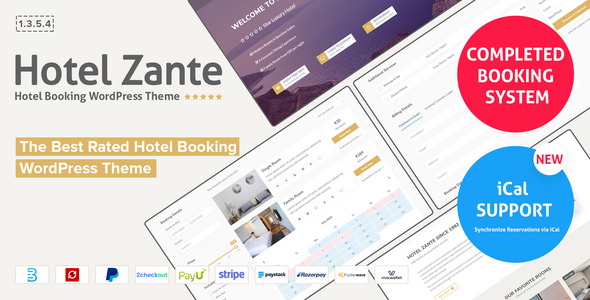
Stuck on your Hotel Theme Zante WordPress theme? Let's fix it.
No endless back-and-forth. Just send us the details and we'll get it done.
No obligation · Replies within 1 hour · Quote within 1 day
Setup · Customization · Bug fixes · WooCommerce integration
About Hotel Theme Zante WP Theme
Hotel Theme Zante is a WordPress theme by Eagle-Themes built specifically for hospitality businesses. It ships with a booking-ready layout, room listing templates, and a clean visual style suited to hotels, guesthouses, and boutique stays.
The theme integrates with popular booking plugins and includes homepage sections for amenities, room types, testimonials, and a gallery. Page builder compatibility makes it easier to rearrange content without touching code.
Eagle-Themes built Zante with a focus on visual presentation, so property photos get prominent placement throughout the layout. It supports WooCommerce for selling add-ons or packages, and the responsive design holds up across mobile, tablet, and desktop without major adjustments.
Get matched with a Hotel Theme Zante developer in under one day
Tell us about your Hotel Theme Zante project. Small fixes, Hotel Theme Zante theme customization, or a full website build, whatever you need, we've got it covered.
We'll connect you to the right Hotel Theme Zante developers, define the scope, and get everything 100% clear.
You'll get one estimate, hire your preferred developer, and start collaborating.
Hotel Theme Zante has enough flexibility to support a professional hotel site, but getting it to perform and look exactly right takes developer experience. FoxyConcept connects you with vetted Hotel Theme Zante developers through Codeable, a platform where every developer is screened before being approved. You post your project, receive a clear estimate within 24 hours, and only move forward if you are satisfied. No retainers, no guesswork.
Pros
- Pre-built room listing templates save significant setup time for hotel sites
- Booking plugin compatibility works with MotoPress Hotel Booking and similar tools without custom code
- Visual layout prioritises large property images, which matters for conversion on hospitality sites
- WooCommerce support allows selling packages, extras, or vouchers directly from the site
- Child theme support means Eagle-Themes updates can be applied without wiping customisations
Cons
- Theme options panel is less intuitive than premium competitors like Divi or Astra
- Limited built-in schema markup for hotel-specific rich results requires manual additions
- Mobile performance needs manual optimisation, especially on image-heavy room pages
- Documentation from Eagle-Themes is sparse, which increases reliance on developer support
- Styling customisation without a child theme risks being overwritten during Eagle-Themes updates
Who is Hotel Theme Zante for?
Boutique Hotels
Hotel Theme Zante suits boutique hotels that need a polished visual layout without a large development budget. A Hotel Theme Zante specialist can tailor room pages, add custom amenity icons, and connect a booking plugin so guests can check availability and reserve directly from the site.
Bed and Breakfast Properties
B&B owners benefit from Zante’s simple room listing structure and homepage sections for local attractions and guest testimonials. A Hotel Theme Zante developer can configure a booking calendar, set pricing rules, and add a breakfast inclusions block without rebuilding the theme from scratch.
Holiday Villas and Rentals
Villa rental businesses often need multi-property layouts and date-based pricing. Hotel Theme Zante handles single or small multi-property setups well. A developer can extend it with booking plugins that support variable rates, cleaning fees, and minimum stay rules common in the short-term rental market.
Hostels and Budget Accommodation
Hostels need dorm listings, bunk-bed pricing, and shared facility descriptions alongside private room options. Hotel Theme Zante’s flexible room templates can be adapted for this. A Hotel Theme Zante expert can restructure room post types and add dormitory-specific fields to the booking process.
Wellness Retreats and Spa Hotels
Wellness retreats need pages for treatments, packages, and retreat schedules alongside standard accommodation listings. Hotel Theme Zante’s WooCommerce compatibility makes it possible to sell packages directly. A specialist can integrate a treatment booking plugin and build a visual schedule for retreat programmes.

Customizing Hotel Theme Zante
Out of the box, Hotel Theme Zante covers most standard hotel site needs, but most businesses need adjustments that go beyond the theme options panel. A Hotel Theme Zante expert can modify room templates, restructure the booking flow, adjust typography and color schemes to match brand guidelines, or rebuild sections using Elementor or the native page builder.
Custom work often includes integrating third-party booking systems like Checkfront or Beds24, adding multilingual support via WPML, or creating custom post types for seasonal packages and special offers.
If the default layout does not match your property’s structure, a developer can restructure the theme hierarchy, add child theme modifications, and ensure updates from Eagle-Themes do not overwrite your changes.
Recommended plugins for Hotel Theme Zante
Hotel Theme Zante works well with several plugins that extend functionality beyond its defaults. For search visibility, pairing it with Yoast or Rank Math is straightforward, and a Hotel Theme Zante specialist can configure schema markup for lodging businesses to improve rich results. See our WordPress SEO optimisation service for details.
On the performance side, image-heavy hotel sites benefit from lazy loading, caching layers, and a CDN setup. Core Web Vitals scores often need manual work on themes like this. Our WordPress performance service covers full audits and implementation.
Not sure which plugins to use? This WordPress plugins directory covers the most popular options with reviews and setup guides.
Hotel Theme Zante common issues
Hotel Theme Zante booking form not showing on page
This usually happens when the booking plugin shortcode is placed in a widget area or page that the theme template does not render correctly. Check that the plugin is active and the shortcode is inside the main content area, not a sidebar. If the booking form was working before an update, a plugin or theme version conflict is likely the cause. A developer can trace the conflict quickly. See our WordPress bug fixing service for fast resolution.
Hotel Theme Zante room images not displaying correctly
Room image display issues in Hotel Theme Zante are often tied to incorrect image sizes set in WordPress media settings, or a missing add_image_size call in the theme. Run Regenerate Thumbnails after confirming the correct image dimensions are registered. If images crop inconsistently across devices, the CSS object-fit property may need adjustment in the child theme stylesheet.
Hotel Theme Zante homepage slider broken after update
After a theme update from Eagle-Themes, slider settings occasionally reset or JavaScript conflicts appear with other plugins. Disable other plugins one at a time to isolate a script conflict. If the slider library version changed in the update, cached JavaScript files may also cause this. Clear all caches, including server-side and CDN, then test again. If the issue persists, a Hotel Theme Zante developer can patch the conflict directly.
Hotel Theme Zante mobile menu not working
A broken mobile menu in Hotel Theme Zante is typically a jQuery conflict or a z-index issue where another element overlaps the menu toggle. Open browser developer tools and check the console for JavaScript errors. Also verify that the mobile menu toggle is visible in the Customizer under the correct breakpoint. If a page builder plugin adds its own scripts, those can sometimes interfere with theme navigation scripts.
Hotel Theme Zante page builder layout not saving
Page builder layouts failing to save in Hotel Theme Zante are often caused by PHP memory limits or nonce timeout issues on longer editing sessions. Increase the memory_limit in wp-config.php to at least 256MB. Also check that no security plugin is blocking the REST API, which many page builders rely on for autosave. Our WordPress bug fixing service can resolve persistent save failures.
Hotel Theme Zante slow loading on room pages
Room pages in Hotel Theme Zante tend to load multiple large images, gallery scripts, and booking plugin assets simultaneously. Start by compressing all room images and enabling lazy loading. Review which scripts the theme loads on those pages and defer non-critical JavaScript. A caching plugin with page-level rules will help. If the theme loads booking plugin scripts site-wide rather than on relevant pages only, a developer can conditionally enqueue them.
Hotel Theme Zante contact form not sending emails
If the Hotel Theme Zante contact form submits but emails do not arrive, the issue is almost always WordPress using PHP mail rather than SMTP. Hosting servers frequently block outgoing PHP mail. Install an SMTP plugin such as WP Mail SMTP and connect it to a transactional email service like Mailgun or SendGrid. Check spam folders first to rule out a delivery filtering issue before changing configuration.
Hotel Theme Zante WooCommerce checkout page layout broken
WooCommerce checkout layout problems in Hotel Theme Zante often appear after a WooCommerce major version update that changes template files. Check the WooCommerce system status for outdated template warnings. If the theme overrides WooCommerce templates in a /woocommerce/ folder, those files need updating to match the current WooCommerce version. Our WordPress bug fixing service handles template conflicts efficiently.
Hotel Theme Zante custom CSS not applying after update
Custom CSS added directly to the Hotel Theme Zante parent theme files will be overwritten on every Eagle-Themes update. Always add custom CSS through a child theme’s stylesheet or via the WordPress Customizer Additional CSS field. If you were using the Customizer and styles disappeared, check whether the Customizer settings were saved to a different theme variation or were wiped during an update that reset the theme options.
Hotel Theme Zante child theme not inheriting parent styles
A Hotel Theme Zante child theme that does not inherit parent styles is usually missing the correct wp_enqueue_scripts setup in its functions.php. The child theme must enqueue the parent stylesheet explicitly rather than relying on the old @import method in CSS. Confirm the Template: header in the child theme’s style.css matches exactly the folder name of the parent theme.
Hotel Theme Zante FAQ
Hotel Theme Zante is generally compatible with Elementor, though some theme-specific sections may not be editable through the page builder without additional configuration. A Hotel Theme Zante specialist can set up Elementor properly, resolve any template conflicts, and ensure the theme’s native layouts do not interfere with pages built using Elementor’s visual editor.
Hotel Theme Zante works with MotoPress Hotel Booking, which is the most common pairing. It can also be adapted for WP Hotel Booking and similar plugins. The booking form display and styling may need developer adjustment depending on which plugin you choose, as default styles vary between booking tools.
Yes. Hotel Theme Zante suits vacation rental sites, particularly for villas, apartments, or small property collections. It handles room or unit listings, availability displays, and contact or booking forms. A Hotel Theme Zante developer can extend the room post type to accommodate rental-specific fields like check-in instructions, house rules, and nightly rates.
Always use a child theme before making any code customisations. Custom CSS and PHP changes in a child theme are not overwritten by Eagle-Themes updates to the parent. Back up the site before updating and test on a staging environment first. Settings in the Customizer are generally preserved across updates.
Hotel Theme Zante is translation-ready and works with WPML and Polylang for multilingual setups. A Hotel Theme Zante developer can configure string translations for theme-specific text, set up language switchers, and ensure the booking plugin also handles multilingual content correctly.
Hotel Theme Zante is built to be responsive across screen sizes. However, real-world performance on mobile varies depending on how much content, how many images, and which plugins are active. Manual optimisation is usually needed on room-heavy sites to pass Core Web Vitals thresholds on mobile.
Go to Appearance, then Customizer, and look for the Site Identity or Header section. Hotel Theme Zante allows logo uploads through the WordPress Customizer. If the logo is not displaying at the expected size, the theme’s logo dimensions may need adjusting in the custom CSS or child theme stylesheet.
Yes, Hotel Theme Zante can be migrated to a new host without issues specific to the theme. The standard WordPress migration process applies. Check our WordPress migration service if you need help moving the site, including database, files, and any booking plugin data.
Hotel Theme Zante does not include advanced built-in SEO features. It outputs clean HTML, which is a baseline requirement, but for proper SEO you need a dedicated plugin like Yoast or Rank Math. Adding lodging schema markup for hotel-specific rich results requires manual configuration or developer assistance.
FoxyConcept connects you with vetted Hotel Theme Zante developers through Codeable. Post your project, receive a free estimate within 24 hours, and only proceed when you are ready. Visit our WordPress development services page or go directly to Get a Free Estimate.
Hire a Hotel Theme Zante Developer
Whether you need a full Hotel Theme Zante setup, custom template work, booking plugin integration, or ongoing fixes, FoxyConcept matches you with a developer who knows the theme. Work is delivered through Codeable, so every project comes with a vetted professional and a clear scope before any work begins. Get a Free Estimate and describe what you need — no obligation to hire.
You'll need a free Codeable account so developers can ask questions and send their quotes.