Cascade WordPress Theme
by QuanticaLabs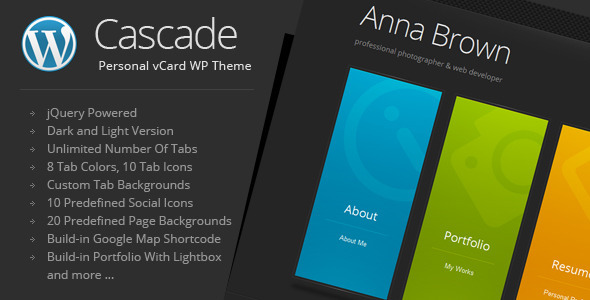
Stuck on your Cascade WordPress theme? Let's fix it.
No endless back-and-forth. Just send us the details and we'll get it done.
No obligation · Replies within 1 hour · Quote within 1 day
Setup · Customization · Bug fixes · WooCommerce integration
About Cascade WP Theme
Cascade is a multipurpose WordPress theme built by QuanticaLabs. It ships with a drag-and-drop page builder, multiple pre-built demo sites, and a clean codebase that loads fast out of the box. The design leans minimal but flexible, covering portfolios, agencies, business sites, and creative studios without feeling generic.
QuanticaLabs built Cascade with WPBakery integration at its core, so most layout control happens visually. It supports WooCommerce, custom headers, and multiple blog layouts. Translation-ready and WPML-compatible, it works for multilingual projects without extra configuration work. Regular updates from QuanticaLabs keep it compatible with current WordPress versions. If you need a theme that handles both visual polish and functional depth without heavy plugin dependencies, Cascade is a solid starting point.
Get matched with a Cascade developer in under one day
Tell us about your Cascade project. Small fixes, Cascade theme customization, or a full website build, whatever you need, we've got it covered.
We'll connect you to the right Cascade developers, define the scope, and get everything 100% clear.
You'll get one estimate, hire your preferred developer, and start collaborating.
QuanticaLabs themes like Cascade are well-documented, but real-world projects always surface edge cases the documentation doesn’t cover. Custom layouts, WooCommerce modifications, speed issues, or third-party integrations all require developer experience with this specific theme.
Codeable connects you with vetted WordPress developers who have hands-on experience with Cascade. Every developer on the platform has passed a strict vetting process, so you’re not gambling on an unknown freelancer. Post your project and get matched within 24 hours.
Pros
- Clean, minimal design that works across multiple niches without heavy restyling
- WPBakery bundled and tightly integrated, so visual layout control is built in from day one
- Multiple pre-built demo sites that can be imported in one click
- WooCommerce compatible with styled product pages and checkout templates
- WPML-ready and translation-compatible for multilingual site builds
Cons
- WPBakery adds JavaScript and CSS weight that needs active management to keep load times low
- Header customization options are limited beyond the preset layouts without custom code
- Some demo sites rely on specific plugins that add to maintenance overhead long-term
- No Gutenberg-first workflow — users who prefer block editing will find WPBakery awkward
- QuanticaLabs support response times can be slow during high-volume periods
Who is Cascade for?
Creative Agency
Cascade suits agencies well. The demo sites include agency-focused layouts with service sections, team grids, and case study pages. A Cascade developer can adapt these layouts to match brand guidelines without rebuilding from scratch. WPBakery makes it easy to update content without developer help once the initial build is done.
Portfolio Site
The grid-based portfolio layouts in Cascade are clean and filterable. Photographers, designers, and developers use it to present work without distracting visual noise. A Cascade specialist can add custom post types for projects, extend filtering with AJAX, or connect the portfolio to a WooCommerce print or licensing shop.
WooCommerce Store
Cascade’s WooCommerce integration covers product pages, shop archives, and cart styling. It’s not a dedicated ecommerce theme, but for small to mid-size stores it handles well. A Cascade developer can add custom product templates, upsell sections, or checkout modifications that the default WooCommerce styling doesn’t include.
Corporate Business Site
Cascade’s business demo sites include service pages, pricing tables, team sections, and contact forms. They’re structured for lead generation rather than pure aesthetics. A Cascade expert can add CRM integrations, custom form routing, or gated content sections that convert visitors rather than just display them.
Freelancer or Consultant
Solo consultants and freelancers use Cascade to build credible, professional sites quickly. The single-page demo layouts work well for this. A Cascade developer can tighten the build, remove unused plugin dependencies, and configure contact forms and booking integrations to match the consultant’s workflow.

Customizing Cascade
Cascade gives you a lot of room in the WordPress Customizer — fonts, colors, header layouts, footer columns, and sidebar options are all adjustable without touching code. WPBakery is bundled, so page layouts are built visually using rows and columns.
That said, deeper customization requires a Cascade expert. Child theme setup, custom post type templates, header modifications beyond the presets, and WooCommerce styling all need developer input to do cleanly. A Cascade specialist can also strip out unused scripts to improve load times, integrate third-party APIs, or build custom shortcodes that extend what the bundled builder offers. If your project needs something the demo sites don’t cover, working with a Cascade developer from the start saves a lot of back-and-forth later.
Recommended plugins for Cascade
Cascade works well with a focused plugin stack. WooCommerce handles ecommerce. WPML or Polylang covers multilingual needs. Contact Form 7 and WPForms both integrate cleanly. For SEO, Yoast and Rank Math slot in without conflicts.
Where things get interesting is performance. Cascade bundles WPBakery, which adds asset weight. Pairing it with proper caching, image optimization, and a CDN makes a real difference. A developer who understands WordPress performance can audit the theme’s output and reduce load times significantly. If organic search matters to your project, an audit covering WordPress SEO alongside theme structure is worth doing early.
Not sure which plugins to use? This WordPress plugins directory covers the most popular options with reviews and setup guides.
Cascade common issues
Cascade theme WPBakery editor not loading after update
This usually happens when WPBakery and Cascade are out of sync after an update. First, check that both the theme and WPBakery plugin are on their latest versions. Clear all caches including server-level cache. If the editor still won’t load, deactivate other plugins temporarily to rule out conflicts. A JavaScript conflict is the most common cause. If you can’t isolate it, a WordPress bug fixing service can trace the conflict fast.
Cascade homepage layout broken after WordPress update
WordPress core updates occasionally break WPBakery shortcode rendering in Cascade. The homepage may show raw shortcodes or collapse to a blank layout. Check if WPBakery is flagged as needing an update in the plugins list. Rolling back the WordPress update temporarily using a staging site can confirm the cause. Restoring from a backup and then updating in sequence — theme first, then WPBakery — usually resolves it cleanly.
Cascade theme header not displaying correctly on mobile
Cascade’s mobile header relies on specific CSS breakpoints that third-party plugins can override. Check the Customizer header settings first and confirm the mobile menu is enabled. Then inspect using browser DevTools at mobile viewport to find which stylesheet is overriding the header styles. A caching plugin serving a desktop-cached version to mobile is another common cause. Clear all caches and test in an incognito window before going deeper.
WooCommerce product page styling broken in Cascade
WooCommerce updates frequently conflict with theme-level product page templates. If Cascade’s product page styling breaks, check whether WooCommerce flagged any outdated template files under WooCommerce > Status > Templates. Those templates need updating to match the current WooCommerce version. This is a manual process that requires copying updated template files into the child theme. A WordPress bug fixing specialist can handle this without breaking existing customizations.
Cascade theme demo import fails or freezes
Demo imports fail most often due to server memory limits, execution time limits, or a slow connection timing out the import process. Check your host’s PHP memory limit — it should be at least 256MB. Maximum execution time should be 120 seconds or more. Try importing content, widgets, and settings separately rather than all at once. Some hosts block external HTTP requests that the importer relies on. Switching to a better-resourced hosting environment often resolves persistent import failures.
Cascade theme fonts not loading or showing wrong font
Cascade loads Google Fonts via enqueued scripts. If fonts aren’t displaying, a privacy plugin blocking external requests or a CSP header from the server is the likely cause. Check the browser console for blocked resource errors. If you’re running a cookie consent or privacy plugin, whitelist Google Fonts or switch to locally hosted fonts using a plugin like OMGF. Also clear any CSS caching from your performance plugin after making changes.
Cascade theme slow loading time on mobile
Cascade with WPBakery can generate significant JavaScript and CSS weight. On mobile, this compounds with image loading. Start by running a PageSpeed Insights test to identify the largest blocking resources. Enable CSS and JS minification and deferral through a performance plugin. Lazy load images. Remove WPBakery assets that aren’t used on specific pages. For a structured approach to this, see our WordPress performance service.
Cascade contact form not sending emails
Contact Form 7 email delivery issues in Cascade are almost always a server mail configuration problem, not a theme issue. WordPress’s wp_mail function relies on the server’s sendmail, which most hosts restrict. Install WP Mail SMTP and configure it with a transactional email service like Mailgun, SendGrid, or your email provider’s SMTP. Test using the plugin’s built-in test email tool. Check spam folders before assuming delivery has failed.
Cascade theme portfolio filter not working
The portfolio filter in Cascade uses Isotope or MixItUp JavaScript. If filtering stops working, a JavaScript conflict with another plugin is usually the cause. Open the browser console and look for JS errors when clicking filter buttons. Deactivate plugins one at a time to isolate the conflict. Also check if jQuery is loading more than once — multiple jQuery instances break event listeners and are a common cause of filter failures in WPBakery-based themes.
Cascade theme white screen after plugin update
A white screen in Cascade after a plugin update indicates a fatal PHP error. Enable WordPress debug mode by adding WP_DEBUG true and WP_DEBUG_LOG true to wp-config.php, then check the debug.log file for the specific error. Most white screens trace back to a plugin conflict or a PHP version incompatibility. Deactivate the recently updated plugin via FTP or the database to restore access. If you can’t access the admin at all, a WordPress bug fixing service can recover the site quickly.
Cascade FAQ
QuanticaLabs updates Cascade regularly to maintain compatibility with current WordPress versions. Always check the theme changelog before updating on a live site. Test updates on a staging environment first. If you’re running an older version of Cascade, large version jumps can sometimes require manual adjustments, particularly to WPBakery-dependent layouts.
Yes. Cascade includes WooCommerce support with styled templates for shop pages, product pages, cart, and checkout. It’s not a dedicated WooCommerce theme, but it handles small to mid-size stores without major issues. A Cascade developer can extend WooCommerce functionality beyond what the default theme templates provide.
Technically yes, but the demo layouts are built entirely with WPBakery shortcodes. Removing WPBakery from a WPBakery-built site will break those layouts. You can use Cascade with Gutenberg for new pages, but migrating existing WPBakery content to blocks requires manual rebuilding of each page.
Cascade includes a one-click demo importer. Go to Appearance > Import Demo Data and select the demo you want. Your server needs adequate PHP memory and execution time limits for the import to complete. If the import freezes or fails, increase PHP limits via your host’s control panel or php.ini file before retrying.
Cascade itself doesn’t handle GDPR compliance — that’s managed through plugins. You’ll need a cookie consent plugin, a privacy policy page, and proper configuration of any contact forms or analytics tools. Google Fonts loaded externally may require local hosting or user consent under stricter interpretations of GDPR in some EU jurisdictions.
Yes. Cascade is marked as WPML-compatible. String translations, page translations, and multilingual menus all work through WPML’s standard workflow. Some custom elements built with WPBakery may need additional string registration to appear in WPML’s translation editor, which a Cascade specialist can handle.
Create a folder in wp-content/themes named cascade-child. Add a style.css file with the correct template header referencing the parent theme slug, and a functions.php file that enqueues the parent stylesheet. Activate the child theme from Appearance > Themes. All custom CSS and template overrides go into the child theme to survive parent theme updates.
Yes. A Cascade developer can handle layout customization, WooCommerce modifications, performance work, custom post types, or any build from scratch using the theme. Codeable is a vetted network where you can post your project and get matched with a Cascade specialist within 24 hours. Every project starts with a free estimate.
Cascade produces reasonably clean HTML output, but WPBakery adds render-blocking scripts that affect Core Web Vitals scores. With proper performance optimization and an SEO plugin like Rank Math or Yoast, Cascade sites can rank well. The theme itself is not an SEO liability, but it needs active performance management to score well technically.
Always use a child theme for customizations. If you’ve modified the parent theme directly, those changes will be overwritten on update. Before updating, back up the site, check the changelog for breaking changes, and test on a staging site. Customizations made through the Customizer are stored in the database and survive theme updates regardless of child theme setup.
Hire a Cascade WordPress Expert
Whether you need a Cascade developer to build a site from a demo, customize layouts beyond what the Customizer allows, fix a bug, or optimize performance, you can get matched with a specialist fast. Work is delivered through Codeable, where every developer is vetted and every project starts with a free estimate.
Get a Free Estimate and describe what you need. No obligation to hire.
You'll need a free Codeable account so developers can ask questions and send their quotes.