imEvent WordPress Theme
by Jthemes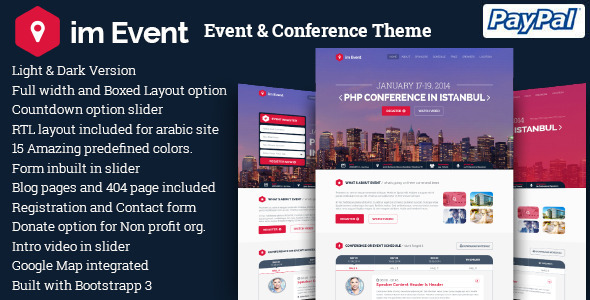
Stuck on your imEvent WordPress theme? Let's fix it.
No endless back-and-forth. Just send us the details and we'll get it done.
No obligation · Replies within 1 hour · Quote within 1 day
Setup · Customization · Bug fixes · WooCommerce integration
About imEvent WP Theme
imEvent is a WordPress theme by Jthemes built specifically for event management websites. It covers conferences, music festivals, corporate summits, sports events, and meetups. The theme ships with a purpose-built event schedule builder, speaker profiles, ticket integration, and countdown timers.
Built on a clean HTML5 and CSS3 foundation, imEvent is compatible with WooCommerce for ticket sales and supports popular page builders. The layout options cover single-day and multi-day event formats, making it flexible enough for annual conferences and recurring community events alike.
Jthemes has kept the codebase organised, which means load times are reasonable out of the box and customisation does not require heavy overrides. If you need a theme that handles event-specific features without forcing you to install five separate plugins, imEvent covers most of that ground natively.
Get matched with a imEvent developer in under one day
Tell us about your imEvent project. Small fixes, imEvent theme customization, or a full website build, whatever you need, we've got it covered.
We'll connect you to the right imEvent developers, define the scope, and get everything 100% clear.
You'll get one estimate, hire your preferred developer, and start collaborating.
imEvent has enough moving parts that getting everything configured correctly the first time saves significant rework later. Speaker grids, schedule builders, and WooCommerce ticket flows each carry their own configuration requirements.
Through Codeable, a vetted network of WordPress specialists, you can connect with an imEvent developer who has handled these setups before. You post your project, receive a clear estimate within 24 hours, and only proceed if the scope and price make sense. No commitment required upfront.
Pros
- Purpose-built event schedule builder with multi-track and multi-day support
- Native speaker profile post type with session linking
- WooCommerce-ready for direct ticket sales without a third-party plugin dependency
- Clean, organised codebase that makes child theme development straightforward
- Countdown timer and registration CTA blocks included without extra plugins
Cons
- Theme options panel is not Gutenberg-native, so block editor use feels limited
- Demo import can be slow and occasionally requires manual cleanup of placeholder content
- Mobile schedule layout becomes cluttered with more than three simultaneous tracks
- Documentation is sparse for advanced customisation and third-party integrations
- No built-in recurring event support, requires a plugin to handle weekly or monthly events
Who is imEvent for?
Tech Conferences
imEvent handles multi-track conference schedules well. A speaker roster, session slots, and sponsor tiers can all be managed from the WordPress backend. An imEvent developer can extend this with custom filtering by topic or audience level, which is common for developer conferences and industry summits with parallel sessions.
Music Festivals
Festival sites need lineup pages, stage schedules, and ticket purchase flows in one place. imEvent supports this structure out of the box. An imEvent specialist can add artist bios as custom post types, build a stage-by-stage schedule view, and wire up WooCommerce for tiered ticket pricing and early bird deadlines.
Corporate Summits
Corporate events need clean design, sponsor visibility, and reliable registration. imEvent provides the structure; a developer can add gated content for registered attendees, custom form flows, and CRM integrations. Branding requirements are usually strict in this space, and a specialist can match corporate identity guidelines precisely.
Sports Events and Tournaments
Tournament brackets, team profiles, and match schedules need a different information architecture than a conference. imEvent’s flexible custom post types give a developer enough to work with. An imEvent expert can build bracket display logic, results pages, and live score update hooks suited to sports event formats.
Community Meetups and Workshops
Smaller recurring events like monthly meetups or weekly workshops benefit from imEvent’s lightweight setup. An imEvent developer can add a recurring event plugin, configure a community calendar view, and set up email reminders through a marketing integration. The theme scales down well for lower-traffic community sites without excess overhead.

Customizing imEvent
Customising imEvent goes well beyond swapping colours and fonts. The theme includes a dedicated event schedule module where you can define tracks, time slots, and speaker assignments. Adjusting these to match a specific event format often requires template-level edits or child theme work.
An imEvent expert can help you restructure the homepage layout for a specific event type, integrate a third-party ticketing system like Eventbrite, or add custom post type relationships between speakers and sessions. Branding work, such as matching a client’s corporate identity precisely, frequently needs CSS overrides and careful typography adjustments across breakpoints.
If you need conditional content, multi-language support through WPML, or a custom agenda PDF export, those features require developer input. An imEvent specialist can scope and deliver these additions without breaking the theme’s existing event management structure.
Recommended plugins for imEvent
imEvent pairs well with several plugins that extend its core event functionality. WooCommerce handles ticket sales with quantity control and order management. The Events Calendar plugin can be layered in for recurring events and iCal feeds.
For site speed, caching and image optimisation are worth addressing early, particularly on pages with large speaker grids and countdown timers. See our WordPress performance service for that. If search visibility matters, structured data for events needs proper implementation. Our WordPress SEO service covers event schema markup so your events appear in Google’s event results.
Not sure which plugins to use? This WordPress plugins directory covers the most popular options with reviews and setup guides.
imEvent common issues
imEvent schedule not displaying on mobile
The multi-track schedule layout in imEvent uses a CSS grid that breaks below certain viewport widths. Check the theme’s responsive stylesheet for the .schedule-grid container. If you have more than three tracks, the columns collapse incorrectly on screens under 768px. Add a media query that switches the grid to a single-column stacked view. If the issue persists after that, a JavaScript conflict with a slider or tab plugin may be overriding the layout rendering.
imEvent countdown timer not working after plugin update
imEvent’s countdown timer relies on a JavaScript function that reads a stored event date value. After plugin updates, conflicts with optimisation plugins that defer or concatenate JS files can break this. Check whether your caching or minification plugin is deferring the timer script. Exclude the countdown script from deferral in your optimisation settings. If the date field itself is returning empty, verify the custom field is still mapped correctly in the event post type settings.
imEvent speaker images not loading on event page
Speaker images failing to load usually points to a broken image URL or a thumbnail size that was not regenerated after a media settings change. Go to Settings > Media and confirm your thumbnail dimensions match what imEvent expects. Then run a thumbnail regeneration using a plugin like Regenerate Thumbnails. If the URLs are broken entirely, check whether a CDN or object cache is serving stale paths. For persistent image issues, our WordPress bug fixing service can trace the root cause.
imEvent WooCommerce tickets not showing on checkout
When imEvent ticket products are not appearing at checkout, the first check is whether the WooCommerce product is published and assigned the correct product type. imEvent’s ticket display relies on a product category or tag match in some template versions. Verify the product is linked to the correct event post. Also check that WooCommerce template files have not been overridden by an outdated copy in the theme’s /woocommerce/ folder that is incompatible with your current WooCommerce version.
imEvent demo content import failed or incomplete
imEvent demo imports fail most often due to PHP memory limits or execution time limits on shared hosting. Set memory_limit to at least 256M and max_execution_time to 300 in your php.ini or wp-config.php. If the import completes but content is missing, the XML file may have imported without associated media. Run the import again with the media option checked. Alternatively, import the XML manually via Tools > Import using the WordPress importer.
imEvent homepage slider not showing on page
If the imEvent homepage slider is not displaying, start by checking whether the slider plugin it depends on is active and updated. imEvent uses a bundled or recommended slider plugin in many versions. Go to Appearance > Theme Options and confirm the slider is set as the active homepage element. If a page builder is in use, the slider shortcode or block may have been removed during a layout edit. Re-add the slider element and save. Clear all caches before testing.
imEvent custom CSS not applying after theme update
Custom CSS added via Appearance > Customize is stored in the active theme’s customizer data. When imEvent updates, that data is usually preserved, but switching themes or child themes can wipe it. Always use a child theme for custom CSS if you intend to keep the parent theme updatable. If CSS was added directly to the parent theme’s style.css, it will be overwritten on update. Move those rules to a child theme stylesheet. Our WordPress bug fixing service can audit and migrate your customisations safely.
imEvent WPML translation not working correctly
WPML compatibility with imEvent requires that all custom post types, including speakers, events, and schedules, are registered as translatable in WPML > Translation Management. If translated pages are showing the default language content, check whether the theme’s custom post type registration includes the necessary arguments for WPML to recognise them. Also confirm that string translations for theme options are synchronised through WPML > Theme and Plugin Localization.
imEvent Google Fonts not loading or showing fallback font
Google Fonts failing to load in imEvent can result from a font API key requirement introduced in newer versions of WordPress or a Content Security Policy header blocking external font requests. Check your browser console for a blocked request error. If the request is blocked, update your CSP header to allow fonts.googleapis.com and fonts.gstatic.com. Alternatively, host the fonts locally using a plugin like OMGF, which also improves page load performance by eliminating the external request entirely.
imEvent event page 404 error after permalink reset
A 404 on event single pages almost always means WordPress permalink rules need to be flushed. Go to Settings > Permalinks and click Save Changes without making any edits. This forces WordPress to regenerate the rewrite rules. If the 404 persists, check whether the imEvent event post type is registered with rewrite set to true. On some hosting environments, the .htaccess file may also need to be updated manually. Our WordPress bug fixing service handles persistent rewrite rule issues.
imEvent FAQ
imEvent is primarily built around its own theme options and shortcode system. WPBakery is generally supported, and most layout sections can be edited through it. Full Elementor compatibility depends on the theme version. Some imEvent-specific sections, like the schedule builder and speaker grid, may not expose all options through Elementor’s drag-and-drop interface and may need direct template editing.
Yes. imEvent is designed to work with WooCommerce for ticket sales. You create ticket products in WooCommerce and link them to your event posts. The theme includes template hooks to display purchase buttons on event pages. For more complex setups like tiered pricing, group tickets, or seat selection, additional WooCommerce extensions or custom development are needed.
imEvent includes a Speaker custom post type. You create individual speaker posts with photo, bio, and social links, then assign them to sessions within the schedule builder. The relationship between speakers and events is managed through the theme’s admin interface. If you need speakers assigned to multiple events or filtered by topic, that requires custom development beyond the default setup.
imEvent supports translation through WPML and Polylang. The theme’s custom post types and theme options strings need to be registered as translatable within the respective plugin settings. Out of the box, the theme is translation-ready with a .pot file included. Full multilingual functionality with translated schedules and speaker profiles typically needs some configuration work to get right.
Not natively. imEvent is structured around single events with a defined date range. For weekly classes, monthly meetups, or recurring conferences, you need a plugin like The Events Calendar or Event Organiser to handle recurrence logic. An imEvent developer can integrate one of these plugins and map the output to imEvent’s schedule display templates.
The imEvent schedule builder allows you to define multiple days and assign sessions to each day with separate time slots. In the event admin screen, you add day tabs and populate each with sessions, speakers, and timing. The frontend displays a tabbed schedule automatically. If your event spans more than four or five days, the tab display can become unwieldy and may need custom layout work.
imEvent does not have built-in video streaming or virtual attendance features. For hybrid events, you would typically embed a Zoom or YouTube Live link within session descriptions and use a separate platform for attendee management. A developer can add a gated content layer so only registered attendees see the stream links, using a membership or access control plugin alongside imEvent.
Always use a child theme for any CSS or template changes. Customisations made directly in the parent theme files will be overwritten when you update. Theme options saved through the Customizer or the theme’s options panel are stored in the database and are not affected by updates. Before updating, take a full backup of your site and test the update on a staging environment first.
imEvent includes a venue location field that outputs a Google Map on the event page. This requires a valid Google Maps API key with the Maps JavaScript API and Geocoding API enabled. Enter the API key in the theme options panel. Without a valid key, the map section will either show an error or a blank area. The API key needs billing enabled in your Google Cloud account.
imEvent was built by Jthemes, a ThemeForest author with a portfolio of event and business themes. Support is provided through the ThemeForest comments and ticket system. Response times vary. If you need ongoing maintenance, updates, or custom development beyond what Jthemes covers directly, hiring an independent imEvent specialist through a platform like Codeable is a practical option.
Hire an imEvent Expert Developer
Whether you need a full imEvent setup, a custom schedule layout, or a ticketing integration that actually works at scale, a specialist gets it done without the trial and error. Post your project and receive a free estimate from a vetted imEvent developer through Codeable. No obligation to hire, no risk.
Get a Free Estimate and have an imEvent expert review your project within 24 hours.
You'll need a free Codeable account so developers can ask questions and send their quotes.