Agile WordPress Theme
by LiveMesh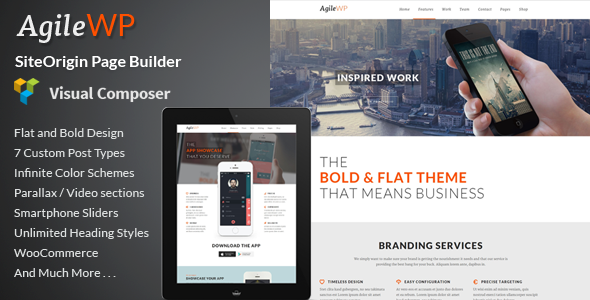
Stuck on your Agile WordPress theme? Let's fix it.
No endless back-and-forth. Just send us the details and we'll get it done.
No obligation · Replies within 1 hour · Quote within 1 day
Setup · Customization · Bug fixes · WooCommerce integration
About Agile WP Theme
Agile is a multipurpose WordPress theme built by LiveMesh, a developer known for clean code and well-maintained products. It ships with a drag-and-drop page builder, a library of pre-built demo sites, and tight WooCommerce integration. The theme targets agencies, freelancers, and businesses that need a flexible layout without writing custom CSS from scratch.
Under the hood, Agile uses a modular architecture. Sections are built with reusable blocks, and the theme registers its own widget areas and custom post types to keep content structured. It supports WPML for multilingual sites and plays well with popular caching plugins. Performance is reasonable out of the box, though a developer familiar with LiveMesh products can push it further through optimisation and selective asset loading.
Get matched with a Agile developer in under one day
Tell us about your Agile project. Small fixes, Agile theme customization, or a full website build, whatever you need, we've got it covered.
We'll connect you to the right Agile developers, define the scope, and get everything 100% clear.
You'll get one estimate, hire your preferred developer, and start collaborating.
LiveMesh themes are well-built, but every site has specific requirements that go beyond demo content. A vetted Agile developer can handle custom post type integration, performance tuning, plugin conflicts, and layout work that the Customizer alone cannot solve. Through Codeable, you get matched with a specialist who has hands-on experience with LiveMesh products. Projects are scoped properly, and you receive a fixed estimate before any work begins.
Pros
- Ships with a large library of pre-built demo sites covering multiple industries
- Clean modular code structure makes child theme development straightforward
- Tight WooCommerce integration with dedicated product layout options
- WPML compatible for multilingual site builds
- Regular updates from LiveMesh with good backward compatibility
Cons
- The bundled page builder can produce bloated markup if sections are stacked without care
- Advanced header configurations require custom code beyond the Customizer options
- Demo import can fail on shared hosting with low PHP memory limits
- Limited native mega menu functionality without a third-party plugin
- Some inner page templates have fixed layouts that are hard to override without a child theme
Who is Agile for?
Creative Agencies
Agile’s portfolio custom post type and filterable grid layouts make it a practical choice for agencies showcasing client work. An Agile developer can configure custom taxonomy filters, set up case study templates, and connect the portfolio grid to a custom post type with minimal friction.
WooCommerce Stores
The theme’s WooCommerce support includes custom product grids, category pages, and cart styling that align with the overall design. An Agile specialist can extend this further with custom product templates, upsell sections, and checkout page modifications that match brand requirements.
Freelance Portfolios
Agile handles single-page and multi-page portfolio layouts with clean section blocks. For freelancers, an Agile developer can wire up a contact form, configure service sections, and set up a blog with a consistent visual style without relying on heavy third-party plugins.
Corporate Business Sites
Corporate sites need reliable page structures, consistent typography, and clear navigation. Agile’s pre-built business demo sites give a solid starting point. A developer familiar with LiveMesh’s block system can adapt these templates to specific brand guidelines and integrate internal tools or CRM embeds cleanly.
SaaS and Tech Product Landing Pages
Landing pages for SaaS products need fast load times and clear conversion paths. Agile’s modular sections work well for feature blocks, pricing tables, and testimonial areas. An Agile specialist can strip out unused assets, optimise above-the-fold rendering, and configure the layout for A/B testing setups.

Customizing Agile
Agile exposes most of its design options through the WordPress Customizer, covering typography, color schemes, header layouts, and footer configurations. You can switch between boxed and full-width containers, adjust sidebar positions per page, and control sticky header behaviour without touching code.
For deeper changes, an Agile expert can extend the theme using child theme hooks, custom CSS variables, and LiveMesh’s documented filter system. Things like custom mega menus, conditional sidebar logic, and bespoke archive templates typically require developer involvement. If you need a layout that goes beyond the built-in demos or want to integrate a custom plugin cleanly, hiring an Agile specialist saves significant time and avoids breaking the theme on future updates.
Recommended plugins for Agile
Agile works well with a range of plugins. WooCommerce integration is solid for product-focused sites. For performance, pairing the theme with a caching layer and image optimisation plugin makes a real difference. See our WordPress performance service for a structured approach to speed improvements.
On the SEO side, Agile outputs clean heading structures and supports schema markup via Yoast or Rank Math. If you want to go further with technical SEO, structured data, and crawl optimisation, our WordPress SEO service covers that in detail.
Not sure which plugins to use? This WordPress plugins directory covers the most popular options with reviews and setup guides.
Agile common issues
Agile theme demo import stuck or not completing
Demo import failures in Agile are almost always caused by insufficient PHP memory, execution time limits, or a missing required plugin. Set memory_limit to at least 256M and max_execution_time to 300 in your php.ini or wp-config.php. Install all required plugins listed in the theme documentation before running the importer. If the issue persists on shared hosting, a manual XML import via Tools > Import is a reliable fallback.
Agile WordPress theme layout broken after update
Post-update layout breaks in Agile usually come from a conflict between cached CSS and new theme styles, or from a plugin that hooks into the page builder output. Clear all caches immediately after updating, including server-side and CDN caches. If the break persists, deactivate plugins one by one to isolate the conflict. If you are running a child theme, check that your overrides still match the parent template structure. Our WordPress bug fixing service can diagnose and resolve update-related breaks quickly.
Agile theme header not showing correctly on mobile
Mobile header issues in Agile typically involve the hamburger menu not triggering, the logo scaling incorrectly, or sticky header logic not resetting at mobile breakpoints. Open your browser’s inspector and check for JavaScript errors first. Then verify that the theme’s mobile menu settings in the Customizer are configured for your header style. If a third-party header plugin is active, it may be overriding Agile’s mobile output. Testing with plugins deactivated confirms the source.
Agile theme page builder sections overlapping
Overlapping sections in Agile’s page builder usually trace back to incorrect margin or padding values set on a row or column, or a negative z-index applied by a custom CSS rule. Open the section settings and reset spacing to defaults, then reapply intentional values. If the overlap only appears at certain viewport widths, a responsive CSS rule is likely the cause. Use the browser inspector to identify which rule is controlling the position.
Agile WordPress theme slow loading speed
Agile’s default setup loads all registered block styles and scripts globally. To improve speed, use a plugin like Asset CleanUp to restrict scripts to the pages that actually use them. Enable lazy loading for images, compress all media before uploading, and configure a caching plugin with CSS and JS minification. If you are on shared hosting, moving to a faster server makes a measurable difference regardless of theme optimisation.
Agile theme WooCommerce product page layout broken
WooCommerce layout breaks in Agile after a WooCommerce update are common because WooCommerce changes its template files regularly. Agile includes bundled WooCommerce templates that can fall out of sync with the core plugin. Go to WooCommerce > Status > System Status and check for outdated templates. Copy the updated template files to your child theme’s WooCommerce folder and re-apply any customisations. Our WordPress bug fixing service handles WooCommerce template conflicts as a standard fix.
Agile theme custom CSS not applying
If custom CSS added in the Customizer or a child theme stylesheet is not applying, check specificity first. Agile’s bundled styles often use class chains that require matching or higher specificity in overrides. Use the browser inspector to confirm which rule is winning. Also verify that your child theme’s stylesheet is enqueued correctly with wp_enqueue_style and that it depends on the parent theme handle. Caching plugins can also serve stale CSS, so clear caches after every change.
Agile theme contact form not sending emails
Contact form email failures in Agile sites are almost never a theme issue. They originate from the hosting server’s mail configuration or the form plugin’s settings. Install WP Mail SMTP and configure it with a transactional email provider such as SendGrid or Mailgun. Test the connection using the plugin’s built-in test tool. Also check spam folders and confirm that the form’s recipient address matches a real inbox.
Agile theme fonts not loading or fallback showing
Font loading failures in Agile are usually caused by a Content Security Policy blocking Google Fonts requests, or a performance plugin that has inlined or removed font calls. Check the browser console for blocked resource errors. If you are self-hosting fonts for GDPR reasons, ensure the font files are referenced correctly in your child theme stylesheet and that the font family name matches exactly what the theme registers. Our WordPress bug fixing service can audit and correct font loading issues.
Agile theme sidebar not showing on inner pages
Agile controls sidebar visibility at the template level and through individual page settings. Open the page in the editor and look for a theme options panel or page attributes section where sidebar position is set. If the option is set to no sidebar, changing it there will resolve the issue. If sidebars are missing site-wide after an update, check that the widget areas are still registered and that your child theme has not removed the sidebar action hook.
Agile FAQ
Yes. Agile has solid WooCommerce support including custom product grids, category templates, and cart styling. It handles standard store setups well out of the box. For custom product layouts, checkout modifications, or complex catalogue structures, an Agile developer will get better results than using the Customizer alone.
Agile ships with its own page builder but is broadly compatible with Gutenberg for standard content editing. Elementor can be used alongside Agile, though mixing two layout systems on the same page creates unnecessary complexity. Most developers who work with Agile regularly stick to the LiveMesh block system for consistency.
Go to Appearance > Import Demo Data after activating the theme and installing required plugins. Choose a demo and click Import. Make sure your PHP memory limit is at least 256M and max execution time is 300 seconds. On restrictive hosting, the import may time out, in which case the manual XML import method is more reliable.
Yes. Agile’s page builder is optional. You can use the theme with standard Gutenberg blocks or another builder. The theme’s header, footer, and global styles apply regardless of how you build page content. Some demo layouts will not import cleanly without the native builder, but custom builds from scratch work fine without it.
Agile is listed as WPML compatible on the LiveMesh product page. String translation, language switcher integration, and multilingual page structures all work with the theme. For complex multilingual setups involving custom post types or dynamic content, testing in a staging environment before going live is recommended.
Create a folder in wp-content/themes/ with a name like agile-child. Add a style.css file with the standard child theme header including Template: agile. Add a functions.php file that enqueues the parent stylesheet using wp_enqueue_style. Activate the child theme from Appearance > Themes. All customisations go in the child theme to survive updates.
Agile supports Google Fonts through the Customizer typography settings. You can select from available font families and assign them to headings and body text. For custom or self-hosted fonts, you need to register them via a child theme stylesheet and override the theme’s font variables or body CSS rules directly.
Rates vary based on the scope of work. Small fixes and customisations typically start from a few hundred dollars. Full site builds or complex integrations cost more. Through Codeable, you post your project, get matched with a vetted Agile developer, and receive a fixed estimate before committing. There is no obligation to hire after receiving the estimate.
Agile recommends a few companion plugins at installation, typically including a LiveMesh widgets plugin for shortcodes and blocks, and a demo importer. WooCommerce is optional and only needed for store functionality. The theme does not force dependencies that break the site if plugins are deactivated, which keeps the setup manageable.
LiveMesh has a track record of maintaining their themes and releasing updates when WordPress core or WooCommerce introduces breaking changes. Check the theme’s changelog on ThemeForest or the LiveMesh site for recent update dates. As of the latest available information, Agile is an actively maintained product with continued support from the developer.
Hire an Agile WordPress Developer
Whether you need a full site build, a specific customisation, or a fix for a broken layout, working with an experienced Agile developer gets the job done cleanly. Describe your project and receive a free estimate with no obligation to hire. Get a Free Estimate and get matched with a vetted Agile specialist within 24 hours.
You'll need a free Codeable account so developers can ask questions and send their quotes.