Lawyer Base WordPress Theme
by GoodLayers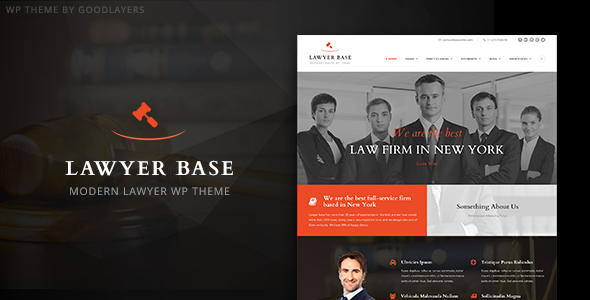
Stuck on your Lawyer Base WordPress theme? Let's fix it.
No endless back-and-forth. Just send us the details and we'll get it done.
No obligation · Replies within 1 hour · Quote within 1 day
Setup · Customization · Bug fixes · WooCommerce integration
About Lawyer Base WP Theme
Lawyer Base is a WordPress theme built by GoodLayers, designed specifically for law firms, attorneys, and legal professionals. It ships with the GoodLayers page builder, giving you drag-and-drop control over layouts without touching code.
The theme includes practice area templates, attorney profile pages, case result sections, and a testimonial system built for legal services. It supports multiple header styles, Google Fonts, and custom color schemes, so firms can match their branding without custom development.
Lawyer Base is built on GoodLayers’ GDLR Core framework and integrates cleanly with WooCommerce and popular form plugins. It’s a practical starting point for any law firm that wants a professional online presence without starting from scratch.
Get matched with a Lawyer Base developer in under one day
Tell us about your Lawyer Base project. Small fixes, Lawyer Base theme customization, or a full website build, whatever you need, we've got it covered.
We'll connect you to the right Lawyer Base developers, define the scope, and get everything 100% clear.
You'll get one estimate, hire your preferred developer, and start collaborating.
GoodLayers themes use a proprietary framework that takes time to learn. If you’re hitting limits with the page builder or need functionality the theme doesn’t support natively, a Lawyer Base developer with hands-on experience is the faster route.
Through Codeable, you get matched with vetted WordPress specialists who know the GoodLayers ecosystem. Post your project, get a free estimate, and review it before committing to anything. No generic agencies, no guesswork on qualifications.
Pros
- Purpose-built templates for law firm pages including practice areas, attorney profiles, and case results
- GoodLayers drag-and-drop page builder included, no separate purchase required
- Multiple pre-built demo layouts covering solo attorneys, full-service firms, and legal consultancies
- WooCommerce compatible for firms selling consultations or legal document downloads
- One-time purchase with lifetime use and access to GoodLayers theme updates
Cons
- GoodLayers page builder is proprietary, so switching themes later means rebuilding all page content
- Default script loading is heavy and requires optimization work to hit good Core Web Vitals scores
- Documentation is thin in places, particularly around advanced custom post type relationships
- No built-in legal-specific functionality like appointment booking or client portals
- Support from GoodLayers can be slow during peak periods, making independent developer help necessary
Who is Lawyer Base for?
Solo Attorney Websites
Solo practitioners need a site that builds credibility fast. Lawyer Base’s attorney profile templates and testimonial sections handle this well. A Lawyer Base developer can strip the layout down to essentials, add a clear consultation booking flow, and connect it to a calendar tool so the site actively generates client inquiries.
Multi-Practice Law Firms
Firms with multiple practice areas need organized navigation and individual landing pages per specialty. Lawyer Base supports this with its practice area post type. A Lawyer Base specialist can extend it with filtering, cross-linking between attorneys and their respective practice areas, and custom archive templates that rank well in local search.
Legal Consultancy Services
Consultancies selling fixed-fee services benefit from Lawyer Base’s WooCommerce compatibility. A developer can build a proper service catalog, set up conditional intake forms based on the service selected, and wire up payment handling. The GoodLayers framework supports the layout flexibility needed to make this feel custom rather than template-based.
Immigration Law Practices
Immigration practices need multilingual support and clear process explanations. Lawyer Base works with WPML, and a Lawyer Base expert can configure language switching, duplicate page structures across languages, and ensure contact forms route correctly per language version. Structured content for visa categories and eligibility guides fits naturally in the practice area framework.
Criminal Defense Attorneys
Criminal defense sites need to communicate availability and urgency. Lawyer Base’s flexible header options and call-to-action sections can be configured for 24/7 contact messaging. A Lawyer Base developer can add click-to-call functionality, an FAQ schema setup for common charges, and case result displays that build trust without making specific outcome promises.

Customizing Lawyer Base
Out of the box, Lawyer Base covers the basics well. But most law firms need something more specific: a custom intake form flow, a filterable attorney directory, multilingual support for bilingual firms, or practice area pages that match a particular structure.
A Lawyer Base expert can handle these adjustments without rewriting the theme. That means adding custom post type relationships, modifying the GoodLayers page builder output, or integrating a CRM like Clio directly into the contact flow.
Child theme development is the right approach for any changes beyond color and font tweaks. It keeps your customizations intact through theme updates and makes future edits easier. If you need a Lawyer Base specialist to build this out properly, working with a vetted developer saves time and avoids breaking changes.
Recommended plugins for Lawyer Base
Lawyer Base works well with a focused plugin stack. For performance, pairing it with a caching layer and image optimization is important since the GoodLayers framework loads multiple scripts by default. A WordPress performance audit can identify exactly what’s slowing your site down.
For search visibility, structured data for attorneys and legal services matters. Adding LocalBusiness and LegalService schema, combined with solid on-page work through a plugin like Rank Math, gives law firms a real edge. A proper WordPress SEO setup ensures Lawyer Base sites rank for the right practice area terms.
Not sure which plugins to use? This WordPress plugins directory covers the most popular options with reviews and setup guides.
Lawyer Base common issues
Lawyer Base page builder content not displaying correctly after update
This usually happens when the GoodLayers GDLR Core plugin is out of sync with the theme version. After a theme update, update all GoodLayers plugins through the Plugins screen first. If content still displays incorrectly, clear your caching plugin and check for JavaScript console errors. Conflicts with third-party plugins are common here. If the issue persists, a WordPress bug fixing service can isolate the conflict quickly.
Lawyer Base contact form not sending emails
Contact form email failures on Lawyer Base are almost always a server mail delivery issue, not a theme bug. Install an SMTP plugin like WP Mail SMTP and configure it with your email provider’s credentials. Test delivery using the plugin’s built-in test tool. Also check that your form plugin is updated and that no security plugin is blocking form submissions. Spam filter rules on the receiving end can also silently drop messages.
Lawyer Base attorney profile page showing 404 error
A 404 on attorney profile pages usually means WordPress permalinks need to be flushed. Go to Settings, then Permalinks, and click Save Changes without changing anything. If the issue continues, check that the custom post type is registered correctly and that your rewrite rules aren’t being overridden by another plugin. Deactivate plugins one by one to find the conflict if flushing permalinks doesn’t resolve it.
Lawyer Base site loading slowly on mobile
Lawyer Base loads the GoodLayers framework scripts globally by default, which adds significant page weight on mobile. Start by enabling a caching plugin and configuring lazy loading for images. Then audit which GoodLayers scripts are loading on pages that don’t need them. A proper performance fix involves deferring non-critical JavaScript and eliminating render-blocking resources identified in PageSpeed Insights.
Lawyer Base header logo not showing on mobile
If the logo disappears on mobile, check the mobile header settings inside the Lawyer Base theme options panel. GoodLayers has separate logo upload fields for standard and mobile breakpoints. If the correct image is set and still not displaying, inspect the element in your browser’s dev tools to check for a CSS rule overriding visibility. A caching issue after a recent change can also cause this.
Lawyer Base practice area custom post type not appearing in menu
Custom post types need to have the menu visibility option enabled before they appear in the WordPress menu editor. In Lawyer Base, go to the practice area post type settings and ensure ‘Show in Menu’ is enabled. If you added the post type via a plugin, check the plugin’s settings for the same option. After enabling it, go to Appearance, then Menus, and the post type should appear in the left panel for adding.
Lawyer Base Google Fonts not loading
Google Fonts failing to load on Lawyer Base sites is often caused by a privacy or GDPR plugin blocking external font requests. Check your cookie consent plugin settings and whitelist fonts.googleapis.com. Alternatively, self-host the fonts using a plugin like OMGF to avoid the external request entirely. This also improves load time. If the fonts were loading before a recent update, check for a conflicting plugin added at the same time.
Lawyer Base child theme not inheriting styles correctly
A Lawyer Base child theme needs to enqueue the parent theme stylesheet correctly in its functions.php file using wp_enqueue_scripts. If styles aren’t inheriting, the most common cause is a missing or incorrect enqueue call. Also confirm the child theme’s style.css has the correct Template header pointing to the parent theme folder name exactly. If you’re unsure about the setup, a WordPress bug fixing specialist can audit the child theme structure.
Lawyer Base WooCommerce pages layout broken
WooCommerce layout issues on Lawyer Base usually stem from the theme’s CSS not accounting for WooCommerce templates added after initial setup. Check if GoodLayers has released a WooCommerce compatibility update for your theme version. If the layout is broken on specific pages like cart or checkout, it may require adding targeted CSS in your child theme or using a WooCommerce-compatible page builder layout for those templates.
Lawyer Base demo import failing or incomplete
Demo import failures in Lawyer Base are commonly caused by PHP memory limits or execution time limits set too low on the server. Ask your host to temporarily raise max_execution_time and memory_limit. Large demo packages with many images also time out on slower connections. If the import completes partially, check which content is missing and import it manually using the WordPress importer with the XML file from the demo package.
Lawyer Base FAQ
For law firms that want a professional site without custom development, Lawyer Base is a solid choice. It includes the key templates legal sites need: practice areas, attorney profiles, and case results. The GoodLayers page builder gives non-technical users layout control. For more complex requirements, a Lawyer Base specialist can extend it significantly beyond the defaults.
Lawyer Base ships with the GoodLayers page builder, not Elementor. You can technically use Elementor alongside it, but it’s not officially supported and can cause conflicts. Most developers recommend working within the GoodLayers builder or building a custom solution rather than mixing two page builders in the same theme.
In your WordPress dashboard, go to the Attorney custom post type in the left sidebar. Add a new entry, fill in the attorney details, upload a photo, and assign practice areas. The template handles the display automatically. You can adjust the layout of individual profile pages using the GoodLayers page builder within that post type if the default layout doesn’t match your needs.
Technically yes, but most of the theme’s design flexibility depends on the GoodLayers builder. Standard WordPress blocks and classic editor will work, but you’ll lose access to the theme-specific layout elements. For firms wanting a block-based workflow, a Lawyer Base developer can help structure the site so builder dependency is reduced without breaking the design.
Lawyer Base itself doesn’t include built-in GDPR tools. You’ll need a consent management plugin like Complianz or CookieYes added separately. Also audit any third-party scripts the theme loads, including Google Fonts, which makes external requests. A developer can help configure these properly to meet GDPR requirements for EU-based or EU-serving law firms.
Lawyer Base is compatible with WPML for multilingual sites. Each page and custom post type can be translated, and language switchers can be added to the header. Configuration requires some technical setup, particularly for practice area and attorney post types. A Lawyer Base specialist familiar with WPML can handle this without breaking the theme’s structure.
Always use a child theme before making any code-level changes. Updates to the parent theme then won’t overwrite your customizations. Theme options saved through the GoodLayers panel are stored in the database and survive updates. Back up your site before every update and test on a staging environment first, particularly for major version changes.
Yes. A Lawyer Base developer can build custom layouts for specific practice areas, modify the attorney directory structure, add intake forms tailored to particular case types, or integrate third-party legal tools. The GoodLayers framework is flexible enough for significant customization when you have someone who knows it well.
For forms, Gravity Forms or WPForms work reliably with Lawyer Base. For SEO, Rank Math handles schema for legal services well. For performance, WP Rocket paired with Imagify covers most optimization needs. For security, Wordfence is a standard choice. Avoid loading too many plugins that add their own scripts globally, as the GoodLayers framework already loads a fair amount.
Rates for a Lawyer Base developer on Codeable typically range based on project scope and complexity. Simple fixes or style changes cost less than full custom builds. You can post your project for free and get a specific estimate before committing. There’s no obligation to hire after receiving the estimate, so the actual cost is clear before any work starts.
Hire a Lawyer Base Expert Developer
Whether you need a custom layout built in the GoodLayers page builder, a broken feature fixed, or a full site built on Lawyer Base from scratch, a vetted specialist can get it done correctly. Get a free estimate and describe exactly what you need. You’ll hear back within 24 hours with a clear scope and no obligation to proceed.
You'll need a free Codeable account so developers can ask questions and send their quotes.