PlayerX WordPress Theme
by Edge-Themes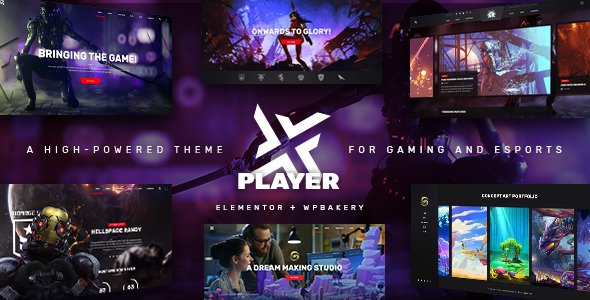
Stuck on your PlayerX WordPress theme? Let's fix it.
No endless back-and-forth. Just send us the details and we'll get it done.
No obligation · Replies within 1 hour · Quote within 1 day
Setup · Customization · Bug fixes · WooCommerce integration
About PlayerX WP Theme
PlayerX is a WordPress theme built by Edge-Themes, aimed at gaming communities, esports teams, and streaming brands. It ships with a dedicated demo library covering everything from clan sites to game review portals, and it runs on Edge-Themes’ in-house page builder, Qode Interactive Page Builder.
The theme includes custom post types for matches, teams, players, and tournaments. Countdown timers, score widgets, and video integration are all built in. It’s heavily visual, which is intentional for gaming audiences, but that also means it requires careful setup to avoid performance issues on shared hosting.
PlayerX works with WooCommerce if you want to sell merchandise or game keys. It’s regularly updated by Edge-Themes and has a solid support forum track record.
Get matched with a PlayerX developer in under one day
Tell us about your PlayerX project. Small fixes, PlayerX theme customization, or a full website build, whatever you need, we've got it covered.
We'll connect you to the right PlayerX developers, define the scope, and get everything 100% clear.
You'll get one estimate, hire your preferred developer, and start collaborating.
PlayerX is a capable theme, but its depth means setup mistakes are easy to make and slow to undo. Getting a vetted PlayerX developer through Codeable means you work with someone who knows Edge-Themes’ structure, not someone learning on your project. Codeable screens every developer before they can take work, so you’re not rolling the dice on quality. Post a project, get a free estimate, and only move forward if the scope and price make sense for you.
Pros
- Dedicated gaming post types for players, teams, matches, and tournaments built into the core theme
- Large demo library with esports, streaming, and game review layouts ready to import
- WooCommerce compatibility for selling merch, game keys, or memberships
- Regular updates from Edge-Themes with active support documentation
- Built-in countdown timers, score widgets, and Twitch/YouTube embed blocks suited to live gaming content
Cons
- Theme options panel has hundreds of settings, which creates a steep learning curve for non-developers
- Qode Interactive Page Builder is proprietary, so switching themes later means rebuilding all page content
- Demo-heavy design can feel generic without significant custom CSS work
- Performance out of the box is heavy due to bundled scripts and visual assets needing manual optimization
- Tournament bracket functionality is limited compared to dedicated bracket plugins
Who is PlayerX for?
Esports Team Website
PlayerX handles team rosters, match schedules, and results natively. Esports organisations can publish player profiles with stats, link upcoming matches to a countdown, and display sponsor logos in dedicated sections. A PlayerX specialist can connect this to a live stats API if your game supports it.
Game Review and News Portal
The theme’s blog and archive templates are adaptable for game reviews, tier lists, and news articles. With proper category structure and an SEO plugin configured, a review portal can rank for individual game titles. A PlayerX developer can add custom review score schema and star rating displays.
Gaming Merchandise Store
WooCommerce drops into PlayerX cleanly, and the theme’s shop templates match the gaming visual style. You can sell branded merchandise, limited-edition prints, or digital downloads. Payment gateways, inventory management, and shipping rules all work through standard WooCommerce without custom code.
Twitch or YouTube Streamer Site
PlayerX includes Twitch and YouTube embed blocks alongside a layout designed around a single content creator’s brand. A PlayerX expert can set up a stream schedule, latest VOD feed, and social links in a way that keeps the page fast and the subscriber call-to-action prominent.
Gaming Community Forum Hub
For communities that need forums alongside gaming content, PlayerX pairs with bbPress or BuddyPress. Member profiles, activity feeds, and game-specific boards can run alongside the main theme content. Initial setup benefits from a PlayerX developer who understands how Edge-Themes handles user role displays.

Customizing PlayerX
PlayerX gives you a lot of control through its theme options panel, but the sheer number of settings can slow down initial setup. Colors, typography, header layouts, and sidebar configurations are all adjustable without touching code.
Where things get more complex is custom match data, team roster displays, and tournament bracket styling. These often need custom CSS or PHP adjustments to match a specific brand. A PlayerX expert can map the theme’s built-in shortcodes and widgets to your actual content structure, rather than forcing your content into the demo layout.
If you need a unique homepage layout, modified player profile templates, or a custom game category archive, that work goes beyond what the options panel can handle. It’s worth getting a developer to scope that work properly before you start.
Recommended plugins for PlayerX
PlayerX works alongside most major WordPress plugins without conflict, but a few integrations add real value. WooCommerce handles merchandise stores cleanly with the theme’s shop templates. WPML is supported for multilingual esports communities. Yoast SEO and Rank Math both work well if you’re running a game news or review site and want to get serious about WordPress SEO.
Performance is a common concern given how image-heavy gaming sites get. Pairing PlayerX with a caching plugin and a CDN is a minimum. For more thorough optimization, see what’s possible with WordPress performance tuning.
Not sure which plugins to use? This WordPress plugins directory covers the most popular options with reviews and setup guides.
PlayerX common issues
PlayerX demo import fails or gets stuck
Demo import failures in PlayerX are usually caused by PHP memory limits or execution time limits on your host. Go to your host’s PHP settings and increase memory_limit to at least 256MB and max_execution_time to 300 seconds. If the import still stalls, try importing XML content manually through WordPress Tools > Import rather than using the one-click importer. Clear your cache after each attempt.
PlayerX page builder content not showing on front end
If Qode Interactive Page Builder content is missing on the front end, the most common cause is a plugin conflict or a missing required plugin. Check that all Edge-Themes companion plugins are active under Appearance > Install Plugins. If the issue appeared after a WordPress core update, the page builder shortcodes may need a theme update to restore compatibility. Check the Edge-Themes changelog for your current version.
PlayerX team or player post type not displaying
PlayerX registers custom post types through its companion plugin, not the theme itself. If team or player posts are missing from the front end, confirm the Edge CPT plugin is active. Also check that your template file is assigned correctly under the post type settings. If display issues persist after checking both, a WordPress bug fix from a specialist can trace whether the query or the template is the problem.
PlayerX countdown timer showing wrong time
The countdown timer in PlayerX relies on the event date and time you set in the match post, and it uses your WordPress timezone setting to calculate the display. Go to Settings > General and confirm your timezone is set correctly. If the site was migrated from another server, the timezone may have reset to UTC. Adjust this and resave the match post to trigger a recalculation.
PlayerX WooCommerce shop page layout broken
WooCommerce layout breaks in PlayerX typically happen after a WooCommerce major version update that changes template file structure. Go to WooCommerce > Status > Tools and run the template override check. If PlayerX overrides are outdated, you may need to update the theme or manually copy the updated WooCommerce templates into the theme’s WooCommerce folder. A WordPress bug fixing service can handle this safely.
PlayerX slider not loading on mobile
Mobile slider issues in PlayerX are usually caused by lazy loading plugins conflicting with the slider’s JavaScript initialization. Try disabling lazy loading for slider images in your optimization plugin settings. Also check if your mobile breakpoint settings in the slider options are configured to hide rather than resize. Some Edge-Themes sliders have a separate mobile visibility toggle in their shortcode settings.
PlayerX header menu not working after update
After a PlayerX update, header menu breaks are often caused by cached CSS or a stale menu assignment. Go to Appearance > Menus and reconfirm which menu is assigned to your primary location. Then clear all site caches including server-level, plugin-level, and browser cache. If a mega menu was in use, check that the mega menu settings saved correctly after the update.
PlayerX custom fonts not applying
Custom fonts not applying in PlayerX usually means the font selection was saved in theme options but the enqueue isn’t firing. Check whether you’re using a Google Font or a self-hosted font, as each has different settings in the PlayerX options panel. If you’re using a caching plugin, purge CSS after saving. Some caching setups inline critical CSS and overwrite the theme’s font stack. Disable CSS minification temporarily to test.
PlayerX page loads slowly after demo import
After importing a PlayerX demo, page speed often drops because every slider image, background video, and animation loads on every page. Start by auditing with PageSpeed Insights to identify the biggest offenders. Compress images with ShortPixel or Smush, disable animations on mobile, and configure a caching plugin. For thorough speed work, the WordPress bug fixing service can audit and fix specific bottlenecks.
PlayerX contact form not sending emails
If PlayerX’s contact form isn’t sending emails, the issue is almost certainly with your server’s mail configuration rather than the theme. WordPress relies on PHP mail by default, which most hosts block. Install an SMTP plugin like WP Mail SMTP and configure it with your email provider’s outgoing mail settings. Test using the plugin’s built-in diagnostic tool before assuming the form itself is broken.
PlayerX FAQ
Yes. PlayerX is one of the more purpose-built options for esports. It includes match schedules, team rosters, player profiles, and tournament countdown features out of the box. Most competitors use generic portfolio themes and style them, which takes more effort with less functional depth. For esports organisations that need real data display features quickly, PlayerX is a practical starting point.
PlayerX includes WooCommerce support with styled shop, product, cart, and checkout templates. The integration works for selling merchandise, digital downloads, or memberships. After major WooCommerce version jumps, template overrides occasionally go out of date and need updating, but day-to-day the two work together without issues.
Basic setup is manageable for non-developers using the demo importer and theme options panel. However, customising beyond the demo layout, building custom match data displays, or adjusting post type templates will require developer help. The options panel is large and some settings interact with each other in non-obvious ways that are easier to navigate with experience.
PlayerX uses Qode Interactive Page Builder as its native editor, not Elementor. You can technically install Elementor alongside it, but you would be running two page builders simultaneously, which causes conflicts. Most Edge-Themes users stick with the Qode builder. If Elementor is a requirement, PlayerX is not the right fit.
Before updating PlayerX, back up your files and database. Check the Edge-Themes changelog for breaking changes, particularly around custom post type templates or page builder compatibility. If you’ve modified theme files directly rather than using a child theme, those changes will be overwritten. Update in a staging environment first if your site has heavy custom work.
PlayerX is WPML compatible for multilingual sites. String translations, post type content in multiple languages, and RTL layout support are all workable with proper WPML configuration. Setup does require a PlayerX specialist if you need tournament and match content translated, as custom post types need extra WPML configuration beyond standard pages.
Migrating an existing WordPress site to PlayerX means rebuilding page layouts inside the Qode page builder. Your posts, custom post type content, and media carry over, but visual layout does not transfer automatically. If you’re on a different theme, plan for a rebuild of key pages. For a smooth transition, see our WordPress migration service.
PlayerX outputs reasonably clean markup and works well with Yoast SEO or Rank Math for meta control. The main SEO concern is performance, as the theme’s heavy scripts can increase load time if not optimized. Schema for reviews and events is not built in natively but can be added via plugins. With proper setup, there’s no structural barrier to good rankings.
PlayerX performs best on managed WordPress hosting or VPS plans with at least 256MB PHP memory. Shared hosting on lower-tier plans often struggles with the demo importer and can cause slow front-end load times. Hosts like Kinsta, WP Engine, or SiteGround’s cloud plans handle PlayerX reliably. Avoid budget shared hosting for any gaming site with video embeds or sliders.
The fastest route to a vetted PlayerX developer is through Codeable. Post your project, describe what you need, and receive a fixed-price estimate from a screened WordPress developer within 24 hours. There’s no obligation to proceed. Alternatively, get a free estimate here and we’ll scope the work for you.
Hire a PlayerX Expert Developer
Whether you need a full PlayerX build from scratch, a specific feature added, or a layout that doesn’t match any of the demos, a dedicated PlayerX developer will get it done correctly. No wasted time on workarounds that break the next time the theme updates. Get a Free Estimate and explain what you need. There’s no obligation to hire and no upfront cost.
You'll need a free Codeable account so developers can ask questions and send their quotes.