Applay WordPress Theme
by leafcolor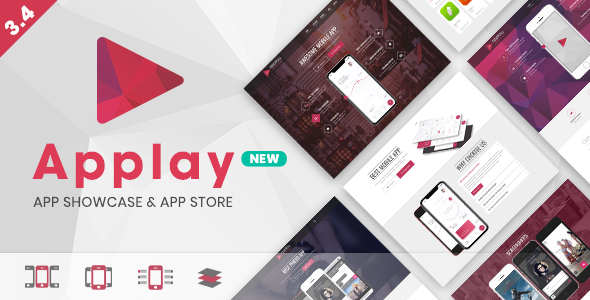
Stuck on your Applay WordPress theme? Let's fix it.
No endless back-and-forth. Just send us the details and we'll get it done.
No obligation · Replies within 1 hour · Quote within 1 day
Setup · Customization · Bug fixes · WooCommerce integration
About Applay WP Theme
Applay is a WordPress theme by leafcolor built for app landing pages and software product sites. It ships with a clean, minimal layout focused on conversion — hero sections, feature grids, pricing tables, and download call-to-action blocks all come included out of the box.
The theme is built on a custom framework with WPBakery Page Builder bundled in. It supports WPML for multilingual sites, has WooCommerce compatibility for selling licences or digital products, and includes a set of shortcodes for quick layout assembly.
Applay suits indie developers, SaaS founders, and digital agencies launching mobile or desktop app products. If you need a fast, focused landing page without building from scratch, Applay gives you a solid starting point that a developer can extend quickly.
Get matched with a Applay developer in under one day
Tell us about your Applay project. Small fixes, Applay theme customization, or a full website build, whatever you need, we've got it covered.
We'll connect you to the right Applay developers, define the scope, and get everything 100% clear.
You'll get one estimate, hire your preferred developer, and start collaborating.
Most WordPress developers can install a theme. Fewer know Applay’s specific quirks — how its options panel interacts with WPBakery, where custom CSS breaks on mobile, or how to extend its shortcode system cleanly.
Through Codeable, you can hire a vetted Applay specialist who has worked on similar app landing page projects. You post a project, get matched within 24 hours, and receive a free estimate before committing to anything. No bidding wars, no random freelancers — just developers who know what they’re doing with this theme.
Pros
- Purpose-built for app and software landing pages with conversion-focused section layouts included
- WPBakery Page Builder bundled in, so you can rearrange and duplicate sections without touching code
- WPML compatible out of the box, making multilingual app sites straightforward to set up
- WooCommerce support allows you to sell licences, subscriptions, or digital downloads directly from the same site
- One-time purchase with lifetime access to theme files and included demo content for faster setup
Cons
- WPBakery creates heavy shortcode lock-in, making it hard to migrate content if you switch page builders later
- Theme updates have been infrequent, which can create compatibility issues with newer WordPress and PHP versions
- Mobile responsiveness on some inner sections needs manual CSS fixes to look right across all screen sizes
- Theme options panel is basic and lacks granular typography controls without adding a custom CSS workaround
- Limited documentation makes it difficult to debug issues or extend functionality without developer experience
Who is Applay for?
Mobile App Landing Page
Applay’s hero sections, app screenshot sliders, and store badge blocks make it a natural fit for mobile app promotion. An Applay developer can wire up App Store and Google Play deep links, add review sections, and set up a lead capture flow for early access signups.
SaaS Product Site
For SaaS products, Applay’s pricing table blocks and feature comparison sections cover the core page structure. A specialist can integrate billing tools like Stripe or Paddle, add a knowledge base section, and connect a live chat widget without disrupting the existing layout.
Desktop Software Download Page
Desktop software sites need clear download flows and OS-specific CTAs. Applay handles this with its download button blocks and platform icon sets. An Applay expert can add version history sections, licence key delivery via WooCommerce, and a changelog post type for regular updates.
Digital Product Sales Page
Selling fonts, templates, or digital assets works well on Applay paired with WooCommerce. A developer can configure product pages, set up secure file delivery, and customise the checkout flow to match the site’s design while keeping the landing page feel intact.
Indie Game or Plugin Promotion
Indie games and WordPress plugins both benefit from Applay’s screenshot galleries, feature lists, and review blocks. An Applay specialist can add a roadmap section, integrate a community forum link, and set up email capture for launch announcements and update notifications.

Customizing Applay
Out of the box, Applay covers the basics — colours, fonts, and section layouts via the theme options panel. But most client projects need more than that. An Applay expert can rework the page builder templates to match a specific brand, add custom post types for changelogs or app features, and wire up third-party integrations like Stripe, Paddle, or Mailchimp.
Custom child theme development keeps your changes safe across updates. An Applay developer can also strip out unused scripts, rebuild sections with a lighter page builder like Elementor or Gutenberg blocks, and improve overall site structure for better load times and maintainability.
Whether you need a single landing page polished up or a full conversion-focused site built around the Applay framework, a specialist can get it done without breaking existing layouts.
Recommended plugins for Applay
Applay works alongside several popular plugins without conflicts. WooCommerce adds a checkout flow for selling app licences or in-app purchases. WPML handles multilingual support if you’re targeting multiple markets. Contact Form 7 and WPForms both integrate cleanly for lead capture.
For performance, caching plugins like WP Rocket or LiteSpeed Cache pair well with Applay, especially after script optimisation. If you’re running paid ads to the landing page, WordPress performance tuning can cut load time significantly and improve conversion rates. Plugin-based WordPress SEO work through Yoast or Rank Math also slots in without theme conflicts.
Not sure which plugins to use? This WordPress plugins directory covers the most popular options with reviews and setup guides.
Applay common issues
Applay theme not updating in WordPress dashboard
Applay updates are delivered through the ThemeForest purchase key. If the theme isn’t updating, check that your Envato API token is correctly entered under Appearance > Theme Options > Updates. An expired or missing token blocks the update feed. If the token is valid but updates still fail, download the latest version from ThemeForest manually and reinstall via FTP, replacing only the parent theme folder.
WPBakery shortcodes showing as plain text after Applay install
Shortcodes displaying as raw text usually means WPBakery isn’t activated or has been deactivated after a plugin conflict. Go to Plugins and confirm WPBakery Page Builder is active. If it’s missing entirely, you can reinstall it from the theme’s bundled plugins panel under Appearance > Install Plugins. If the problem persists after activation, a WordPress bug fix may be needed to resolve the plugin conflict.
Applay homepage not matching demo after import
Demo content imports in Applay require the One Click Demo Import plugin and all bundled plugins to be active first. If sections are missing or unstyled after import, the most common cause is importing before activating WPBakery or the Revolution Slider plugin. Delete the imported content, activate all required plugins, then re-run the demo import from Appearance > Import Demo Data.
Applay mobile menu not opening or closing properly
A broken mobile menu in Applay is usually caused by a JavaScript conflict with another plugin. Open your browser console on mobile or using Chrome’s device toolbar and look for JS errors. Common culprits are caching plugins that minify scripts aggressively. Disable JS minification in your cache plugin, clear the cache, and test again. If the issue remains, check that jQuery is loading in the correct order.
Applay theme breaking after WordPress update
WordPress core updates can break themes that rely on deprecated functions or outdated PHP syntax. If Applay breaks after a WordPress update, first check your error log for specific function errors. Switching to a child theme prevents some issues, but if the parent theme files contain the broken code, you’ll need either a theme update from leafcolor or a targeted fix. A WordPress bug fixing service can patch compatibility issues without waiting for an official update.
Applay pricing table not displaying correctly
Pricing table display issues in Applay are often caused by CSS conflicts with plugins that inject their own styles — particularly form plugins or page builders added after installation. Inspect the affected table element in your browser dev tools to identify which styles are overriding the theme defaults. Add corrective CSS in Appearance > Customize > Additional CSS. If columns are collapsing on desktop, check that the WPBakery row settings haven’t been changed from the default column widths.
Applay slider images not loading or showing broken images
Broken slider images in Applay are typically a file permission issue or a result of the demo import not completing fully. Check that uploaded images exist in wp-content/uploads via FTP. If images are present but not displaying, regenerate thumbnails using the Regenerate Thumbnails plugin. For Revolution Slider specifically, re-import the slider file from the slider’s export included in the theme package.
Applay theme options not saving changes
Theme options not saving is almost always a permissions or nonce issue. Check that your WordPress user role is Administrator. If you’re on a multisite install, confirm you have network admin access. Caching plugins can also interfere — clear all cache layers after saving. If options reset on every page load, a corrupt options row in the database may need to be cleared manually via phpMyAdmin or through a bug fix service.
Applay WooCommerce pages not styled correctly
Applay’s WooCommerce styling covers the basics but doesn’t account for every WooCommerce template change across versions. If cart, checkout, or product pages look unstyled, compare the theme’s WooCommerce template files against the current WooCommerce template versions. Outdated template files need to be updated to match. This is a manual process best handled by a developer familiar with both the theme and WooCommerce’s template hierarchy.
Applay custom CSS not applying after theme update
Custom CSS added directly to the parent theme’s style.css file gets wiped on every theme update. Always add custom CSS through Appearance > Customize > Additional CSS, or better, through a child theme’s style.css file. If you’ve already lost custom CSS to an update, check if your browser cached a previous version — the CSS may still be visible in the browser inspector even if it’s been removed from the file.
Applay FAQ
Applay is still available on ThemeForest, but update frequency from leafcolor has slowed. The theme functions on current WordPress versions for most use cases, but compatibility with PHP 8.x and newer WordPress features isn’t guaranteed without testing. For production sites, have a developer review the theme’s current state before committing to it.
Applay is built around WPBakery and isn’t officially designed for Elementor. You can technically use Elementor on pages that don’t use WPBakery layouts, but mixing both builders on the same site creates conflicts. An Applay developer can migrate the existing layouts to Elementor if you want to move away from WPBakery entirely.
Applay relies on WPBakery shortcodes for most of its demo layouts, so removing WPBakery means losing those layouts unless they’ve been rebuilt in another editor. You can disable WPBakery on specific pages and use the block editor instead, but a full switch requires rebuilding your page content from scratch.
Activate all bundled plugins first — WPBakery, Revolution Slider, and any others listed under Appearance > Install Plugins. Then go to Appearance > Import Demo Data and run the one-click import. Make sure your server’s PHP memory limit is at least 256MB before importing to avoid timeout errors mid-process.
Applay runs on recent WordPress versions but hasn’t been audited for full compatibility with every WordPress 6.x release. Minor visual or functional issues can appear after core updates. Testing on a staging environment before updating a live Applay site is recommended, particularly if you’re running WooCommerce alongside it.
Yes. Applay has WooCommerce support built in, which covers basic product pages, cart, and checkout. It works well for selling digital products like app licences or downloads. The WooCommerce styling is functional rather than polished — a developer can improve the visual integration if the default styles don’t match your design.
Adding a custom domain is handled through your hosting provider’s DNS settings, not through WordPress or Applay. Point your domain’s A record or CNAME to your server IP, update the WordPress Address and Site Address in Settings > General, and clear any caching. The Applay theme itself doesn’t affect domain configuration.
Applay has basic RTL support, but it’s not one of its stronger features. Arabic, Hebrew, and other RTL languages may require additional CSS adjustments for proper text direction in certain layout sections. WPML with RTL support enabled helps, but expect some manual CSS work for full RTL compatibility across all page sections.
Yes, an Applay site can be migrated to a new host like any WordPress site. Export your database, transfer your files via FTP, update the wp-config.php file with new database credentials, and update URLs using WP-CLI or a plugin like Better Search Replace. For more detail, see our WordPress migration service.
Start by identifying what’s slow using GTmetrix or PageSpeed Insights. Common Applay speed issues include unoptimised images, WPBakery loading scripts on every page, and Revolution Slider adding overhead on non-slider pages. A caching plugin, image compression, and script loading controls can address most of this. For deeper work, see our WordPress performance service.
Hire an Applay Developer for Your Project
Need an Applay expert to customise your landing page, fix a layout issue, or build out new functionality? Post your project and get matched with a vetted WordPress developer within 24 hours. You’ll get a clear estimate before any work starts — no obligation, no risk.
Get a Free Estimate and have a specialist look at your Applay site today.
You'll need a free Codeable account so developers can ask questions and send their quotes.