Architecture WordPress Theme
by GoodLayers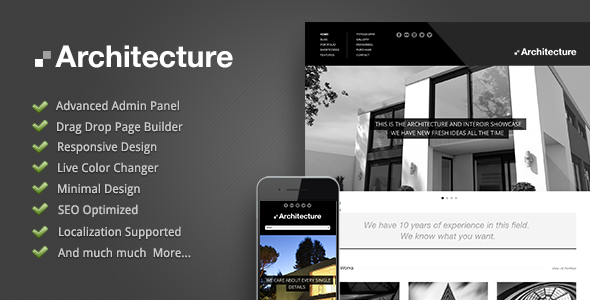
Stuck on your Architecture WordPress theme? Let's fix it.
No endless back-and-forth. Just send us the details and we'll get it done.
No obligation · Replies within 1 hour · Quote within 1 day
Setup · Customization · Bug fixes · WooCommerce integration
About Architecture WP Theme
Architecture is a premium WordPress theme built by GoodLayers, designed specifically for architecture firms, interior designers, and construction studios. It ships with the GoodLayers page builder, giving you drag-and-drop control over layouts without touching code.
The theme includes over 20 pre-built demo pages, portfolio layouts with filterable grids, a project showcase system, and full-width image sections built for high-impact visual presentation. Typography controls, color scheme options, and header variations are all handled inside the theme options panel.
Architecture supports WooCommerce for selling services or digital products, integrates with WPML for multilingual sites, and is coded to meet current WordPress standards. It runs on PHP 7.4 and above and is tested against the latest WordPress core releases.
Get matched with a Architecture developer in under one day
Tell us about your Architecture project. Small fixes, Architecture theme customization, or a full website build, whatever you need, we've got it covered.
We'll connect you to the right Architecture developers, define the scope, and get everything 100% clear.
You'll get one estimate, hire your preferred developer, and start collaborating.
GoodLayers themes use a proprietary page builder, which means standard WordPress knowledge only gets you so far. An Architecture specialist who has worked inside the GoodLayers ecosystem knows how the shortcodes are structured, how the builder stores data, and where customizations need to be made at the template level versus the options panel.
Through Codeable, you get matched with vetted WordPress developers who have real project history. No agencies, no bidding wars, no guesswork about who you are actually hiring.
Pros
- Purpose-built portfolio layouts designed for architecture and design studios
- GoodLayers page builder included, no separate purchase required
- 20+ pre-built demo pages that can be imported in one click
- WooCommerce and WPML compatibility tested and documented
- Active GoodLayers support forum with regular theme updates
Cons
- GoodLayers page builder uses proprietary shortcodes, making future theme switches difficult
- Demo import can be slow and occasionally incomplete on shared hosting environments
- Options panel has a steep learning curve compared to Customizer-based themes
- Limited block editor (Gutenberg) support; primarily built around the classic editor workflow
- Some built-in elements load extra scripts that require manual cleanup to improve page speed scores
Who is Architecture for?
Architecture and Design Firms
Architecture firms need project portfolios that present work with large images, detailed case studies, and service pages. The theme’s full-width layouts and filterable portfolio grids handle this well. A developer can extend it with custom project fields for location, year, and team credits to match how firms actually document their work.
Interior Design Studios
Interior designers rely on visual impact. Architecture’s masonry and grid portfolio layouts display room photography cleanly. An Architecture theme specialist can configure before-and-after sliders, style category pages by project type, and connect an enquiry form to specific portfolio items for lead generation.
Construction and Building Companies
Construction companies need service pages, project timelines, and credibility signals like certifications and client logos. The theme’s flexible page builder handles these layouts. A developer can add custom post types for project stages, integrate review widgets, and set up location-based landing pages for regional targeting.
Landscape Architecture Practices
Landscape practices need to show large-scale project photography alongside detailed project descriptions. Architecture supports full-bleed image sections and custom portfolio taxonomies. A specialist can build filtering by project scale, climate zone, or project type, making it easier for prospects to find relevant work examples.
Urban Planning Consultancies
Urban planning consultancies often need to present reports, maps, and case studies alongside project visuals. An Architecture developer can build custom page templates for research publications, integrate downloadable PDF resources, and create structured project pages that communicate process as clearly as finished outcomes.

Customizing Architecture
Architecture gives you a solid starting point, but most studios need something beyond the default demos. An Architecture expert can modify the portfolio filtering logic, build custom project taxonomy pages, adjust the GoodLayers page builder elements, and create bespoke header layouts that match your brand guidelines.
Common customization requests include custom contact and enquiry forms tied to specific project types, animated section transitions, integration with third-party CRM tools, and client portals. Child theme development ensures your customizations survive theme updates without being overwritten.
If you need the Architecture theme to behave differently from how GoodLayers built it, a developer with hands-on experience in this theme will know where to make changes cleanly and which hooks to use without breaking the builder.
Recommended plugins for Architecture
Architecture works well with a focused set of plugins. For SEO, pairing it with Yoast or Rank Math gives you full control over project and portfolio meta. A dedicated WordPress SEO setup ensures your project pages rank for local and service-based searches.
On the performance side, Architecture’s image-heavy layouts benefit from a proper caching layer, image optimization, and lazy loading. A WordPress performance audit can cut load times significantly on portfolio-heavy sites. Contact Form 7, Gravity Forms, and WooCommerce all install without conflicts on a clean Architecture setup.
Not sure which plugins to use? This WordPress plugins directory covers the most popular options with reviews and setup guides.
Architecture common issues
Architecture theme portfolio not displaying correctly after update
Portfolio display issues after a theme update are usually caused by a conflict between the updated template files and cached data. Clear your site cache and any server-side cache first. If the layout is still broken, check whether your child theme is overriding outdated portfolio templates. Replacing child theme templates with updated copies from the parent theme typically resolves this. If the problem persists, a WordPress bug fixing service can trace the conflict quickly.
GoodLayers page builder elements missing on Architecture theme
Missing GoodLayers page builder elements usually mean the builder plugin bundled with Architecture is deactivated or out of sync with the theme version. Go to Appearance > Install Plugins and check the status of the GoodLayers Core plugin. Reactivate it if needed. If elements are missing after a fresh install, confirm your theme files uploaded completely. Partial uploads during FTP transfers are a common cause of missing components.
Architecture theme demo import failing or incomplete
Demo import failures on Architecture are most often caused by PHP memory limits or max execution time settings that are too low. Your host needs to allow at least 256MB memory and 300 seconds execution time for the import to complete. Import large demos in stages if possible. If you are on shared hosting, consider importing via WP CLI or ask your host to temporarily raise the limits. A broken import can also be caused by conflicting plugins.
Architecture theme slow loading on mobile
Architecture theme slowness on mobile is often tied to unoptimized images and render-blocking scripts loaded by the GoodLayers builder. Start by running the site through PageSpeed Insights to identify the specific offenders. Install a caching plugin, enable lazy loading for images, and consider deferring non-critical JavaScript. If the theme is loading slider scripts on pages that have no slider, a developer can conditionally dequeue those scripts. A WordPress bug fixing specialist can handle this cleanly.
Architecture theme header menu not showing on mobile
If the Architecture theme mobile menu is not appearing, first check the theme options panel under Header Settings to confirm the mobile menu is enabled and assigned. If it is enabled but still not showing, there may be a JavaScript conflict with another plugin. Open your browser console and look for JS errors. Deactivate plugins one by one to identify the conflict. Also confirm your menu is assigned under Appearance > Menus for the correct location.
Architecture theme contact form not sending emails
Contact form email failures on Architecture are almost always a mail delivery issue, not a theme bug. WordPress default mail uses PHP mail, which many hosts block or route to spam. Install WP Mail SMTP and connect it to a transactional email service like Mailgun, SendGrid, or your Google Workspace account. Test delivery using the plugin’s built-in test tool. Also check that your form plugin itself is not throwing validation errors that prevent submission.
Architecture theme WooCommerce pages not styled correctly
WooCommerce page styling issues on Architecture typically mean the theme’s WooCommerce template overrides are outdated. When WooCommerce updates its templates, themes that override them need to update their copies. Go to WooCommerce > Status > System Status and look for outdated templates. Update them through the theme or manually copy updated templates into your child theme’s WooCommerce folder. If you need the styling to match your brand exactly, an Architecture developer can rebuild the templates correctly.
Architecture theme portfolio filter not working
Portfolio filter issues in Architecture are usually caused by missing JavaScript or a jQuery conflict. Check the browser console for errors when clicking a filter. If you recently added a plugin that loads its own version of jQuery, that can break the isotope filtering script the theme relies on. Also confirm that portfolio items are correctly assigned to categories in the portfolio settings. Rebuilding the portfolio shortcode settings sometimes resolves filter display problems after a theme update.
Architecture theme custom CSS not applying
Custom CSS not applying in Architecture is usually a specificity issue or a caching problem. First, clear your cache. If the styles still do not apply, use browser developer tools to inspect the element and see which CSS rule is winning. GoodLayers generates inline styles in some cases, which have high specificity. You may need to add your rules to a child theme stylesheet rather than the custom CSS field in the options panel to ensure they are loaded in the right order.
Architecture theme WPML translation not working
WPML issues with Architecture usually involve untranslated theme strings or duplicated pages that are not inheriting the correct template layout. First, run the WPML String Translation scanner to pick up all theme strings. For page layouts built with the GoodLayers builder, copy page content through WPML’s Advanced Translation Editor rather than duplicating manually. If translated pages are missing styles or sections, confirm the page template is set correctly on each translation. A WordPress bug fixing expert familiar with WPML can resolve deeper conflicts.
Architecture FAQ
GoodLayers continues to release updates for the Architecture theme. You can verify the current version and changelog on ThemeForest where the theme is sold. Updates typically address WordPress core compatibility and minor bug fixes. Always test updates on a staging site before pushing to production, as page builder updates occasionally affect existing layouts.
Architecture is built around the GoodLayers proprietary page builder and is not designed to work alongside Elementor or Beaver Builder. Using a second page builder creates conflicts and duplicate scripts. If you want an Elementor-based workflow, switching to a different theme is a better option than forcing compatibility. An Architecture developer can advise whether migration makes sense for your project.
You can set up a basic site using the demo import and the GoodLayers options panel without writing code. For more complex changes like custom portfolio templates, modified header layouts, or specific plugin integrations, you will need a developer. The GoodLayers builder has a learning curve, and documentation is less detailed than mainstream builders like Elementor.
After activating Architecture, go to GoodLayers One Click Import under the theme options. Select the demo you want, then run the import. Your server needs at least 256MB PHP memory and a generous execution time limit. If the import stalls, increase those limits via php.ini or wp-config.php. On shared hosting, contact your host before attempting the import.
GoodLayers tests Architecture against current WordPress releases and notes compatibility in their changelog. Check the theme’s ThemeForest page for the latest tested version. If you are running WordPress 6.x, verify the theme version is recent. Running an outdated theme version against a current WordPress core is a common source of layout and functionality issues.
Switching away from Architecture will break any content built with the GoodLayers page builder, because that content is stored as proprietary shortcodes. Those shortcodes become visible as raw text on the new theme. Migration requires rebuilding pages in the new theme or converting content to blocks. A developer can manage this migration while minimizing content loss.
Yes. Architecture connects to Google Fonts through the theme options panel, giving you access to hundreds of typefaces without a plugin. You can assign different fonts to headings, body text, and navigation. For premium or self-hosted fonts not available through Google Fonts, a developer can add them via a child theme stylesheet using @font-face declarations.
Rates for an Architecture theme developer on Codeable depend on the scope of work. Small fixes typically run between $100 and $300. Full site builds or complex custom features range from $1,000 upward. You get a free estimate before committing, so you know the cost before any work starts. There is no obligation to proceed after receiving your estimate.
Architecture outputs clean HTML and supports meta fields, but SEO performance depends on how the site is configured and built. Pairing it with a dedicated SEO plugin like Rank Math or Yoast is necessary for full control over titles, descriptions, and schema. Image-heavy portfolio sites also need careful attention to Core Web Vitals scores to perform well in search rankings.
Yes. Architecture is WPML compatible, which is the most widely used WordPress multilingual plugin. You can translate page content, portfolio items, and theme strings. The GoodLayers page builder adds some complexity to translation workflows, particularly for pages with many custom elements. An Architecture specialist familiar with WPML can set up the multilingual structure correctly from the start.
Hire an Architecture Theme Expert
Whether you need a full site build, a specific feature added, or a performance fix, working with an Architecture theme developer who knows GoodLayers saves time and avoids costly mistakes. Get a clear scope and price before committing to anything. Get a Free Estimate and describe your project. You will hear back within 24 hours with no obligation to proceed.
You'll need a free Codeable account so developers can ask questions and send their quotes.