Armada WordPress Theme
by Dream-Theme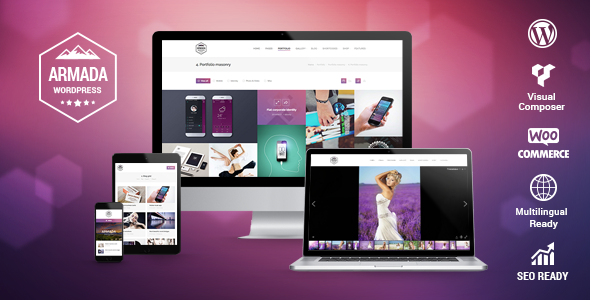
Stuck on your Armada WordPress theme? Let's fix it.
No endless back-and-forth. Just send us the details and we'll get it done.
No obligation · Replies within 1 hour · Quote within 1 day
Setup · Customization · Bug fixes · WooCommerce integration
About Armada WP Theme
Armada is a premium WordPress theme built by Dream-Theme, a developer known for polished, feature-rich themes with strong attention to detail. Armada is designed primarily for corporate, agency, and portfolio use cases, offering a modular page-building approach built on top of WPBakery Page Builder.
The theme ships with a drag-and-drop interface, multiple header layouts, a mega menu, AJAX-powered portfolio grids, and WooCommerce support. It includes Revolution Slider and Layer Slider bundled in, which adds significant value at the purchase price. The codebase is structured and the admin options are well-documented, making it accessible to developers and confident site owners alike. If you need a multi-purpose theme that can handle agency sites, product showcases, or corporate pages without heavy third-party plugin dependencies, Armada is a solid starting point.
Get matched with a Armada developer in under one day
Tell us about your Armada project. Small fixes, Armada theme customization, or a full website build, whatever you need, we've got it covered.
We'll connect you to the right Armada developers, define the scope, and get everything 100% clear.
You'll get one estimate, hire your preferred developer, and start collaborating.
Armada has a learning curve, and not every developer knows Dream-Theme’s conventions. Codeable connects you with vetted WordPress specialists who have real experience with themes like Armada. Every developer on the platform is tested and reviewed, so you’re not gambling on an unknown freelancer.
Post your project, get a free estimate, and only move forward if the scope and cost work for you. No commitment required. For Armada builds, fixes, or customisations, this is the fastest way to reach someone who can actually help.
Pros
- Bundles Revolution Slider and Layer Slider, saving $60+ in plugin costs
- Well-structured WPBakery integration with custom elements specific to Armada
- Multiple header and footer layout variations built into the theme options
- AJAX portfolio grids with filtering work reliably without extra plugins
- Dream-Theme provides documentation and has an active support track record
Cons
- WPBakery dependency makes migrating content to other builders difficult
- Page load times suffer without performance optimisation due to bundled sliders
- Some shortcodes are tightly coupled to the theme, making swaps risky
- Customising the mega menu requires CSS or PHP knowledge beyond the options panel
- Less frequent updates compared to themes in active ThemeForest bestseller lists
Who is Armada for?
Creative Agency Websites
Armada’s portfolio grid, animated page sections, and flexible header options make it a practical choice for creative agencies. You can showcase case studies, client work, and team profiles without bolting on multiple plugins. An Armada developer can tailor the grid layout and filtering categories to match your agency’s specific service structure and branding requirements.
Corporate Business Sites
Corporate sites benefit from Armada’s structured layout options, mega menu, and WPBakery row configurations. The theme handles multi-page information architecture well. An Armada specialist can configure the options panel, set up custom page templates for departments or services, and ensure the site performs cleanly on both desktop and mobile devices.
Freelancer Portfolios
Freelancers using Armada get a polished portfolio setup with built-in project post types and layout flexibility. The AJAX filtering makes work easy to categorise by type or client. With minimal Armada customisation, you can create a focused personal site that presents work clearly without the visual noise of overly complex multi-purpose themes.
Product Launch Pages
Armada’s full-width section layouts and Revolution Slider integration suit product launch pages that need visual impact. Layer animations and call-to-action rows can be configured without custom coding. An Armada developer can build a focused landing page that loads fast and converts well, using the theme’s built-in elements rather than stacking additional page builder plugins.
Multi-Service Companies
Companies offering multiple services benefit from Armada’s icon boxes, pricing tables, and tabbed content elements. The mega menu handles deep navigation without breaking the layout. An Armada specialist can structure your service pages consistently, wire up WooCommerce for paid service tiers, and ensure the overall site architecture reflects how customers actually search for what you offer.

Customizing Armada
Armada gives you a lot out of the box, but most projects need adjustments that go beyond the built-in options panel. Custom post type layouts, header modifications, unique landing page structures, and brand-specific typography all require hands-on work in the theme files or child theme.
An Armada expert can handle child theme setup, custom shortcode styling, WPBakery element modifications, and integration with third-party plugins without breaking the theme’s existing layout logic. Dream-Theme’s code is generally clean, but Armada’s layered structure means small changes can have unintended effects if you don’t know where to look. Hiring an Armada specialist saves time and avoids the back-and-forth of trial-and-error edits. Whether you need a single layout fix or a full site build on Armada, working with someone who knows the theme reduces risk significantly.
Recommended plugins for Armada
Armada works well with plugins that extend its core functionality. WooCommerce integrates cleanly for product-focused sites. WPML handles multilingual setups without major conflicts. Contact Form 7 and Gravity Forms both slot in without layout issues.
For performance, Armada’s bundled sliders and WPBakery can add page weight quickly. Pairing the theme with a proper WordPress performance setup keeps load times in check. If you’re running an SEO-focused site on Armada, a structured WordPress SEO optimisation approach ensures the theme’s JavaScript-heavy elements don’t hurt your rankings. Both areas are worth addressing early in the build process rather than retrofitting later.
Not sure which plugins to use? This WordPress plugins directory covers the most popular options with reviews and setup guides.
Armada common issues
Armada theme not loading CSS after update
This usually happens when Armada’s CSS is cached or the stylesheet path breaks after a theme file update. Start by clearing any caching plugin and your CDN cache. If the issue persists, check that your child theme’s wp_enqueue_styles function correctly references the parent stylesheet. A forced browser cache clear often resolves what looks like a missing CSS issue. If styles are genuinely missing, inspect the source to confirm the stylesheet is loading at all.
WPBakery elements not showing in Armada
Armada ships with a bundled version of WPBakery. If you’ve installed a separate copy or updated WPBakery independently, conflicts between versions can hide custom Armada elements. Deactivate any standalone WPBakery plugin and rely on the version bundled with the theme. If elements are still missing, check that the theme’s element registration files are present in the vc_templates directory and that WPBakery is activated through Armada’s required plugins notice.
Armada Revolution Slider not displaying on mobile
Revolution Slider has known mobile display issues when the slider dimensions are set to fixed pixel values. Open the slider settings and switch width and height to percentage-based values or enable the responsive sizing option. Also check that no CSS in Armada’s options is overriding overflow: hidden on mobile breakpoints. If the slider appears but cuts off content, the issue is almost always a fixed-height container conflicting with Revolution Slider’s responsive scaling logic.
Armada portfolio filter broken after WordPress update
Armada’s AJAX portfolio filter relies on specific JavaScript that can conflict with jQuery changes in newer WordPress versions. If the filter clicks do nothing or reload the page, open your browser console and look for JavaScript errors. A common fix is ensuring jQuery is loaded in the correct order and not deferred by a performance plugin. If you’ve recently updated WordPress or Armada, this is a likely cause. For persistent issues, our WordPress bug fixing service can isolate and resolve the conflict quickly.
Armada mega menu not working on mobile devices
Armada’s mega menu uses JavaScript to handle mobile toggle behaviour. If the hamburger menu opens but mega menu items don’t expand, check whether a caching or minification plugin has combined or deferred Armada’s navigation scripts. Disable script minification temporarily to confirm. Also verify that no CSS rule is setting display: none on dropdown elements at mobile breakpoints without a corresponding toggle class. The issue is often a script loading order problem rather than a theme bug.
Armada theme white screen of death on activation
A white screen on Armada activation usually points to a PHP memory limit or a fatal error in a required plugin. Enable WordPress debug mode by setting WP_DEBUG to true in wp-config.php and check the debug log for the exact error. Common causes include WPBakery version mismatches or a missing Revolution Slider plugin that Armada expects to find. Increasing the PHP memory limit to at least 256MB in your hosting control panel resolves a significant portion of white screen cases. If the problem continues, get help from a WordPress bug fixing specialist.
Armada custom fonts not loading correctly
Armada loads Google Fonts through its options panel. If custom fonts aren’t applying, first confirm the font name is entered exactly as it appears on Google Fonts, including correct capitalisation. If you’ve moved to a self-hosted font for performance reasons, verify the @font-face declarations are in your child theme’s stylesheet and that the font family name in Armada’s typography settings matches exactly. Browser caching can also make font changes appear not to take effect, so always test in a private window after saving.
Armada WooCommerce shop page layout broken
Armada’s WooCommerce compatibility layer can fall out of sync after major WooCommerce updates. If the shop page shows unstyled products or a broken layout, check whether Armada has a WooCommerce template override folder at woocommerce/ in the theme directory. Outdated template files cause layout breakage when WooCommerce updates its template structure. Copy the updated WooCommerce templates into your child theme’s woocommerce/ folder and reapply any Armada-specific styling. This is the most common cause of WooCommerce layout issues in older Dream-Theme builds.
Armada contact form not sending emails
If Armada’s contact form stops sending emails, the issue is almost always server-level email delivery rather than a theme problem. WordPress uses PHP mail by default, which many hosts block or rate-limit. Install an SMTP plugin like WP Mail SMTP and connect it to a transactional email service such as SendGrid or Mailgun. Test delivery using the plugin’s built-in send test feature. Also confirm your contact form plugin (Contact Form 7 or similar) is correctly configured and that no spam filter is silently dropping outgoing messages.
Armada child theme not inheriting parent styles
If your Armada child theme isn’t picking up parent styles, check the functions.php in the child theme to confirm you’re enqueuing the parent stylesheet with wp_enqueue_style using get_template_directory_uri() for the parent path. Armada child themes should not use @import in style.css to load the parent stylesheet as this causes load order issues. Also verify the child theme’s Template: header in style.css exactly matches the parent theme’s folder name. A mismatch here will cause WordPress to ignore the parent entirely. For persistent setup issues, a WordPress bug fix specialist can audit the child theme setup.
Armada FAQ
Dream-Theme has maintained Armada over the years, but update frequency is slower than top-tier bestsellers. Before purchasing or building a new project on Armada, check the ThemeForest changelog for the date of the most recent update. If the theme hasn’t been updated in over 12 months, test it carefully against your current WordPress and PHP versions before committing to a full build.
Armada was built around WPBakery, not Gutenberg. Basic Gutenberg editing works for standard content, but Armada’s custom shortcodes and layout elements are WPBakery-specific. If you want a Gutenberg-first workflow, Armada isn’t the right fit. Most Armada sites continue to use WPBakery for all page layouts and treat Gutenberg as a fallback for simple text pages.
Technically yes, but practically you’ll lose most of the theme’s layout features. Armada’s visual design and row-based layouts are built with WPBakery shortcodes. Removing WPBakery would leave those pages as raw shortcode strings. If you want to move away from WPBakery, you’d need to rebuild your content manually in a different builder, which is a significant undertaking.
Armada is listed as WPML compatible, and most users report clean integration. Menu translation, portfolio post types, and page content all work through WPML’s standard workflow. You may need minor CSS adjustments for RTL languages. Test your specific layout combinations in a staging environment before pushing a multilingual setup to production.
Always use a child theme before making any changes to Armada. With a child theme in place, you can update the parent theme safely without overwriting your customisations. If you’ve edited the parent theme directly, back up all modified files, run the update, then reapply changes manually. Never update a theme with direct edits without a full backup first.
Yes. Armada includes WooCommerce support with styled product pages, cart, checkout, and shop archive layouts. The integration works well for small to medium product catalogues. For complex store setups with custom product types or advanced filtering, you may need additional plugins or developer work to extend what Armada’s WooCommerce templates provide by default.
Yes, migrating an Armada site follows the same process as any WordPress migration. Export your database, move your files, update the siteurl and home values, and update any hardcoded URLs in the database. Armada itself doesn’t add any host-specific dependencies. For a smooth move, consider using a migration plugin or working with a specialist through our WordPress migration service.
Out of the box, Armada scores in the 40 to 60 range on Google PageSpeed, depending on the page. Revolution Slider, Layer Slider, and WPBakery assets all add weight. With image optimisation, lazy loading, a caching layer, and deferred scripts, scores in the 70 to 85 range are achievable. The theme itself isn’t bloated, but its bundled plugins require active performance management.
Armada produces clean HTML output and works with Yoast SEO and Rank Math without conflicts. The main SEO risks are page speed from heavy assets and potential issues with JavaScript-rendered content in portfolio grids. With proper caching, structured data plugins, and a well-organised content hierarchy, Armada sites can rank well. The theme doesn’t introduce any inherent SEO blockers.
Dream-Theme provides support through ThemeForest’s comment system and a dedicated support email. Response times vary. For urgent issues or complex customisation problems that fall outside standard theme support, working with an independent Armada developer through Codeable is often faster. Theme support covers bugs in the default theme; it doesn’t extend to custom modifications or third-party plugin conflicts.
Hire an Armada WordPress Developer
Need an Armada developer to build out a layout, fix a bug, or customise the theme for your specific use case? FoxyConcept matches you with specialists through Codeable, where every developer is vetted and reviewed. Get a free estimate with no obligation to hire. Describe your project and get matched within 24 hours.
You'll need a free Codeable account so developers can ask questions and send their quotes.