Hongo WordPress Theme
by themezaa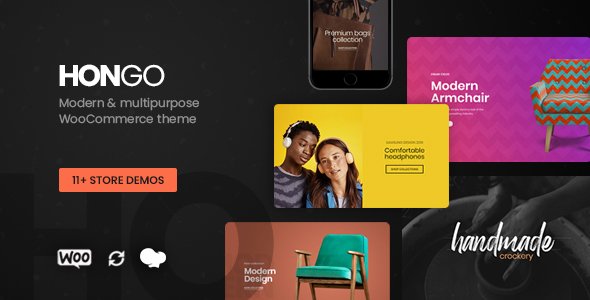
Stuck on your Hongo WordPress theme? Let's fix it.
No endless back-and-forth. Just send us the details and we'll get it done.
No obligation · Replies within 1 hour · Quote within 1 day
Setup · Customization · Bug fixes · WooCommerce integration
About Hongo WP Theme
Hongo is a multi-purpose WordPress theme developed by Themezaa, built on top of the GSAP animation library and powered by Elementor and WPBakery page builders. It ships with over 30 pre-built demos spanning fashion, creative agencies, portfolios, and e-commerce stores.
The theme leans heavily on visual presentation. Smooth scroll, parallax effects, and full-screen layouts are baked in without needing third-party plugins. WooCommerce support is solid, with dedicated product layouts and shop templates included in the package.
Hongo targets designers and studio owners who want a polished frontend without writing code. That said, the sheer number of options, panels, and demo-specific dependencies means setup takes time, and customising beyond the demos often requires someone who knows the theme inside out.
Get matched with a Hongo developer in under one day
Tell us about your Hongo project. Small fixes, Hongo theme customization, or a full website build, whatever you need, we've got it covered.
We'll connect you to the right Hongo developers, define the scope, and get everything 100% clear.
You'll get one estimate, hire your preferred developer, and start collaborating.
Hongo’s feature depth is one of its strengths and one of its biggest friction points. Getting a demo imported cleanly, customised properly, and performing well is not a one-click process.
Through Codeable, you can connect with a vetted Hongo developer who has hands-on experience with Themezaa’s theme architecture. Post your project, get a free estimate within 24 hours, and only move forward if the scope and price work for you. No risk, no obligation.
Pros
- 30+ pre-built demos covering e-commerce, portfolio, agency, and lifestyle niches
- GSAP-powered animations built in without requiring external plugins
- Supports both Elementor and WPBakery, giving layout flexibility
- Strong WooCommerce integration with dedicated shop and product templates
- Lifetime updates included with a single purchase on ThemeForest
Cons
- Demo import can fail or import incomplete content without careful setup
- Heavy reliance on bundled plugins makes the theme hard to move away from
- Animation scripts add significant page weight if not selectively disabled
- Theme options panel is large and poorly documented for non-standard use cases
- Some demo layouts use deprecated WPBakery shortcodes that conflict with newer plugin versions
Who is Hongo for?
Fashion & Apparel Stores
Hongo includes several fashion-specific WooCommerce demos with lookbook layouts, product hover effects, and full-width shop grids. A Hongo developer can configure size guides, variant displays, and custom checkout flows that match the visual polish of the frontend without slowing down conversion paths.
Creative Agencies
The agency demos in Hongo use scroll-triggered animations and case study layouts that work well for showcasing client work. A Hongo specialist can set up team sections, service pages, and contact forms that maintain the animated aesthetic without causing performance issues on mobile devices.
Freelance Portfolios
Hongo’s portfolio grid options include masonry, justified, and full-screen layouts. For freelancers who want their work to lead, a Hongo expert can configure project filtering, lightbox galleries, and case study templates that load fast and display correctly across all screen sizes.
Interior Design Studios
Interior design demos in Hongo lean on large imagery, horizontal scroll sections, and minimal typography. A Hongo developer can tailor these layouts to show room photography effectively, add project category filtering, and integrate booking or enquiry forms without disrupting the visual flow.
Digital Product Shops
Hongo’s WooCommerce support extends to downloadable products with clean checkout templates and account pages. A Hongo specialist can configure digital delivery, licence key plugins, and email receipts to match your brand while keeping the storefront fast and distraction-free for buyers.

Customizing Hongo
Hongo ships with a detailed theme options panel alongside Elementor and WPBakery support. That flexibility is also where things get complicated. Many of the demo layouts rely on theme-specific shortcodes, widget configurations, and plugin bundles that aren’t obvious to configure without experience.
A Hongo expert can map the right demo to your project, strip out what you don’t need, and build out custom sections that stay consistent across breakpoints. Typography, colour palettes, header styles, and mega menu setups all require careful configuration to avoid layout conflicts.
If you need a custom shop layout, a tailored portfolio grid, or a landing page that doesn’t match any existing demo, working with a Hongo specialist saves significant trial and error. The goal is a site that looks intentional, not assembled.
Recommended plugins for Hongo
Hongo bundles Revolution Slider, Essential Grid, and WooCommerce support out of the box. These add functionality but also add page weight if left unconfigured.
On the performance side, Hongo benefits from proper caching, image optimisation, and script deferral. Without these steps, the animation-heavy frontend can hurt Core Web Vitals scores. See our WordPress performance optimisation service for specifics.
For organic visibility, Hongo works with Yoast and Rank Math, but schema, metadata, and crawl structure still need manual attention. Our WordPress SEO service covers that end-to-end.
Not sure which plugins to use? This WordPress plugins directory covers the most popular options with reviews and setup guides.
Hongo common issues
Hongo demo import not working
Demo import failures in Hongo usually come down to server memory limits or a missing required plugin. Set memory_limit to at least 256M in your php.ini or wp-config.php. Make sure all required plugins listed in the theme’s import instructions are active before attempting the import. Import XML and theme settings files separately if the one-click option stalls. If the problem continues, our WordPress bug fixing service can resolve it quickly.
Hongo Revolution Slider not loading
Revolution Slider bundled with Hongo sometimes fails to activate if the plugin was previously installed from a different source. Deactivate and delete the existing Revolution Slider installation, then reinstall the version bundled inside the Hongo package under Appearance > Install Plugins. Clear any caching plugins after reactivation. Version mismatches between Hongo and standalone Revolution Slider purchases are a common cause of blank or broken slider sections.
Hongo header layout broken on mobile
Broken mobile headers in Hongo often result from a custom header layout set in the theme options that doesn’t have a responsive override configured. Check Theme Options > Header > Mobile Header and make sure a mobile-specific header style is selected. If you’re using a custom Elementor header template, confirm it has a mobile breakpoint defined. Also check for CSS conflicts introduced by child theme styles or third-party plugins adding inline styles to the header element.
Hongo WooCommerce shop page showing wrong layout
Hongo’s shop page layout is controlled by a combination of the WooCommerce template override in the theme and the settings under Theme Options > Shop. If the layout looks wrong, check that the correct shop page is assigned under WooCommerce > Settings > Products > Shop page. Also verify that no page-level template override is applied to the shop page itself. Switching between column counts or layout styles requires a cache flush to display correctly.
Hongo animations not working after update
GSAP-based animations in Hongo can stop working after a theme or plugin update if a JavaScript conflict is introduced. Open your browser console and check for JS errors on the page. Common culprits include jQuery version mismatches or a caching plugin serving an outdated version of Hongo’s animation scripts. Purge all caches, deactivate plugins one by one to isolate the conflict, and confirm the correct GSAP version is loading by checking the page source. Our WordPress bug fixing service can trace JS conflicts efficiently.
Hongo page builder content not displaying
If WPBakery or Elementor content isn’t displaying in Hongo, the most likely cause is a missing or deactivated plugin that the shortcode or widget depends on. Go to Appearance > Install Plugins and ensure all required plugins show as active. For WPBakery specifically, check that the page is not set to use the Classic Editor mode, which strips visual builder output. Also confirm the page template matches the intended layout type selected when the content was built.
Hongo site slow after demo import
Hongo demo imports load all assets including sliders, fonts, images, and plugin data, which inflates page size considerably. After import, audit and disable any Revolution Slider presentations you’re not using, remove unused Essential Grid items, and configure a caching plugin with CSS and JS minification. Lazy loading images and limiting GSAP animations to visible sections are also effective steps. See our WordPress performance service for a structured approach to post-import optimisation.
Hongo mega menu not showing submenus
Hongo’s mega menu requires specific configuration inside the WordPress menu editor. Hover over a top-level menu item, click the blue settings icon that appears, and enable the mega menu toggle. Sub-items need to be set as columns within that interface. If the mega menu toggle isn’t visible in the menu editor, confirm that Hongo’s required plugins are all active and that you’re working in the correct WordPress menu assigned to the primary header location. Our WordPress bug fixing service can fix persistent menu issues.
Hongo portfolio grid not filtering correctly
Portfolio grid filtering failures in Hongo typically happen when the filter categories aren’t assigned correctly to portfolio items, or when a JavaScript conflict prevents the Isotope filtering library from initialising. Check each portfolio post has the correct category assigned under the portfolio taxonomy, not the standard post category. In the grid settings, confirm the filter bar is enabled and pointing to the correct taxonomy. If the filter buttons appear but clicking them does nothing, check the browser console for JS errors blocking Isotope.
Hongo sticky header overlapping page content
Sticky header overlap in Hongo is usually caused by an incorrect offset value. The theme doesn’t always calculate the sticky header height automatically when custom header layouts are used. Go to Theme Options > Header and look for a sticky header scroll offset setting. You can also add a CSS rule targeting the first full-width section: margin-top: [header height]px. If the offset changes between pages due to different header configurations, use page-level CSS overrides via the Elementor section padding settings instead.
Hongo FAQ
Yes, Hongo is compatible with Elementor. Many of its demo layouts are built using Elementor’s page builder. Some demos also use WPBakery, so the builder available depends on which demo you import. You can use Elementor exclusively, but switching layouts originally built in WPBakery requires rebuilding those pages.
Hongo includes full WooCommerce support with dedicated shop, product, cart, and checkout templates. Several demos are built specifically for fashion and lifestyle e-commerce stores. WooCommerce-specific settings are available inside the theme options panel, including product columns, quick view, and wishlist configuration.
Hongo ships with over 30 pre-built demos. These cover niches including fashion, portfolio, agency, interior design, photography, and digital products. Each demo can be imported with one click, though a clean WordPress installation is recommended before importing to avoid conflicts with existing content or plugins.
Hongo produces clean HTML output and supports popular SEO plugins like Yoast and Rank Math. However, the theme’s animation scripts and bundled sliders can affect Core Web Vitals if left unoptimised. Schema markup, metadata, and crawl structure still need attention separately. The theme alone does not guarantee good search rankings.
Hongo supports both Elementor and WPBakery, but many demo layouts rely on one or the other. You can deactivate WPBakery and build exclusively with Elementor, but any pre-built pages using WPBakery shortcodes will display raw shortcode text until rebuilt. Starting from an Elementor-based demo avoids this issue.
Themezaa releases updates for Hongo regularly. The theme has an active update history on ThemeForest. Updates cover compatibility with new WordPress versions, WooCommerce releases, and bundled plugin updates. You can update the theme through the Envato Market plugin or by manually uploading the updated package from ThemeForest.
After installing Hongo and activating required plugins, go to Appearance > Import Demo. Choose your demo, select which content to import, and click import. The process can take several minutes. A server with at least 256MB PHP memory and a 300-second max execution time is recommended to avoid timeouts during the import process.
Out of the box, Hongo is not particularly lightweight. GSAP animations, Revolution Slider, and large demo images add significant page weight. With proper caching, image optimisation, lazy loading, and unused script removal, performance can be brought to an acceptable level. Default installations without optimisation often score poorly on PageSpeed Insights.
Yes. A Hongo developer can handle demo setup, customisation, and performance configuration for you. Through Codeable, you can post your project, receive a free estimate within 24 hours, and hire a vetted specialist. There’s no obligation to proceed until you’re satisfied with the proposed scope and cost.
Hongo is WPML-compatible. You can use it to build multilingual sites with translated page content, theme strings, and WooCommerce product listings. String translation for theme-specific labels requires configuring WPML’s String Translation module. Some animation-heavy sections may need individual testing after translation to confirm layout integrity across languages.
Hire a Hongo Expert Developer
Whether you need a full Hongo site build, a demo customised to your brand, or a specific feature added without breaking existing layouts, a dedicated Hongo developer can scope and deliver it properly. Get a free estimate and describe what you need. You’ll hear back within 24 hours with a clear plan and no obligation to proceed.
You'll need a free Codeable account so developers can ask questions and send their quotes.