Travel WordPress Theme
by PhysCode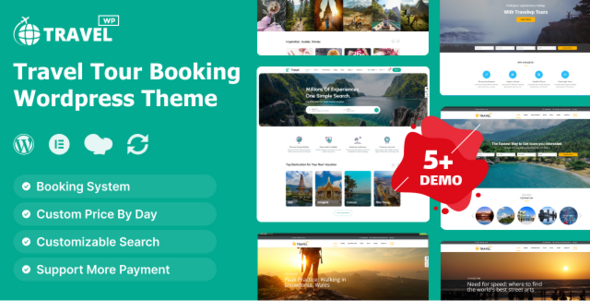
Stuck on your Travel WordPress theme? Let's fix it.
No endless back-and-forth. Just send us the details and we'll get it done.
No obligation · Replies within 1 hour · Quote within 1 day
Setup · Customization · Bug fixes · WooCommerce integration
About Travel WP Theme
Travel is a WordPress theme by PhysCode built for travel blogs, tour operators, and destination websites. It ships with a clean, image-forward layout designed to showcase photography, itineraries, and destination guides without feeling cluttered.
The theme includes a drag-and-drop page builder, pre-built demo content, custom post types for destinations and tours, and a responsive layout that holds up well on mobile. Widget areas, a sticky header, and built-in social sharing give you the core building blocks without needing a stack of third-party plugins.
It integrates with WooCommerce for selling tours or travel packages and supports popular booking plugins. For travel agencies or bloggers who want a polished site without a long setup process, Travel by PhysCode is a practical starting point with enough flexibility to grow into something custom.
Get matched with a Travel developer in under one day
Tell us about your Travel project. Small fixes, Travel theme customization, or a full website build, whatever you need, we've got it covered.
We'll connect you to the right Travel developers, define the scope, and get everything 100% clear.
You'll get one estimate, hire your preferred developer, and start collaborating.
Travel is flexible, but getting it configured correctly takes time and technical knowledge. FoxyConcept works with vetted Travel developers through Codeable, a platform built exclusively for WordPress professionals. Every developer is screened and reviewed, so you are not taking a chance on an unknown freelancer.
Whether you need a full build, a specific feature added, or a problem fixed, you can post a project and receive an estimate without any obligation to hire. It is a straightforward way to get expert help without the usual hiring risk.
Pros
- Pre-built destination and tour post types save significant setup time
- WooCommerce-ready layout supports tour packages and direct bookings
- Image-forward design handles full-width photography well without heavy customization
- Bundled page builder reduces reliance on additional layout plugins
- Responsive layout works across devices with minimal adjustment needed
Cons
- Theme options panel can feel limited once you move beyond basic branding changes
- Demo content import does not always transfer cleanly to fresh installs
- Bundled page builder creates lock-in and can complicate future migrations
- Limited documentation makes troubleshooting custom layout changes harder without developer help
- Plugin compatibility issues can surface with newer versions of WP Travel Engine
Who is Travel for?
Travel Blog
Travel works well for bloggers publishing destination guides, trip reports, and itineraries. The post layouts handle long-form content and photography side by side. A Travel developer can extend it with custom category pages, author profiles, and an email opt-in flow to turn readers into subscribers.
Tour Operator
Tour operators need more than a blog layout. The theme’s custom post types support structured tour listings with pricing, duration, and itinerary details. Paired with WP Travel Engine or WooCommerce, a Travel specialist can build a full booking flow with availability calendars and payment processing.
Destination Marketing Site
Regional tourism boards and destination marketing organisations need filterable content libraries, map integrations, and multilingual support. Travel’s flexible layout is a solid base. A Travel theme expert can add custom taxonomies for regions and activities and build a search interface visitors can actually use.
Adventure Sports Company
Surf schools, hiking guides, and cycling tour companies need sharp visual presentation and clear booking CTAs. Travel handles the imagery well. A developer can tighten the conversion path, add video backgrounds for specific tours, and integrate liability waiver or participant intake forms into the booking process.
Travel Agency
Agencies selling packaged holidays need clean product pages, enquiry forms, and ideally a live availability feed. Travel provides the visual framework. A Travel developer can connect it to third-party APIs, add currency converters, and build custom quote request workflows suited to complex multi-destination packages.

Customizing Travel
Out of the box, Travel handles the basics. But most sites need more than a demo import. A Travel expert can rework the layout to match your brand, build custom destination archive pages, and set up filtered search so visitors can find tours by region, duration, or price.
Common customization work includes integrating booking systems like WP Travel Engine or Checkfront, building custom itinerary post types, and optimizing the homepage for conversions rather than just aesthetics. A Travel theme specialist can also tighten up the mobile experience, which often needs hands-on attention beyond what the theme options panel offers.
If you need multilingual support for international audiences, a Travel developer can configure WPML or Polylang properly so translated pages inherit the correct templates and tour data displays consistently across languages.
Recommended plugins for Travel
Travel pairs well with several plugins depending on what your site needs to do. WP Travel Engine or WooCommerce handle tour bookings and payments. Yoast SEO or Rank Math help structure destination and itinerary pages for search, and pairing them with a proper schema setup makes a real difference in how listings appear in results. For more on that, see our WordPress SEO optimisation service.
On the performance side, heavy image galleries slow things down fast on travel sites. A caching plugin, image compression, and a CDN are near-essential. Our WordPress performance service covers the full setup if your site is loading slowly.
Not sure which plugins to use? This WordPress plugins directory covers the most popular options with reviews and setup guides.
Travel common issues
Travel theme demo import not working
Demo import failures usually come down to file upload size limits or PHP memory constraints on the server. Increase upload_max_filesize, post_max_size, and memory_limit in your php.ini or wp-config.php. Also confirm the required plugins are activated before running the import. If the process stalls repeatedly, a manual import using the WordPress importer tool with the XML file directly often resolves it.
Tour listings not showing on Travel theme archive page
If tour custom post types are not appearing on archive pages, the most common cause is a flushed rewrite rule. Go to Settings > Permalinks and click Save without changing anything. If tours still do not appear, check that the post type is registered with has_archive set to true and that no page is using the same slug as the archive. A plugin conflict can also suppress custom post type output.
Travel theme mobile menu not opening
A non-functional mobile menu in Travel is usually a JavaScript conflict. Open your browser console and look for JS errors. Common culprits are caching plugins serving outdated scripts or a conflicting jQuery version. Disable plugins one by one to isolate the issue. If the menu toggle exists in the DOM but does not respond, the theme’s JS file is likely not loading. Check enqueue order in functions.php.
WooCommerce checkout broken after Travel theme update
Theme updates can override WooCommerce template files that the theme has customised. After any Travel theme update, navigate to WooCommerce > Status > Tools and run the template check. Outdated template files need to be updated manually by copying the newer version from WooCommerce core into the theme’s woocommerce folder. If the issue persists, our WordPress bug fixing service can handle the reconciliation cleanly.
Travel theme homepage slider not loading images
Slider images failing to load usually point to one of three things: images were not imported with the demo content, the slider plugin needs its own media regeneration, or a lazy loading plugin is interfering with the first-paint render. Try regenerating thumbnails using the Regenerate Thumbnails plugin and disabling lazy load for the slider element specifically. Check the browser network tab for 404 errors on image URLs to confirm which images are actually missing.
Travel theme search not filtering by destination
Travel theme search filters depend on how taxonomies are structured and queried. If destination filtering is not working, check that destinations are assigned as a custom taxonomy rather than a standard category and that the filter widget or shortcode is querying the correct taxonomy slug. If you are using a third-party search plugin, confirm it is indexing the custom post type. Mismatched taxonomy names between the theme and plugin are the most common root cause.
Travel theme page builder content missing after update
Page builder content disappearing after a theme update often means the builder’s data is stored in a format tied to a specific plugin version. First check that the bundled page builder plugin is also updated to match the theme version. If content still appears as raw shortcode or blank, do not make edits yet. Restore from a pre-update backup, update the plugin and theme together, then test. If you have no backup, our WordPress bug fixing service can attempt data recovery from the database.
Google Maps not displaying on Travel theme destination pages
Google Maps display issues on Travel destination pages are almost always an API key problem. Since 2018, Maps requires a billing-enabled API key. Go to the Travel theme settings or the relevant plugin settings and enter a valid key with Maps JavaScript API and Geocoding API enabled. If the map loads but shows a grey overlay, check the API key referrer restrictions and make sure your domain is whitelisted in the Google Cloud Console.
Travel theme fonts not loading correctly
Font loading issues in Travel can stem from a blocked Google Fonts request, a CSP header conflict, or a caching plugin serving a stylesheet before fonts are enqueued. Open the network tab in your browser and filter by font to see which requests are failing. If you are running in a privacy-focused setup, consider self-hosting the fonts using the OMGF plugin instead of loading from Google’s CDN. Clear all caches after making changes.
Travel theme booking form not sending emails
Booking form emails not sending is rarely a theme issue and almost always a mail delivery problem. WordPress uses PHP mail by default, which most hosts block or route to spam. Install an SMTP plugin like WP Mail SMTP and configure it with your email provider credentials. Test using the plugin’s built-in email test tool. Also check the spam folder and confirm the from address is on a domain with valid SPF and DKIM records. If the form itself is not submitting, check for JS errors first.
Travel FAQ
Travel works as a foundation for tour booking sites but needs plugin support to handle actual bookings. WP Travel Engine or WooCommerce with a booking extension handle payments, availability, and itinerary details. The theme provides the visual structure. A Travel developer can connect those pieces into a complete booking workflow tailored to your tour types.
Yes, Travel is WooCommerce compatible. Product pages, cart, and checkout inherit theme styling. That said, WooCommerce template files sometimes need manual adjustment after theme updates. If checkout pages break or styling goes off, it usually means outdated template files need reconciling between the theme and the current WooCommerce version.
Technically yes, but content built with the bundled page builder will break if you deactivate it. You would need to rebuild affected pages using Gutenberg or another builder. If you want to migrate away from the bundled builder, do it before investing heavily in page layouts. A Travel theme developer can advise on the cleanest path forward for your specific setup.
The most common approach is WP Travel Engine, which integrates well with Travel and adds departure dates, pricing, booking forms, and payment gateways. Install and activate the plugin, then configure tour post types to use its fields. A Travel specialist can set up the full flow including email confirmations, deposit options, and availability management.
Travel has a reasonable SEO baseline with clean markup and schema support. However, SEO performance depends heavily on how content is structured and which plugins you use. Adding Yoast or Rank Math, implementing proper schema for tours and destinations, and optimising images will matter far more than the theme itself. See our WordPress SEO service for structured help.
Travel is WPML compatible. You can also use Polylang as a lower-cost alternative. Multilingual setup requires translating strings, duplicating pages for each language, and making sure tour custom post types replicate correctly. Machine translation plugins like DeepL integrations can speed up content translation but always need human review for accuracy on commercial tour pages.
Always use a child theme for customizations. If you are editing the parent theme directly, an update will overwrite your changes. Before updating, back up the site and note any files you have modified. After updating, compare changed files against your backup and reapply customizations. Our WordPress maintenance service handles safe update workflows including pre and post-update testing.
Yes, Travel supports Google Maps. You need a valid API key with the Maps JavaScript API enabled and a billing account attached in Google Cloud Console. Enter the key in theme settings or the relevant plugin options. If maps show a grey overlay, your API key likely has domain restrictions that are blocking the request. Update the allowed referrers in your Google Cloud project.
WP Travel Engine is the most commonly paired plugin and has direct compatibility with Travel. WooCommerce with a booking add-on works well for simpler product-style tour pages. For complex availability management, Checkfront or Bokun via API integration are options, though those require developer setup. A Travel developer can recommend the right stack based on your booking volume and tour types.
Travel sites are image-heavy by nature, so image optimisation is the first priority. Use a plugin like ShortPixel or Imagify, enable WebP output, and set up a CDN. Add a caching plugin, reduce unused CSS from the bundled page builder, and defer non-critical JavaScript. For a full audit and implementation, our WordPress performance service covers the complete optimisation process.
Hire a Travel WordPress Developer
Need a Travel theme developer who knows the codebase and can deliver clean, tested work? FoxyConcept connects you with specialists through Codeable. Post your project, get a free estimate within 24 hours, and only move forward if it makes sense for you. No retainers, no guesswork. Get a Free Estimate and describe what you need.
You'll need a free Codeable account so developers can ask questions and send their quotes.