EduBlink WordPress Theme
by DevsBlink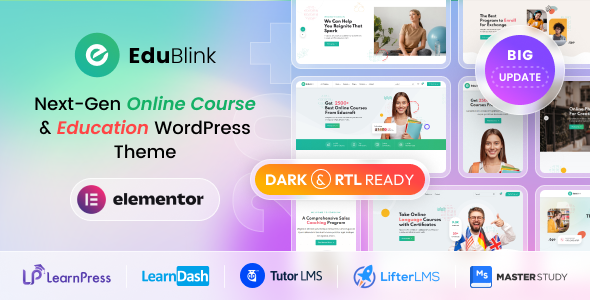
Stuck on your EduBlink WordPress theme? Let's fix it.
No endless back-and-forth. Just send us the details and we'll get it done.
No obligation · Replies within 1 hour · Quote within 1 day
Setup · Customization · Bug fixes · WooCommerce integration
About EduBlink WP Theme
EduBlink is a WordPress theme built by DevsBlink, designed specifically for online education platforms, universities, coaching centres, and LMS-based websites. It ships with deep integration for LearnPress, making it a practical choice for anyone selling or delivering courses online.
The theme includes multiple pre-built demos covering e-learning portals, language schools, kindergartens, and corporate training sites. It supports Elementor, giving you drag-and-drop control over layouts without touching code. Course listing pages, instructor profiles, event sections, and pricing tables are all included out of the box.
EduBlink is built on a clean codebase with WooCommerce compatibility for course sales, WPML support for multilingual sites, and contact form integrations. It is regularly updated by DevsBlink and has a solid track record on ThemeForest with thousands of active installs.
Get matched with a EduBlink developer in under one day
Tell us about your EduBlink project. Small fixes, EduBlink theme customization, or a full website build, whatever you need, we've got it covered.
We'll connect you to the right EduBlink developers, define the scope, and get everything 100% clear.
You'll get one estimate, hire your preferred developer, and start collaborating.
EduBlink has enough moving parts that DIY customization often leads to broken layouts, plugin conflicts, or hard-to-reverse changes. A vetted EduBlink developer on Codeable has done this before and knows where the theme’s edge cases are. Codeable only works with the top tier of WordPress developers, so you are not rolling the dice on quality. Whether you need a full LMS build, a specific feature added, or an existing EduBlink site cleaned up, the right specialist is available and ready to scope your project.
Pros
- Deep LearnPress integration with course, lesson, and quiz templates built directly into the theme
- Multiple niche-specific demo sites covering kindergarten, university, coaching, and corporate training
- Full Elementor compatibility with custom education widgets included
- WooCommerce support for selling courses, merchandise, or training packages
- WPML compatible, making it viable for multilingual education platforms
Cons
- Heavy out of the box, with page load times suffering if caching and image optimisation are not configured properly
- Importing demo content can overwrite existing settings, which is a problem on sites already in progress
- Custom course archive or category page layouts require template overrides, not something you can do through the Customizer
- Some Elementor widgets are tied to LearnPress, so sites using Tutor LMS or LifterLMS will need custom work
- Support from DevsBlink can be slow during busy periods, with some advanced issues requiring independent developer help
Who is EduBlink for?
Online Course Platforms
EduBlink is built around LearnPress, making it a natural fit for online course platforms. You get course listing pages, individual lesson layouts, quiz templates, and instructor profile pages without building from scratch. An EduBlink developer can extend these with custom filtering, drip content, or certificate delivery to match your specific course delivery model.
Universities and Colleges
Universities need structured, information-dense sites with departments, events, admissions pages, and faculty profiles. EduBlink includes demo content specifically for this use case. An EduBlink specialist can adapt those templates to match institutional branding, integrate with student management systems, and build out department-level page structures that work at scale.
Coaching and Tutoring Centres
Tutoring businesses need clean booking flows, instructor bios, subject-based course listings, and testimonials. EduBlink covers most of this with its pre-built sections. A skilled EduBlink developer can add booking plugin integration, custom pricing structures, and lead capture forms tailored to how coaching businesses actually convert enquiries into clients.
Kindergarten and School Websites
EduBlink ships with a kindergarten demo that includes bright layouts, event sections, gallery pages, and parent-facing content blocks. It is a good starting point for primary schools and early years providers. An EduBlink expert can customise the colour scheme, add term date management, integrate a newsletter plugin, and set up a simple contact or enquiry system.
Corporate Training Portals
Corporate training portals often need private course access, team enrolment, and reporting. EduBlink gives you the front-end structure for this, with an EduBlink developer handling the back-end logic through LearnPress add-ons or third-party LMS integrations. Role-based access, bulk enrolment, and internal branding are all achievable with the right build approach.

Customizing EduBlink
EduBlink gives you a reasonable amount of control through the WordPress Customizer and Elementor, but hitting its limits is easy once your requirements go beyond the demo layouts. Custom course filtering, unique instructor page structures, branded checkout flows, or integration with third-party LMS plugins often require direct PHP or CSS work.
An EduBlink expert can handle these customizations properly, keeping your changes upgrade-safe and consistent across devices. Common requests include custom LearnPress templates, modified course archive layouts, unique header and footer designs, and integration with tools like Zoom, Tutor LMS, or LifterLMS.
Rather than patching things together with plugins or workarounds, working with an EduBlink specialist means changes are done at the theme or child theme level, cleanly and without breaking future updates.
Recommended plugins for EduBlink
EduBlink pairs well with several plugins that extend what the theme does out of the box. LearnPress add-ons for certificates, quizzes, and content drip are the most common additions for course sites. WooCommerce subscriptions work with the theme for recurring course access models.
For site speed, image optimisation, caching, and Core Web Vitals improvements are worth addressing early, especially on course pages with heavy media. See our WordPress performance service for details. If you are running an education blog or trying to rank course pages, structured content and technical SEO matter. Our WordPress SEO service covers both.
Not sure which plugins to use? This WordPress plugins directory covers the most popular options with reviews and setup guides.
EduBlink common issues
EduBlink demo import not working
Demo import failures in EduBlink are usually caused by PHP memory limits, max execution time, or server upload size restrictions. Check your php.ini or wp-config.php for memory_limit, max_execution_time, and upload_max_filesize. Set these to at least 256MB, 300 seconds, and 64MB respectively. If the import still fails partway through, try importing XML content manually via Tools > Import and setting up widgets separately. Importing on a staging environment first is always the safer approach.
EduBlink LearnPress courses not displaying correctly
If EduBlink course pages look unstyled or broken, the most common cause is a missing or outdated LearnPress version. EduBlink is built against specific LearnPress versions, and updates to either can break template compatibility. Check that your LearnPress version matches what DevsBlink currently recommends in the theme documentation. If the issue persists after matching versions, the course templates in the theme may need to be refreshed. Our WordPress bug fixing service can diagnose and resolve this quickly.
EduBlink Elementor widgets missing after update
Missing Elementor widgets after an EduBlink or Elementor update usually means a compatibility break between the theme’s custom widget library and the current Elementor version. First, clear all caches and regenerate Elementor’s CSS via Elementor > Tools > Regenerate CSS. If widgets are still absent, deactivate and reactivate the EduBlink core plugin if one is included. Check the DevsBlink changelog for known Elementor compatibility updates. Staying one Elementor version behind the latest release is sometimes necessary until DevsBlink releases a patch.
EduBlink slow page load speed
EduBlink loads a lot of assets by default, including fonts, sliders, and LMS scripts that fire on every page even when not needed. Start by enabling a caching plugin and setting up a CDN. Lazy load images, especially on course listing pages. Use a plugin to dequeue unused scripts by page type. Google PageSpeed will highlight the biggest offenders. For a full audit and implementation, our WordPress performance service covers this end to end.
EduBlink mobile menu not opening
A broken mobile menu in EduBlink is almost always a JavaScript conflict. Open your browser console on mobile or in responsive preview mode and look for JS errors. Common culprits are jQuery version mismatches or another plugin loading a conflicting script. Try disabling plugins one at a time to isolate the conflict. If you have added custom scripts to the header or footer, check those first. Switching to the default WordPress jQuery version via a plugin like Disable jQuery Migrate can also resolve this.
EduBlink header layout broken
Header layout breaks in EduBlink often happen after a theme update resets Customizer settings, or after an Elementor update changes how header templates render. If you are using Elementor to build your header, check whether the header template is still assigned correctly under Elementor > Theme Builder. If you are using the built-in header options, go through the Customizer and recheck header layout settings. Our WordPress bug fixing service can restore a broken header without data loss.
EduBlink WooCommerce checkout not styled correctly
EduBlink’s WooCommerce styles do not always apply correctly to checkout, cart, or account pages, especially after WooCommerce updates its block-based cart and checkout. If you are using the classic shortcode-based checkout, make sure EduBlink has WooCommerce declared as supported in its functions.php. For block-based checkout, additional CSS targeting is needed. Checking the DevsBlink changelog for WooCommerce compatibility updates is the first step. Custom CSS fixes can be applied in a child theme.
EduBlink course category page showing wrong layout
EduBlink’s course category pages use a custom template that can stop applying if the template hierarchy is not matched correctly, particularly after a LearnPress update. Go to Settings > Permalinks and save to flush rewrite rules first. If the layout is still wrong, the archive template for course categories may need to be copied into a child theme and adjusted. This is a common issue and a straightforward fix for an EduBlink developer, but doing it in the parent theme directly risks being overwritten on the next update.
EduBlink WPML language switcher not showing
If WPML’s language switcher is not appearing on an EduBlink site, the first check is whether the switcher widget or menu item has been added correctly. EduBlink may not include a dedicated switcher slot in all header layouts. You may need to add a custom menu location or use WPML’s floating switcher as a fallback. Some EduBlink header configurations built with Elementor require the WPML Elementor widget to be placed manually in the header template rather than relying on theme-level integration.
EduBlink child theme not inheriting styles
If your EduBlink child theme is not picking up styles from the parent, check how the child theme enqueues its stylesheet. It should use wp_enqueue_style with the parent stylesheet as a dependency, not an @import in the CSS file. Also confirm the child theme’s style.css header declares the correct Template: value matching the parent theme’s folder name exactly. If you are using a child theme plugin to generate the child, double check the output matches these requirements. Our WordPress bug fixing service can sort this fast.
EduBlink FAQ
Yes, EduBlink is designed for this. It integrates directly with LearnPress and WooCommerce, giving you course listing pages, checkout, and student account areas without extra setup. For more advanced selling features like subscriptions, memberships, or affiliate tracking, you will need add-ons. An EduBlink specialist can configure the full sales flow for your specific model.
EduBlink is built primarily for LearnPress. Tutor LMS and LifterLMS will work on the site, but EduBlink’s pre-built course templates will not apply to them automatically. You will need custom template work to get those LMS plugins looking native within the theme. An EduBlink developer can build these templates in a child theme.
You can use EduBlink without LearnPress, particularly for school or university informational sites that do not need course delivery features. Most of the theme’s design elements work independently. However, the course-specific templates, widgets, and demo content are built around LearnPress, so you would be leaving a large part of the theme unused.
Go to Appearance > Import Demo Data after installing EduBlink and its required plugins. Choose your demo, click import, and wait. The process can take several minutes. Make sure your server meets the PHP requirements beforehand, specifically memory limit and execution time. Importing on a fresh WordPress install is strongly recommended to avoid overwriting existing content or settings.
DevsBlink updates EduBlink regularly and it generally stays compatible with current WordPress releases. Always check the ThemeForest changelog before updating on a live site. Running updates on a staging environment first is the safe approach. If you are several versions behind, test updates incrementally rather than jumping straight to the latest version.
Yes. The most reliable route is posting your project on Codeable, where vetted EduBlink developers can review your requirements and provide a scoped estimate. You get matched within 24 hours and there is no obligation to hire after receiving the estimate. This works for everything from small customisations to full site builds.
EduBlink is WPML compatible, which covers translation and multilingual setup for most use cases. You will need a WPML licence separately. Some header configurations require manual placement of the language switcher rather than automatic theme-level integration. RTL language support is included, though visual adjustments may still be needed depending on your layout.
Start with a caching plugin, a CDN, and image compression. EduBlink loads several scripts globally that can be conditionally dequeued on pages that do not need them. Reducing slider animations and lazy loading course images makes a noticeable difference. For a full performance audit and implementation, see our WordPress performance service.
Yes. EduBlink includes custom Elementor widgets for education-specific content like course lists, instructor blocks, and counters. The theme is designed to work with Elementor’s page builder for full layout control. Some widgets depend on LearnPress being active. After updates, regenerating Elementor’s CSS cache resolves most display issues.
Migrating an existing site to EduBlink involves moving content, rebuilding layouts within the theme’s structure, and reconnecting any LMS or WooCommerce data. It is not a simple theme swap if your current site has complex content. An EduBlink developer can plan and execute this properly. See our WordPress migration service for more on how that process works.
Hire an EduBlink Developer
If you need an EduBlink expert to build, customise, or fix your education site, you can get matched with a vetted developer through Codeable within 24 hours. No commitment required at the estimate stage. Whether it is a full LearnPress integration, a custom page layout, or a specific feature build, a qualified EduBlink specialist can scope and deliver it properly. Get a free estimate and describe your project today.
You'll need a free Codeable account so developers can ask questions and send their quotes.