Buddy WordPress Theme
by GhostPool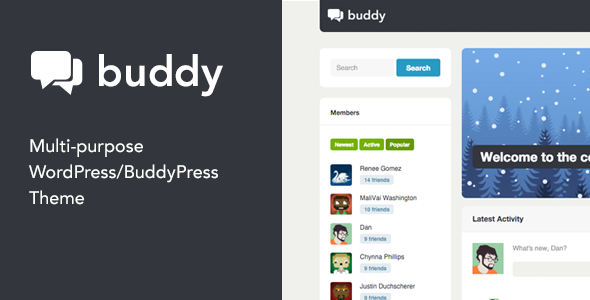
Stuck on your Buddy WordPress theme? Let's fix it.
No endless back-and-forth. Just send us the details and we'll get it done.
No obligation · Replies within 1 hour · Quote within 1 day
Setup · Customization · Bug fixes · WooCommerce integration
About Buddy WP Theme
Buddy is a WordPress theme by GhostPool built specifically for BuddyPress-powered community sites. It ships with a clean, social-network-style layout that puts member profiles, activity feeds, and group pages front and centre. The theme is designed to work alongside BuddyPress out of the box, with template files that match BuddyPress components rather than fighting against them.
GhostPool built Buddy with bbPress support included, so forums sit naturally within the community structure. The theme is widgetised, translation-ready, and includes custom shortcodes for adding community elements into pages. If you are running or planning a membership community, niche social network, or online club on WordPress, Buddy gives you a solid starting point without needing to rebuild BuddyPress templates from scratch.
Get matched with a Buddy developer in under one day
Tell us about your Buddy project. Small fixes, Buddy theme customization, or a full website build, whatever you need, we've got it covered.
We'll connect you to the right Buddy developers, define the scope, and get everything 100% clear.
You'll get one estimate, hire your preferred developer, and start collaborating.
BuddyPress themes have quirks that standard WordPress themes do not. Template hierarchy works differently, hooks fire in unexpected places, and conflicts between BuddyPress versions and theme files are common. A vetted Buddy developer on Codeable has worked through these issues before. You get an accurate estimate before any work starts, no bidding wars, and a developer who understands the GhostPool codebase specifically. That matters when the problem is buried three template files deep.
Pros
- Ships with BuddyPress template files pre-built, so the core social pages work without custom development
- bbPress integration is included out of the box, making forum and community features cohesive
- Widgetised sidebar areas designed specifically for BuddyPress components like member lists and group directories
- Translation-ready with .pot file included, suitable for multilingual community sites
- GhostPool has a long track record with BuddyPress themes, meaning the codebase reflects real community site requirements
Cons
- Theme options panel is dated compared to Customizer-based themes; some settings feel disconnected from live preview
- Mobile responsiveness on BuddyPress profile and activity pages needs additional CSS work on smaller screens
- Limited block editor support; the theme was built before Gutenberg and full-site editing are not supported
- Styling conflicts can appear when BuddyPress updates change its own template markup and the theme has not been updated to match
- Documentation is thin for advanced customisation; developers working with hooks and filters often need to dig into the source code directly
Who is Buddy for?
Niche Online Communities
Buddy works well for interest-based communities where members connect around a shared topic. The group and activity feed structure mirrors how people interact in forums and social feeds. A Buddy specialist can add custom profile fields, category-filtered activity streams, and onboarding flows that help new members find relevant groups quickly.
Professional Networking Sites
The profile-forward layout suits professional networks where credentials, roles, and work history matter. Extended BuddyPress profile fields can display skills, location, and links. A Buddy developer can build directory search filters and connection request flows that make the network functional rather than just decorative.
Alumni and Association Portals
Universities and associations use Buddy to create private portals where verified members access content, directories, and event information. BuddyPress groups map naturally to graduating classes or regional chapters. With the right membership plugin and a Buddy expert handling the integration, access control and member verification can be automated.
Gaming and Fan Communities
Gaming communities need fast activity feeds, group clan pages, and user-generated content areas. Buddy’s BuddyPress foundation handles the social layer while bbPress manages game-specific forums. A Buddy developer can theme the profile pages to display game stats, badges, or custom achievement data pulled from external APIs.
Paid Membership Networks
Combining Buddy with WooCommerce Memberships or Paid Memberships Pro creates a subscription community where access tiers control what members see. Profile pages, private groups, and gated forum sections become the core product. A Buddy specialist can wire up the membership rules so BuddyPress components respect subscription status without manual workarounds.

Customizing Buddy
Buddy includes a theme options panel that covers colours, typography, layout width, and header configuration. You can switch between a boxed and full-width layout, adjust the sidebar position, and control which BuddyPress components appear in the navigation. Custom widgets let you surface member lists, groups, and activity streams in sidebars.
Beyond the options panel, meaningful customisation usually requires template overrides or custom CSS. A Buddy expert can extend profile pages with custom fields, rework the activity feed display, integrate WooCommerce memberships, or wire up custom BuddyPress components. If you want the theme to behave like a product rather than a starter template, working with a Buddy specialist saves a significant amount of trial and error on BuddyPress-specific hooks and filters.
Recommended plugins for Buddy
Buddy pairs well with several plugin categories. BuddyPress add-ons like BuddyBoss (older standalone plugins), BP Profile Search, and activity filters expand the social layer. For paid communities, WooCommerce with a memberships plugin handles subscriptions and gated content.
On the technical side, a community site with active members generates heavy database queries from activity feeds and notifications. Pairing Buddy with a solid caching and WordPress performance setup is important at scale. If you are indexing member profiles or forum threads, structured WordPress SEO optimisation for BuddyPress-generated URLs can meaningfully improve search visibility.
Not sure which plugins to use? This WordPress plugins directory covers the most popular options with reviews and setup guides.
Buddy common issues
Buddy theme BuddyPress pages showing unstyled or broken layout
Unstyled BuddyPress pages in Buddy usually mean the theme’s BuddyPress template files are not being loaded. Check that BuddyPress is active and that the theme has a buddypress folder in its directory. If a child theme is active, it may be missing those templates. Clearing any page or object cache after plugin updates often resolves display breaks. For persistent layout problems, a WordPress bug fixing service can trace which template is being loaded and why the styles are not applying.
Buddy theme member profile page not loading correctly after WordPress update
WordPress or BuddyPress updates occasionally change template markup that Buddy’s template files rely on. When a profile page breaks after an update, compare GhostPool’s profile templates against the current BuddyPress template structure. A version mismatch is usually the cause. Updating to the latest version of Buddy resolves this in many cases. If GhostPool has not released a matching update, a WordPress bug fixing specialist can patch the affected templates directly.
Activity feed not displaying in Buddy theme
A blank or missing activity feed in Buddy is often caused by a caching plugin serving a static version of the page, a JavaScript conflict blocking the feed from rendering, or BuddyPress activity component being disabled. Check the BuddyPress components page in Settings to confirm the Activity Streams component is active. Disable caching for BuddyPress pages and check the browser console for JS errors. If the feed still does not appear, the issue may be a hook conflict between Buddy and another active plugin.
Buddy theme conflict with bbPress forum pages
bbPress pages inheriting incorrect styles from Buddy usually trace back to the theme applying BuddyPress-specific CSS rules too broadly, which then overrides bbPress forum markup. Inspect the affected forum elements and identify which Buddy stylesheet rule is bleeding in. Adding scoped CSS targeting bbPress wrapper classes resolves the conflict without touching core theme files. Making changes in a child theme keeps them safe across future Buddy updates.
Buddy FAQ
Compatibility depends on which version of Buddy you are running. GhostPool has released updates to keep the theme aligned with BuddyPress changes, but older installs that have not been updated can show broken templates. Always check the theme’s changelog against the current BuddyPress version before updating either. If conflicts appear after an update, a developer familiar with BuddyPress template overrides can patch mismatches quickly.
Buddy does not include a dedicated WooCommerce integration, but WooCommerce will function on the site using its own default templates. Shop pages will render without Buddy’s community-specific styling. If you want the shop to match the theme’s design or need memberships tied to BuddyPress profiles, custom development is required to connect the two properly.
Technically yes, Buddy will load as a standard WordPress theme without BuddyPress active. However, the theme is designed around BuddyPress and most of its layout decisions assume community pages are present. Without BuddyPress, you lose the core purpose of the theme. Using it as a general WordPress theme is possible but not what it was built for.
Buddy has limited Gutenberg support. It was built before the block editor became the WordPress standard, and its page templates do not fully accommodate block-based layouts. Standard blocks work on posts and pages, but the BuddyPress-specific templates are classic PHP templates. Full-site editing is not supported. If block editor compatibility is important, a developer can add targeted block support without a full rebuild.
Create a new folder in wp-content/themes/ named something like buddy-child. Add a style.css file with the correct theme header including Template: buddy pointing to GhostPool’s theme folder name. Add a functions.php that enqueues the parent stylesheet. Activate the child theme from the WordPress dashboard. All custom CSS and template overrides go in the child theme folder.
Hire a Buddy WordPress Developer
Whether you need a Buddy expert to configure BuddyPress from scratch, fix a broken component, or build custom community features on top of the theme, the right developer makes the difference. Work is scoped before it starts, so you know exactly what you are paying for. Get a Free Estimate and describe your project. There is no obligation to hire, and you will hear back within 24 hours from a developer with real BuddyPress experience.
You'll need a free Codeable account so developers can ask questions and send their quotes.