IronBand WordPress Theme
by IronTemplates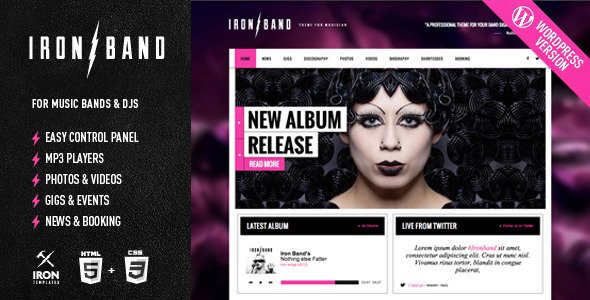
Stuck on your IronBand WordPress theme? Let's fix it.
No endless back-and-forth. Just send us the details and we'll get it done.
No obligation · Replies within 1 hour · Quote within 1 day
Setup · Customization · Bug fixes · WooCommerce integration
About IronBand WP Theme
IronBand is a WordPress theme built by IronTemplates for bands, musicians, and music venues. It ships with a dark, gig-ready aesthetic, event listing support, discography layouts, and audio player integration. The theme is built on a solid page builder foundation, making it flexible enough for solo artists, touring groups, and record labels alike.
Out of the box, IronBand handles the things music sites actually need: tour dates, embedded tracks, merch promotion, and press kits. It supports WooCommerce for selling music and merchandise, and integrates cleanly with platforms like Spotify and SoundCloud. If you want a site that looks like a real band built it rather than a generic business template, IronBand is a practical starting point.
Get matched with a IronBand developer in under one day
Tell us about your IronBand project. Small fixes, IronBand theme customization, or a full website build, whatever you need, we've got it covered.
We'll connect you to the right IronBand developers, define the scope, and get everything 100% clear.
You'll get one estimate, hire your preferred developer, and start collaborating.
IronBand is not a difficult theme, but customising it properly takes time you probably do not have. The developers available through Codeable specialise in WordPress themes like IronBand and can handle everything from a quick fix to a full site build. Every developer on Codeable is vetted, so you are not rolling the dice on quality. You describe what you need, get a free estimate, and decide from there with no obligation to proceed.
Pros
- Built specifically for music acts, so tour dates, discography, and audio players are first-class features rather than afterthoughts
- Dark, high-contrast design looks credible for rock, metal, and alternative genres without heavy customisation
- WooCommerce compatibility is baked in, making merch and digital download sales straightforward to set up
- Supports embedded audio from SoundCloud and Spotify so you are not hosting large audio files yourself
- Page builder integration means layout changes can be made visually without editing template files
Cons
- The dark aesthetic is hard to repurpose for lighter, pop-focused or classical music branding without significant custom CSS
- Event listing functionality is basic compared to dedicated plugins like The Events Calendar, so touring artists with complex schedules may hit limitations
- Demo content import can be unreliable on some hosting environments, often resulting in missing images or broken layouts
- Theme updates from IronTemplates have been infrequent, which creates Gutenberg compatibility concerns on newer WordPress versions
- Mobile menu behaviour on some device sizes requires CSS fixes, particularly when navigation items exceed five links
Who is IronBand for?
Rock and Metal Bands
IronBand’s default dark palette and bold typography suit rock and metal acts immediately. Tour date listings, album grids, and embedded audio tracks line up with what these audiences expect. An IronBand specialist can push the design further with custom section layouts, band member bios, and press kit downloads that match the act’s visual identity.
Solo Musicians and Singer-Songwriters
A solo artist needs a site that centres their music without visual clutter. IronBand’s single-artist layout options work well here, especially when an IronBand developer strips back the demo content and focuses the homepage on a featured release, a newsletter sign-up, and an upcoming shows section. Clean, direct, and easy to update yourself after handoff.
Music Venues and Clubs
Venues need event listings, ticket links, and a clear way to communicate what is on each week. IronBand’s event display features handle this, particularly when extended with a proper events plugin. An IronBand expert can configure recurring events, integrate ticket sales, and set up a submission form for booking inquiries without building from scratch.
Record Labels
A record label represents multiple artists, which requires a more structured information architecture than a single band site. IronBand’s grid layouts can be adapted to showcase a roster, with individual artist pages linked through a custom post type setup. An IronBand developer familiar with the theme can implement this without switching to a different theme entirely.
DJ and Electronic Artists
DJs and electronic artists often want a site that feels as much like a visual experience as it does a press kit. IronBand’s full-width sections and video background support give developers something to work with. Integrating SoundCloud sets, a booking contact form, and social feeds keeps the site functional beyond just looking good.

Customizing IronBand
IronBand gives you a reasonable amount of control through the WordPress Customizer, but the real depth comes from knowing how the theme is structured. Color schemes, typography, header layouts, and section ordering can all be adjusted without touching code. For anything beyond that, you need someone who knows the theme well.
An IronBand expert can reconfigure the homepage to highlight what matters most for your act, whether that is an upcoming tour, a new album, or a mailing list. Custom CSS, child theme development, and integration with third-party booking or ticketing platforms are all common requests. If the default layouts feel too rigid or the demo content does not match your brand, an IronBand specialist can reshape the theme to fit your actual needs without breaking what already works.
Recommended plugins for IronBand
IronBand pairs well with a focused set of plugins that extend its core functionality. WooCommerce handles merch and music sales. The Events Calendar or a ticketing plugin like Ticket Tailor slots into the tour dates section cleanly. For mailing lists, Mailchimp for WordPress connects without friction.
On the technical side, image-heavy music sites benefit from proper caching and delivery optimisation. A developer can configure your stack for real speed gains through our WordPress performance service. If you want your artist name and releases to rank in search, structured SEO work through our WordPress SEO optimisation service gives you a measurable edge over artists with no metadata strategy.
Not sure which plugins to use? This WordPress plugins directory covers the most popular options with reviews and setup guides.
IronBand common issues
IronBand homepage sections not showing after update
This usually happens when a plugin update or WordPress core update conflicts with how IronBand registers its homepage sections. Check whether the page template is still set correctly under Page Attributes. If sections were built with a bundled page builder plugin that has since been updated, the shortcodes or blocks may have stopped rendering. A WordPress bug fixing specialist can identify which component broke the output and restore it without rebuilding the page from scratch.
IronBand audio player not working on mobile
Mobile audio playback issues on IronBand are often caused by browser autoplay restrictions or a JavaScript conflict with another plugin. First, check your browser console for JS errors on mobile. If the player loads but does not play, the issue is likely autoplay policy on iOS or Android. If it does not load at all, a plugin conflict is more likely. Deactivate plugins one at a time to isolate the cause, or bring in a WordPress bug fixing developer to trace the conflict directly.
IronBand event dates not displaying correctly
IronBand’s built-in event date display relies on specific custom field formatting. If dates are showing incorrectly or not at all, the most common causes are a date format mismatch between what the theme expects and what was entered, or a timezone setting conflict in WordPress general settings. If you are using a third-party events plugin alongside IronBand’s native fields, they may be overriding each other. Review which source the theme is pulling dates from and standardise on one approach.
IronBand theme slow to load on mobile
IronBand loads several scripts and large background images by default, which creates performance problems on mobile connections. Start by identifying what is being loaded on initial page render using a tool like PageSpeed Insights. Common fixes include lazy loading images, deferring non-critical JavaScript, and serving appropriately sized images for mobile viewports. If the theme is loading full-width video backgrounds on mobile, disabling that on smaller screens alone can make a significant difference to load time.
IronBand FAQ
For rock, metal, and alternative acts, IronBand is a practical choice. It handles the features music sites genuinely need: tour dates, discography layouts, audio embeds, and merch sales. It is not the most flexible theme on the market, but it is purpose-built for the use case, which saves time compared to adapting a generic multipurpose theme for a band site.
IronBand is generally compatible with Elementor, but some native theme sections and bundled shortcodes do not behave consistently when used alongside Elementor’s page builder. Most developers working with IronBand pick one approach and commit to it rather than mixing the two. If you want to rebuild IronBand pages in Elementor properly, an IronBand specialist can handle the migration without losing your content.
Yes, IronBand supports WooCommerce for selling merchandise and digital downloads. The theme styles basic WooCommerce pages, though the shop layout inherits the dark aesthetic and may need CSS adjustments to match a more product-focused presentation. A developer can extend the integration to include custom product pages, checkout styling, and download delivery for music files.
IronBand includes a built-in events or tour dates section that uses custom post types or custom fields depending on the version. You add events through the WordPress admin, entering date, venue, location, and ticket link. For more complex scheduling needs, pairing IronBand with a dedicated events plugin gives you more control over recurring dates, filtering, and calendar display.
Update frequency from IronTemplates has been inconsistent. If you are running a recent version of WordPress, check the theme’s changelog and test it in a staging environment before updating. Compatibility with the latest Gutenberg editor in particular is worth verifying. If you are concerned about long-term support, a developer can assess the theme’s current state and flag anything that needs attention through a WordPress maintenance plan.
Hire an IronBand Developer
Whether you need help setting up IronBand from scratch, customising the layout for your band, or fixing something that broke after an update, a qualified IronBand developer can sort it without the back-and-forth of forums or guesswork. Work is scoped clearly before anything starts, and you only pay when you are satisfied with the plan. Get a free estimate and have a developer matched to your project within 24 hours.
You'll need a free Codeable account so developers can ask questions and send their quotes.