Restly WordPress Theme
by themepul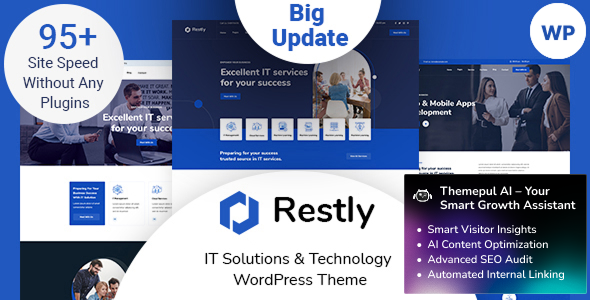
Stuck on your Restly WordPress theme? Let's fix it.
No endless back-and-forth. Just send us the details and we'll get it done.
No obligation · Replies within 1 hour · Quote within 1 day
Setup · Customization · Bug fixes · WooCommerce integration
About Restly WP Theme
Restly is a WordPress theme by Themepul built for SaaS products, software landing pages, and tech startups. It ships with multiple homepage layouts, a clean admin panel, and a block-based design system that keeps things organised without requiring a page builder.
The theme leans on Elementor compatibility and includes dedicated sections for pricing tables, feature grids, testimonials, and app screenshots. It targets product-focused businesses that need a polished front page fast, without heavy custom development out of the box.
That said, Restly has real configuration depth. Colour schemes, typography, header styles, and section ordering all have dedicated settings. For teams with specific brand requirements or complex conversion goals, getting the most from Restly typically means working with someone who knows the theme well.
Get matched with a Restly developer in under one day
Tell us about your Restly project. Small fixes, Restly theme customization, or a full website build, whatever you need, we've got it covered.
We'll connect you to the right Restly developers, define the scope, and get everything 100% clear.
You'll get one estimate, hire your preferred developer, and start collaborating.
Restly is not difficult to set up, but getting it to perform and convert well takes more than clicking through the demo importer. A vetted Restly developer on Codeable can handle everything from initial setup and brand customisation to performance tuning and third-party integrations. Codeable only works with screened WordPress specialists, so you get someone who has dealt with themes like Restly before, not a generalist working from documentation.
Pros
- Multiple SaaS-focused homepage layouts included out of the box
- Elementor compatibility makes visual editing straightforward
- Built-in pricing table, feature grid, and testimonial sections
- Dedicated theme options panel with real control over colours and typography
- Actively maintained by Themepul with regular updates
Cons
- Inner page templates are limited compared to the homepage layouts
- Default spacing and font sizing needs manual adjustment for strong branding
- Some demo sections rely on dummy content that takes effort to replace cleanly
- WooCommerce styling requires additional CSS work to match the rest of the theme
- Documentation covers basics but lacks guidance on advanced customisation scenarios
Who is Restly for?
SaaS Product Landing Page
Restly was built for this. The pricing tables, feature comparison sections, and CTA blocks map directly onto a typical SaaS landing page structure. A Restly specialist can wire these sections up to real conversion goals, integrate a trial signup form, and remove the generic demo content efficiently.
Mobile App Promotion Site
Restly includes app screenshot mockup sections and feature highlight layouts that work well for iOS and Android app promotion. A developer can pull in real device frames, connect to App Store or Play Store links, and ensure the page renders well on mobile where most app traffic lands.
Digital Agency Website
Agencies selling development, design, or marketing services can adapt Restly’s structured layouts for service pages, case studies, and team profiles. A Restly expert can extend the theme to handle multiple service categories without the layout falling apart on inner pages.
Software or Plugin Sales Page
WordPress plugin and software developers selling directly can use Restly’s pricing section alongside WooCommerce or a licensing plugin. Getting that checkout flow styled consistently with the rest of the theme takes a developer who knows how Restly handles WooCommerce templates.
Tech Startup Homepage
Early-stage tech companies often need a credible web presence fast. Restly’s pre-built sections cover most of what a startup homepage needs. A Restly developer can get a polished, on-brand site live quickly while leaving room to expand as the product and team grow.

Customizing Restly
Restly gives you a solid starting point, but most clients need more than the defaults. A Restly expert can rework the homepage structure, create custom pricing layouts, add scroll animations, and wire up contact or demo-request forms to a CRM.
Typography and spacing defaults in Restly are conservative. A developer can push the design further, tighten up whitespace, and make the theme reflect your actual brand identity rather than a stock SaaS look.
Beyond visuals, customisation often means adjusting how sections load, removing unused scripts, and building out inner pages that match the landing page quality. A Restly specialist handles all of that without breaking the theme’s update compatibility.
Recommended plugins for Restly
Restly works well with WooCommerce for software licence sales or digital product checkouts. It also integrates cleanly with popular form plugins, live chat tools, and cookie consent solutions common in SaaS stacks.
For performance, Restly benefits from proper caching and image optimisation work. You can read more about that in the WordPress performance guide. If you are targeting search traffic for your product, pairing Restly with structured on-page SEO setup is important. The WordPress SEO service covers that in detail.
Not sure which plugins to use? This WordPress plugins directory covers the most popular options with reviews and setup guides.
Restly common issues
Restly theme demo content not importing correctly
Demo import failures in Restly are usually caused by a PHP memory limit that is too low, a file upload size restriction, or a timeout during the XML import process. Increase memory_limit to at least 256MB in your php.ini or wp-config.php, raise max_execution_time to 300, and retry. If the importer stalls on media files, import content only first, then pull in media separately. Persistent issues often point to a server configuration problem. A WordPress bug fixing specialist can diagnose and resolve this without data loss.
Restly header menu not showing on mobile
If the Restly mobile menu is not appearing or the toggle button does nothing, the most common causes are a JavaScript conflict with another plugin or a cached asset that references an old script version. Clear all caches, deactivate plugins one by one to isolate the conflict, and check the browser console for JS errors. If the header settings in the Restly panel were changed recently, reverting to the default header style and rebuilding from there usually resolves it. A WordPress bug fixing service can trace the exact conflict quickly.
Restly page builder sections overlapping on tablet
Overlapping sections on tablet in Restly are almost always a CSS specificity issue or a breakpoint that was not accounted for in the Elementor layout. Open the page in Elementor, switch to tablet view, and check that column padding and margin values are explicitly set for tablet, not just desktop. Restly’s default column gaps can collapse awkwardly at mid-range screen widths. Adding targeted CSS for the 768px to 1024px range fixes most cases without touching the desktop layout.
Restly theme slowing down page load speed
Restly loads several scripts and stylesheets that are not always needed on every page. Start by running the site through PageSpeed Insights to identify the largest offenders. Defer non-critical JavaScript, enable lazy loading for images, and use a caching plugin. Restly’s slider and animation libraries add weight, so disabling them on pages that do not use those features helps significantly. For a full performance audit and optimisation, the WordPress performance service covers this end to end.
Restly FAQ
Yes. Restly is built with Elementor compatibility as a core feature. Most of the demo layouts are Elementor-based, and the theme’s sections are designed to work within the Elementor editor. A Restly developer can extend this further with custom widgets or Elementor Pro integrations if your project needs them.
Restly’s layouts are structured around SaaS and software products, but the underlying design system works for any business that needs a feature-focused, conversion-oriented homepage. Agencies, consultancies, and digital product companies have all used it effectively. Adapting it for a non-tech niche typically means replacing the default iconography and section copy, which a Restly specialist can handle cleanly.
Restly supports WooCommerce, but the default WooCommerce templates do not inherit all of Restly’s styling automatically. Product pages, cart, and checkout will need CSS adjustments to feel consistent with the rest of the site. A developer familiar with Restly can apply these styles without affecting theme update compatibility.
Never edit Restly’s core theme files directly. All customisations should live in a child theme or be applied through the Customizer and Elementor. Before any update, back up the site fully. If you have used custom CSS in the Customizer, it will persist through updates. Code added to theme files directly will be wiped. A child theme setup protects your work permanently.
Restly produces clean HTML output and loads reasonably fast on optimised hosting, which gives a reasonable SEO baseline. However, page speed, schema markup, meta tags, and content structure all need deliberate attention. Restly alone does not handle those automatically. Pairing it with a proper SEO plugin and a performance-tuned setup is necessary for competitive search rankings.
Hire a Restly Expert Developer
If you need Restly set up properly, customised to your brand, or fixed after something broke, working with a specialist saves time and avoids costly mistakes. Post your project and get a free estimate with no obligation. A Restly developer will review your requirements and come back with a clear scope and price. Get a Free Estimate and have it done right the first time.
You'll need a free Codeable account so developers can ask questions and send their quotes.