JamSession WordPress Theme
by SmartWPress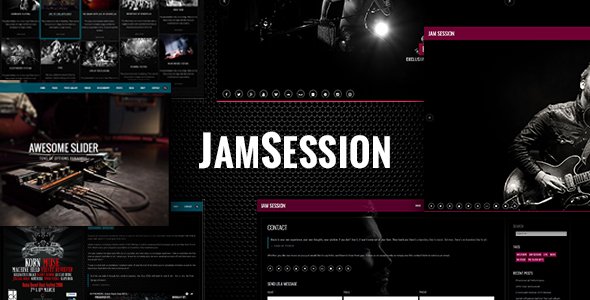
Stuck on your JamSession WordPress theme? Let's fix it.
No endless back-and-forth. Just send us the details and we'll get it done.
No obligation · Replies within 1 hour · Quote within 1 day
Setup · Customization · Bug fixes · WooCommerce integration
About JamSession WP Theme
JamSession is a WordPress theme built by SmartWPress, aimed at musicians, bands, music schools, and event promoters. It ships with a clean layout focused on showcasing gigs, audio samples, artist bios, and ticket links without clutter getting in the way.
The theme uses the Elementor page builder, making visual editing accessible without touching code. It includes purpose-built sections for tour dates, discographies, and press kits. SmartWPress has kept the codebase relatively lean, which helps with page speed out of the box. That said, like most niche themes, JamSession works best when someone who knows the theme sets it up properly from the start rather than piecing it together through trial and error.
Get matched with a JamSession developer in under one day
Tell us about your JamSession project. Small fixes, JamSession theme customization, or a full website build, whatever you need, we've got it covered.
We'll connect you to the right JamSession developers, define the scope, and get everything 100% clear.
You'll get one estimate, hire your preferred developer, and start collaborating.
Most JamSession setup problems are not theme problems. They are configuration problems that compound over time. A developer who has worked with SmartWPress themes knows where the common friction points are and how to avoid them. Through Codeable, you can post your project and get matched with a vetted JamSession specialist within 24 hours. No cold outreach, no guessing at qualifications. You get a free estimate first and decide from there with zero obligation to proceed.
Pros
- Purpose-built for music sites with ready-made sections for tour dates, bios, and discographies
- Elementor compatibility means visual editing without writing custom CSS for most layout changes
- SmartWPress provides regular theme updates with WordPress core compatibility in mind
- Demo content imports give you a working starting point that reflects a real music site structure
- Relatively lightweight compared to multipurpose themes, which benefits initial page speed
Cons
- Limited to Elementor for layout editing, which creates dependency on that plugin staying active
- Demo designs can look generic without significant customization to fonts, colors, and imagery
- No built-in audio player with playlist support, requiring a third-party plugin to fill that gap
- Documentation from SmartWPress is thin in places, making advanced customization harder to self-serve
- Some built-in widgets have limited styling options, pushing you toward custom CSS for finer control
Who is JamSession for?
Independent Musicians and Solo Artists
JamSession suits solo artists who need a professional online presence without the overhead of a custom build. You get a structured layout for your bio, release catalog, and booking contact form. A JamSession specialist can configure these sections to match your visual identity and connect your streaming links and social profiles without the page feeling assembled from generic parts.
Bands and Music Groups
Bands need to present multiple members, shared tour schedules, and collaborative media in one place. JamSession handles multi-member bios and event listings well within its default structure. A JamSession developer can extend this with custom member profile pages, band history timelines, and a press kit download section that PR contacts will actually use.
Music Schools and Instructors
Music schools and private instructors can use JamSession as a base for showcasing lesson offerings, instructor profiles, and student testimonials. The theme’s structured layout adapts reasonably well to a service-focused site. Adding a scheduling or booking plugin alongside a JamSession expert setup makes the site functional for new student inquiries from day one.
Event Promoters and Venues
Promoters and venues can use JamSession to list upcoming shows, sell tickets through WooCommerce, and maintain an archive of past events. The Events Calendar plugin integrates cleanly with the theme. A developer familiar with JamSession can build out a custom event detail template that includes performer info, seating maps, and ticket purchase links in a consistent format.
Music Blogs and Online Publications
Music blogs covering reviews, interviews, and industry news can adapt JamSession’s editorial layout with some configuration work. The theme’s typography and media sections support long-form content adequately. A JamSession specialist can rework the blog templates to prioritize readability and add category filtering that helps readers find content by genre or artist quickly.

Customizing JamSession
JamSession gives you a solid starting point with its demo content, but most sites need more than a fresh import. Customizing the color palette, typography, and section layouts inside Elementor is straightforward enough for basic changes. Where it gets complicated is when you want to deviate from the built-in structure, add custom post types for setlists or merchandise, or integrate a booking form that actually fits the design.
A JamSession expert can handle those customizations without breaking the theme’s existing styles or creating maintenance headaches down the line. Whether you need a one-off layout tweak or a fully custom artist portfolio built on top of JamSession, working with a specialist saves a significant amount of back-and-forth time.
Recommended plugins for JamSession
JamSession pairs well with a handful of plugins that extend its core functionality. WooCommerce covers merchandise sales and ticket purchases. The Events Calendar handles tour dates cleanly. For audio, AudioIgniter integrates without fighting the theme’s styles.
Before adding plugins, it’s worth auditing what’s already loading. Music sites often run heavy media, and plugin bloat makes it worse. A developer familiar with WordPress performance can help you keep load times tight. If you’re trying to rank for local gig searches or artist name queries, pairing JamSession with proper WordPress SEO optimisation work makes a real difference.
Not sure which plugins to use? This WordPress plugins directory covers the most popular options with reviews and setup guides.
JamSession common issues
JamSession Elementor widgets not showing after theme update
This usually happens when a JamSession update changes widget registration or Elementor’s version has a compatibility gap with the theme. First, clear all caches and check whether Elementor and Elementor Pro are both current. If widgets still show as missing, deactivate other plugins temporarily to rule out conflicts. If the problem persists after those steps, a WordPress bug fixing service can identify whether the issue is in the theme’s widget registration code or an Elementor API change that needs a targeted fix.
JamSession tour dates section not displaying correctly on mobile
JamSession’s event and tour date sections rely on Elementor’s responsive controls, which sometimes need manual breakpoint adjustments after updates. Open the affected section in Elementor, switch to mobile preview mode, and check padding, font sizes, and column stacking settings for each breakpoint. If the layout collapses incorrectly at tablet sizes, a custom CSS rule scoped to that breakpoint is usually the fastest fix. A WordPress bug fixing specialist can resolve this without disrupting the desktop layout.
JamSession demo import not working or missing content
JamSession’s one-click demo import depends on the One Click Demo Import plugin and requires specific server conditions to run cleanly. Common causes of failure include PHP memory limits set below 256MB, execution timeouts on shared hosting, or a missing XML file in the theme package. Increase your PHP memory limit in wp-config.php, then retry the import. If content imports but images are missing, run the media regeneration tool. Check your hosting error logs to identify exactly where the process is stopping.
JamSession site loading slowly with large audio or video files
Large audio and video files embedded directly into JamSession pages are the most common cause of slow load times on music sites. Replace direct file embeds with a streaming service link or a dedicated audio plugin that lazy-loads players. Use a CDN to serve media files from a location closer to your visitors. Review what scripts and stylesheets the theme and its plugins are loading on each page type and defer anything non-critical. A performance audit specific to your JamSession setup will identify the heaviest offenders quickly.
JamSession FAQ
SmartWPress updates JamSession with WordPress core releases in mind, so current versions are generally compatible. That said, compatibility between JamSession, Elementor, and third-party plugins can break after major WordPress updates. Always test updates on a staging environment before applying them to a live music site. If something breaks after an update, a developer familiar with JamSession can identify the source quickly.
JamSession is built around Elementor, and its demo templates and custom widgets depend on it. You can technically activate the theme without Elementor installed, but you’ll lose the structured demo layouts and purpose-built sections. Using the block editor or another page builder alongside JamSession is possible but requires custom work to match the theme’s visual output. For most music sites, keeping Elementor active is the practical path.
Yes, JamSession works with WooCommerce. You can sell digital downloads, physical merchandise, or link WooCommerce to a ticketing setup. The default WooCommerce templates may need styling adjustments to match JamSession’s design properly. A JamSession developer can apply theme-consistent styles to the shop, cart, and checkout pages so the purchase flow does not feel disconnected from the rest of the site.
JamSession does not include a built-in audio player with playlist support. The most common solution is the AudioIgniter plugin, which integrates cleanly with Elementor-based layouts. Spotify and SoundCloud embeds also work inside Elementor text or HTML widgets. If you need a custom-styled player that matches your JamSession design precisely, a developer can build or adapt a player component to fit without adding unnecessary plugin weight.
JamSession’s relatively lean codebase is a reasonable foundation for SEO. Page speed, mobile responsiveness, and structured content all contribute positively. The theme does not handle technical SEO on its own though. You will still need an SEO plugin like Yoast or Rank Math for meta control, schema markup, and sitemap generation. For music sites targeting local searches or artist-specific queries, dedicated SEO work on top of the theme setup matters more than the theme choice itself.
Hire a JamSession Developer for Your Music WordPress Site
Whether you need a full JamSession build, a specific layout customization, or help with something that broke after an update, a specialist is faster and cheaper than figuring it out alone. Every developer on Codeable is vetted and reviewed. Get a free estimate and describe your project. You’ll have a developer matched to you within 24 hours, with no obligation to hire until you’re comfortable moving forward.
You'll need a free Codeable account so developers can ask questions and send their quotes.