Campaign WordPress Theme
by scubetheme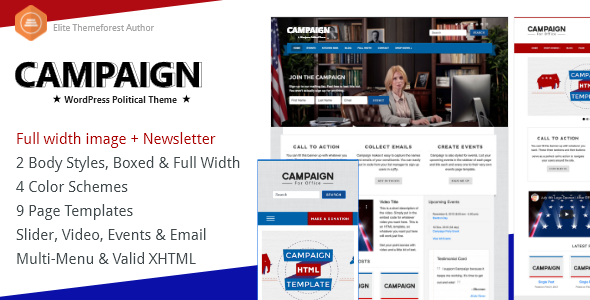
Stuck on your Campaign WordPress theme? Let's fix it.
No endless back-and-forth. Just send us the details and we'll get it done.
No obligation · Replies within 1 hour · Quote within 1 day
Setup · Customization · Bug fixes · WooCommerce integration
About Campaign WP Theme
Campaign is a WordPress theme by Scubetheme built for political campaigns, nonprofit fundraising, and advocacy organizations. It ships with a donation-ready layout, event management support, and a clean visual hierarchy that puts calls to action front and center.
The theme includes pre-built page templates for candidate profiles, campaign goals, volunteer sign-ups, and news sections. It integrates with popular fundraising and form plugins out of the box, which makes initial setup faster than building from scratch.
Campaign is a solid starting point for any cause-driven site, but most clients end up needing custom work to match their branding, connect third-party tools, or extend the default layouts beyond what the theme provides on its own.
Get matched with a Campaign developer in under one day
Tell us about your Campaign project. Small fixes, Campaign theme customization, or a full website build, whatever you need, we've got it covered.
We'll connect you to the right Campaign developers, define the scope, and get everything 100% clear.
You'll get one estimate, hire your preferred developer, and start collaborating.
Most Campaign theme issues come down to customization decisions made early in the build. A developer who knows the theme structure can save you significant time and prevent the kind of technical debt that shows up months later.
Through Codeable, you get matched with vetted WordPress developers who have worked on cause-driven and campaign sites before. No bidding, no guesswork. Post a project, get an estimate, and decide from there. The process is straightforward and there is no obligation to proceed.
Pros
- Pre-built layouts for donation pages, volunteer sign-ups, and candidate profiles save setup time on cause-driven sites
- Integrates cleanly with GiveWP and other fundraising plugins without requiring heavy custom code
- Clear visual hierarchy keeps calls to action visible and conversion-focused across device sizes
- Event management support built into the theme structure suits campaigns with regular public-facing activities
- Child theme compatibility means customizations stay intact when the parent theme receives updates
Cons
- Default typography and color options are limited, most brand-specific builds require custom CSS or a child theme
- The theme is niche-specific, making it a poor fit for general business or e-commerce sites
- Limited third-party documentation outside the official Scubetheme support channels
- Some built-in sections feel dated and need visual overhaul to meet current design expectations
- Plugin conflicts can surface with newer versions of popular form and CRM plugins, requiring manual fixes
Who is Campaign for?
Political Campaigns
Campaign was built with electoral campaigns in mind. The candidate profile templates, issue pages, and donation sections map directly onto what a local or regional political campaign needs. A Campaign developer can extend these with voter registration tools, endorsement sections, and geo-targeted content blocks to support a full digital campaign strategy.
Nonprofit Fundraising
Nonprofits running ongoing fundraising programs get a head start with Campaign’s donation-oriented layout. The theme pairs naturally with GiveWP for recurring donation management. A Campaign specialist can connect it to your CRM, set up campaign goal tracking, and configure confirmation pages that reinforce donor trust at the point of conversion.
Community Advocacy Groups
Advocacy groups need a site that communicates urgency and drives action quickly. Campaign’s petition-ready sections and event layouts support this well. A Campaign WordPress expert can add custom action modules, mailing list integrations, and targeted landing pages for specific issues or legislative pushes without rebuilding the site from scratch.
Charity Events
Charity events benefit from Campaign’s event display templates and ticketing plugin compatibility. The theme handles event listings, speaker profiles, and schedule pages without major structural changes. A Campaign developer can wire up The Events Calendar, integrate payment gateways, and build custom post-event archive pages to document past fundraising milestones.
Volunteer Organizations
Volunteer-driven organizations need clear sign-up flows and role-based content. Campaign supports this with its form-friendly structure and flexible page templates. A Campaign WordPress specialist can build volunteer application workflows, onboarding email sequences, and restricted-access sections for active volunteers using lightweight plugins that fit within the theme’s structure.

Customizing Campaign
Out of the box, Campaign covers the basics. Getting it to match a specific brand identity or campaign strategy takes more deliberate work. A Campaign expert will typically start by overriding the default color schemes, typography stacks, and header layouts to reflect the candidate or cause accurately.
Beyond visual changes, customization often involves restructuring page templates, building custom donation flow layouts, and adding conditional content blocks for different audience segments. Integration work is common too, connecting the theme with CRM platforms, email marketing tools, and event ticketing systems.
If you need the theme to do something it was not originally designed for, a Campaign WordPress specialist can build child theme modifications or custom plugin integrations without touching core theme files, keeping future updates safe.
Recommended plugins for Campaign
Campaign works well with a range of WordPress plugins, but each addition needs to be tested for conflicts and performance impact. Donation plugins like GiveWP, event managers like The Events Calendar, and contact form plugins like Gravity Forms all sit alongside Campaign without major issues in most setups.
That said, stacking multiple plugins on a campaign site can slow things down quickly, especially during high-traffic periods around elections or fundraising drives. Getting WordPress performance right from the start matters here. If visibility is part of the strategy, pairing Campaign with a solid WordPress SEO setup will help the site rank for local and issue-based searches.
Not sure which plugins to use? This WordPress plugins directory covers the most popular options with reviews and setup guides.
Campaign common issues
Campaign theme donation button not working after plugin update
Donation button failures after a plugin update usually point to a JavaScript conflict between the theme and the updated plugin. Start by deactivating the recently updated plugin and testing the button. If it works, the conflict is confirmed. Check the browser console for JS errors to identify which script is causing the problem. In most cases, a WordPress bug fix involves either updating the enqueueing order or patching a deprecated function call in a child theme file.
Campaign theme mobile menu not opening or closing properly
A broken mobile menu in Campaign is almost always a JavaScript or CSS conflict introduced by another plugin or a theme customization. Open browser developer tools on a mobile viewport and look for console errors tied to the menu toggle script. Disable plugins one at a time to isolate the conflict. If the issue persists, check whether a custom CSS rule is setting the menu container to display none without a proper toggle override. A WordPress bug fix specialist can resolve this quickly with targeted script adjustments.
Campaign WordPress theme layout broken after WordPress core update
Core WordPress updates occasionally shift how themes handle block editor styles or template loading. If the Campaign layout breaks after an update, first check whether the theme itself has a pending update in Appearance > Themes. If you are running a child theme, verify that the child theme’s functions.php is not calling deprecated hooks. Roll back the WordPress update in a staging environment to confirm the cause, then apply targeted fixes before pushing to production.
Campaign theme event page showing wrong date or missing events
Event display problems in Campaign usually trace back to a mismatch between the theme’s event templates and the version of The Events Calendar plugin currently installed. Check the plugin’s template override folder and compare it against the current plugin template structure. Outdated overrides cause missing fields and date formatting errors. Update the overridden templates to match the current plugin version, then test across different event types to confirm the fix holds.
Campaign FAQ
Scubetheme does maintain the Campaign theme, but update frequency is limited compared to larger theme shops. Before starting a new build, check the theme’s changelog on ThemeForest and verify compatibility with your current WordPress version. If active development has slowed, working with a Campaign WordPress specialist to maintain a well-structured child theme reduces your exposure to compatibility issues over time.
Yes. Campaign is well-suited for nonprofits, particularly those running donation drives, awareness campaigns, or recurring fundraising programs. The theme’s layout prioritizes calls to action and pairs naturally with fundraising plugins like GiveWP. A Campaign expert can adapt the default templates to fit a nonprofit’s specific messaging structure, branding, and donor management workflow without a full custom build.
The most straightforward approach is to install GiveWP or a similar donation plugin, create a donation form, and embed it using the plugin’s shortcode on a Campaign page template. For a more integrated look, a Campaign WordPress developer can create a custom template that wraps the donation form within the theme’s section styles, keeping the design consistent with the rest of the site.
Campaign has partial compatibility with Elementor, but conflicts can surface with the theme’s built-in section styles and custom post types. Some users run Elementor successfully on standard pages while leaving Campaign’s native templates for event and donation pages. A Campaign specialist can assess where page builder integration makes sense and where native theme templates are the better technical choice for your specific build.
Cost depends on the scope of work. A focused customization or bug fix might run a few hundred dollars. A full Campaign theme build with custom templates, plugin integrations, and content migration will cost more. Through Codeable, you can post your project and receive a free estimate before committing. Rates reflect the complexity of the work, not a flat hourly guess.
Hire a Campaign WordPress Developer
Whether you need a full Campaign theme build, a specific customization, or help fixing something that has broken, working with a dedicated Campaign developer gets the job done without the back-and-forth of general freelancer platforms.
FoxyConcept delivers Campaign WordPress projects through Codeable, where every developer is vetted and reviewed. Get a free estimate and see exactly what your project needs before committing to anything.
You'll need a free Codeable account so developers can ask questions and send their quotes.