Adios WordPress Theme
by theme_bubble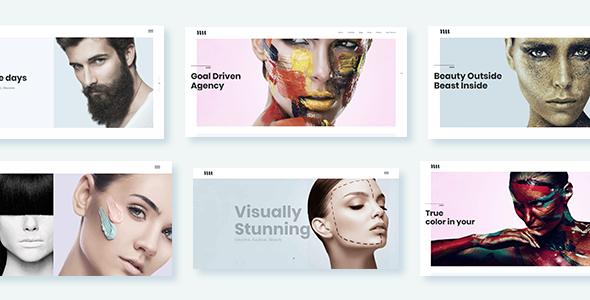
Stuck on your Adios WordPress theme? Let's fix it.
No endless back-and-forth. Just send us the details and we'll get it done.
No obligation · Replies within 1 hour · Quote within 1 day
Setup · Customization · Bug fixes · WooCommerce integration
About Adios WP Theme
Adios is a WordPress theme by theme_bubble built for clean, minimal presentation. It suits portfolio-style sites, small agencies, and creative professionals who want a straightforward layout without excess. The theme ships with a widgetized homepage, basic customizer controls, and a design that keeps content front and center.
It is a lightweight theme, which means faster load times out of the box compared to heavier page-builder themes. The trade-off is limited built-in flexibility. Out of the box, Adios covers the basics well, but most serious projects will need a developer to extend it beyond its default state. If you want a clean starting point without bloat, Adios is a reasonable choice for the right project type.
Get matched with a Adios developer in under one day
Tell us about your Adios project. Small fixes, Adios theme customization, or a full website build, whatever you need, we've got it covered.
We'll connect you to the right Adios developers, define the scope, and get everything 100% clear.
You'll get one estimate, hire your preferred developer, and start collaborating.
FoxyConcept connects you with vetted Adios specialists through Codeable, a curated network of WordPress developers. Every developer on Codeable is screened before they can take on projects, so you are not sifting through freelancer profiles hoping for the best. Post your project, get a clear estimate, and only move forward if you are happy with the plan. No obligation, no risk.
Pros
- Lightweight codebase keeps page load times low without extra configuration
- Clean minimal design works well for portfolios and small business sites
- Widgetized homepage makes basic layout changes accessible without code
- Built by theme_bubble with a track record of straightforward, maintainable themes
- Low visual complexity means custom styling is easier to apply cleanly
Cons
- Limited customizer options mean most design changes require a developer
- No built-in mega menu or advanced navigation options
- Portfolio and post layout options are basic compared to modern themes
- No bundled page builder, so inner page layouts need manual setup or a plugin
- Smaller community means fewer tutorials and third-party resources available
Who is Adios for?
Freelance Photographer Portfolio
Adios suits photographers who want images to take center stage. The minimal frame keeps the focus on the work. A developer can build out a filterable gallery grid, lazy loading for large image sets, and a clean lightbox integration. Combined with proper image compression, the result is a fast, visually strong portfolio that does not rely on a heavy theme framework.
Small Creative Agency
A small agency site needs clear service pages, a work section, and a contact form that actually converts. Adios gives a clean foundation. An Adios specialist can structure the homepage sections, add a custom services block, and connect a CRM or email tool to the contact form. The lightweight base keeps the site snappy even after these additions.
Independent Consultant
Consultants need a site that builds credibility fast. A clean bio section, a services or speaking page, a media or press section, and a clear contact path. Adios handles this structure well without visual noise. A developer can add a testimonials section, link a scheduling tool like Calendly, and make sure the site reads well on mobile across all screen sizes.
Boutique Online Shop
Adios can work as a WooCommerce foundation for a small shop with a focused product range. An Adios developer can style the shop and product pages to match the theme’s minimal aesthetic, configure checkout flow, and integrate a payment gateway. For shops with under 50 products, this approach avoids the overhead of a purpose-built WooCommerce theme.
Personal Blog or Writer Site
Writers and bloggers benefit from Adios’s clean typography and uncluttered reading layout. A developer can set up category filtering, an email list opt-in integrated with Mailchimp or ConvertKit, and a related posts section. The minimal design keeps readers focused on the content, which is exactly what a writing-focused site should do.

Customizing Adios
Adios gives you basic customizer options: logo upload, color controls, and a few layout toggles. For anything beyond that, you are looking at custom code. An Adios expert can modify the header layout, adjust typography, build out a custom homepage section, or integrate a plugin like WooCommerce without breaking the existing design.
Common customization requests include adding custom post types, restructuring the footer, building a filterable portfolio grid, and connecting third-party tools like Mailchimp or a booking plugin. An experienced Adios developer will work directly in a child theme to keep changes safe across future updates. Trying to do this through theme options alone will hit a wall quickly on anything beyond a simple site.
Recommended plugins for Adios
Adios pairs well with plugins that do not add excessive front-end weight. WooCommerce, Elementor as a page builder for inner pages, and contact form plugins all integrate cleanly. That said, adding plugins without care will erode the performance advantage the theme’s lightweight build gives you.
A developer can configure caching, image optimization, and script loading to keep the site fast after plugins are added. If SEO is a priority, structured data and meta handling need to be set up correctly alongside a plugin like Yoast or Rank Math. See our WordPress performance service and WordPress SEO optimisation service for how we handle both.
Not sure which plugins to use? This WordPress plugins directory covers the most popular options with reviews and setup guides.
Adios common issues
Adios theme header not displaying correctly after update
Header display issues after an update usually point to a CSS conflict or a template file that was overridden during the update. First, check whether you are running a child theme. If changes were made directly to the parent theme files, an update will wipe them. Clear your cache, then inspect the header element in your browser’s dev tools to identify which styles are conflicting. If the problem persists, our WordPress bug fixing service can diagnose and resolve it quickly without guesswork.
Adios homepage widgets not showing on mobile
Widgets not showing on mobile is often a CSS visibility issue rather than a widget configuration problem. Check whether the theme’s stylesheet is hiding certain widget areas at mobile breakpoints using display:none or visibility:hidden. It can also be caused by a caching plugin serving a desktop-cached version to mobile users. Disable cache temporarily and recheck. If a plugin conflict is involved, deactivate plugins one by one to isolate the cause. Our WordPress bug fixing service can walk through this systematically.
Adios theme broken layout after installing a plugin
Plugin conflicts with Adios usually show up as layout shifts, missing sidebars, or broken grid sections. The most common culprits are page builder plugins that load their own CSS globally, or plugins that add scripts to every page regardless of where they are needed. Deactivate the most recently installed plugin first and check if the layout recovers. If it does, the plugin needs to be configured to load only where it is used. A developer can adjust script enqueue settings to fix this cleanly.
Adios WordPress theme menu not working properly
Menu issues in Adios are usually one of three things: the wrong menu assigned to the theme’s menu location in Appearance > Menus, a JavaScript error blocking the mobile toggle from working, or a CSS conflict hiding menu items. Open the browser console and look for JS errors first. Then check Appearance > Menus to confirm the correct menu is assigned to the Primary location. If the mobile hamburger menu fails to open, the toggle script may be conflicting with another plugin’s JavaScript library.
Adios FAQ
Support and update history for theme_bubble themes can vary. Check the theme’s page on the WordPress theme directory for the last updated date and active installation count. If active updates have stopped, it is worth auditing the theme for compatibility with the current WordPress version before building on it. A developer can review the codebase and flag any issues before you commit to it for a new project.
Adios does not block page builder plugins, but Elementor’s global styles can conflict with the theme’s own CSS on certain elements. Using Elementor on inner pages while leaving the theme’s homepage structure intact is usually the cleanest approach. A developer can set this up so both coexist without visual conflicts, and limit Elementor’s CSS to only the pages where it is actually used.
Adios does not include a built-in portfolio post type. You can add one using a plugin like Jetpack’s Portfolio module or a standalone portfolio plugin. A developer can register a custom post type directly, build a custom template for it, and style the grid to match the theme’s existing design. This approach gives you more control over the output than most portfolio plugins provide.
Adios is not built as a WooCommerce theme, so the default shop and product pages will inherit minimal styling. Basic WooCommerce functionality works, but product pages, cart, and checkout will need custom CSS to look intentional rather than unstyled. For a small shop, a developer can add a WooCommerce stylesheet that matches Adios’s design language without rebuilding the theme from scratch.
The easiest route is posting your project on Codeable, where vetted WordPress developers review your brief and provide estimates. Developers on Codeable have worked across a wide range of themes including smaller ones like Adios. Describe what you need specifically, and the right developer will respond. You can also get a free estimate here through FoxyConcept before committing to anything.
Hire an Adios Developer for Your WordPress Project
Whether you need a small fix or a full custom build on top of Adios, working with a specialist saves time and avoids mistakes that are expensive to undo. Our Adios developers handle customization, plugin integration, performance work, and troubleshooting. Get a free estimate and describe your project. You will hear back within 24 hours with a clear plan and price before any work begins.
You'll need a free Codeable account so developers can ask questions and send their quotes.