The Aisle WordPress Theme
by Elated-Themes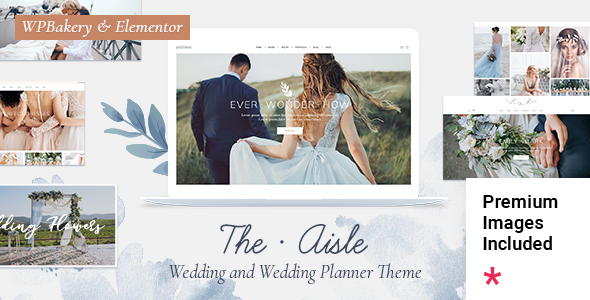
Stuck on your The Aisle WordPress theme? Let's fix it.
No endless back-and-forth. Just send us the details and we'll get it done.
No obligation · Replies within 1 hour · Quote within 1 day
Setup · Customization · Bug fixes · WooCommerce integration
About The Aisle WP Theme
The Aisle is a wedding WordPress theme by Elated-Themes, built specifically for couples, wedding planners, photographers, and venues. It ships with a clean, elegant layout that puts visual storytelling first. Full-width galleries, RSVP forms, countdown timers, and a polished grid for vendor listings come built in.
Elated-Themes built The Aisle on their in-house Elated Core framework, which means the theme ties tightly to their own page builder and plugin ecosystem. Setup is relatively straightforward using the included demo content, and the WooCommerce integration makes it usable for selling packages or prints. It performs well on mobile and scores reasonably in Core Web Vitals out of the box, though heavier gallery pages need extra tuning.
Get matched with a The Aisle developer in under one day
Tell us about your The Aisle project. Small fixes, The Aisle theme customization, or a full website build, whatever you need, we've got it covered.
We'll connect you to the right The Aisle developers, define the scope, and get everything 100% clear.
You'll get one estimate, hire your preferred developer, and start collaborating.
The Aisle looks straightforward until you try to move away from the demo layout or wire up custom functionality. The Elated Core dependency means edits in the wrong place break things on update. A vetted The Aisle developer on Codeable has already worked through those constraints. You get a fixed-scope estimate before any work starts, no junior developers, and a clear timeline. For one-off fixes or full builds, the Codeable model removes the guesswork from hiring.
Pros
- Purpose-built for weddings with countdown timers, RSVP forms, and venue pages included
- Strong visual presentation with full-width hero sections and clean gallery layouts
- WooCommerce-ready for selling photography packages, gift registries, or venue add-ons
- Multiple header and footer variations give decent layout flexibility without custom code
- Demo content imports quickly and gives a usable starting point for most wedding niches
Cons
- Heavily tied to the Elated Core plugin, so customization outside the options panel carries update risk
- Theme options panel is not the native Customizer, which creates a steeper learning curve for non-technical users
- Gallery-heavy pages can load slowly without additional performance optimization
- Template structure is harder to override cleanly using a child theme compared to more developer-friendly themes
- Limited third-party community support since it uses a proprietary framework rather than Elementor or the block editor
Who is The Aisle for?
Wedding Couples Planning Their Own Site
The Aisle gives couples a ready-made structure for sharing their story, venue details, RSVP forms, and a gift registry. The countdown timer and guest information sections work well with minimal setup. For couples who want something beyond the default layout, a The Aisle specialist can tailor the design to match their wedding aesthetic without rebuilding from scratch.
Wedding Photographers
Wedding photographers need fast-loading galleries and a strong portfolio presentation. The Aisle handles both reasonably well, though photographers with large image libraries should pair it with a dedicated gallery plugin and proper image optimization. A The Aisle developer can also integrate booking or inquiry systems directly into the site rather than relying on third-party embeds.
Wedding Planners and Coordinators
Planners need to showcase past events, list services clearly, and capture leads. The Aisle’s grid layouts and inquiry form support cover those basics. Custom service package pages, testimonial sections, and calendar integrations are straightforward additions for an experienced The Aisle developer working within the Elated framework.
Venues and Event Spaces
Venues benefit from the theme’s full-width image sections and capacity for detailed event space pages. Floor plan uploads, virtual tour embeds, and availability inquiry forms can all be built on top of The Aisle’s structure. WooCommerce integration also works for deposit payments and booking fee collection directly through the site.
Bridal Boutiques and Dress Shops
Bridal boutiques can use The Aisle’s clean aesthetic to present dress collections, styled shoots, and appointment booking. WooCommerce handles product listings and e-commerce if the shop sells accessories online. A The Aisle specialist can extend the default product templates to better match a boutique brand without losing compatibility with Elated Core updates.

Customizing The Aisle
The Aisle gives you a theme options panel built on the Elated framework, covering typography, color schemes, header styles, and footer layouts. Most visual changes happen inside that panel rather than the native WordPress Customizer, which takes some getting used to.
For anything beyond surface-level adjustments, like custom RSVP workflows, bespoke countdown sections, or integrations with booking tools, you need PHP and CSS knowledge. A skilled The Aisle expert can restructure template files, extend the Elated Core plugin safely, and add functionality without breaking future updates. If your wedding site needs a unique look that stands apart from the demo, working with a The Aisle specialist saves significant time compared to trial and error inside the options panel.
Recommended plugins for The Aisle
The Aisle works with most major WordPress plugins, but a few additions make a real difference. WooCommerce handles package sales and deposit payments cleanly. Contact Form 7 or WPForms slot in well for RSVP and inquiry forms. For galleries, Envira or FooGallery outperform the built-in grid on larger collections.
On the technical side, pairing The Aisle with a caching layer and image optimization plugin matters on gallery-heavy pages. A proper WordPress performance setup keeps page speed scores healthy even with full-width hero images. If you plan to attract organic traffic, a structured WordPress SEO strategy on top of Rank Math or Yoast will help the site surface for local wedding searches.
Not sure which plugins to use? This WordPress plugins directory covers the most popular options with reviews and setup guides.
The Aisle common issues
The Aisle theme demo content not importing correctly
Failed demo imports on The Aisle usually trace back to PHP memory limits set below 256MB or a server execution timeout cutting the import short. Increase max_execution_time and memory_limit in your php.ini or wp-config.php. Also confirm the Elated Core plugin is active before importing, since the demo content depends on it. If imports keep failing, a manual XML and widget import is more reliable. For persistent issues, the WordPress bug fixing service can diagnose and resolve the exact failure point.
The Aisle gallery page loading slowly
Slow gallery pages on The Aisle almost always come from uncompressed images and no lazy loading. Run images through ShortPixel or Imagify before uploading, and enable lazy load either through a performance plugin or by adding the loading='lazy' attribute to image markup. A CDN makes a measurable difference for image-heavy pages. Also audit whether the Elated Core plugin is loading scripts and styles on pages that do not need them, since that adds unnecessary overhead.
The Aisle RSVP form not sending emails
The Aisle’s contact and RSVP forms typically use Contact Form 7. Email delivery failures are almost always a server mail configuration problem, not a theme bug. Install the WP Mail SMTP plugin and route outgoing mail through a transactional service like SendGrid, Mailgun, or Gmail SMTP. Test with the plugin’s built-in mail test tool after setup. If the form itself is broken rather than just email delivery, check for JavaScript conflicts using your browser console. The WordPress bug fixing service can isolate the conflict quickly.
The Aisle theme options not saving changes
When The Aisle theme options fail to save, the most common cause is a PHP session issue or a caching plugin serving a stale admin page. Clear all caches, including server-level caches, then try saving again in an incognito window. If a security plugin is active, check whether it is blocking the options form submission. Nonce expiration from staying on the options page too long also triggers this. Reload the page and save changes in smaller batches to confirm whether one specific option is the source of the conflict.
The Aisle FAQ
The Aisle has partial block editor support, but its core functionality runs through the Elated page builder and options panel rather than native blocks. Most layout work happens outside Gutenberg. You can add standard blocks to post and page content areas, but the main theme sections and templates are not built with the block editor in mind. A The Aisle developer can bridge this gap if block-based editing is a priority.
No. The Elated Core plugin is required for The Aisle to function correctly. It powers the shortcodes, custom post types, widgets, and theme options that the design depends on. Deactivating it breaks most of the front-end layout. Keep the plugin updated alongside the theme, and always test updates on a staging environment before pushing to production.
Yes, The Aisle is WooCommerce compatible. The theme includes basic WooCommerce template styling that fits the overall design. It works well for selling photography packages, accessories, or gift registry items. For heavily customized shop layouts or complex product configurations, a The Aisle specialist can extend the WooCommerce templates without conflicting with Elated Core.
Always use a child theme for any CSS or template file edits. Changes made directly to the parent theme files are overwritten on update. Theme options panel settings are stored in the database, so those persist through updates. Before any update, back up your site fully and test on a staging copy first. If you have not been using a child theme, a The Aisle developer can migrate your customizations before you update.
The Aisle produces clean markup and loads acceptably on standard pages, which gives a reasonable SEO baseline. However, it does not do anything special for SEO out of the box. Pair it with Rank Math or Yoast SEO for meta control, structured data, and sitemap generation. Gallery-heavy pages need performance work to meet Core Web Vitals thresholds, which directly affect search rankings for competitive wedding keywords.
Hire a The Aisle Developer
Whether you need a full site built from the demo up, a specific feature added, or an existing Aisle installation cleaned up, a dedicated The Aisle developer can scope and deliver the work properly. Post your project and get a detailed estimate before committing to anything. Get a Free Estimate and describe exactly what your wedding site needs. No obligation, no upfront cost.
You'll need a free Codeable account so developers can ask questions and send their quotes.