Braintech WordPress Theme
by rs-theme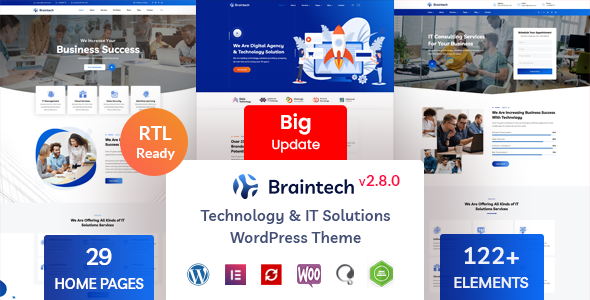
Stuck on your Braintech WordPress theme? Let's fix it.
No endless back-and-forth. Just send us the details and we'll get it done.
No obligation · Replies within 1 hour · Quote within 1 day
Setup · Customization · Bug fixes · WooCommerce integration
About Braintech WP Theme
Braintech is a WordPress theme built by rs-theme, designed for technology companies, IT service providers, and digital agencies. It ships with a clean layout, multiple homepage demos, and a stack of pre-built inner pages that cover the typical needs of a tech-focused site. The design leans toward a dark, modern aesthetic with strong typography and animated elements built on Elementor.
Out of the box, Braintech includes WooCommerce compatibility, a blog layout, service pages, and a portfolio section. It integrates with common plugins like Contact Form 7 and MailChimp. The theme is well-suited for businesses that want a polished, professional look without starting from scratch. That said, making it truly your own takes more than swapping colors, and that’s where having the right Braintech developer in your corner matters.
Get matched with a Braintech developer in under one day
Tell us about your Braintech project. Small fixes, Braintech theme customization, or a full website build, whatever you need, we've got it covered.
We'll connect you to the right Braintech developers, define the scope, and get everything 100% clear.
You'll get one estimate, hire your preferred developer, and start collaborating.
Finding a reliable Braintech developer is straightforward through Codeable. Every developer on the platform is vetted, so you’re not sifting through unknown freelancers. You post your project, describe what you need, and get matched with specialists who have relevant experience. There are no surprise fees and no obligation to hire after you receive an estimate. For Braintech work specifically, working with someone who knows the rs-theme codebase and Elementor integration saves time and avoids the common mistakes that come from general WordPress developers guessing their way through a theme they haven’t worked with before.
Pros
- Includes 10+ pre-built demo sites covering IT services, software, and agency niches, reducing setup time considerably
- Built entirely on Elementor, so layout changes don't require touching code for most standard edits
- Comes with a dedicated mega menu system suited for large tech companies with deep navigation structures
- WooCommerce-ready out of the box, supporting digital product or software license sales without extra configuration
- One-time purchase from ThemeForest with 6 months of included rs-theme support and lifetime updates
Cons
- Heavy use of CSS animations and entrance effects increases page weight and can hurt Core Web Vitals scores without optimization
- Demo content import can be unreliable, sometimes leaving placeholder images or broken widget references that need manual cleanup
- The theme is tightly coupled to Elementor Pro features, meaning a license cost on top of the theme purchase is often necessary
- rs-theme support response times can be slow for complex issues, and documentation covers only basic setup scenarios
- Switching away from Braintech later means rebuilding pages from scratch since Elementor content is stored in a theme-dependent format
Who is Braintech for?
IT Service Companies
Braintech fits IT service providers well. The pre-built service page templates, case study layouts, and team section components map directly to what an IT consultancy needs. A Braintech specialist can restructure these pages around specific service offerings, add structured data for local search, and connect inquiry forms to internal ticketing systems.
Software Product Businesses
For SaaS or software product companies, Braintech’s pricing table components, feature comparison blocks, and app screenshot sections are genuinely useful starting points. A Braintech developer can add a custom license checkout flow via WooCommerce, integrate a knowledge base, and connect trial signup forms to email automation tools.
Digital Marketing Agencies
Agencies often need portfolio sections that show real work without looking generic. Braintech’s portfolio layouts are flexible enough for case study-style pages. A Braintech expert can build filterable project grids by service type, add client logo carousels, and wire up lead capture forms to CRM platforms like HubSpot.
Cybersecurity Firms
Cybersecurity companies need to project authority and clarity. Braintech’s bold typography and structured service layouts support that. A Braintech developer can add compliance certification badges, gated resource downloads behind email capture, and integrate security-focused contact forms with verification to reduce spam submissions.
Tech Startups
Startups move fast and need a site that can evolve. Braintech’s demo variety means you can launch quickly and adjust as the product direction shifts. A Braintech specialist can set up a scalable content structure from the start, ensuring that adding new pages or features later doesn’t require rebuilding what already exists.

Customizing Braintech
Braintech gives you Elementor as the primary builder, which covers most layout changes. But there are real limits once you go beyond the demo content. Custom post type structures, unique service page layouts, conditional logic in forms, and non-standard navigation patterns all require hands-on code work.
A Braintech expert can extend the theme’s existing component library, create child theme modifications that survive updates, and adjust the CSS without breaking the Elementor layer underneath. Things like custom animation triggers, multilingual setup with WPML, or connecting the contact forms to a CRM are common requests that need a developer rather than a page builder drag-and-drop. Getting those details right makes the difference between a site that looks like a template and one that represents your business properly.
Recommended plugins for Braintech
Braintech works with most major WordPress plugins, but the ones most likely to deliver real results are performance and SEO tools. The theme’s animation-heavy design can slow load times significantly on shared hosting without proper optimization. Pairing it with a caching layer, image compression, and a CDN addresses that directly.
For search visibility, Braintech does not include any built-in SEO tooling, so plugins like Rank Math or Yoast are essential additions. A Braintech specialist can configure these properly rather than leaving them at defaults. Read more about WordPress performance optimization and WordPress SEO to understand what’s involved.
Not sure which plugins to use? This WordPress plugins directory covers the most popular options with reviews and setup guides.
Braintech common issues
Braintech theme demo import not working or stuck loading
Demo import failures in Braintech are usually caused by PHP memory limits being too low, a timeout during the XML import, or a conflict with an active security plugin blocking file writes. Set memory_limit to at least 256MB in your php.ini or wp-config.php, increase max_execution_time to 300, and temporarily disable security plugins before retrying. If the process still fails partway through, a manual import via WP CLI is more reliable. Persistent import issues are worth handing to a professional. Our WordPress bug fixing service handles exactly this kind of setup problem.
Braintech site slow after install, poor Core Web Vitals score
Braintech’s animations and large slider assets are the main culprits behind slow load times. Start by enabling lazy loading for images, switching to a lighter hosting plan or adding a CDN, and installing a caching plugin like WP Rocket or LiteSpeed Cache. In the theme settings, reduce or disable entrance animations for mobile. Minifying CSS and JS via the plugin handles much of the render-blocking resource issues. If scores are still poor after these steps, a Braintech developer can audit the specific assets being loaded and defer what isn’t needed on initial paint.
Braintech Elementor widgets missing or not displaying correctly
Missing Elementor widgets in Braintech are almost always caused by a version mismatch between the theme and Elementor or Elementor Pro. Check that all three are on their latest compatible versions. If a widget shows as a placeholder, deactivate and reactivate the Elementor plugin, then clear the Elementor cache from the dashboard. A plugin conflict can also suppress widgets entirely. Test by switching to a default theme temporarily to isolate whether the issue is theme-specific. If the problem persists across versions, our WordPress bug fixing service can trace the root cause.
Braintech header or menu broken after WordPress update
Header and menu breakage after a WordPress update usually points to a JavaScript conflict introduced by the update or a change in how WordPress handles script loading. Check the browser console for JS errors first. If you’re running the theme without a child theme, a core theme file may have been overwritten during update. Restore from a backup if available, then apply your changes to a proper child theme going forward. If the mega menu specifically stopped rendering, check that the theme’s bundled menu plugin is still active and compatible with the current WordPress version.
Braintech FAQ
Yes, Braintech is a reasonable choice for a small IT company. The pre-built service and team page layouts reduce the amount of design work needed. The main consideration is ongoing maintenance: the theme requires Elementor, which adds a layer of complexity. If your team isn’t managing the site day-to-day, having a Braintech specialist available for updates and changes is worth factoring into the budget.
Braintech’s demo content and many of its advanced layout features rely on Elementor Pro widgets, particularly the form widget, popup builder, and dynamic content features. You can run the theme with Elementor Free, but some demo sections won’t function correctly and you’ll need to replace Pro-specific elements. For a production site matching the demo closely, Elementor Pro is effectively a requirement.
After purchasing and installing the Braintech theme, go to Appearance > Import Demo Data. This section is provided by the One Click Demo Import plugin, which rs-theme bundles with the theme. Select your preferred demo, then click import. The process can take several minutes. Make sure required plugins like Elementor and the theme’s bundled plugins are activated before starting the import, or assets may not load correctly.
Basic customization is accessible without coding. You can change colors, fonts, text, and images through Elementor and the WordPress Customizer without writing any code. However, structural changes like modifying the header layout, adjusting responsive breakpoints, or adding custom functionality require either PHP and CSS knowledge or a Braintech developer. Most business owners handle content updates themselves but bring in a specialist for anything structural.
Braintech developer rates vary based on the scope of work. Simple customizations like color changes or layout adjustments tend to be fixed-price, low-cost projects. Full site builds from a demo start higher. The most transparent way to get an accurate number is to post your project through Codeable and receive a specific estimate based on your requirements. There’s no obligation to hire after receiving the estimate.
Hire a Braintech Developer for Your WordPress Project
Whether you need a Braintech expert to build a site from one of the demos, customize layouts beyond what Elementor allows, fix a broken update, or integrate third-party tools, you can get matched with the right developer quickly. Projects are handled through Codeable, which means fixed pricing, vetted talent, and no risk. Get a Free Estimate and describe what you need. There’s no obligation to proceed, and you’ll know the cost before any work begins.
You'll need a free Codeable account so developers can ask questions and send their quotes.