TheBuilt WordPress Theme
by dedalx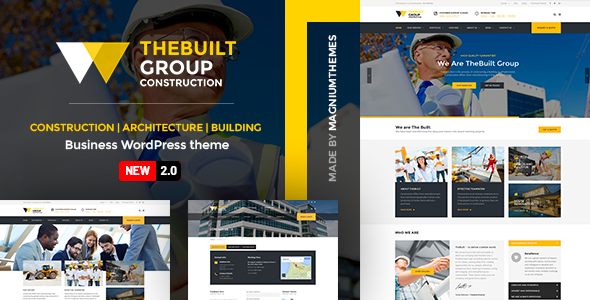
Stuck on your TheBuilt WordPress theme? Let's fix it.
No endless back-and-forth. Just send us the details and we'll get it done.
No obligation · Replies within 1 hour · Quote within 1 day
Setup · Customization · Bug fixes · WooCommerce integration
About TheBuilt WP Theme
TheBuilt is a WordPress theme by dedalx built for construction companies, contractors, and trade businesses. It ships with a project portfolio, service pages, team sections, and a request-a-quote form — all the building blocks a trade site typically needs out of the box.
The theme uses Elementor for page building, which means layout control without custom code. It also includes demo content that covers general contractors, architecture firms, and renovation companies, so you can import a starting point and work from there.
TheBuilt is a solid choice if you need a professional-looking construction site quickly. That said, making it truly fit your brand — custom colors, fonts, unique sections — takes more than clicking through settings. Most businesses end up needing a TheBuilt specialist to get the details right.
Get matched with a TheBuilt developer in under one day
Tell us about your TheBuilt project. Small fixes, TheBuilt theme customization, or a full website build, whatever you need, we've got it covered.
We'll connect you to the right TheBuilt developers, define the scope, and get everything 100% clear.
You'll get one estimate, hire your preferred developer, and start collaborating.
Most TheBuilt issues come down to one thing: the gap between what the theme does by default and what a real business actually needs. Getting that gap closed properly takes a developer who knows the theme’s structure and won’t just patch over problems.
Through Codeable, you get matched with a vetted TheBuilt specialist within 24 hours. No bidding wars, no guesswork on quality. Post your project, get a free estimate, and decide from there — no obligation to hire.
Pros
- Ships with construction-specific demo content including portfolio, services, and team sections
- Built on Elementor, so most layout changes don't require touching code
- Includes a functional request-a-quote form ready to configure
- Multiple demo variants covering contractors, architects, and renovation companies
- Clean project portfolio with category filtering built in
Cons
- Header and footer customization is limited without custom code or a child theme
- Demo styles can conflict with custom Elementor sections in unexpected ways
- Portfolio layout options are fairly rigid — adding columns or masonry grids requires extra work
- Plugin compatibility isn't always tested on theme updates, which can cause breakage
- Limited documentation for edge cases and advanced customization scenarios
Who is TheBuilt for?
General Contractors
TheBuilt’s project portfolio and service page structure map directly to how general contractors present their work. A TheBuilt developer can configure the portfolio filters to sort by project type — residential, commercial, industrial — and set up a quote form that captures the right details from prospective clients.
Architecture Firms
Architecture firms need strong visual presentation. TheBuilt’s full-width layouts and project gallery sections work well for showcasing completed builds. A TheBuilt specialist can extend the portfolio to include project details like square footage, year, and materials, giving each case study more depth without cluttering the design.
Home Renovation Companies
Renovation companies benefit from before-and-after content. TheBuilt supports image-heavy layouts that suit this well. A TheBuilt developer can add custom fields to portfolio items, enabling structured comparison galleries and filterable renovation categories that help visitors find relevant past projects quickly.
Interior Design Studios
Interior design studios need a site that looks as polished as their work. TheBuilt’s clean typography and grid layouts suit this sector. A TheBuilt expert can refine the color palette, adjust spacing, and build out a lookbook-style portfolio that fits the studio’s visual identity rather than defaulting to construction aesthetics.
Landscaping and Outdoor Services
Landscaping businesses often need seasonal service pages and local SEO setup. TheBuilt handles the service page structure well, and a TheBuilt developer can build out location-specific landing pages alongside the main site, giving the business a better foothold in local search results for each area they serve.

Customizing TheBuilt
TheBuilt gives you a lot through Elementor and the WordPress Customizer, but there are limits. Changing the header layout, adjusting the project filter, or modifying the quote form behavior usually requires either custom CSS or direct template edits. These are areas where things break if you don’t know what you’re touching.
A TheBuilt expert can handle deeper customization — adding custom post types, modifying the portfolio grid, setting up conditional logic in forms, or building new page sections that match your branding. They can also clean up the default demo styles that often bleed into custom pages without obvious cause.
If you want a site that looks built for your business rather than modified from a template, working with a TheBuilt developer from the start saves time and avoids rework later.
Recommended plugins for TheBuilt
TheBuilt works well alongside a focused set of plugins. WooCommerce fits if you sell products or services online. WPML handles multilingual sites without breaking the layout. A caching plugin paired with image optimization will noticeably cut load times on portfolio-heavy pages — something worth prioritizing for construction sites with lots of project photos. See our WordPress performance service for how we approach this.
For organic traffic, the theme is compatible with Yoast and Rank Math. Pairing it with proper schema markup for local businesses gives it a real edge in local search. Our WordPress SEO service covers that setup in full.
Not sure which plugins to use? This WordPress plugins directory covers the most popular options with reviews and setup guides.
TheBuilt common issues
TheBuilt portfolio not displaying projects correctly
Portfolio display issues in TheBuilt are usually caused by a conflict between the theme’s custom post type settings and a caching plugin, or a failed query due to mismatched category slugs. Start by clearing all caches and checking that your project categories are assigned correctly. If the grid still breaks, inspect the theme’s portfolio widget settings in Elementor — a wrong posts-per-page value or missing taxonomy link is often the cause. Persistent display bugs are best handled through our WordPress bug fixing service.
TheBuilt Elementor sections not saving or reverting after update
Elementor content reverting after a save usually points to a PHP memory limit, a REST API conflict, or a permissions issue on the uploads folder. Check your server’s PHP memory — TheBuilt with Elementor needs at least 256MB. Also confirm the WordPress REST API isn’t being blocked by a security plugin. If the issue appeared after a theme or plugin update, roll back the update and test in a staging environment before pushing live again. Our WordPress bug fixing service handles these systematically.
TheBuilt contact or quote form not sending emails
When TheBuilt’s quote or contact form stops sending emails, the problem is almost always server mail configuration, not the form itself. WordPress relies on PHP mail by default, which most hosts block. Install an SMTP plugin — WP Mail SMTP is a straightforward option — and connect it to a transactional email service like Mailgun or SendGrid. Also check your spam folder before assuming emails aren’t sending. If the form itself throws an error on submission, that’s a separate issue likely tied to a plugin conflict.
TheBuilt site layout broken on mobile
Mobile layout issues in TheBuilt often come from Elementor column settings that weren’t configured for smaller screens. Open the affected section in Elementor, switch to mobile view, and check column widths, padding, and font sizes — these all have separate mobile values. Also check if a custom CSS snippet is overriding responsive rules. If the header specifically breaks on mobile, the issue is usually in the theme’s mobile menu settings, which have their own set of Customizer controls separate from the main header.
TheBuilt FAQ
Yes, TheBuilt is purpose-built for construction and trade businesses. It includes a project portfolio, service pages, team sections, and a quote form — all relevant to that sector. It’s a practical starting point, though most construction companies need a TheBuilt specialist to customize it beyond the demo and match their actual branding and service structure.
TheBuilt is built on Elementor, so yes — the page builder is central to how the theme works. Most sections are built as Elementor templates or widgets. This gives you drag-and-drop control over layouts, but some theme-specific elements like the header and footer need the Customizer or custom code to modify properly.
Custom sections in TheBuilt are added through Elementor by creating new sections on any page. For site-wide additions — like a sticky CTA bar or a custom header block — you’ll need either Elementor Pro’s Theme Builder or custom PHP in a child theme. A TheBuilt developer can build these cleanly without breaking existing layouts.
TheBuilt’s structure works beyond construction. The portfolio system suits any project-based business, and the service page layouts adapt to industries like cleaning, plumbing, or facilities management. The default demo aesthetic is construction-focused, but a TheBuilt specialist can restyle it fully to fit a different sector without switching themes.
Cost depends on scope. A focused customization task — adjusting layouts, fixing a specific feature, configuring forms — typically runs less than a full build. A complete TheBuilt site build from demo import to launch sits in a wider range depending on pages and complexity. Post your project on Codeable for a specific estimate with no obligation to hire.
Hire a TheBuilt Developer
Whether you need a full site build, specific customizations, or fixes to an existing TheBuilt setup, working with a specialist makes the difference between a site that looks close enough and one that actually works for your business.
Through FoxyConcept, your project goes to a vetted TheBuilt developer via Codeable. You get a clear estimate before anything starts. Get a Free Estimate and have a developer lined up within 24 hours.
You'll need a free Codeable account so developers can ask questions and send their quotes.