Auros WordPress Theme
by Opal_WP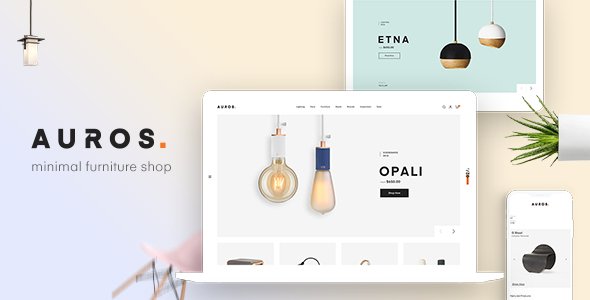
Stuck on your Auros WordPress theme? Let's fix it.
No endless back-and-forth. Just send us the details and we'll get it done.
No obligation · Replies within 1 hour · Quote within 1 day
Setup · Customization · Bug fixes · WooCommerce integration
About Auros WP Theme
Auros is a multipurpose WordPress theme built by Opal_WP, designed around WooCommerce storefronts and business sites. It ships with Elementor page builder support, multiple pre-built demo layouts, and a header/footer builder that gives you real control over your site structure without touching code.
The theme leans heavily on visual customization. You get mega menus, sticky headers, product quick-view, and Ajax cart functionality out of the box. Opal_WP maintains a consistent release schedule, so compatibility with current versions of WordPress and WooCommerce is generally reliable.
Auros works well for shops selling fashion, electronics, furniture, or mixed-category products. It also covers service-based business layouts if you need something outside the eCommerce space. Performance depends on how many bundled plugins you activate, so setup choices matter early.
Get matched with a Auros developer in under one day
Tell us about your Auros project. Small fixes, Auros theme customization, or a full website build, whatever you need, we've got it covered.
We'll connect you to the right Auros developers, define the scope, and get everything 100% clear.
You'll get one estimate, hire your preferred developer, and start collaborating.
Auros has enough moving parts that small configuration mistakes compound quickly. An Auros specialist who works with the theme regularly knows where those problems appear and how to avoid them. Through Codeable, you get access to vetted WordPress developers with real project history. You post your project, receive a clear estimate within 24 hours, and only move forward if it makes sense for you. No obligation, no risk.
Pros
- Ships with a functional header and footer builder that covers most layout needs without extra plugins
- Strong WooCommerce integration including Ajax cart, quick view, and wishlist features ready out of the box
- Multiple demo layouts available covering fashion, electronics, furniture, and services niches
- Elementor compatibility means visual editing without switching to a different page builder ecosystem
- Opal_WP provides regular updates keeping the theme current with WordPress and WooCommerce core changes
Cons
- Page weight increases noticeably when Elementor and multiple bundled plugins are all active simultaneously
- Demo import can be inconsistent, sometimes requiring manual cleanup of imported content and widgets
- Customizer options are extensive but poorly documented, making specific adjustments harder than they should be
- Support response times from Opal_WP can be slow during high-volume periods, particularly for complex issues
- Some design elements look dated compared to more recently released multipurpose themes in the same price range
Who is Auros for?
Fashion and Apparel Stores
Auros includes fashion-specific demo layouts with lookbook-style product grids, full-width banners, and category landing pages built for visual merchandising. The mega menu handles large product catalogs without cluttering the navigation. An Auros specialist can adapt these layouts to match a specific brand identity rather than using the demo design directly.
Electronics and Tech Retail
Product comparison tables, specification-heavy product pages, and filter-heavy category pages are all supported within Auros’s WooCommerce framework. Electronics stores benefit from the quick-view and Ajax filtering features that reduce page reloads during browsing. An Auros developer can extend these with third-party comparison or spec plugins where needed.
Furniture and Home Decor Shops
The furniture demo layout in Auros uses large imagery, room-scene product photography formats, and a clean grid that suits high-ticket items where visual presentation drives conversions. Product page layouts can be customized to include dimension details, material swatches, and delivery information sections without needing a custom theme build.
Multi-Category Marketplaces
Auros handles mixed-category stores through its flexible header, mega menu, and category-specific layout options. Vendors selling across multiple product types can use different category page templates without redesigning the whole site. An Auros expert can configure the navigation and filtering to keep large catalogs browsable and conversion-focused.
Business and Agency Websites
Outside WooCommerce, Auros includes business and agency demo layouts built with Elementor. Service pages, team sections, portfolio grids, and contact layouts are all available. These work for agencies or professional services firms that want a polished site without a fully custom build. An Auros developer can adapt these templates to specific service offerings quickly.

Customizing Auros
Auros gives you a lot of options, but having options and knowing which ones to use are different things. The theme’s Customizer panel is deep, and Elementor adds another layer of settings on top. An Auros expert can cut through that complexity and build exactly what you need without the trial-and-error.
Common customization work includes setting up the header builder to match brand guidelines, configuring WooCommerce product pages with custom layouts, adjusting typography and color schemes globally, and integrating third-party plugins without layout breakage. The mega menu system also takes specific configuration to work correctly across devices.
If you need a custom demo imported cleanly, or want to build a layout that doesn’t exist in the pre-built options, working with an Auros developer saves significant time and avoids the common mistakes that come from self-configuration.
Recommended plugins for Auros
Auros works alongside most major WordPress plugins, but some combinations need careful handling. WooCommerce extensions like WPML for multilingual stores, currency switchers, and advanced product filter plugins generally integrate without major issues.
For site speed, Auros can get heavy when multiple Elementor widgets and bundled plugins are active. Pairing it with a proper caching strategy and image optimization setup helps significantly. See our WordPress performance service if load times are a concern.
On the SEO side, the theme is compatible with Yoast and Rank Math. Structured data for products needs verification after setup. Our WordPress SEO service covers that alongside broader on-page work.
Not sure which plugins to use? This WordPress plugins directory covers the most popular options with reviews and setup guides.
Auros common issues
Auros theme demo import failing or incomplete
Demo import failures in Auros usually come down to PHP memory limits, execution time limits, or a conflict with an active plugin during the import process. Start by increasing memory_limit to at least 256MB and max_execution_time to 300 in your php.ini or wp-config.php. Deactivate non-essential plugins before importing. If the import still stalls, import XML content manually through WordPress Tools and configure widgets separately. For persistent failures, our WordPress bug fixing service can handle the process cleanly.
Auros header builder not saving changes
The Auros header builder failing to save is often a JavaScript conflict, a caching issue, or a permissions problem with the uploads directory. First, clear all caches including server-level, plugin, and browser cache. Check the browser console for JS errors pointing to the conflicting script. If a plugin like a security or optimization tool is blocking scripts, whitelist the header builder’s assets. Regenerating the Elementor CSS cache sometimes resolves save failures tied to file write permissions. If the problem persists, our WordPress bug fixing service can isolate the conflict.
Auros WooCommerce product page layout broken after update
Auros product page layouts breaking after a WooCommerce update typically means a template file in the theme is outdated. Auros uses custom WooCommerce template overrides that need updating when WooCommerce changes its template structure. Check the WooCommerce System Status for outdated templates. If the theme hasn’t been updated to match, you may need to manually update the override files or wait for an Opal_WP patch release. A child theme helps prevent this from recurring after future updates.
Auros site running slow with Elementor
Auros with Elementor active loads a significant number of scripts and styles even on pages that don’t use the builder. Use a plugin like Asset CleanUp or Perfmatters to disable Elementor assets on non-Elementor pages. Enable Elementor’s built-in Improved Asset Loading experiment in the Elementor settings panel. Combine this with server-side caching and a CDN for static assets. If the site is still slow after these changes, the issue may be hosting-related rather than theme-specific.
Auros FAQ
Opal_WP updates Auros regularly to maintain WooCommerce compatibility, but there can be a lag after major WooCommerce releases. It’s worth checking the theme changelog and the WooCommerce System Status panel for outdated templates before updating WooCommerce on a live site. Testing updates in a staging environment first prevents disruption to an active store.
Auros is built around Elementor and most of the demo layouts depend on it. You can use the WordPress block editor for basic pages, but you’ll lose access to the Elementor-specific widgets and layouts that make the theme useful. Running Auros without Elementor significantly limits what you can build with the pre-designed templates.
Auros is listed as WPML-compatible, and most of the theme’s front-end strings can be translated through WPML’s String Translation module. That said, multilingual WooCommerce setups have additional complexity around product, category, and checkout translation that needs testing specific to your store configuration. An Auros specialist can verify and configure this properly.
Support for Auros is provided through ThemeForest’s comment system and Opal_WP’s dedicated support forum. Response times vary. For faster resolution on complex issues, working with an independent Auros developer through a service like Codeable gives you direct access to someone who knows the theme in depth rather than waiting on ticket queues.
Auros includes business and agency demo layouts built for service-based sites, so it’s not limited to eCommerce. These layouts cover team pages, service listings, portfolio sections, and contact pages. However, the theme’s overall feature set skews toward WooCommerce, so if eCommerce is not part of your plan, a lighter theme might perform better with less overhead.
Hire an Auros Developer for Your WordPress Project
Whether you need a full Auros build, a specific customization, or fixes to an existing setup, working with a specialist gets the job done faster and cleaner. FoxyConcept delivers Auros development through Codeable, matching you with a vetted developer who knows the theme inside out. Get a Free Estimate and describe your project. You’ll have a clear scope and price before any work begins.
You'll need a free Codeable account so developers can ask questions and send their quotes.