Moments WordPress Theme
by Select-Themes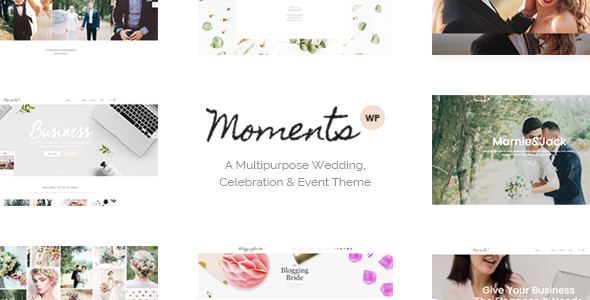
Stuck on your Moments WordPress theme? Let's fix it.
No endless back-and-forth. Just send us the details and we'll get it done.
No obligation · Replies within 1 hour · Quote within 1 day
Setup · Customization · Bug fixes · WooCommerce integration
About Moments WP Theme
Moments is a photography-focused WordPress theme by Select-Themes. It’s built for photographers, visual artists, and creatives who want their images to lead. The layout is minimal by design, keeping the focus on full-width galleries and clean portfolio grids. It ships with multiple homepage layouts, filterable portfolio sections, and a smooth lightbox for image viewing.
Under the hood, Moments uses a well-structured codebase with support for the WordPress Customizer, making basic changes accessible without touching code. It’s compatible with WooCommerce, which makes it viable for photographers selling prints or digital downloads. Page speed depends heavily on image optimisation, so the theme rewards users who invest in proper media handling. Overall, it’s a solid choice for image-heavy sites that need to stay fast and uncluttered.
Get matched with a Moments developer in under one day
Tell us about your Moments project. Small fixes, Moments theme customization, or a full website build, whatever you need, we've got it covered.
We'll connect you to the right Moments developers, define the scope, and get everything 100% clear.
You'll get one estimate, hire your preferred developer, and start collaborating.
Moments looks straightforward until you need it to do something specific. Codeable connects you with vetted WordPress developers who have hands-on experience with Select-Themes products and photography-focused builds. No junior developers, no outsourcing. You post your project, get a transparent estimate, and choose whether to proceed. If you need a Moments developer who can work to a brief and deliver clean code, this is the most reliable way to find one.
Pros
- Clean, minimal design that keeps the focus on photography and visual work
- Multiple homepage and portfolio layout options included at purchase
- WooCommerce compatible for selling prints or digital downloads
- WordPress Customizer support makes basic styling changes accessible
- Smooth lightbox integration for image viewing without leaving the page
Cons
- Deep customization requires child theme development and PHP knowledge
- Performance can degrade quickly without proper image optimization and caching
- Limited block editor (Gutenberg) integration compared to newer themes
- Plugin compatibility issues can arise with page builders like Elementor
- Documentation is sparse for more advanced use cases and custom layouts
Who is Moments for?
Freelance Photographer Portfolio
Moments is built for exactly this. A freelance photographer can set up filterable portfolio categories, use the full-width grid to display work by project type, and keep the navigation minimal. A Moments developer can add client proofing pages, password-protected galleries per client, and a contact form integrated with a booking plugin.
Photography Studio Website
Photography studios often need team pages, service pricing sections, and a gallery that handles multiple photographers’ work. Moments handles the gallery side cleanly. A Moments specialist can extend it with custom taxonomies to separate work by photographer or service type, and integrate a CRM or booking tool for session scheduling.
Fine Art Print Shop
With WooCommerce, Moments can function as a print shop. Products display within the same visual style as the portfolio. A developer can configure variable products for print sizes, add a proofing workflow, and ensure the shop pages match the minimal aesthetic of the rest of the site without default WooCommerce styles taking over.
Wedding Photography Business
Wedding photographers need strong image presentation and clear calls to action for inquiries. Moments handles the visual side well. A Moments expert can build a testimonials section, a styled inquiry form, an availability calendar integration, and package pricing pages that fit within the theme’s clean layout without looking bolted on.
Creative Agency Showcase
Creative agencies showcasing client work can use Moments as a base for a case study-style portfolio. Each project can have its own page with full-width imagery and project details. A developer can add custom fields for project scope, client name, and outcomes, turning each portfolio entry into a structured case study format.

Customizing Moments
Out of the box, Moments gives you Customizer controls for colors, typography, layout options, and header styles. That covers most surface-level changes. But anything beyond that, custom portfolio filters, modified grid spacing, unique gallery layouts, or integrating third-party booking tools requires direct theme or child theme work.
A Moments expert can build a child theme so your customizations survive updates, restructure the portfolio grid to match your exact vision, and integrate plugins cleanly without breaking the minimal aesthetic. If you need custom post types for client galleries, password-protected project pages, or a restructured homepage, working with a Moments specialist saves hours of trial and error. The theme’s flexibility is real, but it shows most when a developer is driving.
Recommended plugins for Moments
Moments pairs well with a focused set of plugins. For galleries, Envira Gallery or FooGallery can extend the built-in display options. WooCommerce adds print sales or digital download functionality without major layout conflicts.
Performance is the main concern with image-heavy themes. Proper caching, a CDN, and image compression are essential. A full WordPress performance audit can identify exactly where load time is being lost. If you’re using Moments for a client-facing portfolio or photography business, WordPress SEO optimisation helps your work surface in search results, especially for local and niche photography queries.
Not sure which plugins to use? This WordPress plugins directory covers the most popular options with reviews and setup guides.
Moments common issues
Moments theme portfolio grid not displaying correctly
Grid display issues in Moments are usually caused by JavaScript conflicts with other plugins or incorrect image sizes set in the media settings. Start by deactivating plugins one by one to isolate the conflict. Check that your featured image dimensions match what the theme expects. If the grid worked before a plugin update, that’s your most likely cause. For persistent issues, a WordPress bug fixing specialist can trace the conflict and resolve it without disrupting the rest of the site.
Moments theme images loading slowly on mobile
Moments doesn’t include built-in lazy loading or automatic image compression. Large unoptimized images are the most common cause of slow mobile load times. Install a plugin like ShortPixel or Imagify to compress existing media. Enable lazy loading through your caching plugin. If you’re still seeing slow times after that, a server-side issue or missing CDN configuration is likely the cause. A WordPress performance fix can identify exactly where the bottleneck is.
Moments theme not compatible with Elementor page builder
Moments was not built with Elementor in mind. Conflicts typically appear as broken layouts, missing styles, or Customizer settings being overridden. The safest approach is to use Elementor only on specific pages rather than theme-wide. Avoid using Elementor’s global styles if the Moments theme has its own typography and color controls active. In some cases, a developer needs to scope the CSS to prevent Elementor from affecting theme-controlled sections.
Moments theme update broke my homepage layout
Theme updates can overwrite customizations made directly in the theme files. If your homepage broke after an update, check whether you had edits in the theme’s template files without a child theme in place. Restoring from a backup and rebuilding with a child theme is the cleanest fix. Going forward, all customizations should live in a child theme so updates don’t cause this again. A WordPress developer can migrate your existing changes into a proper child theme structure.
Moments FAQ
Yes, Moments is designed with photographers in mind. It includes filterable portfolio layouts, a lightbox gallery, and a minimal aesthetic that keeps focus on the images. It handles both large-scale portfolios and smaller curated showcases well. For more advanced needs like client proofing or booking integration, you’ll need a developer to extend the theme.
Moments is WooCommerce compatible. You can use it to sell prints, digital downloads, or photography packages. The default WooCommerce styles may need adjustment to match the theme’s aesthetic. A developer can restyle the shop and product pages so they feel consistent with the rest of the Moments design rather than using generic WooCommerce templates.
Moments and Elementor can coexist but they don’t integrate cleanly. Elementor’s global styles can conflict with Moments’ own Customizer settings. Most developers recommend using Elementor selectively on specific pages rather than site-wide. Full Elementor builds work better on themes designed specifically for that workflow. Expect some CSS scoping work if you want to use both.
Creating a child theme for Moments involves creating a new theme folder, a style.css file with the correct template declaration, and a functions.php file that enqueues the parent theme’s styles. Any template overrides go into the child theme folder. This is the correct way to customize Moments without losing changes on updates. A developer can set this up and migrate any existing edits.
Cost depends on the scope of work. A single fix or small customization typically ranges from $50 to $200. A full custom build using Moments as the base can run from $500 upward depending on complexity. The most reliable way to get an accurate number is to post your project through Codeable and receive a specific estimate based on your actual requirements.
Hire a Moments Developer for Your WordPress Site
Whether you need a Moments expert to build a custom portfolio layout, fix a display issue, or extend the theme with new functionality, the process is straightforward. Post your project, get a free estimate, and only proceed if it makes sense for you. Every developer on the platform is vetted and reviewed. Get a Free Estimate and describe what you need. No commitment required.
You'll need a free Codeable account so developers can ask questions and send their quotes.