Eventr WordPress Theme
by themecube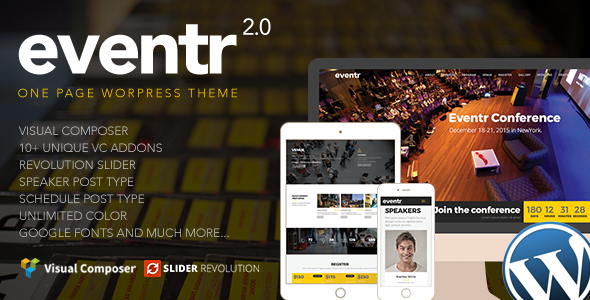
Stuck on your Eventr WordPress theme? Let's fix it.
No endless back-and-forth. Just send us the details and we'll get it done.
No obligation · Replies within 1 hour · Quote within 1 day
Setup · Customization · Bug fixes · WooCommerce integration
About Eventr WP Theme
Eventr is a WordPress theme by ThemeCube built specifically for event organizers, venues, and conference managers. It ships with a dedicated events post type, ticketing-ready layouts, countdown timers, and schedule builders that cover most event site needs out of the box.
The theme uses a visual page builder approach, so non-technical users can arrange sections without touching code. Speaker profiles, sponsor grids, and session timings all have pre-built blocks. It integrates with popular event plugins and payment gateways, making it a practical starting point for single-event landing pages or ongoing multi-event calendars. ThemeCube maintains the theme with regular updates, keeping it compatible with current WordPress core releases.
Get matched with a Eventr developer in under one day
Tell us about your Eventr project. Small fixes, Eventr theme customization, or a full website build, whatever you need, we've got it covered.
We'll connect you to the right Eventr developers, define the scope, and get everything 100% clear.
You'll get one estimate, hire your preferred developer, and start collaborating.
Eventr does a lot well, but production event sites involve real complexity: payment flows, attendee data, integrations, and tight deadlines. Mistakes on a live event site cost money directly. Codeable connects you with vetted WordPress developers who have worked on event and ticketing projects before. You post your project, get a clear estimate within 24 hours, and only move forward if the scope and price work for you. No commitment required to get that estimate.
Pros
- Purpose-built for events with native schedule, speaker, and sponsor sections
- Countdown timers and ticket CTA blocks are included without extra plugins
- Compatible with The Events Calendar and WooCommerce Tickets out of the box
- Mobile-optimized layouts that handle agenda and session views cleanly on small screens
- Regular updates from ThemeCube keep the theme compatible with current WordPress versions
Cons
- Design options are limited without custom CSS or a child theme
- Multi-track schedule builder gets complex and may need developer help for large conferences
- Heavy demo content can slow staging environments if not cleaned up before launch
- Some advanced ticketing workflows require WooCommerce add-ons that add cost and complexity
- Documentation covers basics but lacks detail for custom integrations or developer use cases
Who is Eventr for?
Conference and Summit Websites
Eventr suits multi-day conference sites well. Speaker bios, session schedules, and sponsor tiers all have dedicated sections. An Eventr developer can extend the schedule builder to handle parallel tracks, add a CFP submission form, or integrate badge printing tools for larger professional events.
Music Festival and Concert Promoters
Festival promoters need strong visual impact and fast ticket links. Eventr’s countdown blocks and lineup sections handle this well. Pairing it with WooCommerce and a ticketing plugin gives you a working sales flow. An Eventr specialist can add setlist pages, artist profiles, and stage timetables.
Corporate Event and Workshop Organizers
Workshops and corporate training days need simple registration and clear agenda layouts. Eventr’s schedule and speaker sections work for this without heavy customization. An Eventr expert can connect registration forms to CRM tools like HubSpot or Salesforce for lead capture and attendee follow-up.
Charity Galas and Fundraising Events
Gala and fundraising event sites need donation flows alongside ticket sales. Eventr’s layouts handle the promotional side, and a developer can integrate Give WP or Charitable alongside WooCommerce Tickets. Table booking and seating options are also achievable with the right plugin pairing and customization.
Sports Events and Tournament Organizers
Tournament organizers need bracket displays, team profiles, and result updates. Eventr’s event structure provides a foundation, but an Eventr developer will typically extend it with custom post types for teams and matches. Schedule sections can be repurposed for fixture lists with some targeted customization work.

Customizing Eventr
Out-of-the-box Eventr covers the basics, but most real projects need more. Color schemes, typography, and section layouts are adjustable through the Customizer, but anything beyond surface styling requires template edits or custom CSS.
An Eventr expert can restructure the event archive, build custom ticket flows, connect third-party CRM tools, or adapt the schedule builder for multi-track conferences. If you need a heavily branded experience, speaker portal, or integration with tools like Zoom or Stripe, working with an Eventr developer saves significant trial-and-error time. Custom child theme development also protects your changes from being overwritten on every theme update.
Recommended plugins for Eventr
Eventr works alongside several plugins that expand what the theme alone can do. The Events Calendar, Event Tickets, and WooCommerce cover scheduling and payments. For growth, pairing Eventr with proper WordPress SEO optimisation ensures your event pages rank for relevant searches before tickets go on sale.
Page speed matters too. Event pages with countdown scripts, video embeds, and map blocks can slow down quickly. Investing in WordPress performance work keeps load times low, which directly affects both ad spend efficiency and organic rankings for time-sensitive events.
Not sure which plugins to use? This WordPress plugins directory covers the most popular options with reviews and setup guides.
Eventr common issues
Eventr schedule not displaying correctly on mobile
Mobile schedule display issues in Eventr usually come from conflicting CSS between the theme and a plugin, or from custom column layouts that don’t have proper responsive breakpoints. Check your browser’s dev tools at common mobile widths to identify which element is overflowing. If you’ve added custom CSS or a third-party page builder block, that’s the likely source. Our WordPress bug fixing service can diagnose and resolve layout conflicts without touching your live site content.
Eventr countdown timer not showing or showing wrong time
Countdown timer issues in Eventr are often caused by a timezone mismatch between the event date setting and your WordPress site timezone, or by a JavaScript conflict with another plugin. First, check Settings > General for your site timezone and confirm the event date is set in that same zone. Disable other plugins temporarily to test for JS conflicts. If the timer still misbehaves, a developer can trace the script conflict quickly. Our WordPress bug fixing service handles exactly these kinds of front-end issues.
Eventr theme conflicts with The Events Calendar plugin
Eventr and The Events Calendar can conflict around custom post type registration, template overrides, or shared CSS class names. The most common symptom is event archive pages using the wrong template or styling from one overriding the other. Check whether Eventr has a built-in Events Calendar integration file in its includes folder. Disabling Eventr’s native event post type while using The Events Calendar plugin usually resolves the duplication. A child theme approach keeps these adjustments upgrade-safe.
Eventr speaker section layout broken after update
Speaker section layout breaks after a theme update typically mean custom CSS written against old class names, or a child theme template that no longer matches the parent. Compare your child theme’s speaker template against the updated parent version using a diff tool. If you’re not running a child theme, updates will overwrite any direct file edits. Rebuilding the speaker section in a child theme takes less than an hour for a developer and prevents this from recurring on future updates.
Eventr FAQ
Eventr isn’t a ticketing platform on its own, but it integrates with WooCommerce and plugins like Event Tickets by The Events Calendar to handle ticket sales. For more complex sales flows, paid add-ons or a custom checkout setup may be needed. An Eventr specialist can configure this correctly and avoid common cart and checkout conflicts that crop up with event-specific products.
Yes, Eventr is compatible with WooCommerce. You can use WooCommerce to sell tickets, merchandise, or event add-ons. That said, making WooCommerce and Eventr’s own event functionality work together cleanly sometimes requires developer input, particularly around product page templates and the checkout flow matching your event site’s design.
Eventr’s schedule builder handles multi-day events, but parallel multi-track sessions can get complicated. The built-in blocks work for straightforward agendas. For large conferences with multiple simultaneous sessions, filtering by track, and speaker linking, you’ll likely need custom development. An Eventr developer can extend the schedule to handle this without replacing the whole theme.
Eventr doesn’t include a built-in registration form. You’ll need a form plugin like Gravity Forms, WPForms, or Fluent Forms. These embed easily into event pages using shortcodes or blocks. For attendee management, connecting the form to a plugin like Event Espresso or a CRM adds more capability. Setup is straightforward but benefits from a developer if you need conditional logic or payment integration.
ThemeCube continues to release updates for Eventr, keeping it compatible with recent WordPress versions. You can verify the last update date on the theme’s ThemeForest or ThemeCube product page. For long-term site stability, pairing regular theme updates with a WordPress maintenance plan ensures compatibility issues are caught early rather than after something breaks.
Hire an Eventr Developer for Your Event Site
Whether you need an Eventr specialist to build from scratch, fix a broken feature, or integrate a ticketing or CRM tool, working with the right developer makes the difference between a site that converts and one that loses attendees at checkout. Get a free estimate and describe your project. You’ll hear back within 24 hours with no obligation to hire.
You'll need a free Codeable account so developers can ask questions and send their quotes.