Wiso Photography WordPress Theme
by fox-themes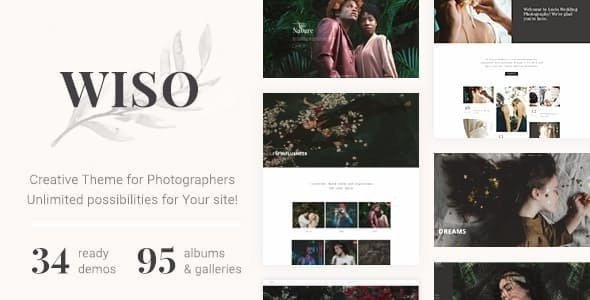
Stuck on your Wiso Photography WordPress theme? Let's fix it.
No endless back-and-forth. Just send us the details and we'll get it done.
No obligation · Replies within 1 hour · Quote within 1 day
Setup · Customization · Bug fixes · WooCommerce integration
About Wiso Photography WP Theme
Wiso Photography is a clean, image-first WordPress theme built for photographers, visual artists, and studios who need their work to speak before anything else does. It ships with fullscreen galleries, minimal typography, and portfolio layouts designed to keep the focus on the images themselves.
The theme is built on a solid foundation with customizer controls, multiple portfolio grid options, and support for WooCommerce if you want to sell prints or digital downloads. It works well for solo photographers and small studios alike. Page load is generally fast out of the box, though gallery-heavy sites will benefit from proper image optimization and caching. If you need a theme that gets out of the way and lets photography lead, Wiso Photography is worth a close look.
Get matched with a Wiso Photography developer in under one day
Tell us about your Wiso Photography project. Small fixes, Wiso Photography theme customization, or a full website build, whatever you need, we've got it covered.
We'll connect you to the right Wiso Photography developers, define the scope, and get everything 100% clear.
You'll get one estimate, hire your preferred developer, and start collaborating.
Most photographers know their craft. Most don’t want to spend hours debugging theme conflicts or figuring out why a gallery layout broke after an update. That’s where a vetted Wiso Photography developer makes the difference. Through Codeable, you get matched with WordPress specialists who have real experience with photography themes, not generalists learning on your project. Work is scoped clearly, estimated upfront, and delivered without the guesswork.
Pros
- Fullscreen image display puts photography front and center without layout distractions
- Multiple portfolio grid styles give flexibility for different types of photography work
- WooCommerce compatibility makes selling prints or digital files straightforward to add
- Clean, minimal design holds up well across screen sizes without heavy customization
- Customizer controls cover most common styling changes without needing code edits
Cons
- Limited built-in filtering options for large or multi-category portfolio archives
- Advanced gallery behaviors like lightbox customization require custom development work
- No native booking or client proofing system included out of the box
- Heavy gallery pages can load slowly without proper image optimization and caching in place
- Theme update history from fox-themes is less frequent than larger theme shops
Who is Wiso Photography for?
Wedding Photography Studios
Wedding photographers need galleries that impress on first load and make it easy for couples to browse large sets of images. Wiso Photography’s fullscreen layouts and clean grid options handle this well. A Wiso Photography developer can add inquiry forms, package pages, and a streamlined contact flow to convert visitors into booked clients.
Portrait and Family Photographers
Portrait studios benefit from a warm, approachable design that puts faces and emotion first. Wiso Photography keeps the layout out of the way so the images lead. Custom session booking forms, pricing pages, and a client gallery area can all be built on top of the theme by a Wiso Photography specialist familiar with how portrait businesses actually operate.
Commercial and Product Photographers
Commercial photographers need a portfolio that communicates professionalism quickly to agency and brand clients. Wiso Photography’s minimal aesthetic works in this context. A developer can extend it with filterable case study pages, client logos, usage licensing information, and WooCommerce-powered digital delivery for commissioned files.
Fine Art and Gallery Artists
Fine art photographers and artists selling limited edition prints need a site that feels like a gallery, not a blog. Wiso Photography’s fullscreen image presentation and clean typography support that tone. WooCommerce integration handles print sales, and a Wiso Photography expert can customize the shopping experience to match the aesthetic carefully.
Photography Schools and Workshops
Photography educators running workshops or online courses need clear structure alongside strong visual presentation. Wiso Photography provides the visual foundation. A developer can layer in course listing pages, registration forms, member areas, or LMS plugin integration to support the educational side without compromising the look of the site.

Customizing Wiso Photography
Out of the box, Wiso Photography covers the basics through the WordPress Customizer. You can adjust colors, fonts, logo placement, and header layout without touching code. Portfolio templates offer a few grid options, and the homepage sections can be rearranged to suit how you want to present your work.
Where it gets more specific, though, is where a Wiso Photography expert earns their place. Custom gallery filtering, client proofing pages, booking integrations, lightbox behavior, or a fully bespoke homepage layout all require hands-on development work. If you want the theme to behave in ways the default settings don’t support, working with a developer who knows Wiso Photography well means you get exactly what you need without breaking what’s already working.
Recommended plugins for Wiso Photography
Wiso Photography pairs well with a focused set of plugins. For galleries and portfolios, tools like Envira Gallery or FooGallery add features the theme doesn’t include natively. WooCommerce handles print sales cleanly. Contact Form 7 or WPForms covers inquiry and booking forms.
On the performance side, gallery-heavy sites need proper image optimization and caching from day one. A WordPress performance specialist can set this up correctly so large image files don’t slow the site down. If you’re shooting for search visibility, getting structured data and image SEO right through a WordPress SEO service gives photography sites a real advantage in Google image search.
Not sure which plugins to use? This WordPress plugins directory covers the most popular options with reviews and setup guides.
Wiso Photography common issues
Wiso Photography gallery not loading images correctly
Gallery loading issues in Wiso Photography are usually caused by a JavaScript conflict with another plugin, a CDN serving stale cached files, or an image path problem after a site migration. Start by deactivating plugins one at a time to isolate the conflict. Clear all caches, including server-side and CDN layers. If images were recently moved or the domain changed, check that file paths in the media library are resolving correctly. For persistent issues, a WordPress bug fixing service can diagnose the root cause efficiently.
Wiso Photography portfolio grid broken after update
Portfolio grid layout breaks after a theme or WordPress update are common and usually come down to a CSS conflict, a missing script, or a shortcode that changed behavior. Check the browser console for JavaScript errors first. Disable any caching plugins and test in a fresh browser session. If you recently added a page builder or updated a plugin that touches layout output, that’s a likely culprit. A WordPress bug fixing specialist can trace the conflict and restore the layout without disrupting the rest of the site.
Wiso Photography fullscreen slider not working on mobile
Mobile fullscreen slider problems in Wiso Photography often trace back to touch event JavaScript not firing correctly, viewport meta tag conflicts, or CSS overflow rules blocking the slider container. Check whether the issue appears in a specific mobile browser or across all of them. Disable caching and test on a real device, not just a browser emulator. If a recent plugin update changed anything related to scripts or styles, roll it back and test again to confirm the source of the problem.
Wiso Photography WooCommerce shop page layout misaligned
WooCommerce shop page layout issues in Wiso Photography usually happen when the theme’s stylesheet doesn’t fully account for WooCommerce’s default markup, or when a WooCommerce update changes template structure the theme relies on. Check whether the issue appeared after a WooCommerce update. A child theme with targeted CSS overrides is the right fix here. Avoid editing the parent theme files directly, as any theme update will overwrite your changes. Scoping the fix to a child theme keeps it stable long term.
Wiso Photography FAQ
Yes, for photographers who want a clean, image-focused site without a lot of overhead. Wiso Photography handles fullscreen galleries, portfolio grids, and minimal layouts well. It works best for solo photographers and small studios. If you need advanced client proofing, booking systems, or heavily customized layouts, you’ll need a Wiso Photography developer to extend it properly.
Wiso Photography supports WooCommerce, so selling prints, digital downloads, or photography packages is possible. The default WooCommerce templates work with the theme, though the shop page styling may need adjustments to match the rest of the design. A developer can align the shop pages with the theme’s visual style and set up product variations for print sizes or formats.
The Customizer in Wiso Photography offers font options, but the selection is limited to what the theme natively supports. To use a custom or Google Font not in the default list, you’ll need to enqueue it through a child theme or use a plugin like Custom Fonts or Typekit. Editing theme files directly is not recommended unless you’re working with a child theme, as updates will overwrite changes.
Wiso Photography can be used alongside Elementor, but compatibility varies by page type. The theme’s portfolio and gallery templates are built with their own structure, and Elementor may conflict with those on specific pages. Testing carefully before committing to a page builder is important. A Wiso Photography specialist can advise on where a page builder adds value versus where the native theme templates should be used instead.
Developer costs depend on the scope of work. Small fixes or single customizations are typically quoted in the range of a few hundred dollars. Full site builds or complex feature additions cost more. Through Codeable, you post your project, get a transparent estimate from a vetted Wiso Photography developer, and decide whether to proceed. There’s no obligation until you’re comfortable with the scope and cost.
Hire a Wiso Photography Developer
Whether you need a full site build, a specific customization, or help fixing something that’s broken, a dedicated Wiso Photography expert can get it done properly. Every project through FoxyConcept is matched to a vetted developer with hands-on WordPress experience. You get a clear estimate before any work starts, no surprises, and no obligation to proceed if it doesn’t feel right. Get a Free Estimate and describe what you need.
You'll need a free Codeable account so developers can ask questions and send their quotes.