Prowess WordPress Theme
by Select-Themes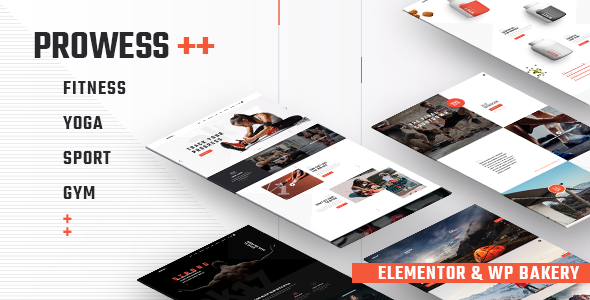
Stuck on your Prowess WordPress theme? Let's fix it.
No endless back-and-forth. Just send us the details and we'll get it done.
No obligation · Replies within 1 hour · Quote within 1 day
Setup · Customization · Bug fixes · WooCommerce integration
About Prowess WP Theme
Prowess is a business-oriented WordPress theme by Select-Themes, built for agencies, consultancies, and service-based companies that need a professional online presence without starting from scratch. It ships with a clean layout system, multiple homepage variations, and a page builder-friendly structure that works well with popular drag-and-drop tools.
The theme uses a Bootstrap foundation, giving it predictable grid behaviour across screen sizes. It supports WooCommerce for light e-commerce use cases, includes custom widget areas, and comes with a bundled slider and portfolio post type. Select-Themes maintains the theme with regular updates, though the release cadence has slowed compared to earlier years. For businesses that want a polished starting point with room to customise, Prowess holds up well.
Get matched with a Prowess developer in under one day
Tell us about your Prowess project. Small fixes, Prowess theme customization, or a full website build, whatever you need, we've got it covered.
We'll connect you to the right Prowess developers, define the scope, and get everything 100% clear.
You'll get one estimate, hire your preferred developer, and start collaborating.
Prowess is a capable theme, but getting the most from it usually means going beyond the default settings. A vetted Prowess developer on Codeable can handle child theme development, custom template work, plugin integrations, and performance tuning. Codeable only accepts the top tier of WordPress freelancers, so you’re working with someone who has done this before, not someone learning on your project. You post your project, get a scoped estimate, and decide whether to proceed. No payment until you’re ready to hire.
Pros
- Clean Bootstrap grid that behaves predictably across screen sizes without extra CSS fixes
- Multiple pre-built homepage layouts reduce initial setup time for agency and service sites
- WooCommerce compatible out of the box for light product or service catalogue use
- Built-in portfolio post type with filtering, useful for agencies displaying case studies or work samples
- Select-Themes provides documentation and support, making it easier for developers to onboard quickly
Cons
- Update frequency has slowed, which can create compatibility gaps with newer WordPress versions over time
- Bundled slider plugin (Revolution Slider or similar) adds page weight and requires separate licence management
- Customizer options are limited for deeper layout changes, requiring child theme work for anything non-standard
- Demo content import can leave placeholder images and dummy posts that need manual cleanup
- Some shortcodes are theme-specific, meaning content built with them becomes harder to migrate to a new theme later
Who is Prowess for?
Marketing and Digital Agencies
Prowess suits agency sites that need a portfolio section, service listings, and a contact flow. The built-in portfolio post type handles case studies and project showcases without additional plugins. A Prowess developer can extend it with client logos, testimonial sections, and custom filtering to match how an agency actually presents its work to prospects.
Business Consultancies
Consultancies benefit from Prowess’s structured service sections and clean typography. The theme presents expertise clearly without visual noise. A Prowess specialist can adapt the layout to highlight individual consultants, specific practice areas, or lead generation forms tied to a CRM, making the site work harder as a business development tool.
Professional Services Firms
Law firms, accountants, financial advisers, and similar firms get a professional baseline with Prowess. The layout supports clear service descriptions and trust signals like credentials or accreditations. A Prowess expert can configure the theme to meet accessibility requirements and ensure contact forms route correctly to the right team members or departments.
Creative Studios and Freelancers
Designers, photographers, and independent studios use Prowess for its portfolio and visual presentation options. The theme handles image-heavy layouts without excessive configuration. A Prowess developer can fine-tune gallery layouts, add lightbox behaviour, and set up custom project detail pages that go beyond the default portfolio template.
Corporate or B2B Companies
B2B companies need a site that communicates reliability and structure. Prowess delivers that with its corporate-leaning design language. A Prowess specialist can integrate it with HubSpot, Salesforce, or other CRM tools, build out team or leadership pages, and configure multi-language support for companies operating across different markets.

Customizing Prowess
Out of the box, Prowess gives you colour controls, font options, and layout switches through the WordPress Customizer. That covers basic branding changes. Anything beyond that, custom header layouts, modified service section structures, unique portfolio filtering logic, or integrating third-party tools, requires direct work in the theme files or child theme.
A Prowess expert can build a child theme to protect your changes from update overwrites, restructure page templates to match your actual content needs, and wire up Advanced Custom Fields or custom post types where the default setup falls short. If you want the site to look and function differently from the demo, working with a Prowess specialist saves significant time and avoids the trial-and-error that comes with modifying an unfamiliar theme structure.
Recommended plugins for Prowess
Prowess pairs naturally with WooCommerce for product or service listings, Contact Form 7 or Gravity Forms for lead capture, and WPBakery or Elementor for page layout control. Adding caching and optimisation plugins is straightforward given the theme’s clean code base. For sites that depend on search traffic, pairing Prowess with a proper WordPress SEO setup makes a measurable difference. If page speed is a priority, a dedicated WordPress performance service can address image loading, script handling, and Core Web Vitals scores that affect both rankings and user experience.
Not sure which plugins to use? This WordPress plugins directory covers the most popular options with reviews and setup guides.
Prowess common issues
Prowess theme not loading styles after WordPress update
Style failures after a WordPress update usually point to a parent theme file being overwritten or a PHP compatibility issue introduced by the update. Check whether you’re running a child theme. If you made edits directly to the parent theme files, those changes are gone. A WordPress bug fixing service can audit what broke, restore the correct styles, and set up a proper child theme so this doesn’t repeat. Also check your browser console for 404 errors on CSS or JS files, which often pinpoint the exact file causing the failure.
Prowess homepage layout broken or sections missing
Broken homepage layouts in Prowess are commonly caused by a page builder plugin update that changed how shortcodes or blocks are rendered, or a missing required plugin that the theme depends on. Check the Plugins screen for inactive or outdated plugins that Prowess bundles. If sections have disappeared, the page builder data may be corrupt. A WordPress bug fixing specialist can recover the layout data or rebuild the affected sections cleanly without losing your content.
Prowess portfolio not displaying or filtering not working
Portfolio display issues in Prowess usually come down to one of three things: the portfolio post type wasn’t registered correctly after an update, the page template assigned to your portfolio page changed, or a permalink flush is needed. Go to Settings, then Permalinks, and save without changes to flush rewrite rules. If the issue persists, check that the portfolio page template is still assigned in Page Attributes. A developer can also verify that custom post type registration in the theme functions file is firing correctly.
Prowess theme slow page speed and poor Core Web Vitals
Prowess loads several scripts and stylesheets by default, including slider libraries that run even on pages that don’t use a slider. This adds unnecessary weight. Start by auditing what scripts load on each page type using browser dev tools. Deferring non-critical JavaScript, enabling caching, and optimising images will address most speed issues. A developer familiar with Prowess can conditionally load heavy assets only where needed, which typically produces the biggest improvement in load time and Lighthouse scores.
Prowess FAQ
Select-Themes still lists Prowess as an active product and provides support through their helpdesk. Update frequency has reduced over the years, so it’s worth checking the theme changelog before purchasing or upgrading. For sites already running Prowess, a WordPress maintenance plan can help track compatibility with new WordPress and PHP versions before issues affect the live site.
Prowess works with WPBakery, which is often bundled with the theme. Elementor can also be used alongside it, though the theme’s default page templates were designed with WPBakery in mind. Mixing both page builders on the same site is not recommended. A Prowess developer can advise on which builder fits your project and handle the integration cleanly.
Prowess supports WooCommerce, so basic product listings and a checkout flow work without major modification. It’s better suited to small catalogues or service-based purchases than high-volume shops. For a more capable WooCommerce setup, additional configuration and possibly custom templates will be needed. A Prowess specialist can assess whether the theme fits your e-commerce requirements before you commit to it.
A Prowess child theme requires a new folder in your themes directory with a style.css file that references Prowess as the parent theme, plus a functions.php file that enqueues the parent stylesheet. Any changes you make in the child theme override the parent without touching its files. This protects your customisations through theme updates. A Prowess developer can set this up correctly from the start.
Select-Themes produces several business-focused themes with similar structures. Prowess sits toward the corporate and agency end of their catalogue, with stronger portfolio and service section support compared to their more general business themes. The choice usually comes down to which demo layout is closest to your target design, since the underlying code structure is similar across their range.
Hire a Prowess WordPress Developer
Whether you need a Prowess expert to customise your layout, fix a specific issue, or build out new functionality, FoxyConcept connects you with vetted WordPress developers through Codeable. Work is scoped before any payment, and you only hire if the estimate works for you. Get a free estimate and describe what you need. A qualified Prowess developer will review your project and respond within 24 hours.
You'll need a free Codeable account so developers can ask questions and send their quotes.