PressMart WordPress Theme
by PressLayouts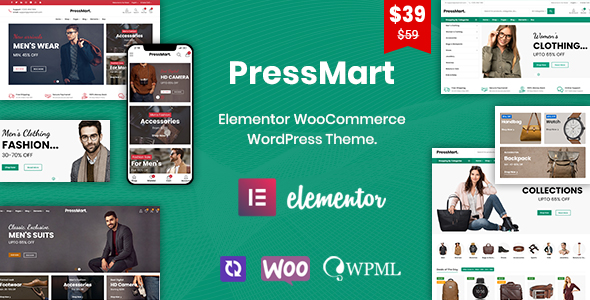
Stuck on your PressMart WordPress theme? Let's fix it.
No endless back-and-forth. Just send us the details and we'll get it done.
No obligation · Replies within 1 hour · Quote within 1 day
Setup · Customization · Bug fixes · WooCommerce integration
About PressMart WP Theme
PressMart is a multipurpose WooCommerce theme by PressLayouts, built primarily for online stores. It ships with multiple pre-built demo stores covering fashion, electronics, furniture, and grocery niches. The theme uses Elementor as its page builder, giving you visual control over layouts without touching code.
PressMart is fast by default, with clean markup and support for lazy loading. It integrates tightly with WooCommerce, covering product pages, category archives, cart, and checkout. The theme also supports AJAX filtering, wishlist functionality, and a sticky header out of the box.
PressLayouts updates the theme regularly, and the codebase is structured well enough that a PressMart developer can extend or customise it without fighting the theme’s core styles. It suits small to mid-size stores that want a polished starting point without a heavy build process.
Get matched with a PressMart developer in under one day
Tell us about your PressMart project. Small fixes, PressMart theme customization, or a full website build, whatever you need, we've got it covered.
We'll connect you to the right PressMart developers, define the scope, and get everything 100% clear.
You'll get one estimate, hire your preferred developer, and start collaborating.
PressMart gives you a solid WooCommerce foundation, but getting it to match your exact store requirements usually takes more than clicking through the Customizer. A PressMart developer on Codeable can handle the work that generic tutorials skip: custom checkout flows, performance tuning on large catalogues, third-party integrations, and template overrides that survive theme updates. Codeable vets every developer on the platform, so you’re matched with someone who actually knows WooCommerce and theme development, not a generalist guessing their way through your project.
Pros
- Multiple niche-specific demo stores ready to import, covering fashion, electronics, furniture, and grocery
- Tight WooCommerce integration with built-in AJAX product filtering and wishlist support
- Elementor-based page builder makes layout changes accessible without custom development
- Clean, lightweight markup contributes to good page speed scores on default setups
- Regular updates from PressLayouts with active theme support and documentation
Cons
- Heavy reliance on Elementor means switching page builders later is a significant rebuild
- Some advanced WooCommerce features like multi-vendor or subscriptions require additional paid plugins
- Demo import can bring in bloat that needs manual cleanup before going live
- Customizer options can feel scattered across multiple panels, making it hard to locate specific settings
- Deep customisations without a child theme risk being overwritten on theme updates
Who is PressMart for?
Fashion and Apparel Store
PressMart’s fashion demo includes lookbook-style layouts, size guides, and product variation displays suited to clothing stores. A PressMart specialist can extend this with custom colour swatch filtering, wishlist features, and a streamlined checkout that reduces cart abandonment on mobile.
Electronics and Tech Retail
The electronics demo handles product comparison, detailed specification tables, and category filtering well. For tech retailers with large catalogues, a PressMart developer can optimise database queries and implement layered navigation to keep filter-heavy pages loading fast.
Home Furniture and Decor
PressMart’s furniture layouts support high-resolution product imagery and room scene galleries. A PressMart expert can build out room category pages using Elementor templates, integrate a product configurator for custom orders, and set up delivery zone pricing for large items.
Online Grocery or Food Store
The grocery demo includes quantity-based ordering, product badges, and category-heavy navigation. For food stores, a PressMart developer can wire up delivery slot booking plugins, minimum order logic, and postcode-based delivery checks without breaking the theme’s layout.
Multi-Niche Marketplace
PressMart’s flexible demo system and Elementor integration make it a workable starting point for multi-niche stores or Dokan-powered marketplaces. A PressMart specialist can configure vendor storefronts, commission rules, and category-specific templates that keep the experience consistent across different product types.

Customizing PressMart
Most PressMart customisation happens inside the WordPress Customizer and Elementor. You can control header layouts, footer columns, typography, colours, and WooCommerce-specific elements like product card styles and checkout layouts from the Customizer panel.
For deeper work, a PressMart expert will typically use a child theme to override templates. WooCommerce template overrides in PressMart follow standard WooCommerce file structure, so changes to product pages, loops, or cart templates are straightforward to maintain across updates.
More complex tasks, like integrating a custom product configurator, adding role-based pricing, or restructuring the checkout flow, require PHP and hook-level work. That’s where hiring a PressMart specialist saves time. They know which theme hooks to target and how to avoid conflicts with PressLayouts’ custom functions.
Recommended plugins for PressMart
PressMart works well with a standard WooCommerce plugin stack. Popular additions include WooCommerce Subscriptions, YITH Wishlist, YITH Quick View, and Dokan for multi-vendor stores. The theme’s Elementor integration means most Elementor add-on plugins drop in without layout conflicts.
For store performance, caching plugins like WP Rocket pair well with PressMart’s already clean output. A proper WordPress performance setup can push Core Web Vitals scores significantly on product-heavy pages.
If you’re running organic traffic to your store, structured data and meta handling matter. A solid WordPress SEO setup alongside PressMart gives product pages a better shot at ranking in search results.
Not sure which plugins to use? This WordPress plugins directory covers the most popular options with reviews and setup guides.
PressMart common issues
PressMart AJAX filter not working after update
AJAX filter failures in PressMart usually come from a JavaScript conflict introduced by a plugin update or a theme update that changed filter hook names. Start by disabling plugins one at a time while testing the filter. If the filter works with all plugins disabled, re-enable them in batches to isolate the conflict. Check the browser console for JS errors pointing to the specific script. If you’re stuck, our WordPress bug fixing service can trace and resolve the conflict without disrupting your live store.
PressMart product page layout broken with WooCommerce update
WooCommerce regularly updates its template files, and if your PressMart installation is using outdated template overrides, a WooCommerce version bump can break product page layouts. Go to WooCommerce > Status > System Status and check for outdated templates. Update the overrides in your child theme to match the new WooCommerce templates. If you’re not sure which files need merging, our WordPress bug fixing service handles template reconciliation and prevents the issue from recurring.
PressMart slow loading on category pages with many products
Category pages slow down in PressMart when product counts climb above a few hundred items. The usual culprits are unoptimised product images, too many active widgets loading scripts on every page, and database queries that aren’t cached. Enable object caching, compress product images through a tool like ShortPixel, and review which scripts are being loaded on archive pages. Limiting products per page and enabling pagination also helps significantly on larger catalogues.
PressMart header not displaying correctly on mobile
PressMart’s header layout is controlled through the Customizer under Header settings. If the mobile header breaks, it’s usually a CSS conflict from an Elementor widget or a plugin adding inline styles. Open the browser inspector on mobile view, look for styles overriding the header container width or z-index, and trace the source. Check if the issue appeared after a specific plugin or theme update and roll back if needed to confirm the source before patching.
PressMart FAQ
Yes, PressMart is built specifically around WooCommerce. It includes built-in AJAX filtering, wishlist support, a sticky header, and niche-specific demo stores. It’s a practical choice for small to mid-size shops that want a functional store without building everything from scratch. For anything beyond the defaults, a PressMart specialist can extend it to match your exact requirements.
PressMart uses Elementor as its primary page builder. Most layout work, including homepage sections, product landing pages, and promotional banners, is done inside Elementor. The theme includes custom Elementor widgets added by PressLayouts. Most third-party Elementor add-on plugins are also compatible, though some may require minor CSS adjustments depending on your setup.
PressMart demos are best imported onto a fresh WordPress install to avoid conflicts with existing content. Use the one-click demo importer from the theme panel. Before importing on an existing site, back up your database and files first. Demo imports bring in pages, widgets, menus, and settings, which can overwrite your current configuration. A staging environment is the safest place to test a demo import before pushing it live.
Yes. PressMart’s demos are optional starting points. You can activate the theme and build your store from scratch using the Customizer and Elementor. This approach keeps your install lean and avoids cleaning up demo content you don’t need. It does require more initial setup time, but a PressMart developer can build a custom layout from the blank canvas efficiently.
The most reliable way is through Codeable, a vetted platform for WordPress developers. You post your project, describe what you need, and get matched with a PressMart developer who has relevant WooCommerce and theme experience. You receive a free estimate before any work starts. It’s faster and more reliable than searching freelancer marketplaces where experience levels vary significantly.
Hire a PressMart Expert Developer
Whether you need a one-off fix or a full store build on PressMart, working with a vetted specialist gets it done faster and without the rework. Post your project, get matched with a PressMart developer within 24 hours, and receive a free estimate before committing to anything. Get a Free Estimate and see exactly what your project will take.
You'll need a free Codeable account so developers can ask questions and send their quotes.