Mixtape WordPress Theme
by Select-Themes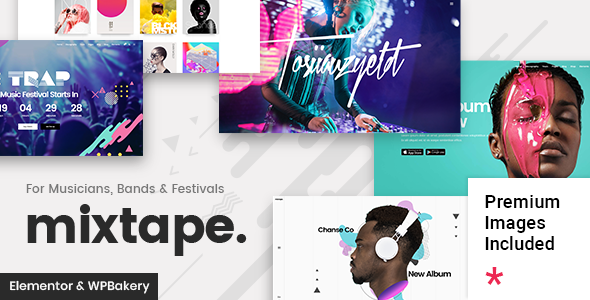
Stuck on your Mixtape WordPress theme? Let's fix it.
No endless back-and-forth. Just send us the details and we'll get it done.
No obligation · Replies within 1 hour · Quote within 1 day
Setup · Customization · Bug fixes · WooCommerce integration
About Mixtape WP Theme
Mixtape is a music-focused WordPress theme by Select-Themes, built for bands, musicians, DJs, and record labels. It ships with a clean layout designed around audio content, including track listings, discography pages, and event schedules. The theme integrates with popular audio players and supports custom post types for albums and tours out of the box.
Select-Themes is known for polished, niche-specific designs, and Mixtape reflects that. It uses a dark aesthetic with strong typography, making it well-suited for genres where visual identity matters. The theme is compatible with major page builders and works with WooCommerce if you need to sell music or merchandise directly from your site. Setup is straightforward, but getting the most out of it usually requires some configuration work beyond the defaults.
Get matched with a Mixtape developer in under one day
Tell us about your Mixtape project. Small fixes, Mixtape theme customization, or a full website build, whatever you need, we've got it covered.
We'll connect you to the right Mixtape developers, define the scope, and get everything 100% clear.
You'll get one estimate, hire your preferred developer, and start collaborating.
Most Mixtape customisation problems come down to one thing: knowing which layer to work in. Some changes belong in the customizer, others need a child theme, and some require plugin-level solutions. Getting that wrong creates technical debt that’s expensive to fix later.
Through Codeable, you get matched with vetted WordPress developers who have worked on music and entertainment sites. Post a project, get a free estimate within 24 hours, and only move forward if the scope and cost make sense for you.
Pros
- Purpose-built for music sites with album and tour post types included
- Dark, high-contrast design that works well for most music genres without heavy customisation
- WooCommerce compatibility lets you sell music and merch from the same site
- Audio player integration is built in, reducing reliance on third-party player plugins
- Select-Themes provides documentation and updates, keeping the theme maintained over time
Cons
- Limited layout flexibility outside the music niche makes it a poor fit for general-purpose sites
- The default colour scheme is dark and may need significant work to match lighter or more colourful brand identities
- Some advanced customisations require child theme work rather than customizer-only changes
- Page builder compatibility can be inconsistent depending on which builder you use
- Documentation covers basics but leaves gaps for more complex event or discography setups
Who is Mixtape for?
Independent Musicians
Solo artists can use Mixtape to build a central hub for their music, bio, and upcoming shows. The discography post type handles releases cleanly, and the built-in audio player means visitors can sample tracks without leaving the site. A Mixtape developer can tailor the layout to match an artist’s visual identity.
Record Labels
Labels managing multiple artists benefit from Mixtape’s structured content types. You can create separate pages per artist, list releases by date, and link to streaming platforms. A Mixtape specialist can extend this with custom taxonomies so filtering by genre or artist works correctly across the catalogue.
DJs and Electronic Artists
DJs need a mix archive, booking info, and a strong visual presence. Mixtape handles all three with minimal setup. The dark aesthetic fits the genre, and embedded SoundCloud or Mixcloud players drop in cleanly. A Mixtape expert can add a dedicated mixes section with custom fields for tracklists and download links.
Bands with Active Tour Schedules
Mixtape’s events system is well-suited to bands that tour regularly. Tour dates can be listed with venue details, ticket links, and status flags. A Mixtape developer can connect this to external ticketing APIs or pull data from services like Bandsintown so the tour page stays current automatically.
Music Blogs and Review Sites
Music blogs need fast load times, readable typography, and category structures that make sense to readers. Mixtape’s editorial layout handles this, though a Mixtape specialist may need to adjust the default post templates to better support long-form reviews and editorial photography.

Customizing Mixtape
Mixtape gives you a solid starting point, but most serious musicians and labels need more than the default setup. A Mixtape expert can reconfigure the homepage layout, adjust the audio player behaviour, build out a custom discography structure, and tie in third-party services like Spotify embeds or Bandcamp iframes without breaking the existing design.
Colour schemes, font pairings, and section ordering all sit within the customizer, but some changes require direct theme file edits or a child theme. A Mixtape developer can also extend the events system, add custom fields for tour dates, and connect ticketing platforms. If you want a site that matches your actual brand rather than a template, working with a specialist saves time and avoids the trial-and-error that comes with doing it yourself.
Recommended plugins for Mixtape
Mixtape works well with a focused set of plugins. For speed, a caching layer and image optimisation plugin are worth adding early, especially if you’re embedding audio files or large album artwork. Read more about getting this right on the WordPress performance page.
If you’re promoting music, tours, or merchandise through search, structured metadata and proper on-page optimisation matter. A dedicated SEO plugin combined with good configuration goes a long way. See the WordPress SEO optimisation service for details on how that works in practice.
Not sure which plugins to use? This WordPress plugins directory covers the most popular options with reviews and setup guides.
Mixtape common issues
Mixtape theme audio player not working after WordPress update
Audio player failures after a WordPress update usually point to a JavaScript conflict introduced by a plugin update or a change in how WordPress handles media. Start by deactivating plugins one at a time and checking if the player recovers. If the issue persists, it may be a conflict between the theme’s built-in player scripts and a recently updated plugin. A WordPress bug fixing specialist can isolate the conflict and apply a targeted fix without affecting other site functionality.
Mixtape events page showing wrong date order or missing tour dates
Date ordering issues in the Mixtape events system are often caused by incorrect date field formats or a caching plugin serving stale output. Check that all tour date entries use a consistent date format, then clear your cache. If dates are still out of order, the query sorting in the events template may need adjustment. A WordPress bug fixing service can audit the template and fix the query parameters directly.
Mixtape theme layout broken on mobile or tablet
Mobile layout issues in Mixtape usually trace back to a custom CSS rule overriding the theme’s responsive breakpoints, or a plugin injecting styles that conflict with the mobile layout. Open browser developer tools on the affected device or emulator and identify which CSS rule is breaking the layout. In many cases a targeted media query fix in a child theme resolves it without touching core theme files.
Mixtape WooCommerce shop page not matching theme design
When WooCommerce shop pages don’t match the Mixtape design, the cause is usually missing WooCommerce template overrides in the theme. Mixtape may not include full WooCommerce template support, so the shop falls back to default WooCommerce styles. Adding theme-specific WooCommerce templates in a child theme and applying matching CSS brings the shop in line with the rest of the site.
Mixtape FAQ
Yes. Mixtape is built specifically for bands and musicians. It includes custom post types for albums, tour dates, and track listings, which cover most of what a band site needs. The layout prioritises music content and the dark default style suits most genres. For more specific requirements, a Mixtape developer can extend the theme further.
Mixtape supports WooCommerce, so you can sell digital downloads, physical merch, or tickets from the same site. The integration works at a basic level out of the box, but the shop pages may not fully match Mixtape’s design without additional template work. A Mixtape specialist can align the WooCommerce pages with the rest of your theme.
Mixtape has some compatibility with page builders, but results vary. Elementor works for general page layouts, though theme-specific sections like the discography and events templates are managed separately. Heavy reliance on a page builder can create conflicts with Mixtape’s built-in content types. Test your specific setup before committing to a builder workflow.
Mixtape includes built-in audio player support for track playback. If you need a custom player with specific controls, playlist features, or streaming service integration, the cleanest approach is to use a dedicated audio player plugin and configure it within the theme layout. A Mixtape expert can make sure the player matches your site design and doesn’t conflict with existing scripts.
Select-Themes continues to maintain Mixtape with compatibility updates for current WordPress versions. Check the theme’s changelog on ThemeForest or the Select-Themes site for the most recent update date. For ongoing maintenance and security monitoring, a WordPress maintenance plan covers updates across your full site, not just the theme.
Hire a Mixtape Developer for Your Music Site
Whether you need a Mixtape expert to build out your discography, fix a layout issue, or extend the theme with custom functionality, you can get a free estimate with no obligation. Projects are posted through Codeable, where developers are vetted before they can take on client work. Describe what you need, receive an estimate, and decide from there. Get a free estimate and have a developer reviewing your project within 24 hours.
You'll need a free Codeable account so developers can ask questions and send their quotes.