Gameleon WordPress Theme
by QuanticThemes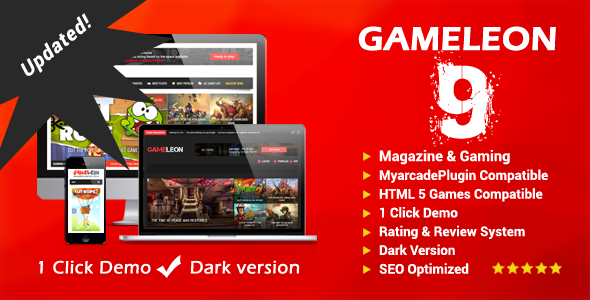
Stuck on your Gameleon WordPress theme? Let's fix it.
No endless back-and-forth. Just send us the details and we'll get it done.
No obligation · Replies within 1 hour · Quote within 1 day
Setup · Customization · Bug fixes · WooCommerce integration
About Gameleon WP Theme
Gameleon is a WordPress theme built by QuanticThemes specifically for gaming websites, game review platforms, and esports communities. It ships with a points-based review system, game database layouts, video embed support, and front-end submission forms that let users add their own game entries.
The theme targets a narrow use case and does it well. You get category pages styled like game libraries, rating widgets, comparison tables, and a design language that fits the gaming niche without requiring heavy customization out of the box.
It runs on a custom options panel rather than the Customizer, which gives experienced developers direct control but adds a learning curve for newcomers. Gameleon also integrates with WooCommerce if you want to sell game-related products or memberships alongside your review content.
Get matched with a Gameleon developer in under one day
Tell us about your Gameleon project. Small fixes, Gameleon theme customization, or a full website build, whatever you need, we've got it covered.
We'll connect you to the right Gameleon developers, define the scope, and get everything 100% clear.
You'll get one estimate, hire your preferred developer, and start collaborating.
Gameleon has enough moving parts that a developer who knows the theme saves you real time. Through Codeable, you get matched with vetted WordPress developers who have hands-on experience with QuanticThemes builds. Post your project, get a free estimate within 24 hours, and only proceed if the scope and cost make sense. No obligation, no risk.
Pros
- Built-in points-based review system with customizable criteria saves significant plugin setup time
- Front-end game submission forms let communities contribute content without admin access
- Game database layout with filtering by genre, platform, and rating works out of the box
- WooCommerce compatibility allows digital product or membership sales alongside review content
- Video embed support and media-rich layouts are styled specifically for gaming content
Cons
- Uses a custom options panel instead of the WordPress Customizer, which slows down straightforward edits
- WPBakery Page Builder dependency adds page weight and complicates future builder migrations
- Documentation is limited for advanced customizations like custom scoring logic or API integrations
- Theme updates have historically been infrequent, creating compatibility concerns with newer WordPress versions
- Design feels dated compared to modern gaming platforms without significant custom styling work
Who is Gameleon for?
Video Game Review Websites
Gameleon’s core review engine is built for this. You can define review categories like graphics, gameplay, and story, assign weighted scores, and display aggregated ratings automatically. A Gameleon developer can extend the criteria fields and add schema markup so your review scores appear in Google search results.
Esports News and Coverage Portals
The theme’s post formats and video embed layouts handle news publishing well. Tournament coverage, match recaps, and player profiles all fit within Gameleon’s content structure. A Gameleon specialist can configure category hierarchies and custom archive templates to keep esports content organized and browsable.
Game Database and Discovery Platforms
With front-end submission forms and a filterable game library layout, Gameleon works as a game discovery platform where users browse by genre, platform, or rating. A Gameleon expert can connect custom taxonomies, add advanced filtering, and scale the database structure to handle thousands of entries cleanly.
Gaming Affiliate and Deals Sites
Gameleon’s WooCommerce integration and review-style layouts suit affiliate sites that compare game deals, bundle offers, or hardware. A Gameleon developer can wire up affiliate link tracking, build comparison tables, and configure call-to-action placements that convert without breaking the editorial feel of the site.
Community-Driven Game Rating Sites
The front-end submission system makes Gameleon a natural fit for community rating platforms where registered users score and review games themselves. A Gameleon specialist can set up user role permissions, moderate submission workflows, and display community score aggregates alongside editorial ratings.

Customizing Gameleon
Getting Gameleon to match a specific brand identity takes more work than themes built on the Customizer. Color schemes, typography, and layout adjustments all happen through the theme’s own options panel, so changes are less predictable until you know the system well.
A Gameleon expert can set up custom review criteria, configure the front-end submission workflow, and build out game category archives that perform well on mobile. If you need custom post type extensions, unique scoring logic, or a homepage that pulls featured games from specific categories, that kind of work benefits from a developer who has handled Gameleon builds before.
Child theme development is strongly recommended before making any code-level changes. A Gameleon specialist will handle that as a starting point and keep your modifications upgrade-safe.
Recommended plugins for Gameleon
Gameleon supports WooCommerce for digital product sales, WPBakery Page Builder for layout control, and standard WordPress plugin integrations for ads, memberships, and community features.
For gaming sites that depend on search traffic, pairing Gameleon with a properly configured SEO setup matters. See our WordPress SEO optimisation service for structured data, schema markup for reviews, and technical SEO work specific to content-heavy gaming sites.
Page speed is also a real concern with media-rich game review pages. Our WordPress performance service covers image optimisation, caching, and database cleanup to keep load times manageable.
Not sure which plugins to use? This WordPress plugins directory covers the most popular options with reviews and setup guides.
Gameleon common issues
Gameleon review scores not displaying correctly on archive pages
Score display issues on archive pages usually come from a conflict between Gameleon’s custom post meta and a caching plugin or a theme options setting that controls which post types show review data. Clear your cache first, then check the theme options panel under review display settings. If scores still don’t appear, the meta fields may need a database query fix. Our WordPress bug fixing service handles exactly this kind of meta output problem.
Gameleon theme not compatible with latest WordPress update
QuanticThemes has not updated Gameleon at the same pace as WordPress core releases. After major WordPress updates, you may see deprecated function warnings, broken admin screens, or missing theme options. The safest fix is a compatibility audit followed by targeted PHP updates in a child theme. Our WordPress bug fixing service can diagnose which functions are throwing errors and patch them without breaking your existing content.
Gameleon front-end submission form not sending email notifications
Missing email notifications from Gameleon’s submission forms usually point to a server-level mail delivery issue rather than a theme bug. WordPress relies on PHP mail by default, which many hosts block. Installing an SMTP plugin like WP Mail SMTP and connecting it to a transactional email service fixes delivery reliably. Also check that the notification email address in the theme options matches an address your server accepts as a sender.
Gameleon game filter not working after plugin update
Gameleon’s game filter relies on JavaScript and specific taxonomy query parameters. Plugin updates that modify how WordPress handles query strings, or JavaScript conflicts from a newly installed plugin, can silently break filter functionality. Open your browser console and check for JS errors first. If a script conflict is present, loading order adjustments in your child theme’s functions.php usually resolve it. A plugin update that touched permalink structures may also require a simple permalink flush under Settings.
Gameleon FAQ
QuanticThemes has released updates for Gameleon, but the update frequency is lower than many comparable themes. Before building a new site on Gameleon, check the ThemeForest changelog for recent activity. If you already have an existing Gameleon site and compatibility with a recent WordPress version is a concern, a developer can patch the specific functions causing issues without requiring a full theme switch.
Technically yes, but it is not a good fit outside the gaming niche. The layout system, custom post types, and review engine are all designed around games as content. Using it for a blog, business site, or portfolio would mean working against the theme rather than with it. A general-purpose WordPress theme would be a better starting point for non-gaming projects.
Gameleon was built around WPBakery Page Builder and its own options panel. Gutenberg works for basic post editing, but the theme’s custom templates and shortcodes are WPBakery-dependent. Elementor can be installed alongside Gameleon, but the integration is not native and may require extra work to make page templates behave consistently across the site.
Custom review criteria are managed through the Gameleon theme options panel under the review settings section. You can add criteria names and assign weights from there. For more complex setups, like conditional criteria per game genre or weighted category scores, a Gameleon developer would need to extend the review fields using custom meta boxes and modify the score calculation logic in a child theme.
Out of the box, Gameleon has basic SEO structure but lacks review schema markup, which is important for getting star ratings in Google search results. It also uses WPBakery shortcodes that can bloat page source and slow down rendering. Pairing Gameleon with a solid SEO plugin, clean schema configuration, and performance optimisation gives you a much stronger foundation for organic traffic.
Hire a Gameleon Developer for Your Gaming Site
Whether you need a full Gameleon setup, custom review functionality, or fixes to an existing build, working with a specialist gets the job done faster and cleaner. Describe your project and get a free estimate from a vetted developer who knows the theme. Get a Free Estimate and see what your build will actually cost before committing to anything.
You'll need a free Codeable account so developers can ask questions and send their quotes.