Onum WordPress Theme
by OceanThemes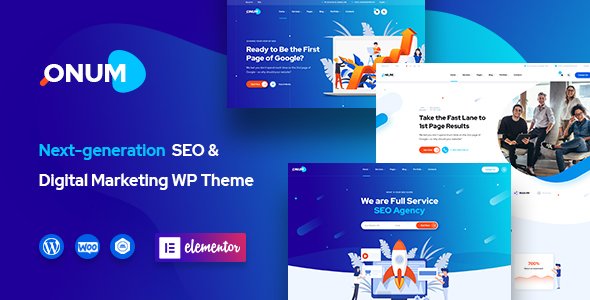
Stuck on your Onum WordPress theme? Let's fix it.
No endless back-and-forth. Just send us the details and we'll get it done.
No obligation · Replies within 1 hour · Quote within 1 day
Setup · Customization · Bug fixes · WooCommerce integration
About Onum WP Theme
Onum is a WordPress theme built by OceanThemes, designed specifically for SEO agencies, digital marketing firms, and online business consultants. It ships with pre-built demo pages, a clean visual hierarchy, and tight integration with Elementor, making it a practical choice for service-based businesses that need a professional site without starting from scratch.
The theme leans heavily on conversion-focused layouts: landing pages, pricing tables, testimonial sections, and call-to-action blocks are all baked in. Performance is reasonable out of the box, and the codebase is structured well enough to support custom development. It works with major plugins including WooCommerce, Contact Form 7, and popular SEO tools. For agencies and consultants, Onum offers a solid foundation that an experienced developer can extend into something genuinely custom.
Get matched with a Onum developer in under one day
Tell us about your Onum project. Small fixes, Onum theme customization, or a full website build, whatever you need, we've got it covered.
We'll connect you to the right Onum developers, define the scope, and get everything 100% clear.
You'll get one estimate, hire your preferred developer, and start collaborating.
Most Onum issues come down to one thing: the theme doing something you didn’t expect and not knowing where to fix it. That’s where a vetted Onum developer makes the difference. Through Codeable, you get access to experienced WordPress specialists who know Onum’s structure, Elementor’s quirks, and how to deliver clean, maintainable code. No generalist freelancers, no wasted back-and-forth. Just a developer who has seen the problem before and knows how to solve it.
Pros
- Purpose-built for SEO and digital marketing agencies with relevant pre-built sections
- Full Elementor compatibility makes visual editing straightforward for non-developers
- Includes multiple demo imports covering different agency and consultant niches
- Clean typography and spacing defaults that hold up without heavy customization
- WooCommerce-ready for agencies selling services or digital products directly
Cons
- Demo content import can be slow and sometimes requires manual cleanup afterward
- Some design elements feel dated compared to newer agency-focused themes
- Deep layout changes outside Elementor require child theme work and PHP knowledge
- Documentation from OceanThemes is limited for edge cases and advanced configurations
- Heavy reliance on Elementor means performance tuning is harder without developer involvement
Who is Onum for?
SEO Agencies
Onum was built with SEO agencies in mind. The pre-built service pages, case study layouts, and results-focused sections give agencies a head start. An Onum specialist can customise these templates to match your branding and connect them to lead capture tools without rebuilding from scratch.
Digital Marketing Consultants
Consultants who sell strategy and execution services need a site that builds credibility fast. Onum’s testimonial blocks, pricing tables, and about-page templates cover that well. An Onum developer can wire up booking plugins, custom forms, and CRM integrations to turn the site into an actual lead generation tool.
PPC and Paid Ads Specialists
Paid ads agencies need clear service pages and fast landing pages that convert. Onum’s conversion-focused layouts are a strong starting point. A developer can strip out unnecessary elements, tighten load times, and create dedicated landing pages that aren’t connected to the main navigation.
Content Marketing Firms
Content marketing firms benefit from Onum’s blog and case study section layouts. The theme handles long-form content pages well and pairs cleanly with SEO plugins. An Onum expert can add custom content types, author pages, and structured data to support a content-heavy site strategy.
Small Business Growth Coaches
Business coaches need a site that positions them clearly and drives discovery calls. Onum includes the layout components for that: headline sections, service breakdowns, social proof blocks, and contact CTAs. A developer can customise these and add calendar or scheduling integrations with minimal friction.

Customizing Onum
Onum gives you a decent amount of control through the WordPress Customizer and Elementor’s drag-and-drop editor. You can adjust typography, colors, header layouts, and section spacing without touching code. The theme also includes custom widgets and shortcodes that cover most standard agency page needs.
That said, deeper customization, such as modifying the demo structure, adding custom post types, or building out non-standard layouts, requires real development knowledge. An Onum expert can save you hours of trial and error. Whether you need a custom header, a tailored pricing page, or a child theme built to protect your changes across updates, working with an Onum specialist means the work gets done correctly the first time and stays that way.
Recommended plugins for Onum
Onum pairs well with several key plugins that extend what the theme does on its own. For performance, combining Onum with a caching plugin, image optimization tool, and a CDN makes a measurable difference in load times. A developer can configure these correctly so nothing conflicts with the theme’s scripts or Elementor’s output. See our WordPress performance optimization service for details.
On the SEO side, Onum’s structured layouts work well with Yoast or Rank Math, but schema markup, breadcrumb configuration, and technical SEO still need proper setup. Our WordPress SEO service covers all of that.
Not sure which plugins to use? This WordPress plugins directory covers the most popular options with reviews and setup guides.
Onum common issues
Onum theme not displaying correctly after update
Theme display issues after an update usually come from CSS conflicts, a cached stylesheet, or a plugin that hasn’t been updated to match. Clear your cache first, then check whether a recent plugin update coincides with the problem. If you’re editing Onum directly without a child theme, updates will overwrite your changes. A proper fix involves rebuilding those customizations in a child theme. If the issue persists, our WordPress bug fixing service can diagnose and resolve it without guesswork.
Onum demo import failing or incomplete in WordPress
Failed demo imports in Onum are usually caused by server timeout limits, low PHP memory, or a conflict with an active security or caching plugin. Try importing on a staging environment first with caching disabled. Increase your PHP memory limit to at least 256MB and set the max execution time to 300 seconds. If the import still stalls or leaves placeholders, our WordPress bug fixing service can complete the import and clean up any leftover content safely.
Onum header layout broken or not showing on mobile
Header layout problems on mobile with Onum are often caused by custom CSS that wasn’t written with responsive breakpoints in mind, or a conflict with Elementor’s mobile editor settings. Open the header in Elementor and check the mobile view specifically. Look for hidden elements or fixed pixel widths causing overflow. If the header was customized outside of Elementor, the fix will need to happen in a child theme stylesheet with correct media queries applied.
Onum page builder elements not loading or showing blank sections
Blank sections in Elementor on an Onum site usually point to a JavaScript error, a missing widget from a deactivated plugin, or a version mismatch between Elementor and Elementor Pro. Open your browser console and look for JS errors on the page. Re-saving the page in Elementor often resolves rendering glitches after updates. If specific widgets are missing, check whether the plugin that provided them is still active and compatible with your current Elementor version.
Onum FAQ
Yes. Onum was specifically designed for SEO and digital marketing agencies. It includes pre-built pages for services, case studies, pricing, and lead generation that match what agency sites typically need. The layouts are conversion-focused and the theme integrates well with SEO plugins. An Onum specialist can customize it further to match your exact positioning and service offering.
Yes, Onum is fully compatible with Elementor. Most of the theme’s demo content is built using Elementor templates, so editing pages visually is straightforward. Elementor Pro adds additional widget options that work well with the theme. For more complex layout changes, an Onum developer can extend those templates without breaking the underlying structure.
Technically yes, but Onum’s design language is strongly oriented toward agencies and consultants. If your site is for a very different niche, you may spend more time overriding defaults than building forward. The theme can work for broader use cases, but a different theme may be a better fit. An Onum developer can assess whether it’s the right tool for your project before you commit.
Go to Appearance, then Import Demo Data in your WordPress dashboard after installing the Onum theme and its required plugins. Select the demo you want and run the import. Make sure your hosting environment allows sufficient PHP memory and execution time, as imports can time out on restricted servers. If the import fails or leaves missing images and placeholders, a developer can complete it manually.
Basic customization through Elementor and the WordPress Customizer is manageable without a developer. However, if you need custom layouts, plugin integrations, performance optimization, or anything that requires code changes, an Onum specialist will get better results faster. It also avoids the risk of breaking things that are harder to diagnose later.
Hire an Onum Expert Developer
If your Onum site needs custom development, a layout fix, performance work, or a full build from one of the demo templates, an experienced Onum developer can handle it. Projects are posted on Codeable, matched within 24 hours, and come with a free estimate before any commitment. Get a free estimate and describe what you need. There’s no obligation to hire.
You'll need a free Codeable account so developers can ask questions and send their quotes.