Unero WordPress Theme
by drfuri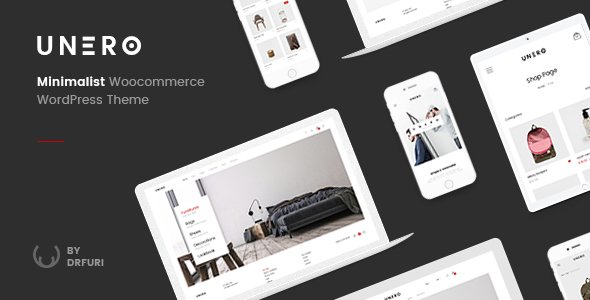
Stuck on your Unero WordPress theme? Let's fix it.
No endless back-and-forth. Just send us the details and we'll get it done.
No obligation · Replies within 1 hour · Quote within 1 day
Setup · Customization · Bug fixes · WooCommerce integration
About Unero WP Theme
Unero is a WooCommerce theme by drfuri built specifically for fashion, electronics, and lifestyle stores. It ships with multiple homepage layouts, Ajax cart and search, product quick view, and a clean minimal aesthetic that keeps focus on the products.
The theme uses Elementor for page building and includes a dedicated mega menu builder, wishlist support, and built-in product filtering. It handles multi-vendor setups and works with most major WooCommerce extensions without heavy configuration.
Performance is reasonable out of the box, but stores with large catalogues or heavy traffic will need proper caching, image optimisation, and query tuning. Unero gives you a solid starting point, but getting the most out of it usually requires a developer who knows the theme well.
Get matched with a Unero developer in under one day
Tell us about your Unero project. Small fixes, Unero theme customization, or a full website build, whatever you need, we've got it covered.
We'll connect you to the right Unero developers, define the scope, and get everything 100% clear.
You'll get one estimate, hire your preferred developer, and start collaborating.
Finding a developer who actually knows Unero saves time. Through Codeable, you get matched with vetted WordPress specialists who have hands-on WooCommerce and theme experience. Post your project, get a free estimate, and review it before committing to anything. No cold pitches, no generalist agencies. Just developers who know what they’re doing with themes like Unero.
Pros
- Ships with 10+ pre-built homepage layouts covering fashion, electronics, and furniture niches
- Built-in Ajax search, Ajax cart, and product quick view reduce page reloads on the front end
- Dedicated mega menu builder included without needing a third-party plugin
- Elementor-based page building means layouts are editable without touching code
- Actively maintained by drfuri with regular WooCommerce compatibility updates
Cons
- No child theme included by default, making safe customization harder for non-developers
- Heavy use of custom Elementor widgets creates lock-in if you switch themes later
- Default image sizes and slider scripts add noticeable load weight on mobile
- Some layout options only apply globally, not per product category or page
- Documentation covers basics but lacks detail on advanced WooCommerce configuration
Who is Unero for?
Fashion and Clothing Stores
Unero’s minimal grid layouts and large hero banners suit apparel stores well. Product filtering by size, colour, and category works cleanly out of the box. An Unero specialist can extend this with custom size guide modals, lookbook pages, or outfit bundling logic tied to WooCommerce product relationships.
Electronics and Gadget Shops
The theme handles technical product listings with spec tables, comparison features, and tabbed product descriptions. Electronics stores benefit from Unero’s Ajax filtering and quick view. A developer can wire up custom attribute displays or integrate third-party comparison plugins to match the buying behaviour of tech shoppers.
Furniture and Home Decor
Unero’s full-width layouts and large imagery options work well for furniture and home goods. Room scene banners, category landing pages, and product video support are all achievable. An Unero developer can build custom room-by-room category structures and tailor the checkout to handle large-item delivery options.
Multi-Vendor Marketplaces
Unero supports Dokan and WCFM for multi-vendor setups. The theme’s header and product card styles adapt reasonably to marketplace layouts. An Unero specialist can handle vendor-specific product pages, commission display, and front-end vendor dashboards styled to match the rest of the store design.
Beauty and Cosmetics Brands
Clean typography, pastel colour options, and product-focused layouts make Unero a natural fit for beauty brands. Shade selectors, ingredient tabs, and before/after imagery can all be built into product pages. An Unero developer can also handle subscription product setups for replenishment-based cosmetics businesses.

Customizing Unero
Unero’s customization happens across three areas: the WordPress Customizer for global styles, Elementor for page layouts, and the theme’s own options panel for WooCommerce-specific settings like header cart behaviour, product page layout, and category page filters.
Pushing beyond the built-in controls, such as custom product page templates, conditional header layouts, or non-standard checkout flows, requires direct work in PHP and CSS. An Unero expert can handle those changes without breaking theme updates or introducing conflicts with your active plugins.
Drfuri releases updates regularly. If you have customizations applied directly to theme files, those changes will be lost on the next update. A proper child theme setup is the first thing any Unero specialist should address before making changes.
Recommended plugins for Unero
Unero works well with YITH WooCommerce plugins, WooCommerce Subscriptions, and most Elementor add-on packs. For stores running paid ads or organic search, pairing Unero with a solid SEO setup matters. See our WordPress SEO optimisation service for structured data, page speed scoring, and search visibility work.
Site speed directly affects conversion on product pages. Our WordPress performance service covers caching configuration, image delivery, and database optimisation specifically for WooCommerce stores running themes like Unero.
Not sure which plugins to use? This WordPress plugins directory covers the most popular options with reviews and setup guides.
Unero common issues
Unero header not sticking or disappearing on scroll
Sticky header issues in Unero usually come from a JavaScript conflict with another plugin or a Customizer setting that got reset during an update. Check the Header section in the Customizer first and confirm the sticky option is enabled. If it is, open the browser console and look for JS errors. Plugin conflicts with cache plugins or page optimisers are a common cause. Our WordPress bug fixing service can isolate and resolve the conflict without affecting your layout.
Unero product page layout broken after WooCommerce update
WooCommerce updates occasionally change template file structure, and Unero’s product page templates can fall out of sync. Check the WooCommerce system status for outdated templates. If Unero’s templates are flagged, they need to be manually updated to match the new WooCommerce versions. If you’re running a child theme with overridden templates, those files need individual review. Our WordPress bug fixing service handles template reconciliation without losing your custom changes.
Unero mega menu not showing on mobile
Unero’s mega menu relies on JavaScript that can be blocked or overridden on mobile by certain optimisation plugins, particularly those that defer scripts. It can also conflict with mobile-specific CSS from Elementor. Test with plugins disabled one at a time to isolate the cause. If the issue appeared after a caching or minification plugin was added, the fix usually involves excluding the menu scripts from deferral or concatenation in that plugin’s settings.
Unero homepage slider slow to load and hurting page speed score
Unero’s homepage sliders load full-size images by default and often render above the fold, which impacts Largest Contentful Paint scores directly. The fix involves serving correctly sized images, enabling lazy loading for below-fold slides, and preloading only the first slide image. Switching from the bundled slider to a lighter alternative is sometimes the better long-term option for stores prioritising page speed over animation features.
Unero FAQ
Yes, Unero is built specifically for WooCommerce. It includes product filtering, Ajax cart, quick view, wishlist support, and multiple shop layout options. It suits stores in fashion, electronics, and home goods particularly well. For high-traffic stores or heavily customised builds, bringing in an Unero specialist will get more out of the theme than the default configuration allows.
Yes. Unero uses Elementor as its primary page builder and includes custom Elementor widgets for product carousels, banners, and category grids. Most homepage and landing page work is done inside Elementor. Keep in mind that heavy use of custom widgets creates dependency on both Elementor and Unero staying compatible, which requires attention during major updates.
Unero does not ship with a child theme. You need to create one manually or use a plugin like Child Theme Configurator. A child theme requires a separate folder with a style.css referencing Unero as the parent and a functions.php to enqueue parent styles. Any customizations to templates or CSS should live in the child theme to survive Unero updates.
Unero is compatible with Dokan and WCFM, the two most common multi-vendor plugins for WooCommerce. The theme’s design adapts reasonably well to marketplace layouts. Some vendor dashboard and product submission pages may need styling work to match Unero’s front end. An Unero developer familiar with multi-vendor setups can handle that integration cleanly.
Unero developer rates through Codeable typically range from $70 to $120 per hour depending on the scope and complexity of the work. Fixed-price projects are also available for defined scopes. Post your project to get a specific estimate based on what you actually need. There is no fee for the estimate and no obligation to proceed.
Hire an Unero Developer for Your WooCommerce Store
Whether you need a custom product page layout, a performance fix, or a full store build on Unero, working with the right developer makes the difference. Our Unero specialists work through Codeable, so every developer is vetted before they touch your project. Get a free estimate with no obligation to hire. Describe your project and get matched within 24 hours.
You'll need a free Codeable account so developers can ask questions and send their quotes.