Clinico WordPress Theme
by CreativeWS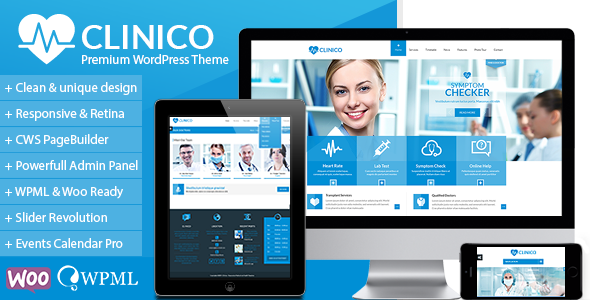
Stuck on your Clinico WordPress theme? Let's fix it.
No endless back-and-forth. Just send us the details and we'll get it done.
No obligation · Replies within 1 hour · Quote within 1 day
Setup · Customization · Bug fixes · WooCommerce integration
About Clinico WP Theme
Clinico is a medical WordPress theme by CreativeWS, built for healthcare websites. It targets clinics, private practices, hospitals, and medical professionals who need a clean, appointment-ready website without building from scratch.
The theme ships with multiple demo layouts, a built-in appointment booking section, department and doctor profile pages, and compatibility with popular plugins like WPBakery and Contact Form 7. It follows standard WordPress conventions, so most developers can work with it without a steep learning curve.
Clinico handles the visual side of a medical site reasonably well. The layouts are structured for trust and clarity, which matters when patients are choosing a provider. That said, real-world deployments often need customisation beyond what the theme panel offers.
Get matched with a Clinico developer in under one day
Tell us about your Clinico project. Small fixes, Clinico theme customization, or a full website build, whatever you need, we've got it covered.
We'll connect you to the right Clinico developers, define the scope, and get everything 100% clear.
You'll get one estimate, hire your preferred developer, and start collaborating.
Clinico is straightforward for simple setups, but healthcare sites carry specific requirements: appointment flows, patient trust signals, accessibility standards, and often GDPR-sensitive forms. A developer who has worked with Clinico on Codeable has already solved those problems for other clients.
Codeable only works with vetted WordPress developers, so you are not sorting through freelancer profiles hoping for the best. Post your project, get a scoped estimate, and decide from there with no obligation.
Pros
- Clean medical layouts designed for patient-facing credibility out of the box
- Includes dedicated doctor profile and department page templates
- Compatible with WPBakery for non-code layout editing
- Built-in appointment section structure saves setup time on simple sites
- Multiple demo imports available to match different clinic types
Cons
- WPBakery dependency makes migrating to block editor more complicated
- Theme options panel is not the most intuitive for non-technical clients
- Built-in booking section is basic and needs a proper plugin for real appointment management
- Demo content import can be unreliable and may require manual cleanup
- Limited documentation makes troubleshooting harder without developer support
Who is Clinico for?
Private Medical Clinics
Clinico suits private clinics that need department listings, doctor bios, and an appointment call-to-action on the homepage. A Clinico developer can connect a booking plugin, set up service pages for each specialty, and make the site feel specific to the practice rather than template-generic.
Dental Practices
Dental practices benefit from Clinico’s structured service page format. A Clinico specialist can build individual treatment pages, add before-and-after image sections, and integrate a booking system that handles appointment types like consultations versus procedures.
Specialist Consultant Websites
Solo consultants and specialists need a site that establishes credibility quickly. Clinico’s doctor profile template works well here. A Clinico expert can adapt it to highlight qualifications, publications, and referral pathways, making it useful for both patients and referring GPs.
Physiotherapy and Allied Health
Physio and allied health practices often need service-specific landing pages alongside team profiles. Clinico’s layout structure handles this well when customised properly. A developer can build condition-based pages, add telehealth booking options, and configure the contact forms for referral intake.
Multi-Location Medical Groups
Groups operating across multiple sites need consistent branding with location-specific content. A Clinico developer can set up location pages, integrate Google Maps for each branch, and structure the navigation so patients find the right clinic and the right doctors without confusion.

Customizing Clinico
Out of the box, Clinico gives you colour controls, font options, and a theme options panel built on standard WordPress customizer patterns. That covers basic branding, but most clinics need more than that.
A Clinico expert can restructure department pages, build out custom doctor profile templates, integrate booking plugins like Amelia or Simply Schedule Appointments, and handle anything the default panel does not expose. If you want custom post type adjustments, child theme builds, or layout changes that go beyond drag-and-drop, you need someone who knows the theme’s structure.
Working with a Clinico specialist also reduces the risk of update conflicts breaking your customisations, since a proper child theme setup keeps your changes separate from the core files.
Recommended plugins for Clinico
Clinico pairs well with several plugin categories. Booking plugins like Amelia add proper appointment management. For contact and intake forms, Gravity Forms or WPForms handle complex field logic better than Contact Form 7 alone.
Performance matters on medical sites where patients expect fast load times. A Clinico developer can configure caching, image optimisation, and CDN setup to keep scores healthy. See our WordPress performance service for details.
Medical practices also need local SEO. Schema markup for doctors and clinics, Google Business integration, and structured data all help. Our WordPress SEO service covers that side of things.
Not sure which plugins to use? This WordPress plugins directory covers the most popular options with reviews and setup guides.
Clinico common issues
Clinico theme not loading demo content correctly after import
Demo import failures in Clinico are common and usually come down to server memory limits, missing required plugins, or a timeout during the import process. Check that WPBakery and any bundled plugins are activated before importing. Increase max_execution_time and memory_limit in your PHP configuration if the import stalls. If content imports but images do not appear, run the media import separately. Persistent issues are worth handing to a WordPress bug fixing specialist rather than repeating failed imports.
Clinico appointment form not sending emails
When Clinico’s appointment or contact form stops sending email, the problem is almost always server-side mail delivery rather than the theme itself. WordPress uses PHP mail by default, which most hosts block or send to spam. Install an SMTP plugin like WP Mail SMTP and connect it to a transactional email service such as SendGrid or Mailgun. Test the connection from within the plugin. If forms still fail after correct SMTP setup, check the form plugin configuration or consult a WordPress bug fixing service to trace the exact failure point.
Clinico theme slow page load speed
Clinico sites can run slow due to unoptimised images, WPBakery loading scripts on every page, and lack of caching. Start by running a performance audit in GTmetrix or PageSpeed Insights to identify the largest issues. Install a caching plugin, compress images using a tool like ShortPixel, and configure WPBakery to load scripts only on pages that use it. A CDN makes a significant difference for sites with patient visitors spread across different regions.
Clinico layout broken after WordPress or plugin update
Layout breaks after updates usually mean a conflict between Clinico’s bundled WPBakery version and the standalone plugin, or a CSS override being dropped. Check the browser console for JavaScript errors first. If the issue appeared immediately after an update, rolling back the plugin or theme version via your host’s backup confirms the source. Rebuild affected sections using the current version of WPBakery rather than trying to fix outdated shortcode output. A child theme prevents most of these issues on future updates.
Clinico FAQ
Clinico is a reasonable starting point for medical sites. It handles the structural requirements well: doctor profiles, department pages, and appointment-focused layouts. For a basic clinic site it works without much adjustment. For anything more specific, a Clinico specialist will need to customise it. It is not the most feature-rich medical theme available, but it is clean and functional.
Clinico is built around WPBakery, not Elementor. You can technically install Elementor alongside it, but there will be conflicts and the theme’s built-in templates will not work in Elementor’s editor. If you want to use Elementor, you are better off choosing a theme built with Elementor compatibility in mind, or having a developer rebuild the Clinico layout using Elementor widgets.
Clinico does not include a functional booking system. You need a separate plugin. Amelia is a popular choice for medical sites because it handles appointment types, staff scheduling, and email reminders properly. Simply Schedule Appointments is a lighter alternative. A Clinico developer can integrate either into your existing page layouts so booking fits the design rather than looking bolted on.
Not easily. WPBakery shortcodes are embedded in Clinico’s demo pages and many of its template structures. Removing WPBakery means rebuilding those pages. If you want a block editor workflow, a developer can migrate the content to Gutenberg blocks using a child theme approach, but it requires deliberate work rather than just deactivating WPBakery.
Cost depends on the scope. A bug fix or small customisation might take a few hours. A full Clinico build with booking integration, custom templates, and SEO setup is a larger project. Rates on Codeable reflect the work involved rather than a fixed package price. The best way to get an accurate number is to post your project and receive a scoped estimate before committing to anything.
Hire a Clinico WordPress Developer
If you need a Clinico developer to build, customise, or fix your medical site, the fastest route is a free project estimate. Whether it is a full build from a Clinico demo, a booking integration, a performance issue, or structural changes to existing pages, a specialist can scope it accurately before any work starts.
Get a Free Estimate and describe what your site needs. You will hear back within 24 hours.
You'll need a free Codeable account so developers can ask questions and send their quotes.