Okab WordPress Theme
by PixelDima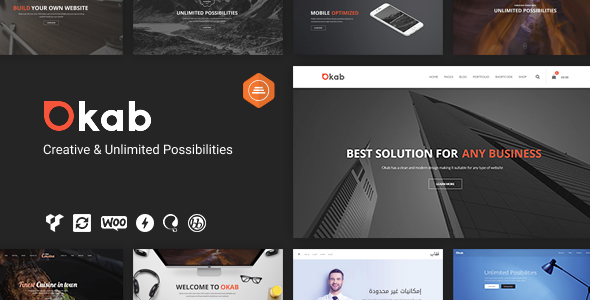
Stuck on your Okab WordPress theme? Let's fix it.
No endless back-and-forth. Just send us the details and we'll get it done.
No obligation · Replies within 1 hour · Quote within 1 day
Setup · Customization · Bug fixes · WooCommerce integration
About Okab WP Theme
Okab is a multi-purpose WordPress theme by PixelDima, built around a drag-and-drop page builder and a wide library of pre-built demo sites. It targets agencies, freelancers, and businesses that want a polished site without starting from scratch.
The theme ships with WPBakery Page Builder, multiple header layouts, mega menu support, and WooCommerce compatibility out of the box. It also includes Revolution Slider and a set of custom shortcodes that cover most common layout needs.
Okab has been on the market long enough to have a track record. It works well for content-heavy sites and product showcases, but like any theme with this many moving parts, it requires some configuration to get right. That’s where a skilled Okab developer makes a real difference.
Get matched with a Okab developer in under one day
Tell us about your Okab project. Small fixes, Okab theme customization, or a full website build, whatever you need, we've got it covered.
We'll connect you to the right Okab developers, define the scope, and get everything 100% clear.
You'll get one estimate, hire your preferred developer, and start collaborating.
Okab has enough flexibility to build almost any layout, but that flexibility has a cost: setup takes real skill to get right. A generalist developer who hasn’t worked with PixelDima themes before will spend time figuring out what an Okab specialist already knows.
Through Codeable, you get matched with vetted WordPress developers who have hands-on experience with themes like Okab. No agencies, no juniors, no guesswork. Just developers who can look at your project and give you a straight answer about what it takes.
Pros
- Ships with WPBakery and Revolution Slider included, no extra purchase needed
- Wide selection of pre-built demo sites covering different industries
- WooCommerce ready out of the box with shop page templates included
- Mega menu support with icon and image integration built in
- Multiple header layouts and sticky navigation options without extra plugins
Cons
- WPBakery shortcode lock-in makes switching themes later painful
- Default load includes scripts from all bundled plugins regardless of use
- Options panel is large and not always logically organised
- Demo import can be unreliable and sometimes requires manual cleanup
- PixelDima support response times can be slow for complex issues
Who is Okab for?
Digital Agencies
Okab’s agency-focused demo sites and flexible header layouts make it a practical choice for digital agencies. You can showcase services, team members, and case studies cleanly. An Okab expert can tailor the layout to reflect your brand rather than looking like an off-the-shelf template.
Online Stores
With native WooCommerce support and dedicated product page layouts, Okab handles small to medium-sized online stores well. The mega menu is useful for shops with multiple product categories. An Okab developer can extend the default shop templates with custom filtering or promotional sections.
Corporate Business Sites
Okab’s clean corporate demos and full-width layout options work for B2B companies that need a professional presence without heavy customisation. Features like custom sidebars and per-page header control give you enough flexibility to handle service pages, team bios, and contact forms.
Freelance Portfolios
Freelancers can use Okab’s portfolio post type and masonry grid layouts to display work clearly. The built-in shortcodes for skills bars, counters, and testimonials cover most portfolio page needs. A specialist can add custom filtering or case study templates if you need something beyond the defaults.
News and Magazine Sites
Okab includes blog and magazine-style layouts with support for multiple post formats. If you’re running a content-heavy site, the theme handles categories, featured images, and post grids reasonably well. An Okab developer can set up custom category templates and ad placement areas specific to your editorial structure.

Customizing Okab
Okab gives you a lot to work with: multiple header styles, sticky navigation, custom sidebars, and WPBakery elements you can mix and match. But the options panel can get overwhelming fast, especially when you’re trying to match a specific brand.
An experienced Okab expert can cut through that noise. Whether you need a custom child theme, pixel-accurate layout adjustments, font and colour changes that go beyond the theme options, or a fully custom page template, having a specialist handle it saves time and avoids breaking things.
PixelDima’s documentation covers the basics, but advanced customisation, like custom post type integration or header overrides per page, typically requires hands-on PHP and CSS work. That’s where professional help pays off.
Recommended plugins for Okab
Okab bundles Revolution Slider and WPBakery, which handles most layout needs. For extended functionality, it integrates cleanly with popular plugins like WooCommerce, Contact Form 7, and WPML for multilingual sites.
Performance is where extra attention is needed. Okab loads several scripts and stylesheets by default, so pairing it with a proper caching and optimisation setup matters. Check out our WordPress performance services to get load times under control.
If you’re relying on Okab for organic traffic, the theme’s structure supports SEO plugins well. Our WordPress SEO optimisation service can help you build on that foundation.
Not sure which plugins to use? This WordPress plugins directory covers the most popular options with reviews and setup guides.
Okab common issues
Okab theme mobile menu not working after update
Mobile menu issues in Okab are usually triggered by a JavaScript conflict introduced after a plugin or theme update. Start by deactivating plugins one at a time to isolate the conflict. Check your browser console for JS errors. If the menu worked before a specific update, rolling back that plugin often restores it. For persistent issues, our WordPress bug fixing service can trace and resolve the conflict properly.
Okab WPBakery page builder showing blank or broken layout
Blank or broken WPBakery layouts in Okab typically happen after a WPBakery update that introduces incompatibilities with Okab’s bundled version. The theme ships with its own copy of WPBakery, and updating it through the plugins screen can cause version mismatches. Restore the bundled version via the theme’s included plugins or contact an Okab specialist. Our WordPress bug fixing service handles these version conflicts regularly.
Okab theme slow loading speed and high page size
Okab loads scripts and styles for all its bundled plugins by default, even on pages where they’re not used. To improve speed, use a plugin like Asset CleanUp to disable unused scripts per page. Enable lazy loading for images, switch to a faster hosting environment, and set up object caching. Combining this with a proper CDN setup can significantly reduce load times for Okab-based sites.
Okab Revolution Slider not displaying on homepage
Revolution Slider not displaying on the homepage is often caused by a plugin conflict, an incorrectly assigned slider alias, or a failed import. Check the slider’s alias in Revolution Slider settings and make sure it matches the shortcode or theme option you’re using. Also verify that the slider is published, not in draft mode. If the issue appeared after a theme or plugin update, check for JavaScript errors in the browser console first.
Okab FAQ
PixelDima continues to release updates for Okab, though the pace is not as frequent as some newer themes. The theme remains compatible with current versions of WordPress and WooCommerce. If you’re starting a long-term project, it’s worth checking the ThemeForest changelog for recent update dates before committing.
Okab is built around WPBakery, and most of its page templates and shortcodes depend on it. You can use basic WordPress blocks for simple content, but the full layout system requires WPBakery. Removing it will break most demo layouts. If you want to move away from WPBakery, a rebuild with a different builder or theme is the more practical route.
Okab is not designed for Elementor. It uses WPBakery as its primary page builder, and switching to Elementor would require rebuilding your pages from scratch. You can install Elementor on an Okab site, but the two builders will not share styles or layouts. For an Elementor-first project, a different theme is a better fit.
Okab’s one-click demo importer can time out on shared hosting due to large import files. To avoid errors, increase PHP memory limit and max execution time before importing. Importing media separately from content also helps. If the import fails halfway, clear the partial data and try again. A clean WordPress install with no conflicting plugins gives the best results.
Okab’s markup is reasonably clean and works well with SEO plugins like Yoast or Rank Math. The main SEO concern is page speed, since the theme loads more assets than necessary by default. Addressing that with proper script management and caching makes a noticeable difference. The theme’s structure does not create technical SEO problems on its own.
Hire an Okab Developer for Your WordPress Project
If you need an Okab expert who can customise, fix, or extend your site without the back-and-forth, you’re in the right place. FoxyConcept works through Codeable, which means your project goes to a vetted developer with a verified track record.
Post your project, get a free estimate, and decide from there. No commitment required. Get a Free Estimate and see what’s possible.
You'll need a free Codeable account so developers can ask questions and send their quotes.